

Last updated on: July 09, 2025
Have you ever had a new hire show up on their first day only to find that they haven't been assigned a laptop or workstation? Or found out months later that a former employee never had their network or system access revoked? You are not alone! Forty-eight percent of businesses are aware of former employees having access to organizational data, while 24% organizations report that their onboarding process extends over a month!
These stats point out the two extremes of what should be the most common, easily achieved service management processes. And here's the thing−you can't just fix one and hope the other will sort itself out. Onboarding and offboarding come with their own sets of challenges, and you've got to tackle them holistically.
In this guide, we'll go through some of the typical challenges that IT teams run into during employee onboarding and offboarding and explore the best practices to streamline these processes. Let's dive in.
What is employee onboarding?
Employee onboarding is a series of coordinated tasks aimed at integrating a new joiner into the organization, helping them understand their roles, acclimate to organizational processes, and get the tools and access they need to be effective from day one.
For IT teams, onboarding means equipping new hires with the necessary devices, access, and support to hit the ground running. This process also requires a collaborative effort between HR, IT, facilities, legal, and finance departments to ensure a seamless integration into the organization.
A well-structured onboarding process helps organizations
- Accelerate productivity so that employees do not waste their valuable time chasing credentials and waiting for devices or approvals.
- Improve collaboration between IT, HR, and other teams, reducing silos and eliminating repetitive manual tasks.
- Maintain security by ensuring proper provisioning of role-based access privileges.
Common challenges in employee onboarding

Onboarding new employees should be a well-oiled process−quick, coordinated, and repeatable. But in reality, IT teams are often faced with several productivity-draining hurdles that we'll discuss below.
Siloed operations across departments
Onboarding involves HR, IT, security, legal, and finance, each handling different tasks. But without proper collaboration, there is a high chance for things to slip through the cracks. Adding to these silos, the absence of clearly defined SLAs and OLAs for each task can cause critical activities to be delayed or given less priority.
For instance, during onboarding, the IT team often isn't even notified until the new hire's first day, leaving them scrambling to set up accounts and devices at the last minute. In some cases, IT provisioning is expected within a certain timeframe after notification but lacks a formal SLA, making delays inevitable.
This way, expectations don't align between the different teams, and sometimes, processes get duplicated or missed, leading to inefficiencies and security gaps.
Endless conversations, zero clarity
Capturing a new hire's IT requirements often relies on back-and-forth emails, forms, or calls. For every new employee joining the organization, the IT team has to collect role-specific requirements. In the time of onboarding a new hire, they need to answer questions like:
- What type of hardware does the new hire need to do their work?
- What software has to be installed?
- What kind of access privileges have to be granted?
Getting these answers upfront would help save time and avoid any unnecessary delays. However, in reality, most IT teams spend a lot of time piecing together information from long-winded email threads, thereby slowing things down and introducing room for miscommunication.
Over-provisioning without fine-grained scrutiny
In the rush to get employees started, IT teams may default to granting broad access rights. Without role-based provisioning controls, this can lead to over-provisioning, creating unnecessary risk and complicating access management downstream.
High frequency of contractor onboarding
Contractors and temporary staff often join and leave the organization at a higher velocity than full-time employees. Without a scalable, high-throughput onboarding system, IT teams struggle to keep pace, especially when the same level of access controls and service experience are expected.
Time and effort sunk into manual tasks
Onboarding processes span across multiple departments of the organization and aren't just a one-step process. When these processes rely on manual effort, there is a wide margin of error, paving the way for security risks due to human oversight. From account creation to device assignment, manual provisioning on its own is labor-intensive and prone to delays.
Imagine hiring hundreds of contractors at once and manually performing tasks like creating accounts, configuring access privileges, setting up workstations, installing the required software, and a whole lot more. Not only does this bog down IT with repetitive, time-consuming work, but a single human error like granting the wrong access can lead to security mishaps and compliance issues.
Best practices for employee onboarding

The key to a productive onboarding experience lies in process consistency, cross-functional coordination, and automation and orchestration of multiple tasks. Here's how IT teams can achieve that:
Break down silos with enterprise service management
Adopt an ESM tool that enables cross-departmental visibility and collaboration. This unified platform ensures that all stakeholders−HR, IT, legal, facilities, and finance−stay aligned and accountable throughout the onboarding journey.
Standardize onboarding with a centralized service catalog
Implement a self-service portal with a centralized service catalogue and request templates. This allows HR and hiring managers to raise structured onboarding requests, reducing back-and-forth and enabling IT to deliver the right resources on time.
Collect contextual information with dynamic forms
Use dynamic form rules to tailor request forms based on variables like department, role, or work mode (remote, hybrid, on-site). This ensures you collect all relevant information from the outset, speeding up the request fulfillment process and reducing miscommunication.
Ensure timely provisioning with role-based workflows
Create predefined workflows based on employee type, either full time, part time, contractor, or intern, to ensure that each worker receives the right access and tools without delay. Approvals, tasks, and notifications can be triggered automatically based on start dates, roles, or departments. Define clear SLAs for each onboarding step and use timers and reminders to ensure deadlines are met and overdue items are flagged.
Orchestrate workflows to connect disparate systems
Use workflow orchestration engines to automate common onboarding tasks such as creating AD accounts, setting up email, installing software, and assigning devices without human intervention. This ensures consistent, timely provisioning while minimizing manual effort.
Align onboarding with IT asset management
Integrate the onboarding workflow with IT asset and inventory management. This allows you to assign devices and licenses to new hires with full traceability, eliminating guesswork and simplifying recovery during offboarding.
Build for scale with low-code customization
Leverage low-code platforms to create custom modules, automate complex use cases, and adapt your onboarding workflows to evolving business needs. This high-throughput approach minimizes human touchpoints, reduces errors, and supports growth without increasing manual overhead.
Productivity-first employee onboarding workflow

Now that we've explored the common challenges and the best practices to address them, let's dive into how these practices can come to life using a structured onboarding workflow. Below is an example workflow demonstrating how IT teams can deliver a smooth, secure, and scalable onboarding experience by aligning cross-functional teams, automating hand-offs, and embedding visibility at every step of the process.
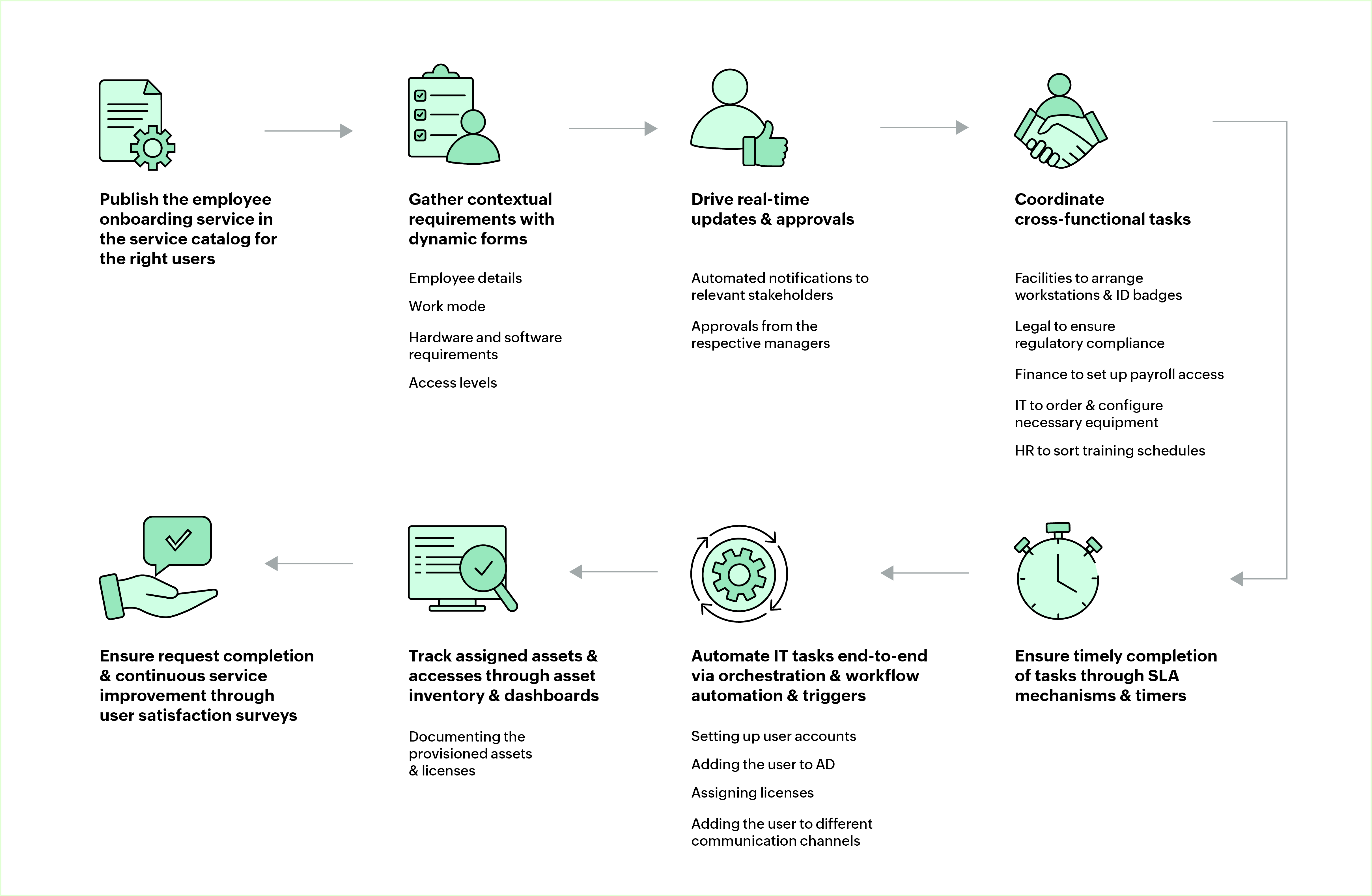
1. Initiating the request
HR logs into the ESM portal and kicks off the onboarding request using a predefined onboarding template. In more advanced setups, this step is automated through integration with the HRMS, triggering the onboarding workflow as soon as a new hire is created in the system.
2. Capturing contextual requirements with dynamic forms
The fields in the onboarding form should dynamically adapt to the employee's role, department, location, and work mode using form rules. This ensures that the form is kept lean and relevant while providing the IT team with contextual information, like hardware specifications, software needs, and access levels, all in one go without endless back-and-forth.
3. Coordinating cross-functional tasks
The submitted request triggers a predefined, automated workflow that assigns tasks to all participating departments. Each assigned task includes predefined OLAs and timers tracked centrally, ensuring accountability and timely completion. Automated reminders and escalation rules help keep delays in check, so onboarding stays on track from start to finish. These workflows can be tailored further using low-code scripts and triggers to automate specific actions, thereby making the onboarding process both precise and adaptable.
- IT−provisioning of accounts, devices, and software
- Facilities−arrange workstations and ID badges
- Legal and finance−set up regulatory compliance (e.g., agreements like NDAs) and payroll access
4. Automating IT provisioning behind the scenes
Use workflow orchestration engines to automate backend provisioning tasks and ensure they run in the right order without manual intervention.
- User accounts are created in Active Directory.
- Software is deployed using preapproved configurations.
- Role-based access is provisioned using predefined policies.
This makes the entire process faster, more accurate, and easier to scale. With such end-to-end automation in place, provisioning time is reduced, errors are minimized, and IT teams are freed from repetitive work.
5. Driving real-time updates and approvals
Notifications are sent to stakeholders automatically whenever tasks are assigned, completed, or delayed. Approvals for elevated access or non-standard software are routed based on roles. With custom widgets, display real-time task status, pending approvals, and key onboarding metrics to give teams complete visibility and control.
6. Tracking asset and access allocation with full visibility
Devices and software licenses assigned to the employee are tagged and tracked in the asset management module. To avoid devices or licenses being out of stock, inventory levels are monitored in real time, enabling proactive procurement. Documenting the provisioned resources would also be helpful for future reference.
7. Ensuring completion and closure
Once all the tasks are fulfilled, a final review is conducted to confirm that everything is in place. If required, for continuous improvement, a satisfaction survey can be triggered to gather feedback from the new hire.
IT employee
onboarding checklist

The success of any onboarding process depends heavily on how quickly and securely IT can enable a new hire. Here's a checklist of tasks put together to help IT teams ensure a smooth and successful onboarding process.
| Task | Action |
|---|---|
Asset provisioning | Assign and log all required devices, keycards, and other IT assets in the asset management system. |
System access provisioning | Set up the new employee's user accounts across corporate applications, networks, and internal systems. |
Email account creation | Create and configure the employee's email account. |
Grant necessary privileges | Assign access privileges to files, applications, and internal systems based on the employee's role. |
Secure accounts | Generate and share login credentials after enforcing password security policies, and enable multi-factor authentication (MFA). |
Configure user profiles | Set up the employee's profile in Active Directory, and add them to the necessary communication channels. |
Set up workstations | Configure and install required software, VPN access, and security settings on the employee's assigned devices. |
Assign IT training | Provide onboarding materials or training sessions on security best practices, IT policies, and internal tools. |
What is employee offboarding?
Employee offboarding, as you might have already figured out, refers to the formal process of separation between the employee and the organization, whether it's due to resignation, termination, or retirement. When done well, it ensures the smooth exit of an employee while securing company data and assets.
For IT, it is crucial to have a structured offboarding process for the following reasons:
- Ensures timely revocation of system access, retrieval of company devices, and proper handling of sensitive data to prevent unauthorized access and potential security breaches.
- Facilitates knowledge transfer and documentation of ongoing projects to help teams stay on track.
- Ensures the return of organization-owned assets.
- Streamlines exit workflows, reducing the manual workload for HR, IT, and other departments, and ensuring compliance with company policies while eliminating unnecessary back-and-forth.
- Enables organizations to collect feedback through exit surveys, which help pinpoint issues and work on the strategies to increase retention.
Common challenges in employee offboarding

Offboarding may seem easier than onboarding, since it is all about revoking access. But from a security standpoint, it is even more critical. While many of the operational hurdles discussed in the onboarding section, like siloed teams and manual processes, apply here, too, offboarding brings its own set of security-specific challenges. Let's look at them one by one.
Razor-thin timelines for IT
During offboarding, IT teams are left with just a short window to revoke system access, secure data, and retrieve company assets. This is especially true for involuntary exits of employees or those with minimal notice. This rush to act quickly is further compounded by the lack of a clear, up-to-date view of the employee's access footprint. This can result in missed steps, overlooked accounts, and potentially serious security risks if access isn't fully removed in time.
Lack of centralized visibility
Since organizations nowadays are adopting a diverse set of hybrid, multi-cloud, and third-party SaaS tools, it is easy for IT teams to lose track of all the accounts an employee had access to during their employment. They remain hidden, especially when employees have signed up for tools using corporate credentials or when there are shadow IT systems in play. This lack of visibility can prevent IT from fully revoking access across all platforms, creating backdoors, and leaving sensitive data vulnerable even after an employee has departed.
Lack of an audit trail when things go wrong
Offboarding typically calls for a bunch of coordinated tasks like deactivating accounts, recovering company property, and transferring responsibilities. But if this process is not centrally managed, it is tough to track what has been done, who performed the tasks, and when they were completed. Without a solid audit trail, it becomes difficult to ensure that all steps were followed and to pinpoint what went wrong if a security incident pops up later. This lack of documentation also complicates compliance audits and accountability, as organizations cannot easily prove that their offboarding processes were properly followed.
Best practices for
employee offboarding

Offboarding might seem straightforward, but it's a process with high stakes, especially when it comes to data security, compliance, and operational continuity. Here are some of the best practices that could help IT teams get it right:
Initiate a structured offboarding workflow
Kick off the offboarding process using predefined workflows tailored to employee types. These workflows should trigger the right tasks at the right time, including access deprovisioning, device collection, license reclamation, and stakeholder notifications. A standard workflow ensures consistency, reduces risk, and prevents oversight.
Enable cross-functional coordination
Just like onboarding, offboarding involves multiple teams like HR, IT, security, legal, and finance, each with their own responsibilities. Centralizing the offboarding request in an ESM platform allows for seamless task assignment, status tracking, and collaboration, so nothing falls through the cracks.
Automate access revocation and deprovisioning
Timely deactivation of user accounts and access rights is critical. Use orchestration workflows to automate revocation across systems like Active Directory, VPNs, email, and SaaS tools. Automating these steps based on the employee's exit date ensures immediate execution and minimizes security exposure.
Track and recover assigned assets with full visibility
While it is essential to ensure that all issued hardware is collected and logged and to free up user licenses, subscriptions, and storage tied to the departing employee, it is equally important to link these asset return tasks with your asset management system. Doing so ensures every item is accurately tracked with clear ownership and return status, improving inventory accuracy and minimizing losses. It also helps in maintaining an audit trail for meeting compliance requirements, responding to audits, and proving policy adherence.
Security-first employee offboarding workflow

Having mapped the employee offboarding landscape, let's explore a robust workflow designed to ensure a secure and compliant exit of the departing employee. The below workflow highlights how teams can streamline exit procedures, safeguard sensitive data, and maintain accountability from start to finish.
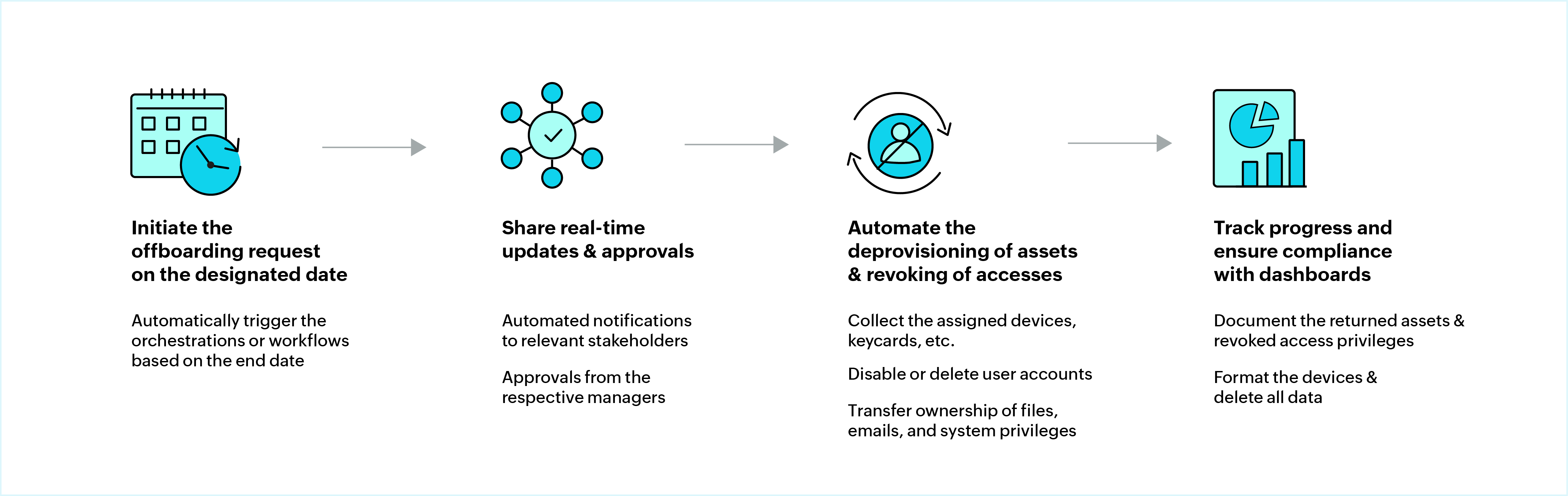
1. Triggering the process automatically
A manager or HR personnel initiates the offboarding request manually via the ESM portal. For contract roles, offboarding starts with an automated trigger based on predefined end dates. Either way, offboarding should be kicked off on time, so that all the following processes will be carried out without missing a beat.
2. Bringing in the right stakeholders
The moment an offboarding request is created, workflow actions kick in to loop in the right stakeholders, ensuring everyone is aligned. This step also includes a mandatory checkpoint with the reporting manager to go over the request and approve of its validity.
3. Automating deprovisioning in the right sequence
Use workflow orchestration engines to automatically revoke access to business applications, email, devices, and shared folders. These deprovisioning actions run in a predefined sequence:
- User accounts are disabled in Active Directory or Entra ID.
- Software licenses are reclaimed.
- Role-based access is removed from critical systems.
Sensitive access and privileged accounts have to be flagged and handled with extra scrutiny. These automated actions eliminate delays and reduce the risk of exposure. This way, every offboarding request can be handled consistently and securely.
4. Tracking progress and ensuring compliance
HR and stakeholders get real-time visibility into the offboarding process with dashboards and widgets that track task progress, pending actions, and SLA breaches. Before the request is closed out, a final review ensures that devices are returned, access is fully revoked, and all checklist items are marked complete. With request closure rules in place, you can ensure every step of offboarding is properly logged and aligned with internal IT and HR policies, allowing you to stay on top of audits and meet compliance requirements.
IT employee
offboarding checklist

IT offboarding is the last line of defense that organizations have to ensure security and wrap things up in the right way. Here's a handy checklist that outlines the key IT steps to securely seal off an employee's access and recover all assets.
| Task | Action |
|---|---|
Reclaim company assets | Collect and log all assigned devices, keycards, and other IT assets in the asset management system. |
Revoke system access | Disable the departing employee's user accounts across all corporate applications and networks. |
Block inbound emails | Prevent emails from being sent to the employee's user account and configure an auto-response or email forwarding if necessary. |
Reassign responsibilities | Transfer ownership of files, emails, and system privileges to the appropriate reporting manager or team member. |
Secure accounts | Reset passwords to prevent unauthorized access. |
Delete user profiles | Permanently delete the employee's user account from all systems. |
Eliminate the hassle of employee transitions
with AI

Onboarding and offboarding employees has always been a complex, high-stakes process. While a well-structured process can streamline the workflows, introducing AI can further enhance efficiency by removing bottlenecks and red tape that are common in these employee transition workflows.
And with the rise of agentic AI, onboarding and offboarding might soon be autonomous−where AI agents can collect and verify employee details, automatically trigger onboarding or offboarding workflows, follow up on pending tasks with relevant stakeholders, update the training resources, and do a whole lot more on their own to keep things running without constant human intervention. This way, IT teams get the breathing room to focus on bigger priorities.
Here's how AI currently steps up and takes the load off your team:
- Handle the heavy-lifting of intelligently triaging tickets by categorizing, prioritizing, and assigning them to the right technicians.
- Summarize tickets instantly by extracting key details like employment type, joining or leaving dates, resource and access requirements, and more, so technicians need not waste time wading through the details.
- Reducing reliance on manual service desk interactions through AI-powered virtual agents to provide instant IT and HR assistance.
Read this article to learn more about how AI can transform your IT employee onboarding workflows.
Employee onboarding and offboarding simplified with ServiceDesk Plus

ServiceDesk Plus is the AI-driven, unified service management platform that can streamline the joiner-mover-leaver journey by automating every step and keeping the different enterprise teams in sync. Through a combination of proprietary technologies and integrations with public LLMs, ServiceDesk Plus provides high-value AI capabilities that help speed up the request fulfillment process.
Additionally, capabilities like single-touch workflow automation ensure smooth access provisioning and deprovisioning, account setup or revocation, and asset assignment. ServiceDesk Plus also supports seamless integrations with identity and access management solutions like ADManager Plus and PAM360, keeping your employee journeys secure.
Turn your onboarding and offboarding into a structured, secure, and seamless experience with ServiceDesk Plus. Try it free for 30 days or schedule a demo today!