

Last updated on: June 23, 2025
Consider a fictional hospital Zylker, with a typical IT infrastructure, where the IT team frequently faces network downtimes during peak working hours, which disrupts operations and impacts productivity. Incident management may restore network service by providing a workaround to the incident, but without problem management to investigate why the network keeps failing, the team could face ongoing and repetitive disruptions. Problem management helps identify the root cause of each similar incident−perhaps outdated firmware, drivers, or network congestion.
This article delves into the importance of problem management in IT service management, exploring frameworks such as the Five Whys, Fishbone, and Kepner-Tregoe, with a detailed look at implementing the Five Whys framework using ServiceDesk Plus to streamline problem resolution.
What is problem management?

ITIL® defines problem management as the process of identifying and managing the root causes of repeating incidents and managing the life cycles of underlying problems on an IT service. While incident management addresses individual issues, problem management is a broader approach that seeks to prevent recurring incidents, enhancing long-term stability.
Why do you need to implement problem management frameworks in your IT infrastructure?

In the absence of root cause analyses using a problem management framework, organizations may face:
- Persistent downtimes impacting business processes and leading to potential revenue loss, especially in critical systems.
- Recurring issues burdening IT staff, causing incidents to resurface without clear resolution.
- Decreased productivity and service quality due to repeated incidents
- Poor digital experiences for employees due to recurring issues and loss of morale amongst the workforce.
Key problem management frameworks

Organizations have several frameworks at their disposal to diagnose and resolve IT problems. Each framework provides a unique approach to analyzing these issues and finding solutions. They help IT teams identify and solve root causes, prevent future incidents, and improve system reliability.
This helps IT teams understand the underlying problems and resolve them through an efficient RCA process. Depending on the type of problem and the organization's needs, different frameworks can be applied to solve problems systematically.
| Framework | Key Information |
Five Whys |
|
Kepner-Tregoe |
|
Fishbone |
|
Pareto |
|
Implementing the Five Whys Framework using ServiceDesk Plus

Platforms like ServiceDesk Plus empower IT teams to apply structured frameworks, such as the Five Whys and Fishbone approach, to facilitate problem management and uncover and address root causes. This breaks the cycle of reactive fixes and ensuring continuity and trust in their services.
Let us revisit the issue Zylker Hospitals is facing and explore how the Five Whys framework can be applied. Five Whys is a dynamic framework that is both the simplest way to get to the root cause—by repeatedly asking why?—in relation to each cause and can be used in conjunction with other frameworks. This makes it the preferred choice for routine incidents. For instance:
Why 1: Why did the network go down?
Due to a failure in one of the primary network switches during peak hours.
Why 2: Why did the network switch fail?
It was outdated and lacked the necessary capacity for high data traffic.
Why 3: Why was an outdated switch still in use?
The budget allocation did not account for regular hardware updates, and there was no proactive maintenance plan.
The root cause has been identified without the fifth why.
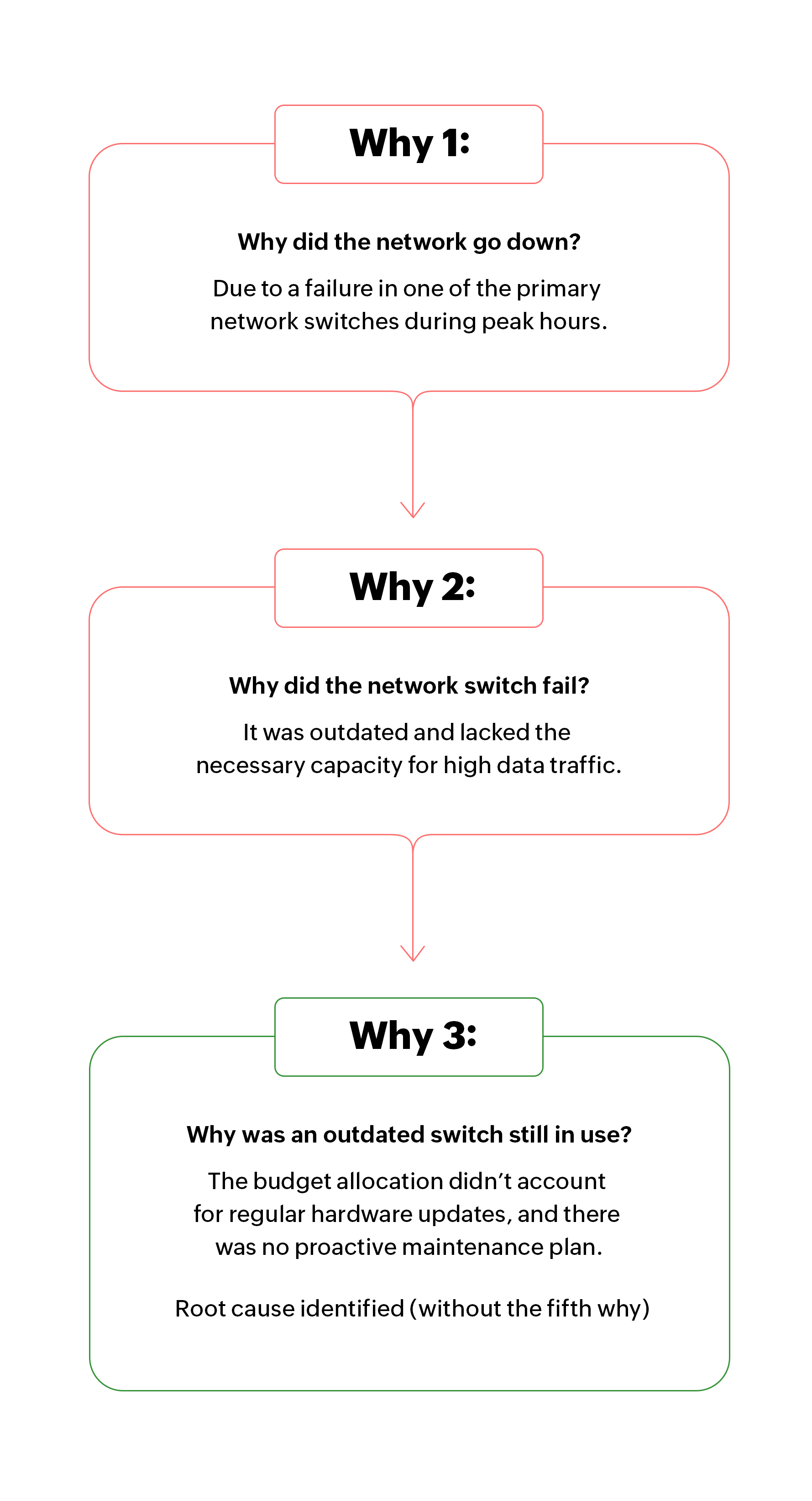
Here's a breakdown of how the Five Whys Framework can be set up in ServiceDesk Plus.
1. Creating a Custom Template for the Five Whys Framework
To begin, we can set up a problem management template in ServiceDesk Plus that guides the IT staff through the Five Whys process. This template ensures consistency in how each why is addressed and provides a structured format for recording responses and analyzing root causes. It also allows for customized fields dedicated for each of the Five Whys and identifying the root cause. The template displays fields for the immediate cause, underlying and secondary causes, as well as the systemic issue and root cause.
To set up your Five Whys template, go to Setup > Templates & Forms > Problem Template > New Problem Template
In Figure 1, a Five Whys Framework for Zylker Hospital's ServiceDesk Plus instance is created along with the associated life cycle, and five levels of "why?" available as fields. Each of these fields stores contextual data that helps technicians understand the nature of the problem. Each field can be set to mandatory. Related fields can be collated as a section. The ability to drag and drop sections and fields makes setting up your templates simple and quick.
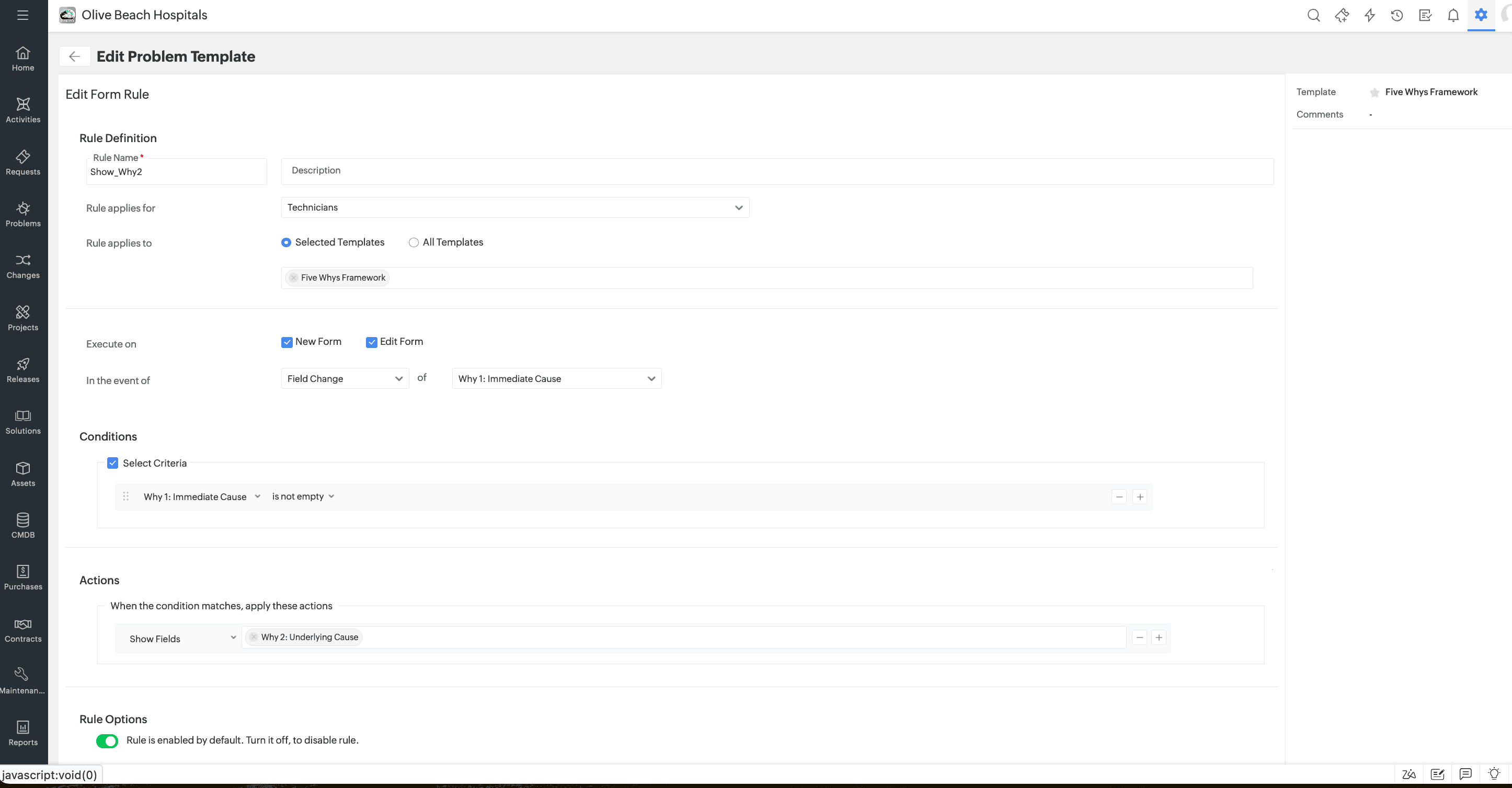
Form rules can be used to hide and show fields appropriate to the responses collected through the template to streamline the problem management process further. By progressively disclosing fields and reacting to the user's inputs, we can avoid overwhelming the technicians. This keeps the problem management template dynamic and adaptive.
For example, the form rule below enables you to display the first "why?" alone, and hide the rest until the first is filled. Similar form rules can do the same for subsequent "why?" fields. By using form rules, Zylker's technicians can make data acquisition both efficient and personalized to the nuances of the incident and the root cause of the problem, eliminating unnecessary fields and improving the user's experience. Zylker's technicians have set the rule to show the second why only after the first why has been specified. A corresponding rule has to be set to hide the field when the form loads.
To setup form rules, go to Setup -> Templates & Forms > Problem Template > New Problem Template -> Form Rules
You can see the form rules interface and options in Figure 2 below.
2. Designing a life cycle with mandatory fields and notifications
With the problem management template in place, we create a life cycle within ServiceDesk Plus to manage the problem's progression from initial analysis to resolution. This life cycle is tailored for the Five Whys framework, requiring each why to be addressed before moving to the next phase. Notifications are set up to alert stakeholders when some stages are completed, promoting transparency and accountability.
Rules can be used to update fields automatically, especially if the root cause is identified before the fifth why. By creating mandatory fields, we can ensure that each why is a required step to transition to the next stage. Mandatory fields ensure thoroughness, while automated notifications keep stakeholders informed about each phase's completion, driving effective collaboration.
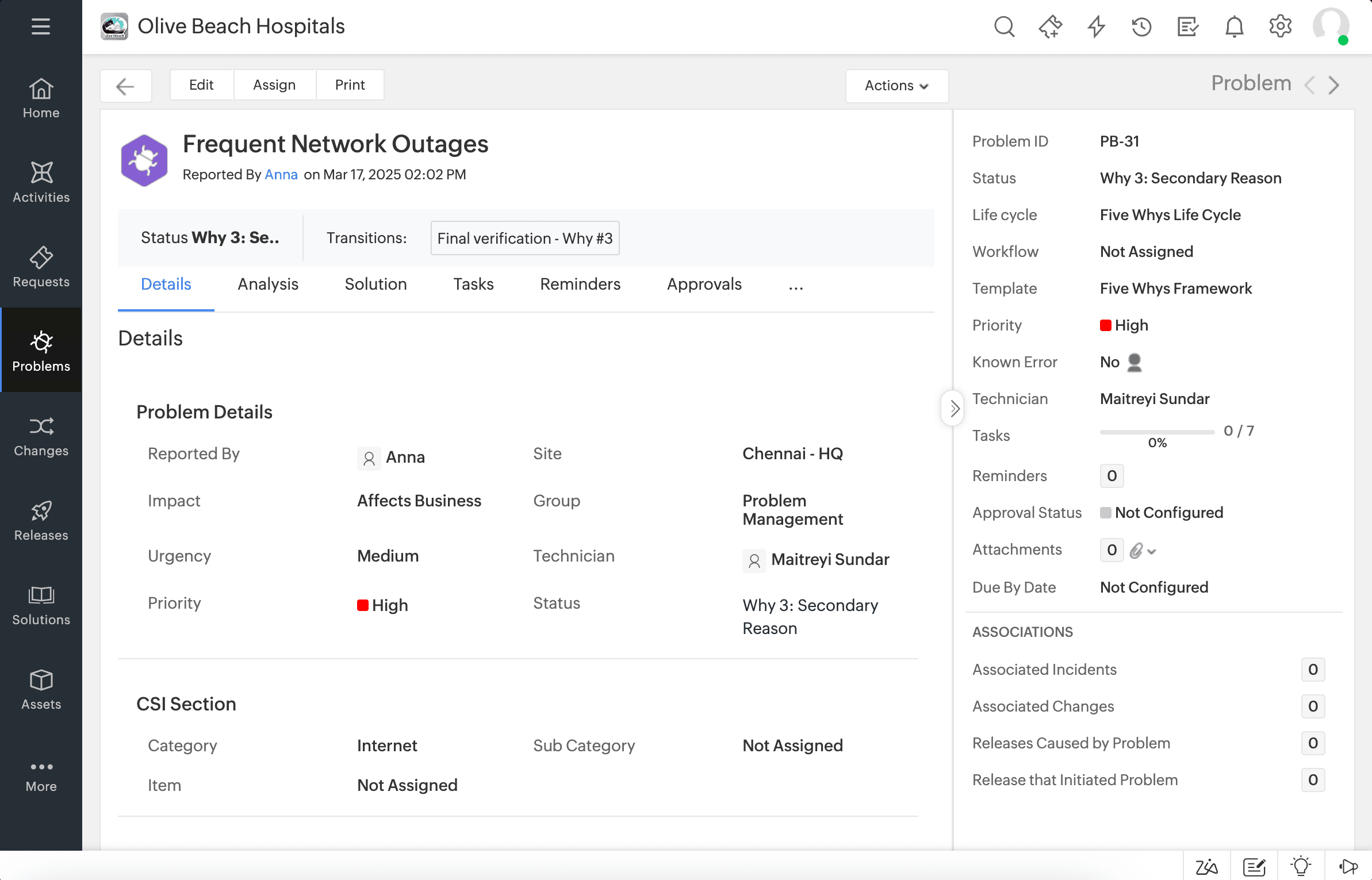
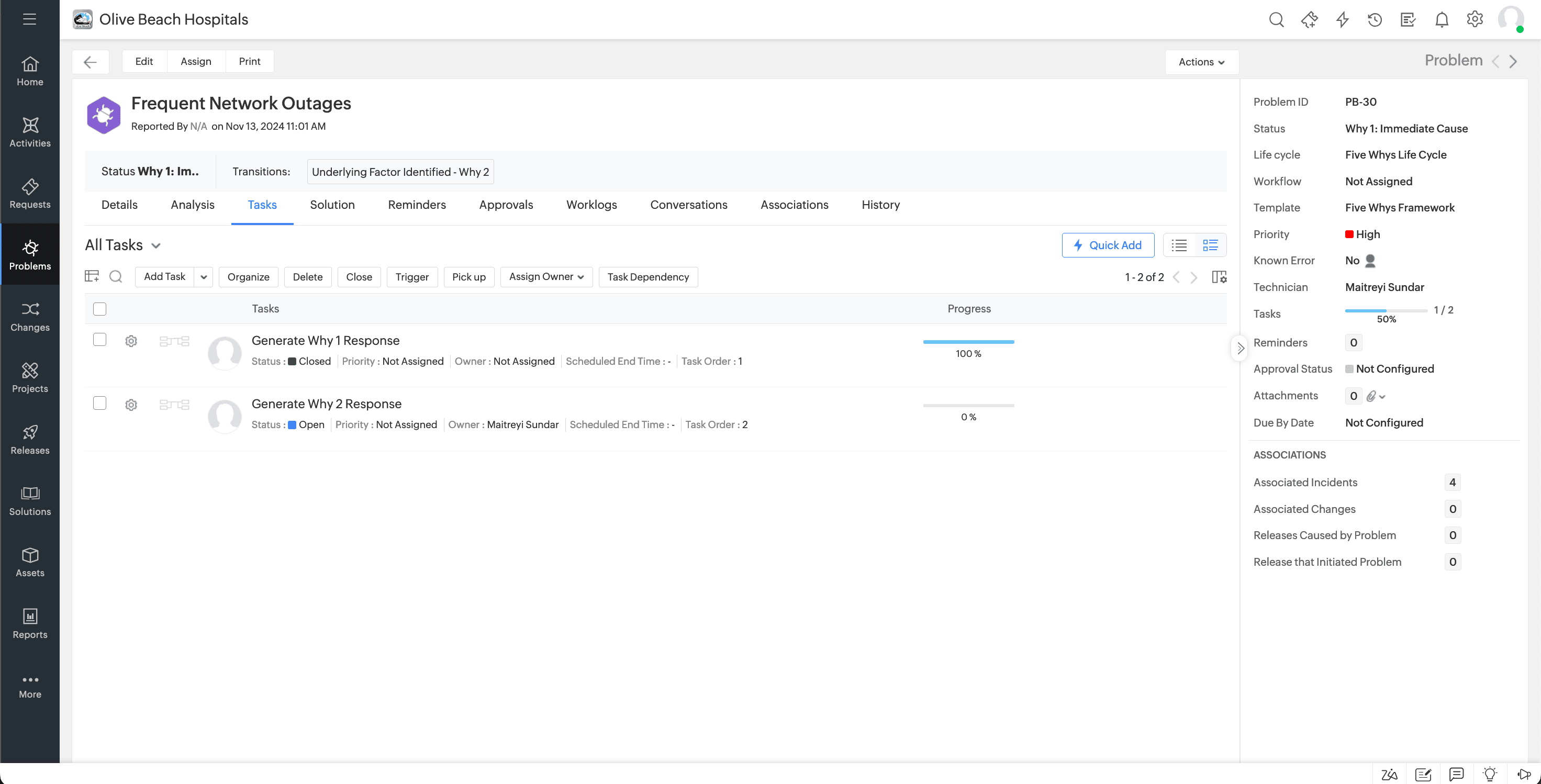
Similarly, rules can be used to automatically trigger tasks associated with various stages of the lifecycle. This is reflected in the problem ticket as depicted in figure 3.
To configure life cycles, go to Setup -> Automation -> Life Cycles > New Life Cycle
For example, to deal with a problem ticket created to check the network connectivity issues of Zylker, one would have to start off by checking the router, its functions, connecting device's driver software, and whether the problem is on the connecting device's end, or at the router's end.
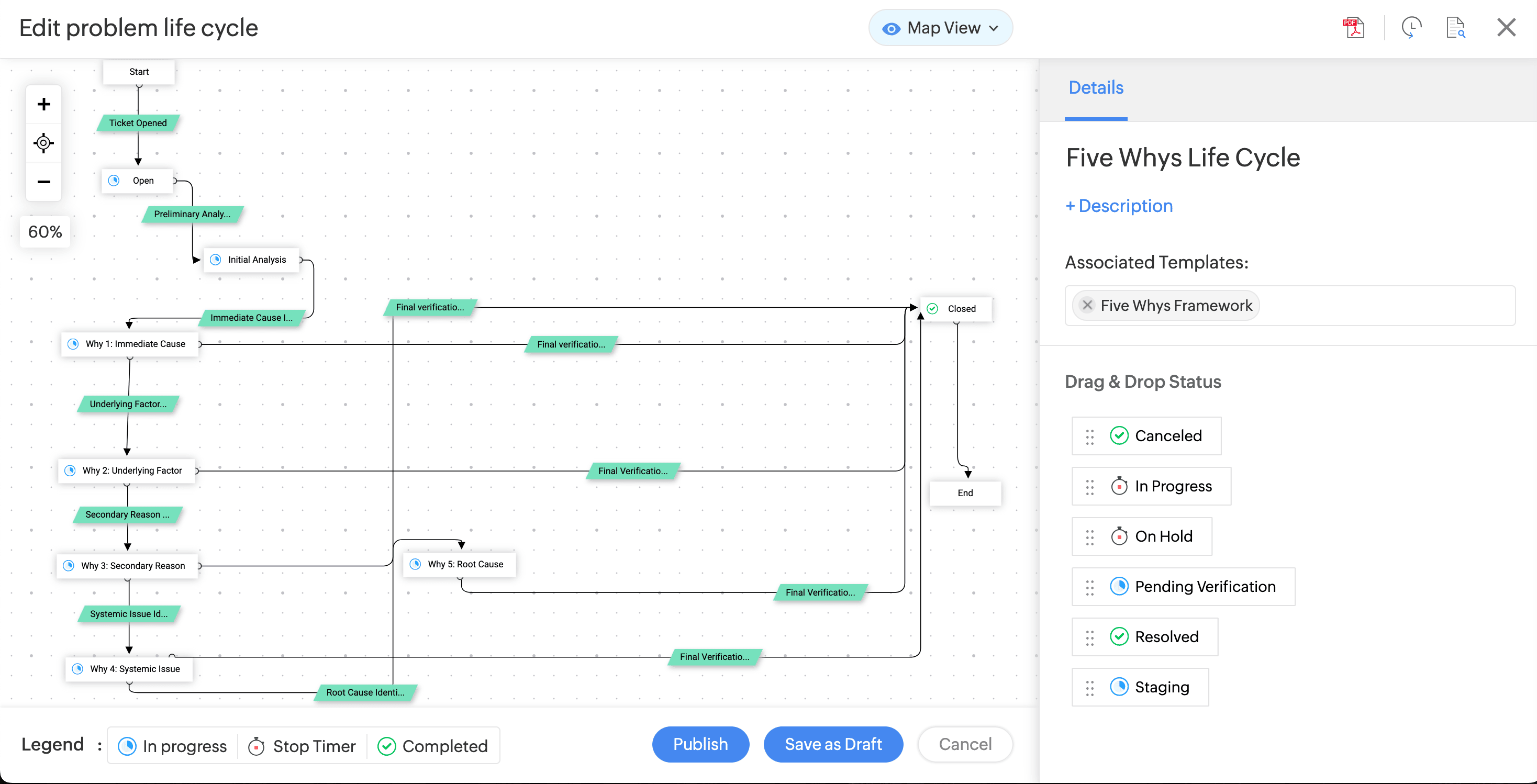
Toggle mandatory fields within your workflows to create constraints for checks and balances. The response to each why, and whether this stage is the final why, has been automated across all the stages.
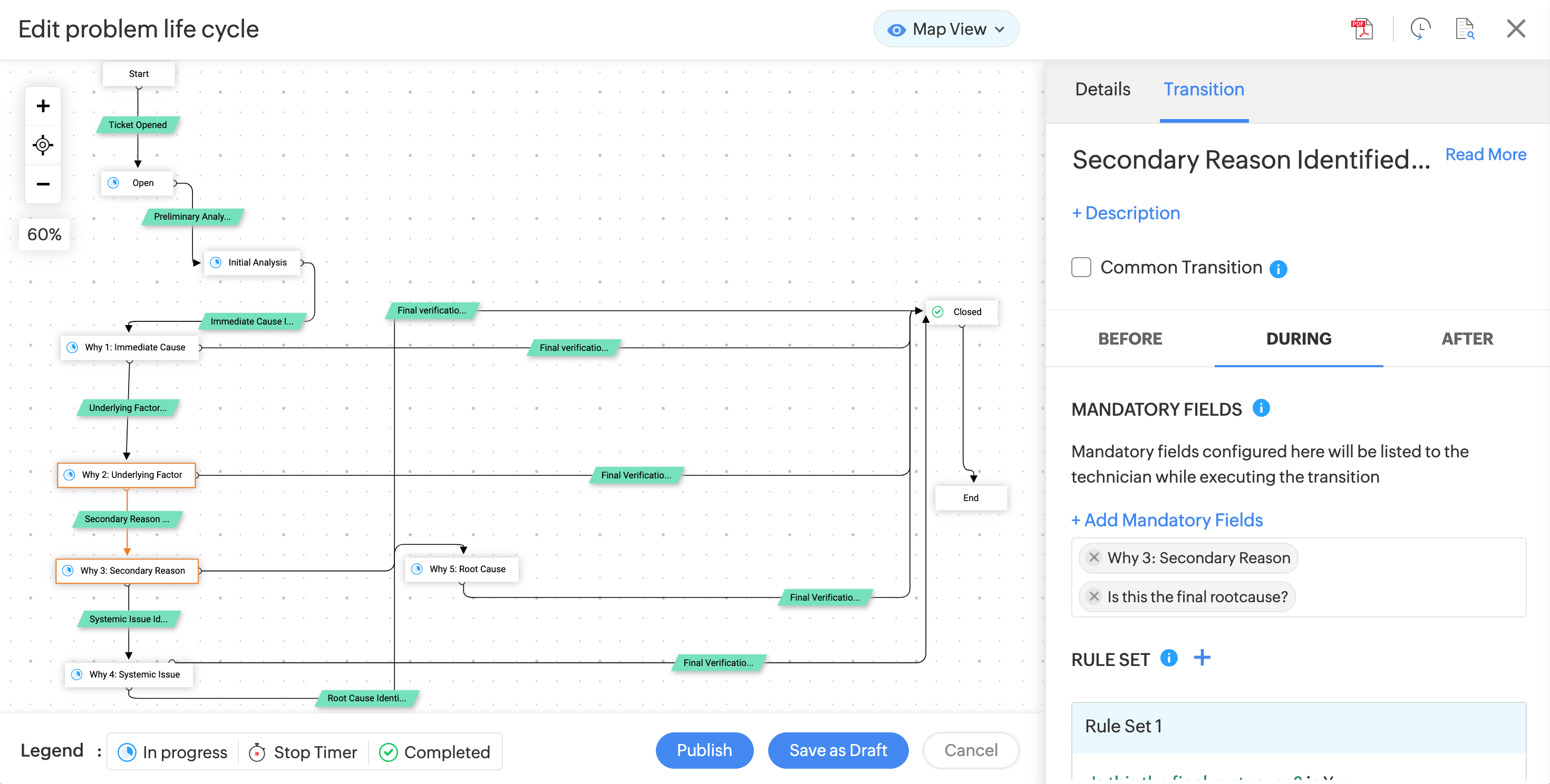
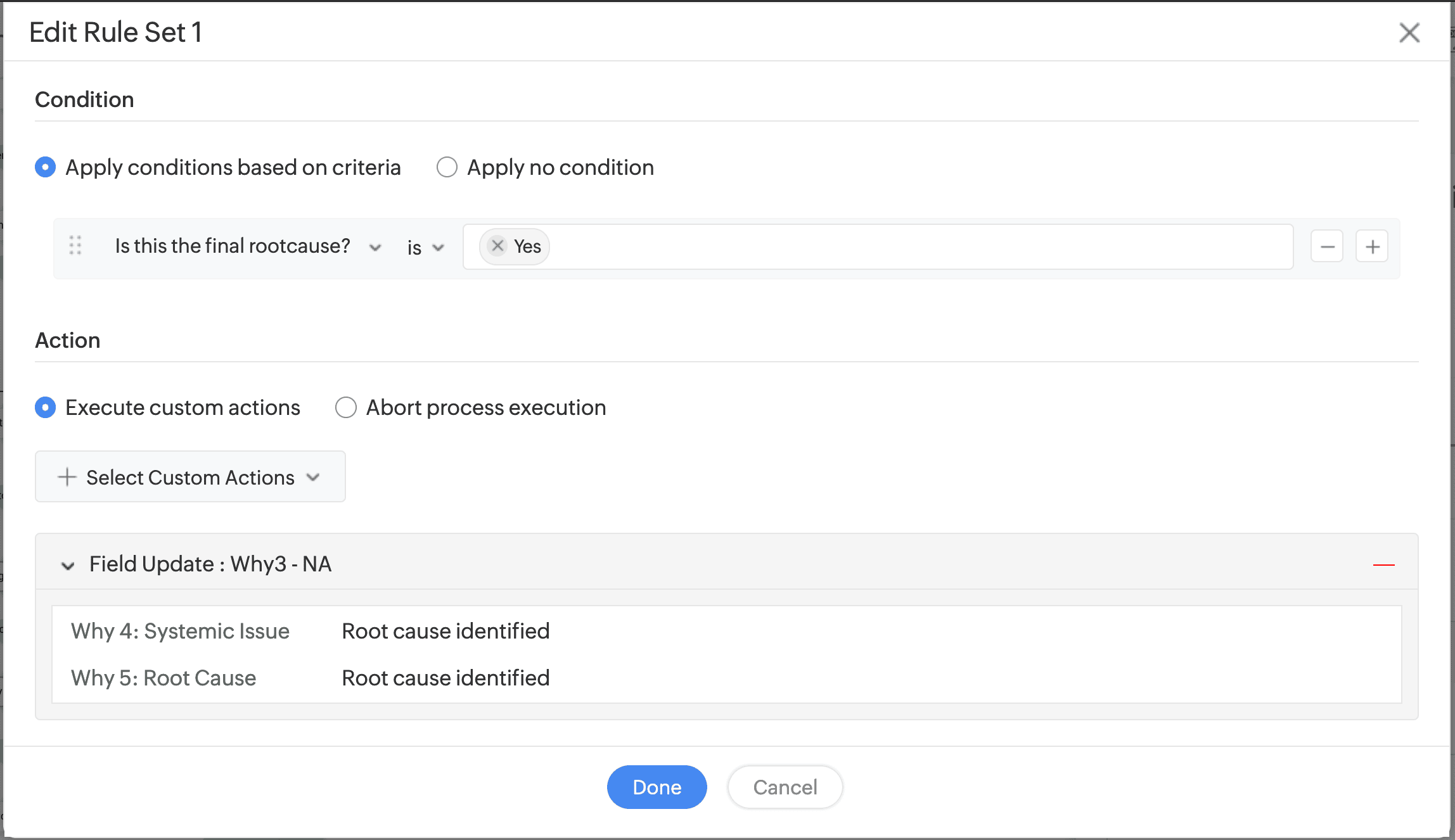
If the Five Whys analysis identifies the root cause before we reach the final why, then subsequent fields can be set to auto-update to reflect the same through form rules.
Zylker's technicians have also setup the rule under which subsequent stages can be auto filled to "Root Cause identified," as you can see in Figure 5.
Edit your lifecycle rules under Setup -> Automation -> Life Cycles > New Life Cycle -> Transition -> Rule Set -> New Rule
Here we have an overview of the tasks created to address the underlying problem by addressing the Five Whys in succession. Once the template is filled and the ticket has been raised, technicians will have to complete tasks to process the ticket. These tasks can be created by selecting a problem ticket under your Problems tab and switching to the tasks tab. Now select add new task. You can view these options and the tasks tab in Figure 6.
3. Recording the problem ticket in ServiceDesk Plus
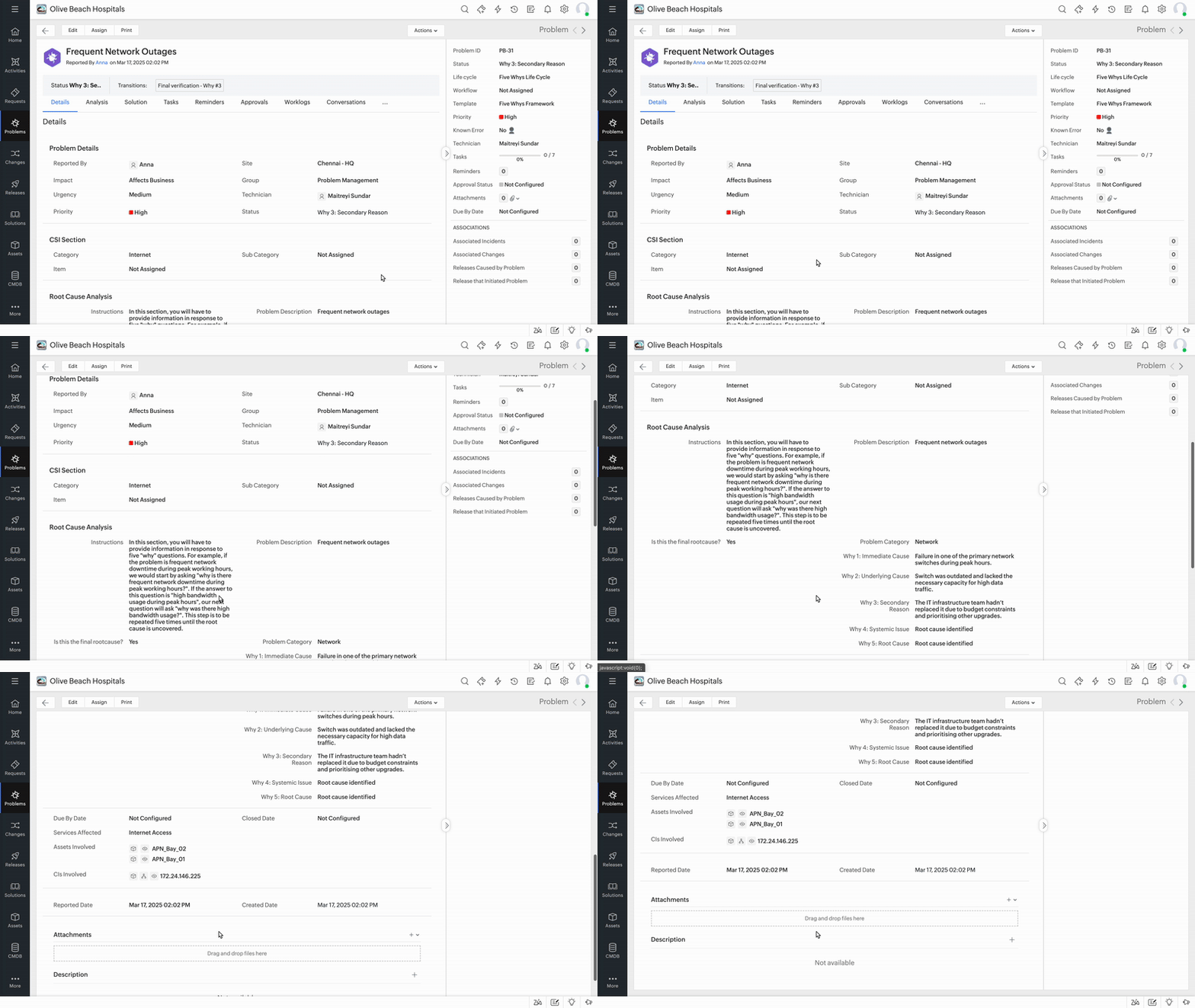
Once the Five Whys template and life cycle are configured, we can create a problem ticket for the network downtime issue. The answer to each why is documented as part of the problem ticket, providing a clear record of the diagnostic process and laying the groundwork for corrective action. Zylker Hospital's problem ticket in Video 1 below shows each stage of the Five Why's analysis as an entry within the ticket's description.
The clear documentation helps team members understand the step-by-step breakdown of the root cause analysis, ensuring all underlying factors are identified and addressed. If a similar problem arises in perhaps a different region or site, they can refer to the solutions module and check if it is applicable, or provide alternatives to keep your IT teams more prepared to tackle any issue.
4. Associating incidents with the problem ticket
To ensure a comprehensive and accurate RCA, we can link related incidents to the problem ticket. This linkage provides context on the issue's impact, helping prioritize the problem's resolution and enabling easier tracking of similar issues in the future.
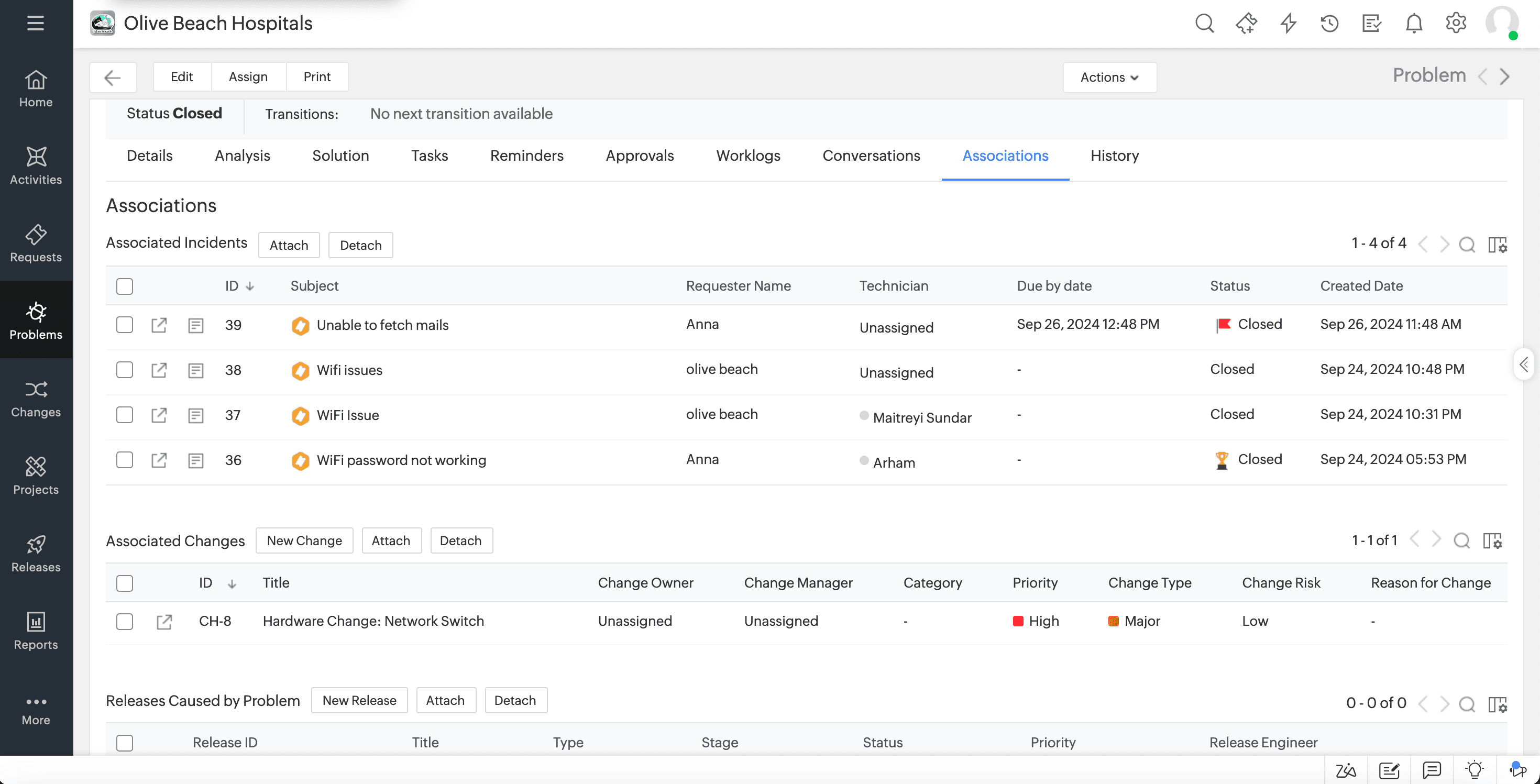
As shown below, multiple incidents related to network downtime are associated with the main problem ticket. This consolidated view allows IT teams to see how pervasive the issue is, reinforcing the importance of addressing the root cause to prevent recurring incidents. This view also enables your ServiceDesk technicians to store and reuse workarounds and resolutions for a particular class of tickets.
You can find associations in the right hand column of the problem ticket details page or under the associations tab under a problem ticket's view. A problem ticket can be associated with incidents, changes, or to the release which caused or initiated it.
Under Zylker's network downtime problem ticket, you can view various associations to other related incidents and the associated change in Figure 7 below.
5. Using closure rules to ensure tickets are addressed to completion
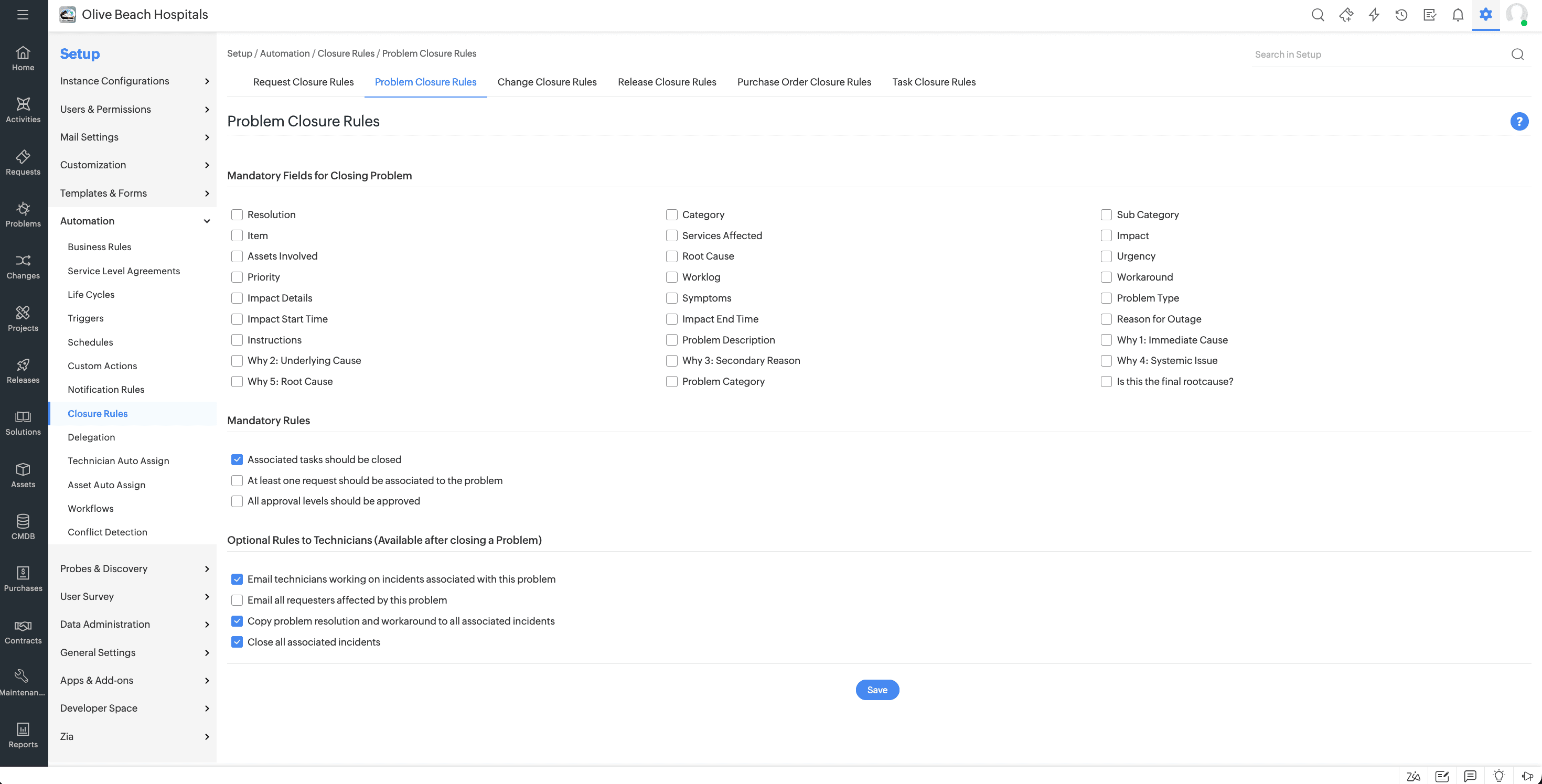
Using closure rules, we can mandate which tasks need to be completed and which fields need to be updated before the problem ticket is closed.
You can find and edit your closure rules under Setup -> Automation -> Closure Rules - > Toggle closure rules. Zylker has mandated that all tasks should be closed before closing the problem ticket as shown in in Figure 8.
6. Generating Reports on Problems Solved Using the Five Whys Framework
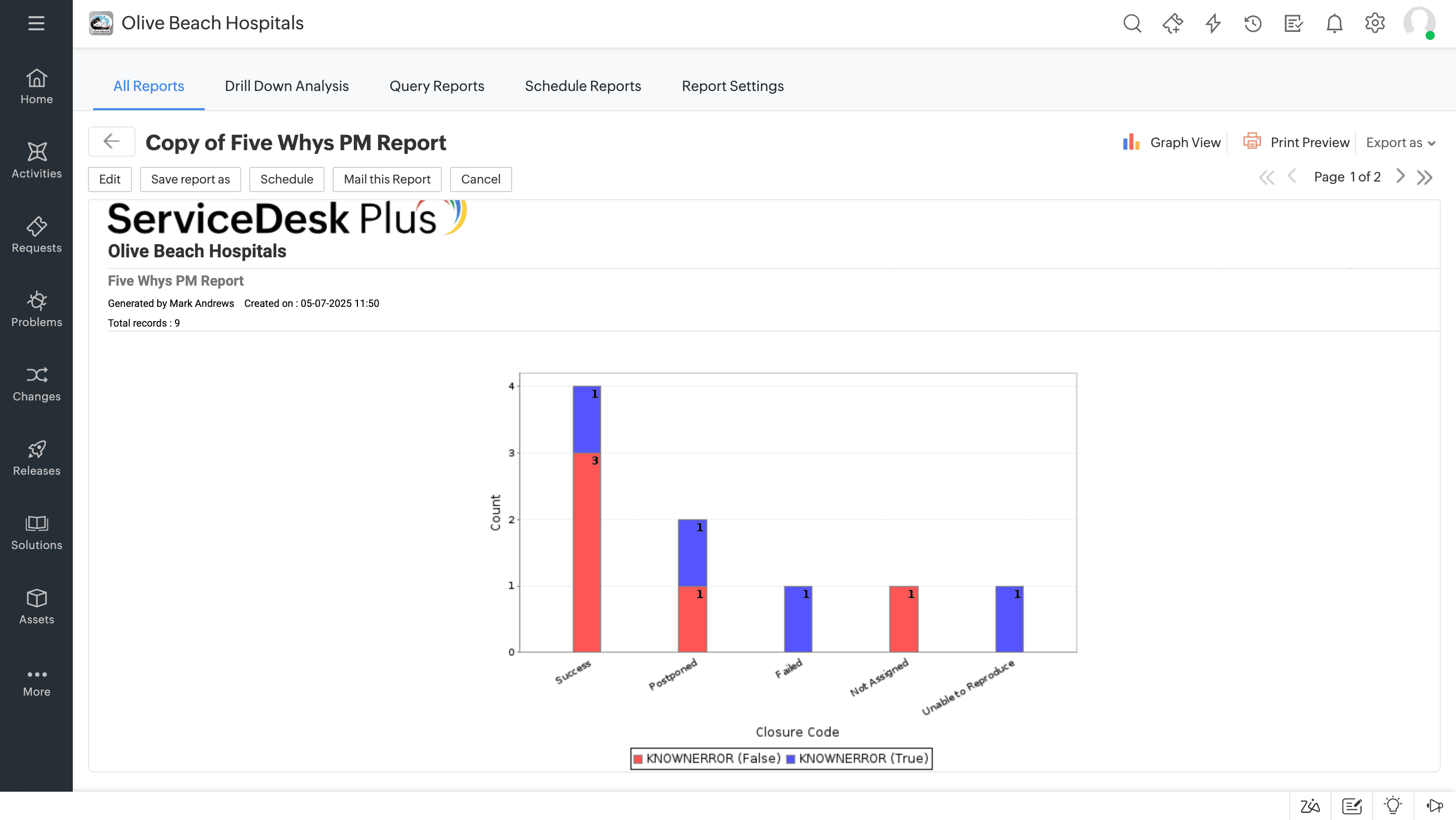
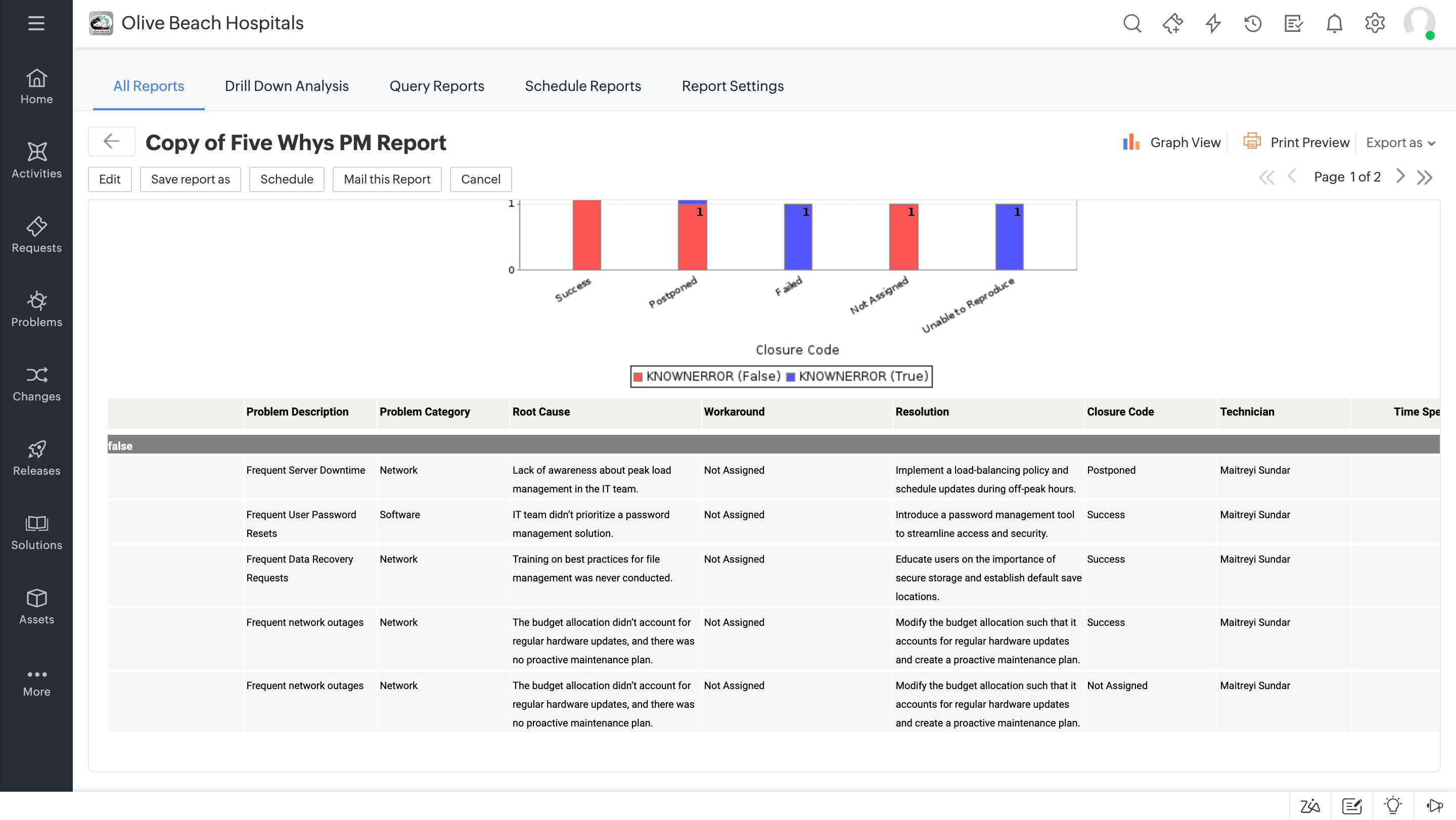
Finally, we create a report in ServiceDesk Plus that tracks problems resolved using the Five Whys approach. This report provides insights into common root causes, the effectiveness of the framework, and any patterns that might indicate the need for broader preventive measures or the use of a different problem management framework.
The report here highlights all problems resolved through the Five Whys framework. By reviewing patterns in these cases, IT managers can proactively allocate resources toward preventive maintenance, ensuring that similar issues are nipped in the bud before they grow into systemic problems.
Reports are available under the Reports tab. You can also customize your reports, change between graph and tabular views, and categorize various reports under folders here. Zylker's reports can be seen in Figure 9, showing the status of problem tickets, their closure codes, and their descriptions in brief.
Minimizing downtime
with ServiceDesk Plus

ServiceDesk Plus offers a wide range of AI-driven incident and problem management capabilities built on top of the ITIL framework to minimize IT service disruptions. ServiceDesk Plus help IT teams build and employ an incident response playbook that helps them firefight swiftly and restore normal state of operations. Meanwhile, its problem management capabilities help IT teams link and work on similar tickets simultaneously, or even deploy known solutions from past tickets from the knowledge base you can build, saving downtime and streamlining the resolution process.
Explore a free trial or schedule a personalized demo of ServiceDesk Plus today and discover how it can help you build and deliver smart service experiences across IT and beyond.