

- Free Edition
- Quick links
- Active Directory management
- Active Directory reporting
- Active Directory delegation
- Active Directory permissions management and reporting
- Active Directory automation
- Governance, risk, and compliance
- Microsoft 365 management and reporting
- Microsoft 365 management and reporting
- Microsoft 365 management
- Microsoft 365 reports
- Microsoft 365 user management
- Microsoft 365 user provisioning
- Microsoft 365 license managementn
- Microsoft 365 license reports
- Microsoft 365 group reports
- Dynamic distribution group creation
- Dynamic distribution group reports
- Exchange management and reporting
- Active Directory integrations
- Popular products
Active Directory user provisioning
When you think about automating Active Directory (AD), the first thing that comes to mind is automating user creation and provisioning as it's one of the most frequently performed operations. Since PowerShell scripts can be complex, choosing AD automation software that offers a well-thought-out automated user provisioning system is a must and you're often walking a tightrope between a feature-rich AD automation tool and its cost.
Striking a balance between these two decisive factors, ADManager Plus offers one of the most comprehensive automated user provisioning systems in the industry. Automating user provisioning isn't just about running a batch file at a scheduled time or churning out hundreds or thousands of user accounts; it's beyond that. ADManager Plus provides features to tackle every issue involved in automated user provisioning. Take a look at the following table for more info.
Automated user provisioning with ADManager Plus
Approval Workflow system
What is it?
The approval Workflow system allows you to build a linear hierarchy of process approval for the automation. Simply put, you can specify who configures and initiates the automated process, who reviews the process, and who approves it.
In other words, it helps you introduce supervision breaks at crucial junctions of the automated process.
Why is this feature important?
User provisioning automation is a crucial activity and it's not wise to leave it unmanned. Moreover, several IT regulatory laws mandate a supervision system to overlook and document all crucial activities such as user provisioning and deprovisioning.
Advanced Naming Formats for unique identification
What is it?
With Advanced Naming Formats, you can tag names or email addresses with a unique identifier specified by you to avoid duplication.
Why is this feature important?
Attribute name duplication is a common problem in bulk user provisioning. ADManager Plus conveniently avoids this issue with the help of Advanced Naming Formats.
Reactive Naming Formats
What is it?
These are naming widgets whose job is to name the user accounts and their properties. You can configure them to improvise names with whatever data they're supplied with.
Why is this feature important?
Perhaps the most common reason for unsuccessful user creation and provisioning runs in automated user provisioning systems is that there are missing fields in the provided CSV file.
User account provisioning templates
What is it?
ADManager Plus allows you to standardize user provisioning. You can save all the configurations of user account properties and mailboxes in a template and apply them to user accounts when they're created.
Why is this feature so important?
User provisioning is labor-intensive, so a shortcut like this does a world of good in terms of time and effort saved. Additionally, every configuration needed for a user account can be applied from a single window.
ADManager Plus user provisioning automation: Behind the scenes
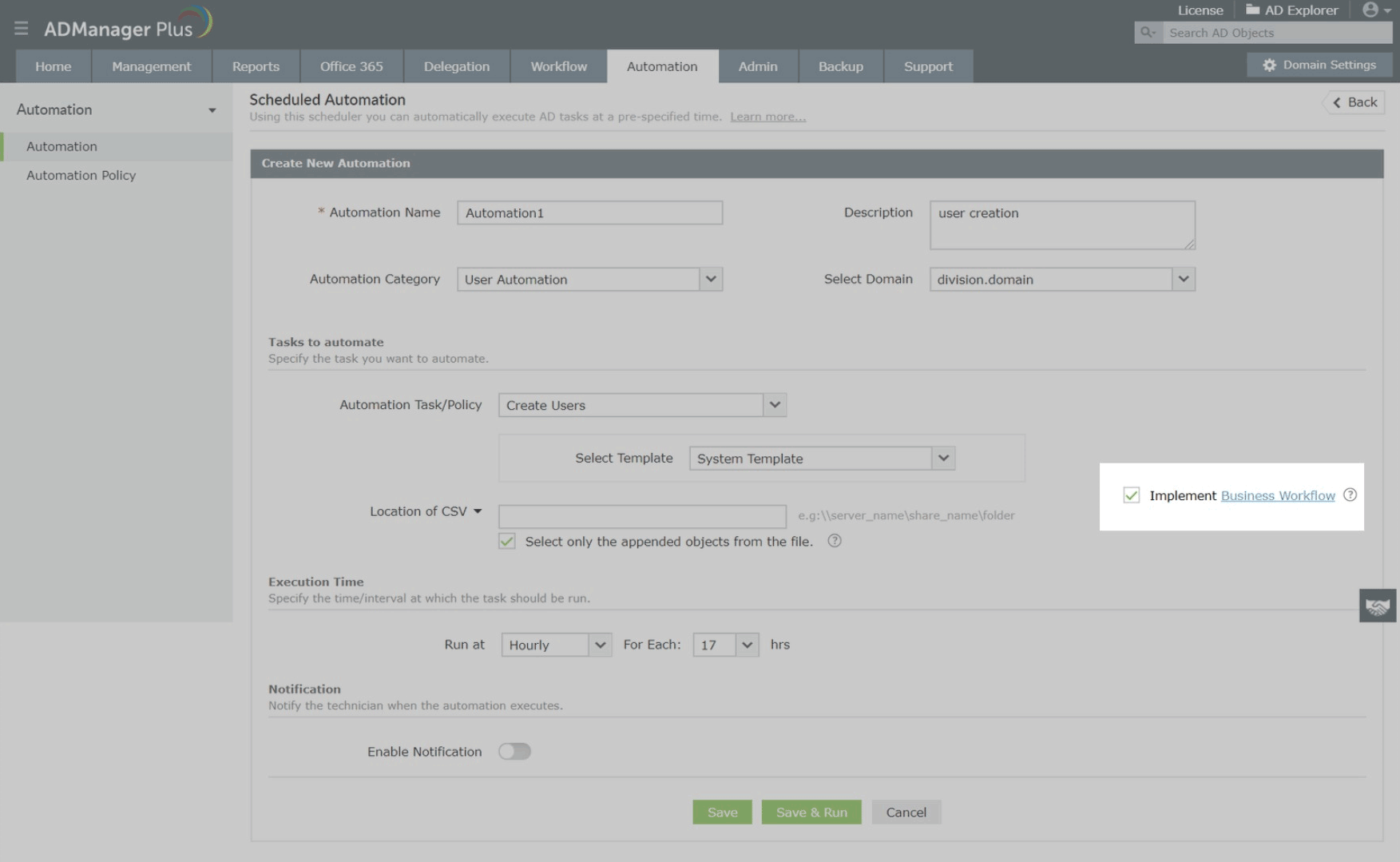
In ADManager Plus, to automate a user provisioning process, all you need to do is:
- Set the execution time for this automation.
- Specify the path where the CSV file should be stored.
- Select a User Creation Template to be applied.
- Depending on your needs, you can choose whether to implement the Workflow or not.
Now, the process kick-starts whenever a new or updated CSV file is discovered by the automation during its scheduled run. It either completes the creation and notifies the admin or, in the case of a controlled automation (a Business Workflow-implemented automation), it yields a neat report of user accounts to be created and waits for the Reviewer (as defined in the implemented workflow), who simply has to give approval after viewing the request.
ADManager Plus' automated user provisioning is so simple and foolproof that even non-technical HR personnel can be delegated the task of user account provisioning; when in doubt, you can always send the process through a workflow to make sure each task is double-checked at each phase.
Automation Policies

ADManager Plus, an automated user provisioning tool, helps automate all follow-up tasks for the user provisioning process. For example, say you created user accounts for students who were admitted for a two-month course in the month of March using automation. With the help of an Automation Policy, you can also configure the automation to delete the accounts automatically after a period of two months. Any number of follow-up tasks can also be configured.
Highlights of using ADManager Plus for automated AD user provisioning:
- Automate the entire AD user creation process to save time and effort
- Leverage review-approval-based AD user provisioning automation
- Keep track of the entire automation process via reports
FAQs
Follow the below steps to automate user account creation using ADManager Plus:
- Click the Automation tab.
- From the left pane, click Automation.
- Click Create New Automation in the top-right corner.
- Enter a suitable automation name and description.
- Select User Automation from the category drop-down list.
- Choose a domain and OU.
- In the Automation Task/Policy section, choose Create Users or a policy from the drop-down list.
- In the Select Objects section, select the input source.
- Set your execution date and time. Click Save.
Click here for a detailed walk-through on automation.
In ADManager Plus, to automate the entire user provisioning process, all you need to do is:
- Create an automation policy:
- Click the Automation tab.
- From the left pane, click Automation Policy.
- Click Create New Automation Policy in the top-right corner.
- On the page that appears configure the settings for the automation policy with the help of the labels:
- Automation Policy Name: Enter a name for the automation process.
- Description: Add a note that describes the automation process.
- Automation Category: Choose User Automation.
- Select Domain: Choose the domain and OUs where the task should be run.
- Instant tasks: Choose a task from the drop-down list box that has to be run immediately. You can add more by clicking the plus sign.
Example: Add the users to groups, add M365 license, etc. - Successive tasks: Choose the period (days, hours, or minutes) after which the successive tasks have to be run, and then choose the task from the drop-down list box.
- To add more successive tasks, click the Add Successive Task link.
- Finally, click Save, and the automation policy will be saved.
Schedule this automation policy to be executed at specified intervals by referring to these steps.
Follow the below steps to automate adding AD users to AD groups:
- Click the Automation tab.
- From the left pane, click Automation.
- Click Create New Automation in the top-right corner.
- Enter a suitable automation name and description.
- Select User Automation from the category drop-down list.
- Choose a domain and OU.
- In the Automation Task/Policy section, choose Add To Group and specify the group in the Select Group field or you can choose a policy from the drop-down list.
- In the Select objects section, select the input source.
- Set your execution date and time.
- Click Save.
Featured links
Other features
Terminal Services management
Configure Active Directory Terminal Services attributes from a much simpler interface than AD native tools. Exercise complete control over technicians accessing other domain users' computers.
Active Directory Logon Reports
Monitor logon activities of Active Directory users on your AD environment. Filter out Inactive Users. Reporting on hourly level. Generate reports for true last logon time & recently logged on users.
Active Directory Compliance Reports
Active Directory reports to assist you for compliance to Government Regulatory Acts like SOX, HIPAA, GLBA, PCI, USA PATRIOT...and much more! Make your organization compliance-perfect!
Microsoft Exchange Management
Create and manage Exchange mailboxes and configure mailbox rights using ADManager Plus's Exchange Management system. Now with support for Microsoft Exchange 2010!!
Active Directory Cleanup
Get rid of the inactive, obsolete and unwanted objects in your Active Directory to make it more secure and efficient...assisted by ADManager Plus's AD Cleanup capabilities.
Active Directory Automation
A complete automation of AD critical tasks such as user provisioning, inactive-user clean up etc. Also lets you sequence and execute follow-up tasks and blends with workflow to offer a brilliant controlled-automation.
Need Features? Tell Us
If you want to see additional features implemented in ADManager Plus, we would love to hear. Click here to continue


