ManageEngine Logo
FacilitiesDesk
Integrated Facilities Management Software
Success Stories
"FacilitiesDesk CAFM Systems is the most user friendly facility software for our needs."
- Joe Freeman-Facilities Manager, Million Air Dallas.   More...
CAFM systems Chinese CMMS free French CAFM systems Polish CMMS free Italian CAFM systems Dutch CMMS free Brazilian Portuguese CAFM systems Russian CMMS free German CAFM systems Spanish
Download as PDF

FacilitiesDesk - Product Article

Why do you need a Facility Management tool?

Optimizing facility management can save your organization a considerable percentage of its maintenance contract charge. Breakdown of resources can take a toll in your revenue through loss in productivity. Costly downtimes can be reduced if a proper facility management system is in place.

Types of Facility Management Software

Computer-aided facility management (CAFM) software focuses primarily on space management issues: who owns the property, People of the workplace, where are the facilities located, how many facilities are present across the globe, how much does it cost to run the operation in each facility, and so forth. It also is used to manage moves and renovation projects that change how the spaces look and work. There is also usually a graphical component to CAFM so that users can connect CAD plans to facilities database information.

Computerized maintenance management system (CMMS) software focuses primarily on maintenance issues and problem resolution. Assets in a facility break down and somebody has to fix them. The primary vehicles for communicating problems and resolutions are the initial work request that is logged when something is wrong and the work order that is created to track the steps to fix the problem. In short maintenance management, work order tracking and preventive maintenance are the order of the day for a CMMS Application.

In CMMS software Preventive maintenance focuses on processes and activities designed to maintain assets before they break and to extend their life. CMMS may include tools to manage parts, equipment documentation, fleet maintenance, staff and subcontractor activities, and so forth.

Which type would suit you?

CAFM and CMMS sometimes overlap in the area of work orders. Most CAFM software uses work orders to manage staff and Facilities, employees and team’s relocations. The work order provides a convenient and efficient tool to manage the details that go with these activities.In large organizations having facilities and operated across globe, different teams are generally responsible for facility and maintenance issues. Each group may want software applications that meet their specific needs. In smaller organizations the same team may be responsible for both functions and prefer a tightly integrated solution that meets all their needs.

Why should you choose FacilitiesDesk? 

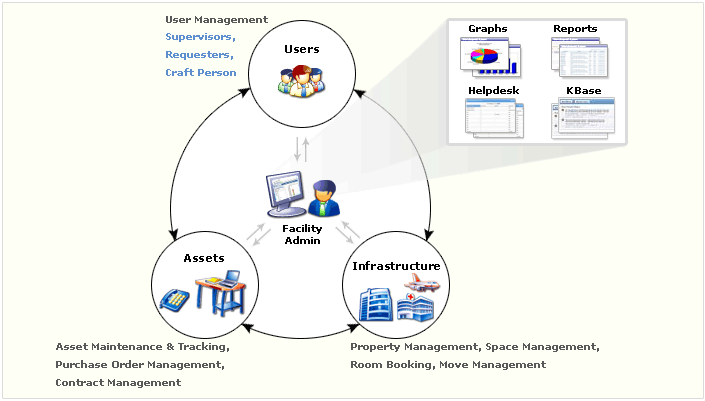
FacilitiesDesk addresses the needs of both CAFM and CMMS seekers.

FacilitiesDesk Plus Editions

FacilitiesDesk Standard Edition is Computerized Maintenance Management Software (CMMS) tailored to help managers like you to take control of the complete maintenance management of your facilities across the globe from this single console.

  • Maintenance Management
    • Preventive or Scheduled Maintenance Management
    • Breakdown Maintenance Request Management
    • Tracking and monitoring the work orders
  • Asset Management and Tracking
  • Purchase Orders Management and Tracking
  • Contracts Creation, Management and Tracking
  • Generation of a n number of reports with varied permutations and combinations of parameters
  • Comprehensive KnowledgeBase
  • User-Friendly Configuration Wizard

On the whole, FacilitiesDesk standard edition provides all that you need to have in full-fledged and productive Maintenance HelpDesk - a CMMS.

Facilities Management

FacilitiesDesk Enterprise Edition is a CAFM (Computer Aided Facilities Management) Software. And the good
news is that (mainly for the SMBs) FacilitiesDesk enterprise edition is available at an interestingly affordable price point compared to other CAFM vendors. It includes all the features of the standard edition plus entire portfolio management with property, lease and space management and Move Management. If you are looking at a fully fledged Facility management tool enterprise edition is the best fit.

  • Property Management & Lease Management - Access information and manage the details of all nature
    with respect to your properties and their lease structures of all your facilities across the globe from a central
    console.
  • Space Management - Intuitively visualize and analyze the utility of the space available in all your facilities across
    different locations and manage to put the space to use more effectively. Space management with FacilitiesDesk
    is made efficient with the help of tools like graphs and AutoCAD integration.
  • Move Management - Good news with FacilitiesDesk is that no more Chaos while initiating a move, in other
    words relocation. The Move management feature in enterprise edition helps in the complete move cycle from
    planning till the completion of relocation.
  • Room Booking - With FacilitiesDesk room booking feature you will see effective room booking management
    with least chaos and eradicated double bookings. This takes care of the chores like pre-setting the meeting
    room and allows the meeting chair to concentrate on the cores of conducting a meeting.

Facility managers typically want a single application to manage is tailored to fulfill both needs. Also FacilitiesDesk offers all that a CAFM offers interestingly at the price of CMMS.

Do not take my word for it…Try it…decide for yourself…

Facilities Management Software Download