
Servers are the backbone of an organization's data center. Be it an optimized user experience, or well-managed resources, the server is the one that does everything for you. Keeping the server readily available and accessible is crucial for the business-facing applications and services to perform at their optimum levels.
The ideal server performance requires proactive monitoring of both physical and virtual servers such as VMware, Hyper-V, and Nutanix clusters and the components that constitute server health with a server performance monitor like OpManager. In other words, monitoring server performance and server monitoring metrics is crucial for any business to remain operational and prevent productivity and business losses.
Key server performance metrics
The key server performance metrics to be monitored to ensure ideal server health are listed below:
Availability
Availability refers to the server being up and running without any interruptions, ensuring maximum network uptime. Monitoring server uptime and availability is important to ensure the smooth functioning of servers and the network.
Response time
The time taken to transmit data packets from a source device to a destination device is called response time. Tracking response time is essential to prevent server and network latency and provide a rich end-user experience.
Performance
Network performance is determined by critical server performance metrics such as CPU utilization, memory utilization, disk utilization, device partition details, etc. These metrics need to be monitored in real-time to maintain optimal server performance.
Process count
Keeping count of the number of processes running on your server is important to maintain server efficiency and ensure QoS (quality of service).
Service performance
The performance of background running services such as TCP port service, MS Exchange service, and MS SQL service is crucial to the server's health and performance. Monitoring services for their availability and performance is hence essential to prevent unforeseen server crashes or downtime.
Hardware metrics
Hardware failure or fluctuations in hardware performance metrics such as fan speed, power, temperature, and battery could affect server performance. Tracking hardware health hence becomes the need.
Best practices for server performance monitoring
Correlate monitoring data of server performance metrics
Troubleshooting server performance outages requires not only monitoring them but also correlating their performance data to analyze if there is a ripple effect (outages in one metric impacting the other). For instance, a spike in CPU utilization could be due to low memory, which requires you to correlate CPU and memory performance, rather than relying only on examining CPU temperature, and fan speed etc., Having a holistic view of all the server performance metrics is essential to have the server performance monitoring in check.
Enable multi-channel alerting
Monitoring your network is as important as what you are going to do with the monitored data. You cannot log in to your monitoring tool and keep looking at the dashboard 24/7. You need to have an automated alerting system in place that triggers alerts whenever the defined threshold level breaches. These alerts should be notified via different notification channels to let you work at your own pace.
Configure remedial scripts to automate troubleshooting
To help in troubleshooting, the server performance monitoring tool should be able to comprehend past network issues, their historic behavior, and their definite causes to help initiate faster fault resolution. You should also be able to configure remedial scripts to automate troubleshooting if a particular issue arises.
Generate intelligent reports
Monitoring data should be stored in the form of reports to enable access to the historic data patterns and growth trends. This aids in forecasting storage issues and planning capacity. This helps you decide if you could upgrade resources or purchase storage, averting unforeseen network downtime or business losses.
OpManager: The potent server performance management tool
With many of today's applications and services moving to a data center, virtualization and server consolidation are creating new management challenges. OpManager's server performance management tool provides IT administrators, with a single management console for in-depth visibility and control of both physical and virtual servers across Windows, Linux, Unix, VMware, Hyper-V, Nutanix, and Xen server platforms.
How to monitor server performance with OpManager
OpManager's server monitoring capabilities help to perform real-time server performance monitoring management by:
Physical and virtual server performance monitoring
Monitoring servers proactively for availability and response time is vital for server management. Be it Linux server management or Windows server management, OpManager, the trusted network and server performance management software, actively monitors over 300 critical server performance metrics like CPU utilization, disk utilization, partition-wise memory utilization, etc. along with monitoring processes and services. OpManager's fault monitoring includes threshold-based alerts and notifications for the server's availability and health.
OpManager monitors the performance of:
- VMware ESX servers and Guest OS
- Application servers, Active Directory, SQL, and Exchange servers
- Hyper-V servers
- Xen servers
- Nutanix assets (Clusters/Hosts/VMs)
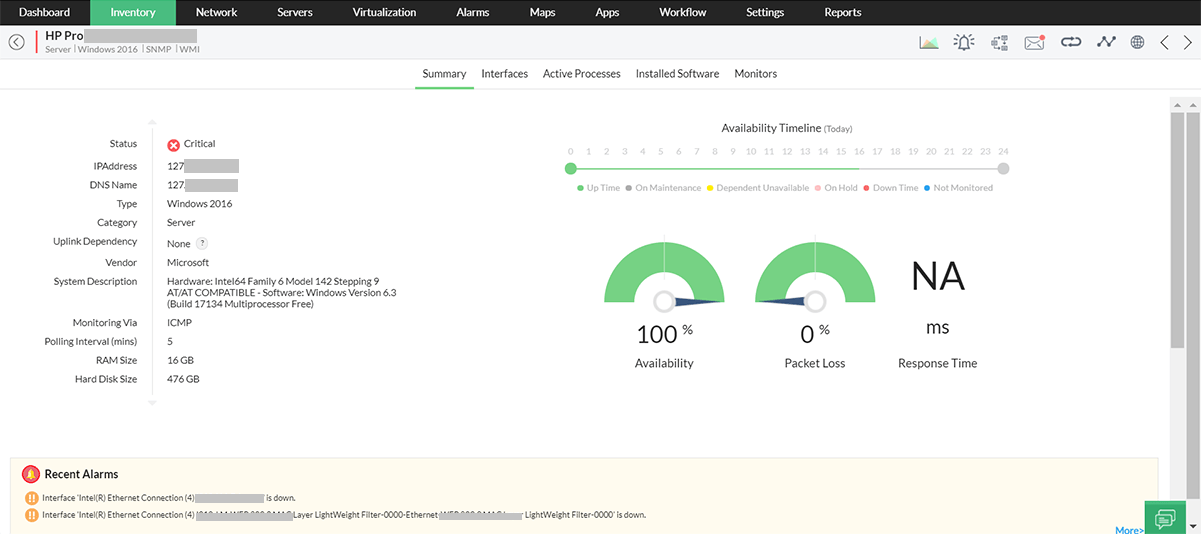
Detecting and troubleshooting server performance issues
Server monitoring and management tools detect and troubleshoot server issues, that would otherwise impact businesses/end users. OpManager detects server performance problems like CPU busy time, low available memory, etc. beforehand and sends intelligent and actionable alerts to remedy them. With Workflows, it is possible to automate the network troubleshooting process in OpManager. Advanced alerting that can even log a trouble ticket into an integrated helpdesk system ensures that you identify potential problems much before users get affected. OpManager simplifies the entire process of server performance monitoring.
OpManager's enhanced server management activities:
With OpManager's server performance management tools, you can simplify the process of monitoring and managing server performance as follows.
Ping and Traceroute: The ping tool in server snapshot pages can be used to ping the server directly to monitor its availability and uptime. Traceroute allows you to identify the network path and helps differentiate issues with the server or the network.
Remote server connection: Accessing servers remotely is useful for setting up a VPN, running a version control system, backing up data, and other IT tasks. OpManager allows you to access servers remotely within its web client. You can either connect to the server directly using SNMP, WMI, Telnet/SSH credentials with the remote desktop connection or connect to a particular web service running on the server through HTTP or HTTPS connection. (IE only)
Downtime scheduler: OpManager's downtime scheduler helps schedule maintenance activities on your servers periodically. This feature can also be extended to other network devices like switches, routers, etc. During the scheduled maintenance period, OpManager intelligently ceases monitoring for that particular device.
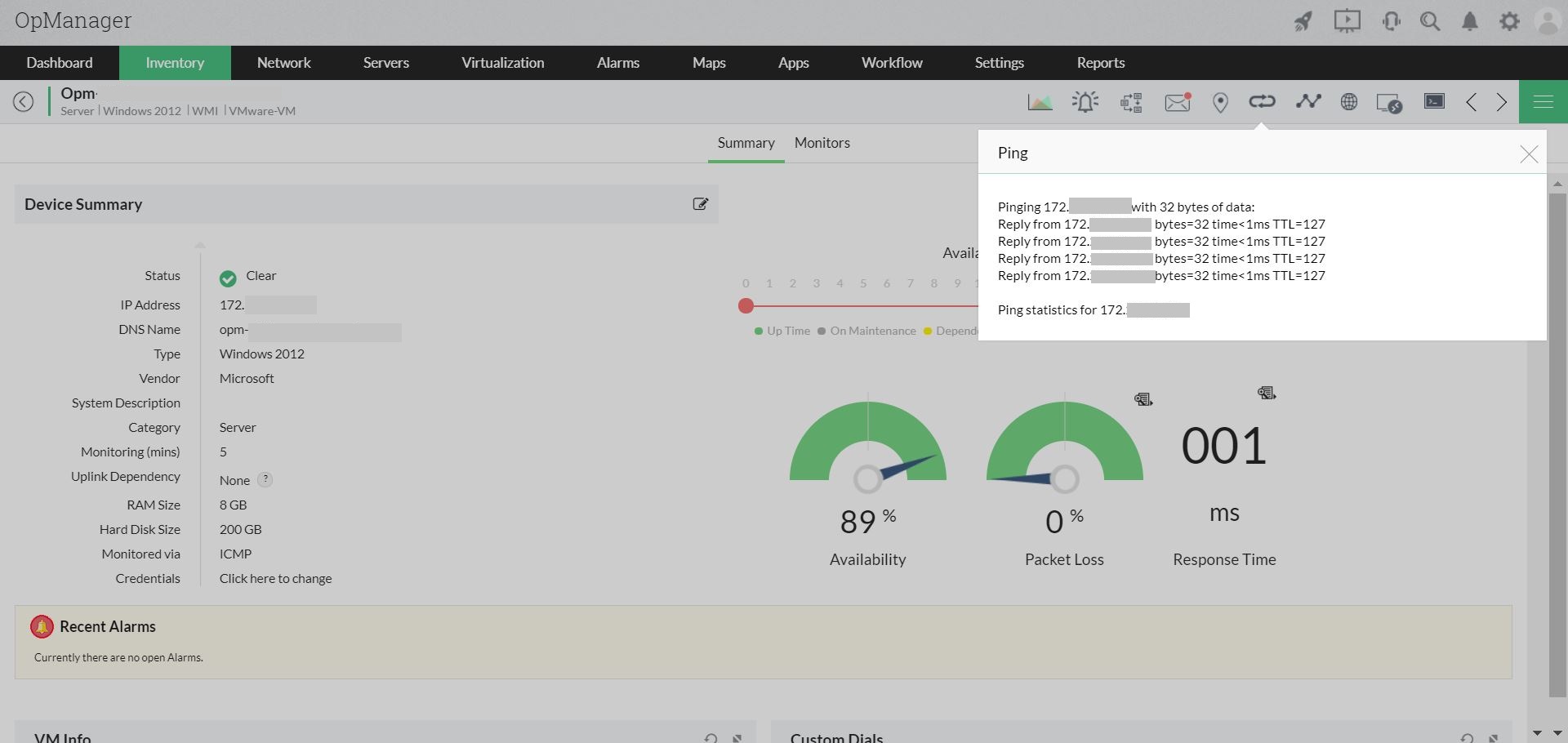
Test monitor: OpManager allows you to configure server performance monitors for critical performance metrics like CPU utilization, memory utilization, partition details, etc. The test monitor verifies if the metric is being monitored by OpManager and provides the value of the monitored metric. It also lists the possible reasons why data is not received from the server.
OS monitoring: OpManager allows you to comprehensively monitor your desktop and server operating systems. This includes tracking critical system metrics, service states, process states, event logs, performance counters, applications (Exchange, MSSQL, etc.), and services (Active Directory, DHCP, etc.). OpManager supports monitoring Windows, Linux, Unix, and Solaris operating systems.
Automating server performance management with Workflows
The role of server management tools includes fixing server faults and routine maintenance tasks that are repetitive and laborious. Automating such management tasks can help IT admins maximize their productivity by saving time and effort. OpManager supports close to 80 actions that can be automated with its Workflows.
Some of the server performance management tasks that can be automated with OpManager's Workflows are:
- Place/exit a server from maintenance.
- Stop/Restart/Suspend a virtual machine.
- Refresh Datastore in virtual servers.
- Stop/Shut Down/Restart Guest OS.
- List server process by disk read/write/memory/CPU usage.
- Start/Stop/Pause/Restart Windows services.
- Execute scripts.
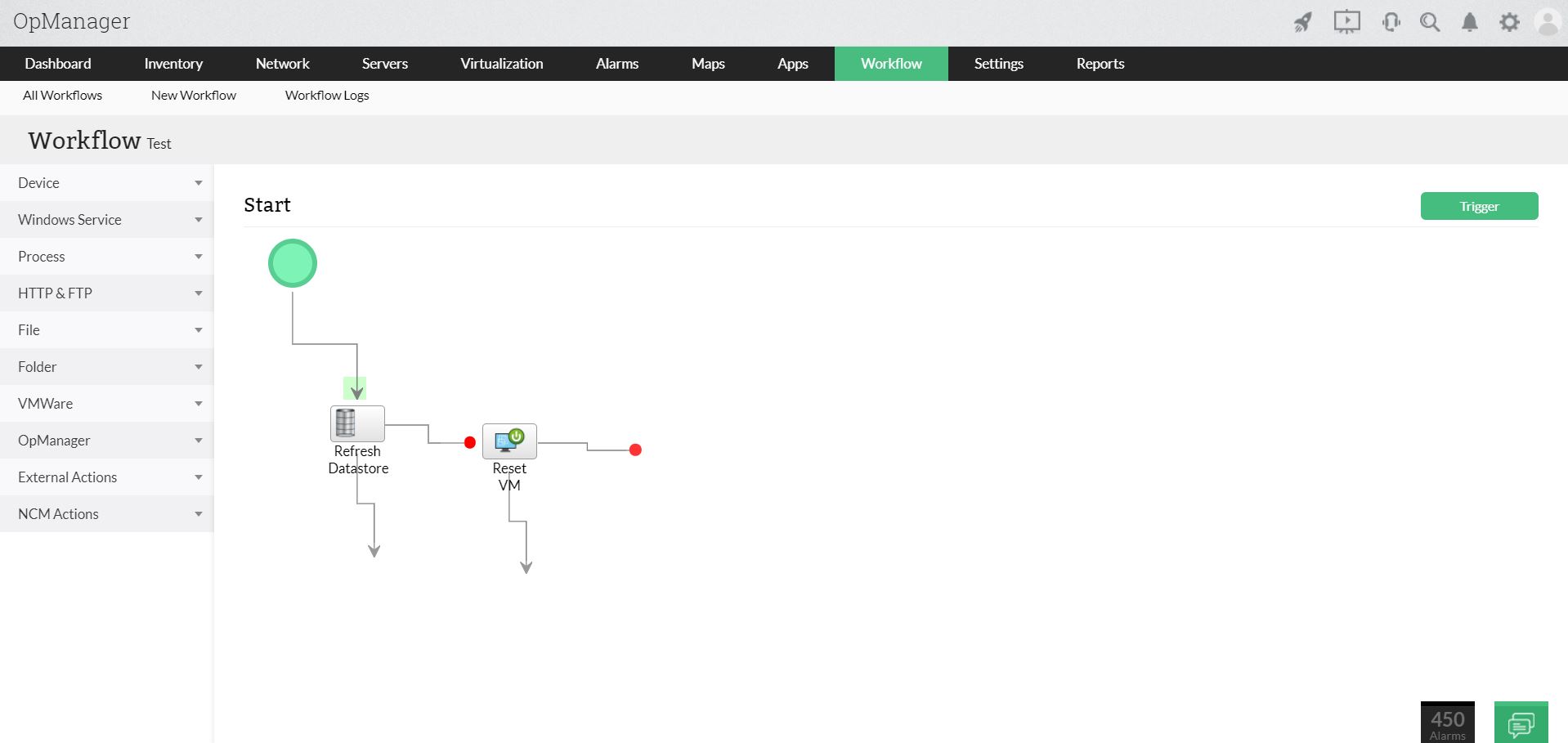
Server performance management with SLAs
With OpManager, it is possible to group devices according to the service they facilitate and ensure that for each business service, SLAs are being met. OpManager alerts for falling SLAs and from the intuitive business service maps you can drill down and troubleshoot problem devices to quickly restore SLAs.

Server performance management and capacity planning with Reports
Through over 100 out–of–the–box server performance reports on availability, resource utilization, fault events, etc., OpManager provides ready–to–use information for your next capacity addition. What’s more, you can create customized reports, e.g. an end-of-the-day report on the availability & response times of all the servers in the datacenter, and have these automatically sent to your mailbox everyday.
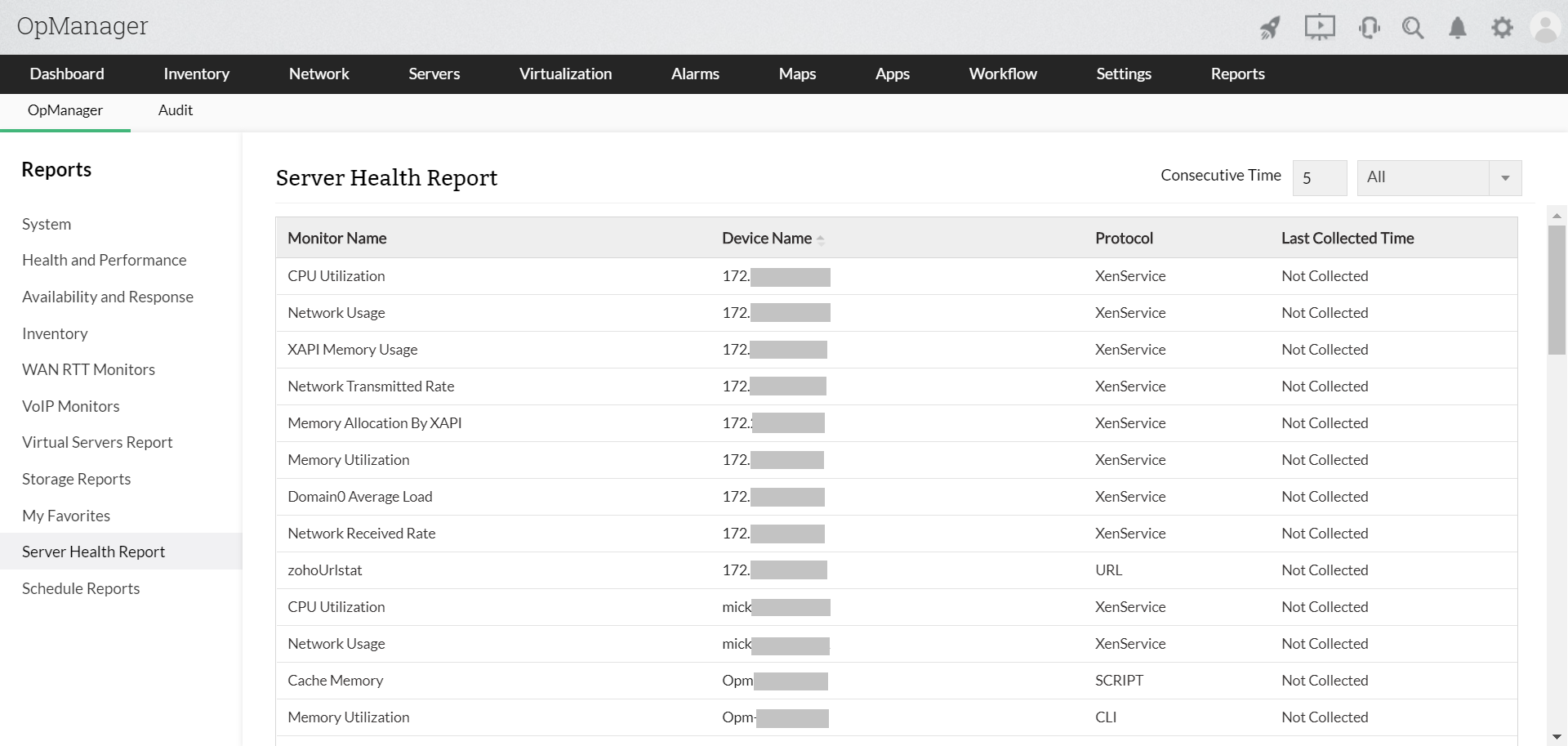
FAQs on Server performance management
What is server management?
+What is server performance?
+Why do we need server performance management?
+How to measure server performance?
+Manage the server environment from a single console, OpManager.
Download 30-day free trialCustomer reviews

Case Studies - OpManager
Awards & Honors
- Recognized as a May 2019 Gartner Peer Insights Customers' Choice for Network Performance Monitoring and Diagnostics Software
- Recognised as an April 2019 Gartner Peer Insights Customers' Choice for IT Infrastructure Monitoring Tools.
- Network Management and Monitor Vendor of the Year 2018, 2019
- Entered the 2019 Gartner NPMD Magic Quadrant.
- Ranked #2 in the Infotech Research Software Reviews Data Quadrant 2018.