Service Pack for builds 128000 & above.
We strongly recommend you to take backups before updating. This helps you prevent accidental loss of data.
SHA256 Value: 3719569468c22d8a7646e0607f5a794b0ca4d3e232f137ec3436b1b9331f284f
(Released on September 01, 2026)
Read and accept the License Agreement before downloading this software.
How to apply service pack?
- 1. Choose your
upgrade path. - 2. Download the
appropriate PPM file. - 3. Apply it in
OpManager. - 4. Restart
OpManager.
Choose your upgrade path
| Current build | Upgrade path to the latest build | SHA256 Value |
|---|---|---|
| 128000 & above | Install the service pack to move to the latest build. | 3719569468c22d8a7646e0607f5a794b0ca4d3e232f137ec3436b1b9331f284f |
| 127000 to 127317 | Install the service pack to move to the build 128004. | 84b96393bee8f461058551a1b73c083e08f9b62c63ab7dbe989bd3ef9ea37437 |
| 126000 to 126329 | Install the service pack to move to the build 127007. | 05af866bd8e1e31654f387adde1586bb2410318810c3ed446879c58fd5a78041 |
| 125000 to 125659 | Install the service pack to move to the build 126007. | f9ec6edcc1203a0c9c48be636bcb7c4d6007f3c536d1793e62b6994b1c62183a |
| 124000 to 124196 | Install the service pack to move to the build 125012 | 61894a37398fe154e33efb174f787c90cf9d50281a4bfafe3da1c55bc7bb7743 |
| 123000 to 123329 | Install the service pack to move to the build 124006 | de726f2f3eaae3513532e44fdcef64e113b5dc4fd4ca4163371b4c75f2b96e7d |
| 12200 | Install the service pack to move to the build 123000 | ad8738cb2240a9bb98da95f8da43899141217a21e07e14438f4034bdc1f37c5e |
| 12000 / 12100 | Install the Service Pack to move to build 12200 | dc4171d607bfc000308c0f68baa90215ea035e78d00d3e3fa05c6c9d1fae10d1 |
| 11600 | Install the service pack to move to the build 123097 ( Watch video ) | 27f05e9798157c2c0115fcbb59940a072b9cbd22238c57bb8abeea64e825abf9 |
Note:
- End of support has been announced for all OpManager versions below 12.7
- Only users with a valid AMS (Annual Maintenance and Support) contract are eligible to download Service packs and other upgrades. Refer https://www.manageengine.com/support.html for more details.
- If the Applications Manager plugin is installed in OpManager, ensure that it is upgraded to the corresponding compatible version as specified here.
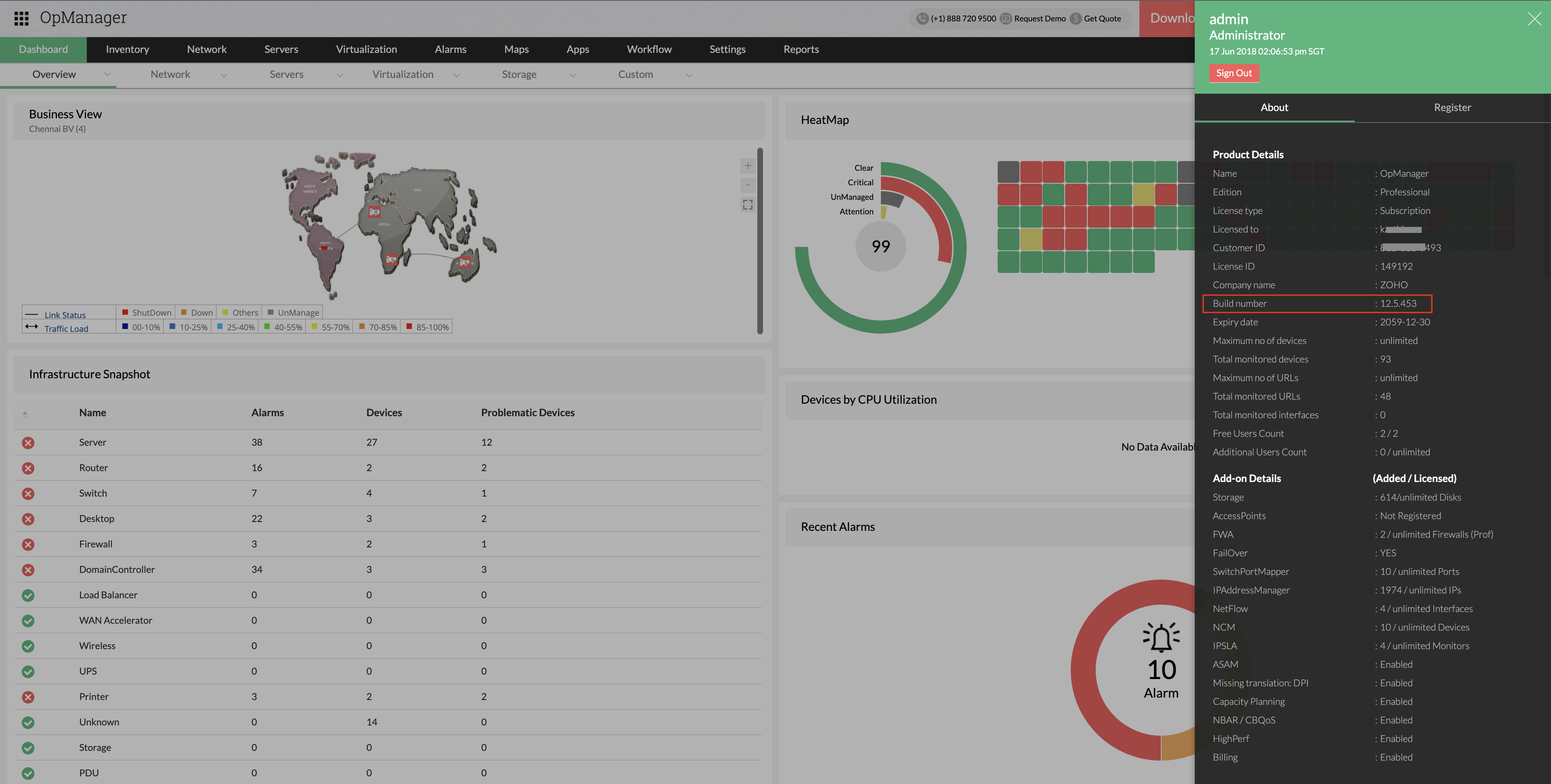
How can I find the build number of OpManager?
- In the Web Client, click on the "Administrator" icon in the top right corner of the page.
- Search for the 'Build Number' among the product details listed.
- Check the following image guide to locate the build number.
Need help ?
Want help with upgrading OpManager to the latest version? Contact OpManager Support.
Know what's coming up next with OpManager. Head to our product roadmap page.