
- Cloud Protection
- Compliance
- Data Leak Prevention
- Data Risk Assessment
- File Analysis
- File Audit
- Threat Glossary
Homograph attacks
Key takeaways
- Homograph attacks tricks users by exploiting visually similar characters from different writing systems to replace standard Latin characters, creating deceptive domains or text that appear legitimate—for example, a spoofed аppIe.com using a non-Latin “ a”.
- Homograph attacks commonly target trusted applications that receive a high volume of traffic such as amazon.com and google.com.
- These deceptive attacks can be applied across multiple channels, including URLs, email addresses, user accounts, and file names.
- Preventing homograph attacks is a shared responsibility, requiring heightened awareness and proactive actions from both administrators and end users.
What is a homograph attack
A homograph attack (also known as homo-glyph attack) is a form of cyber deception that exploits the visual similarities between characters from different writing systems. When a user misinterprets the Greek omicron "o" in "adoḅe.com" as the Latin "o" in "adobe.com", they are falling for the same trick threat actors use to build malicious lookalike domains and URLs.
These threat actors exploit human innate cognitive biases by creating visually indistinguishable accounts, domains, or applications. This is accomplished by by replacing Latin letters with visually identical characters from Greek, Cyrillic, and other Unicode scripts, which in turn helps bypass traditional threat detection systems.
Generally, the objective of these attacks is to lure victims into providing their login credentials through phishing or redirect them to a compromised application that delivers malware. Ultimately this attack aims to steal sensitive data and compromise the victim's system or network.
How is a homograph attack different from typo-squatting
While the intent of both homograph and typo-squatting attack is to deceive users into accessing a domain, or responding to a fraudulent email, there is a subtle, yet important difference between the two.
In a typo-squatting attack, the attacker deliberately misspells the name of a domain, email address, file name, or other such identifiers in hope of bypassing an end user's attention.
Example, a domain such as "rnicrosoft.com" replaces the "m" in microsoft" with characters "r" and "n". For users in haste, this difference can be hard to notice.
However, a homograph attack takes this deception a notch higher by replacing characters from Latin script with visually similar characters from other writing systems, such as Greek or Cyrillic. As a result, homograph attacks are generally more devious and significantly harder to spot.
Example, a domain such as "rnicrosoft.com" replaces the Latin "o" in microsoft" with Greek omicron "o" making it less conspicuous and more efficacious for an attacker.
Homograph attack types
From an user in disguise to a malicious web application, homograph attacks can take different forms based on how it is deployed. A few ubiquitous types that attackers rely on include:
- Internationalized domain names (IDN) exploit: This technique involves registering deceptive domain names that closely resemble legitimate ones by replacing Latin characters with visually similar characters from other writing systems such as Greek or Cyrillic. As these characters are nearly indistinguishable to the human eye, the resulting domains can appear authentic while resolving to attacker-controlled infrastructure. This table illustrates how nearly convincing these deceptive domains can be.
Brand Legitimate domain Homograph domain Script used Character substitution Unicode Amazon amazon.com amazοn.com Greek o → ο (omicron) U+03BF Nike nike.com nιke.com Greek i → ι (iota) U+03B9 Slack slack.com slaсk.com Cyrillic c → с (es) U+0441 Apple. apple.com аррle.com Cyrillic a → а, p → р U+0430, U+0440 Because these domains are technically valid and often indistinguishable from their legitimate counterparts, IDN-based homograph exploits are particularly effective for phishing, credential harvesting, and malware delivery.
- Email spoofing: In this technique attackers using deceptive email addresses that appear similar to those of legitimate businesses to lure users. For example, support@google.com may be spoofed as support@google.com, where the Latin "o" is replaced with Greek omicron "o" to mislead recipients.
- File names deception: In this technique, attackers disguise malicious files with names that closely resemble legitimate documents using visually similar Unicode characters. These files often appear as routine items like invoices, reports, shipping documents, etc. However, when opened these files trigger a hidden malicious code to gain access and compromise the network. For example, a file named Invoice_2025_αpril.pdf.exe uses a Greek alpha "α" instead of a Latin “a”, making it appear as a legitimate PDF while actually executing malicious code when opened.
- User account spoof: In this technique, attackers create user accounts that closely resemble legitimate users by substituting characters with visually similar Unicode alternatives. These accounts can appear trustworthy in email or collaboration tools, increasing the likelihood of users responding to malicious requests. For example, an attacker might create an account named finance.teаm@company.com where the “a” in team is a Cyrillic character, making the account appear legitimate and increasing the likelihood of users responding to malicious requests.
How does a homograph attack work?
From identifying visually similar characters to luring users into interacting with a deceptive domain, user account, or file, and ultimately into providing sensitive information, homograph attacks follow an intricate path, which often looks like this:
- Identifying similar characters: Attackers begin by selecting high‑value targets—such as popular websites, trusted applications, or corporate user accounts—that users are likely to trust and respond to. They then identify visually similar Unicode characters from scripts like Greek or Cyrillic that can be used as substitutes without drawing attention.
- Registering a domain or user account: Using these character substitutions, attackers register a deceptive domain name or create a fake user account that closely mirrors the legitimate one. To most users, this fraudulent domain or identity appears visually indistinguishable from the original.
- Encoding the Punycode: Similar to an IDN exploit, Punycode was created in the early days of the internet to address foreign language characters. When non‑Latin characters are used in a domain name, Punycode encodes IDN names into standard ASCII characters but this can be can exploited so that the underlying characters are masked from the users and malicious versions substituted.
- Launching the attack campaign: Once the domain or user account is active, attackers send phishing emails, messages, or advertisements containing links or references to the deceptive identity, prompting users to engage with the fraudulent content.
- Exploitation: After users interact with the fraudulent content, attackers exploit that trust to harvest credentials, execute malware, take over accounts, and move laterally within the environment.
Homograph attack examples
- Amazon.com, but with a twist:
Who doesn’t like a great deal on Amazon? Attackers certainly do—and in 2020, this interest led to a concerning discovery. Matt Hamilton, a security researcher at Soluble, identified a flaw that allowed the creation of an amazon.com look-alike domain by substituting Latin characters with visually identical homo-glyphs. Further investigations revealed that similar homograph domains were also created for other prominent brands such as Verisign, DigitalOcean, and Wasabi.
Even more alarming, Hamilton found that several of these deceptive domains had successfully obtained valid HTTPS certificates, lending them an added layer of credibility. In response to these findings, Amazon restricted the registration of S3 bucket names that use homo-glyph characters, mitigating the risk of similar attacks against its web services.
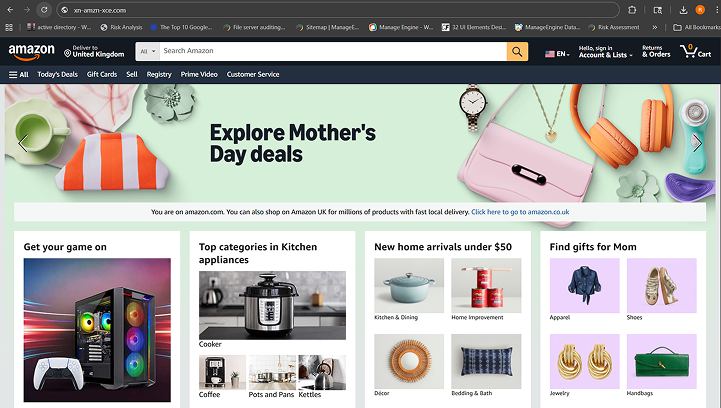
The image above shows an example of amazοn.com, where the Latin letter “o” has been replaced with the Greek omicron “ο”. While the application interface may appear identical, a vigilant user can identify such homograph attacks by noticing the xn-- Punycode indicator in the domain name.
- Microsoft Outlook, as reported by Bitdefender:
In their research, Bitdefender researchers identified that Microsoft Outlook was susceptible to homograph attacks due to how URLs are handled in the preview pane. The researchers noted that Outlook does not always display the accurate underlying URL when users hover over links in email attachments. As a result, even cautious users who attempt to verify links before clicking could be misled into visiting a malicious website.
In some cases, simply visiting such a site may be sufficient to trigger a drive-by download attack. Bitdefender further observed that similar behavior affected other Microsoft applications, including Word, Excel, and PowerPoint. The issue was subsequently reported to the Microsoft Security Response Center (MSRC) for mitigation.
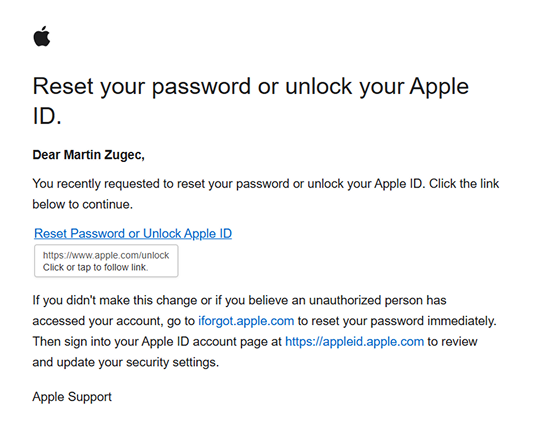
The image below illustrates an instance of attackers masquerading as Apple and exposes a shortcoming in Microsoft Outlook’s ability to display the accurate URL.
- Sροtify, not Spotify:
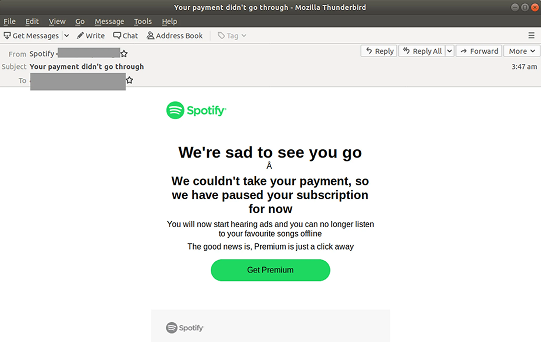
The unusual title of this section is not a typo, but a tactic used by attackers to impersonate the popular music-streaming app Spotify. On closer inspection, the letters “p” and “o” have been replaced with their visually similar Greek counterparts—ρ (rho) and ο (omicron).
Attackers used this technique to impersonate Spotify and prompted users to resolve a pending payment. The link often directed unsuspecting victims to a fraudulent website designed to capture payment card details and login credentials
How to prevent homograph attacks
Homograph attacks know no bias. Likewise, irrespective of the hat you're wearing—admin or end user—everyone has a role to play in safeguarding data. Here’s what you can do based on your role:
For the end user:
- Trust your password manager, not your eyes: A password manager matches credentials to a site’s actual domain code, not its visual appearance. Look-alike domains created with special characters won’t trigger auto-fill. If your password doesn’t fill automatically, treat it as a red flag and leave the site.
- Type, don't click (for sensitive accounts): For high-risk accounts like banking, healthcare, or primary email, avoid clicking links in emails or texts. Manually type the website address or use a saved bookmark to bypass hidden look-alike or Punycode characters.
- Don’t trust the padlock, inspect it: The padlock only indicates encryption, not legitimacy. Click it and review the certificate. Domains showing garbled names or an xn-- prefix are strong indicators of IDN-based impersonation.
- Hover before you click: Hover over links to preview their true destination in the corner of your browser. Watch for odd characters, accents, or subtle misspellings. If anything looks off, don’t click.
- Watch for the xn-- prefix: If a URL displays an xn-- prefix (for example, xn--mzon-6ra.com), it indicates the use of special characters often associated with homograph attacks. Treat the site as high risk and exit immediately.
For administrators:
- Enforce endpoint data leak prevention (DLP)
Homograph attacks often aim to trick users into uploading sensitive data. Endpoint DLP solutions can detect and block transfers of sensitive information (like PII or financial records) to unsanctioned or spoofed web applications, preventing data exfiltration even if the user is deceived.
- Use real-time web and cloud filtering
Deploy robust URI filtering solutions that blocks newly registered, look-alike, low reputed, or risky domains. These tools analyze the underlying Punycode encoding before the page loads, preventing users from accessing deceptive sites.
- Mandate phishing-resistant MFA and password managers
Phishing-resistant authentication methods (such as FIDO2/WebAuthn) binds logins to the legitimate domain, rendering spoofed sites ineffective. Password managers further protect credentials by refusing to auto-fill login information on deceptive URLs.
- Enable file activity auditing and alerts
Monitor file access and uploads with real-time alerts. This allows administrators to detect anomalous behavior—such as a user suddenly uploading data to an unfamiliar external domain—and stop a breach in progress.
- Force Punycode display in browsers
Use GPOs or mobile device management policies to require browsers to display the Punycode version for all IDNs. This "unmasks" the attack, forcing the browser to display the technical string (for example, xn--...) instead of the visual look-alike, making attacks easier to identify.
Eliminate homograph attacks and protect your data with DataSecurity Plus
A minor oversight is all it takes for attackers to execute a homograph attack and harvest data that can fuel a cascade of subsequent follow-up threats. That’s why visibility into how users access cloud applications and interact with them is critical. ManageEngine DataSecurity Plus provides in-depth visibility and control so you can:
Filter URLs:
Block access to websites with a low reputation score, and those that use mixed scripts—Latin, Greek, or Cyrillic—a common hallmark of homograph-based phishing domains.
Regulate file uploads:
Control which cloud applications users can upload sensitive data to,reducing the risk of accidental data leakage.
Restrict file downloads:
Prevent downloads of files with names containing multiple scripts, often used to disguise malicious content.
Enforce login controls:
Allow access to applications only through official corporate email addresses, minimizing the risk of account impersonation.
Download a free, 30-day trialFrequently asked questions
1. What is a homograph attack?
A homograph attack allows attackers to create URLs, emails, or filenames that look like legitimate ones by using visually similar characters which is then used to trick users into visiting malicious sites or sharing sensitive information.
2. How do I detect a homograph attack?
Look closely for URLs, email addresses, or file names that use mixed or unusual characters from different scripts. Hover over links to verify their destination and be cautious of look-alike domains that appear legitimate but behave unexpectedly.
3. Are homograph attacks prevalent?
Yes. Homograph attacks are a cornerstone of modern phishing and brand impersonation. According to the 2025 Phishing Landscape Report, the volume of unique domain names registered for phishing reached an all-time high of over 1.5 million domains annually, a 38% increase year-over-year.
4. What should I do if I click on a homograph URL?
Immediately close the page and do not enter any credentials or download files. Clear your browser session, change any passwords you may have entered, and report the incident to your IT or security team so they can investigate and block similar threats.