- Home
- Logging Guide
- How to use the grep command in Linux
How to use the grep command in Linux
In this page
- What is the grep command in Linux?
- How can grep be used?
- What is the basic syntax of the grep command in Linux?
- What are the most common options used with the grep command in Linux?
- How to use the grep command with regular expressions
- How to combine grep with other commands
- How does ManageEngine EventLog Analyzer help monitor and analyze Linux grep command usage?
What is the grep command in Linux?
The grep command, short for global regular expression print, is a powerful and versatile tool in Linux for searching and filtering text based on specific patterns. Whether you're a system administrator sifting through log files, a developer debugging code, or a data analyst extracting valuable insights, the grep command in Linux offers a fast and flexible way to locate text within files or streams.
With its ability to handle both simple keywords and complex regular expressions, the grep command empowers users to perform precise searches, streamline troubleshooting, and efficiently manage large volumes of data. This makes it an indispensable utility for anyone working with the Linux command line.
How can grep be used?
The grep command finds wide application in Linux environments due to its versatility and efficiency. Listed below are some of them.
- Log file analysis : The grep command helps administrators and security analysts search for specific keywords or error messages within large log files, identifying potential issues and anomalies quickly.
- Configuration file management: System administrators use the grep command to locate settings and parameters in configuration files, making it easy to verify or modify configurations without manually searching through each file.
- Data extraction: The grep command simplifies the extraction of relevant data from large text files, often as part of preprocessing tasks in data analysis pipelines, making it a go-to tool for data analysts and engineers.
- Real-time monitoring : Using tools like tail in real-time monitoring allows you to observe log activity as it happens, helping you quickly detect errors or system events and respond promptly. Its wide-ranging applications make grep essential for anyone working with Linux, helping them navigate and manage text-based information effectively.

What is the basic syntax of the grep command in Linux?
The grep command has a simple yet flexible syntax that allows it to be used in a wide range of text-searching scenarios:
grep [options] pattern [file...]
Components of the syntax include:
- pattern: This is the keyword or regular expression that you want to search for. It defines the text pattern grep will match against each line within the specified file(s).
- file: the file(s) in which grep will search for the pattern. You can specify one file, multiple files, or even entire directories. If no file is provided, grep will read from standard input (e.g., data piped from another command).
Examples of the syntax variations
Here are some common ways to use the grep command in Linux, demonstrating its flexibility for different use cases:
| Command | Description | Syntax | Output |
|---|---|---|---|
| Search within a single file | Finds lines matching a pattern in a specific file | grep "error" system.log | Displays all lines in system.log that contain the word "error" |
| Search across multiple files | Searches for a pattern in multiple specified files | grep "failed" auth.log access.log | Displays lines containing "failed" from both the auth.log and access.log |
| Recursive search in directories | Searches for a pattern in all files within a directory and its subdirectories | grep -r "timeout" /var/logs/ | Displays lines with "timeout" from all files in /var/logs/ and its subdirectories |
| Using grep with piped input | Filters the output of another command to find lines matching a pattern | `dmesg | grep "disk"` |
| Search with regular expressions | Matches lines using regex patterns like ^ for the start or $ for the end of the line | grep "^root" /etc/passwd | Displays lines from /etc/passwd that start with "root" |
With the ability to search both single and multiple files, recursively search directories, and combine with other commands via piping, the grep command makes for a great tool for locating text patterns across a range of Linux environments.
What are the most common options used with the grep command in Linux?
The grep command includes a variety of options that can be used to customize searches, making it highly versatile for different use cases.
Here’s a list of the commonly used options:
| Command | Description | Syntax | Output |
|---|---|---|---|
| grep -i | Case-insensitive search | grep -i "error" logfile.txt | Matches all instances of "error" regardless of case (e.g., Error, ERROR) |
| grep -v | Exclude lines with a pattern | grep -v "debug" logfile.txt | Displays all lines except those containing "debug" |
| grep -c | Count matching lines | grep -c "warning" logfile.txt | Outputs the number of lines containing "warning" |
| grep -l | List file names with matches | grep -l "failure" *.log | Lists the names of files containing the word "failure" |
| grep -r | Recursive search in directories | grep -r "timeout" /var/log/ | Searches for "timeout" across all files in /var/log/ and its subdirectories |
| grep -n | Show line numbers of matches | grep -n "disk" system.log | Displays matching lines along with their line numbers |
| grep -e | Search using multiple patterns | grep -e "error" -e "failure" logfile.txt | Matches lines containing either "error" or "failure" |
| grep -f | Use patterns from a file | grep -f patterns.txt logfile.txt | Matches lines in logfile.txt based on patterns listed in patterns.txt |
| grep -q | Quiet mode (suppress output) | grep -q "error" logfile.txt && echo "Found" | No output if a match is found; exit status used for scripts |
These options allow for customizing searches with grep, making it easier to pinpoint or exclude data in diverse text-processing scenarios.
How to use the grep command with regular expressions
Regular expressions (regex) enable advanced pattern matching with the grep command, providing flexibility to search based on character patterns, positions, or repetitions. The grep command supports Basic Regular Expressions (BRE) and Extended Regular Expressions (ERE), allowing for precise text searches. BRE and ERE define regex syntax in tools like grep.
BRE, the default in grep, supports basic patterns but requires escaping for operators like + and |.
Here are some of the common basic regexes along with their description and syntax:
| Command | Description | Syntax | Output |
|---|---|---|---|
| grep "^pattern" | Matches lines starting with the pattern | grep "^ERROR" logfile.txt | Finds lines beginning with "ERROR" |
| grep "pattern$" | Matches lines ending with the pattern | grep "done$" logfile.txt | Finds lines ending with "done" |
| grep "[abc]" | Matches any character inside brackets | grep "[aeiou]" file.txt | Finds lines containing at least one vowel (a, e, i, o, u) |
| grep "c.t" | Matches any single character (dot wildcard) | grep "c.t" file.txt | Matches lines with "cat," "cut," "cot," etc. |
| grep -P "\d" | Matches any digit (Perl regex) | grep -P "\d" file.txt | Finds lines containing digits |
| grep -P "\w+" | Matches words (letters, digits, underscores) | grep -P "\w+" file.txt | Matches alphanumeric words or strings with underscores |
| grep "lo*g" | Matches zero or more of the previous character | grep "lo*g" file.txt | Matches "lg," "log," "loog," etc. |
| grep "\.txt" | Escapes special characters | grep "\.txt" filelist.txt | Matches lines containing .txt (literal period) |
The -e option enables ERE in grep, allowing for more complex patterns such as |, +, and {} without needing to escape them. Alternatively, you can use egrep, which is equivalent to grep -e.
Here are some of the commonly used -e commands along with their descriptions and syntax:
| Command | Description | Syntax | Output |
|---|---|---|---|
| [A-Z]+ | Matches one or more uppercase letters | grep -E "[A-Z]+" file.txt | Matches "HELLO," "TEST," or any uppercase word |
| grep -E "lo+g" | Matches one or more of the previous character | grep -E "lo+g" file.txt | Matches "log," "loog," "looog," etc. |
| grep -E "a{3}" | Matches the exact number of occurrences | grep -E "a{3}" file.txt | Matches "aaa" but not "aa" or "aaaa" |
| \w+@\w+\.\w+ | Matches a simple email format | \grep -E "\w+@\w+\.\w+" | Matches lines containing "user@example.com" |
| [0-9]{2,4} | Matches two to four digits | grep -E "[0-9]{2,4}" file.txt | Matches "12," "123," or "1234" but not "1" or "12345" |
By leveraging basic and extended regular expressions in grep, users can tailor their searches to locate patterns with precision, simplifying the process of finding data across complex files and large datasets.
How to combine grep with other commands
Combining grep with other commands enhances its capabilities, allowing you to process, filter, and analyze text data more efficiently.
| Command combination | Description | Syntax | Example use case |
|---|---|---|---|
| cat + grep + sort + uniq | Finds and removes duplicate lines matching a pattern, sorting them for easy viewing | cat largefile.txt | grep "keyword" | sort | uniq | Searches for "keyword" in largefile.txt, removes duplicates, and sorts the results |
| find + grep + awk | Finds files matching criteria, searches for a pattern, and displays specific details | find /var/log -name "*.log" -mtime -7 -exec grep "error" {} \; | awk '{print $1, $2, $3}' | Searches .log files modified in the last seven days for "error" and displays specific columns like date and time |
| ps + grep | Filters running processes by name | ps aux | grep "apache" | Lists all running processes matching "apache" |
| grep + cut | Extracts specific fields from matched lines | grep "username" /etc/passwd | cut -d: -f1 | Finds lines with "username" in /etc/passwd and extracts the first field (username) |
| tail + grep | Monitors live log entries containing a specific pattern | tail -f server.log | grep "error" | Continuously watches server.log for new entries containing "error" |
These combinations make grep a versatile tool for handling various tasks, from real-time monitoring to extracting specific data fields in large datasets.
How does ManageEngine EventLog Analyzer help monitor and analyze Linux grep command usage?
ManageEngine EventLog Analyzer, a robust log management and IT compliance solution, centralizes the collection, monitoring, correlation, and archiving of logs across your network, including Linux systems. It enables administrators to monitor critical user activity, troubleshoot issues, and enhance security posture, all while ensuring compliance with regulatory mandates.
Monitoring and analyzing grep command usage
EventLog Analyzer provides real-time monitoring of grep command execution, capturing logs associated with its usage and correlating them with other system and user events. This ensures that administrators can identify misuse, investigate security incidents, and monitor legitimate activities efficiently.
Enhanced monitoring and security with EventLog Analyzer
EventLog Analyzer leverages robust analytics to correlate grep command activities with network and system events, providing actionable insights:
- Privilege elevation monitoring:
- Tracks successful and failed su command executions to correlate grep usage with privilege elevation attempts.
- Identifies the most frequently executed and failed su commands to uncover patterns of repetitive or automated usage.
- Keyword and pattern alerts:
- Monitors frequent use of grep to search for sensitive terms such as password or confidential.
- Generates alerts for unusual activity, delivering detailed reports to track patterns and potential threats.
- Severity and event insights:
- Categorizes grep command executions by severity, helping to identify potential threats quickly.
- Highlights critical activities on Unix systems, flagging excessive or anomalous grep usage.
- Provides insights into general system activity where grep is part of executed commands.
- Performance and root cause analysis:
- Correlates grep command usage with system performance logs to identify CPU or memory spikes.
- Links grep output to system events and error logs for misconfiguration detection and troubleshooting.
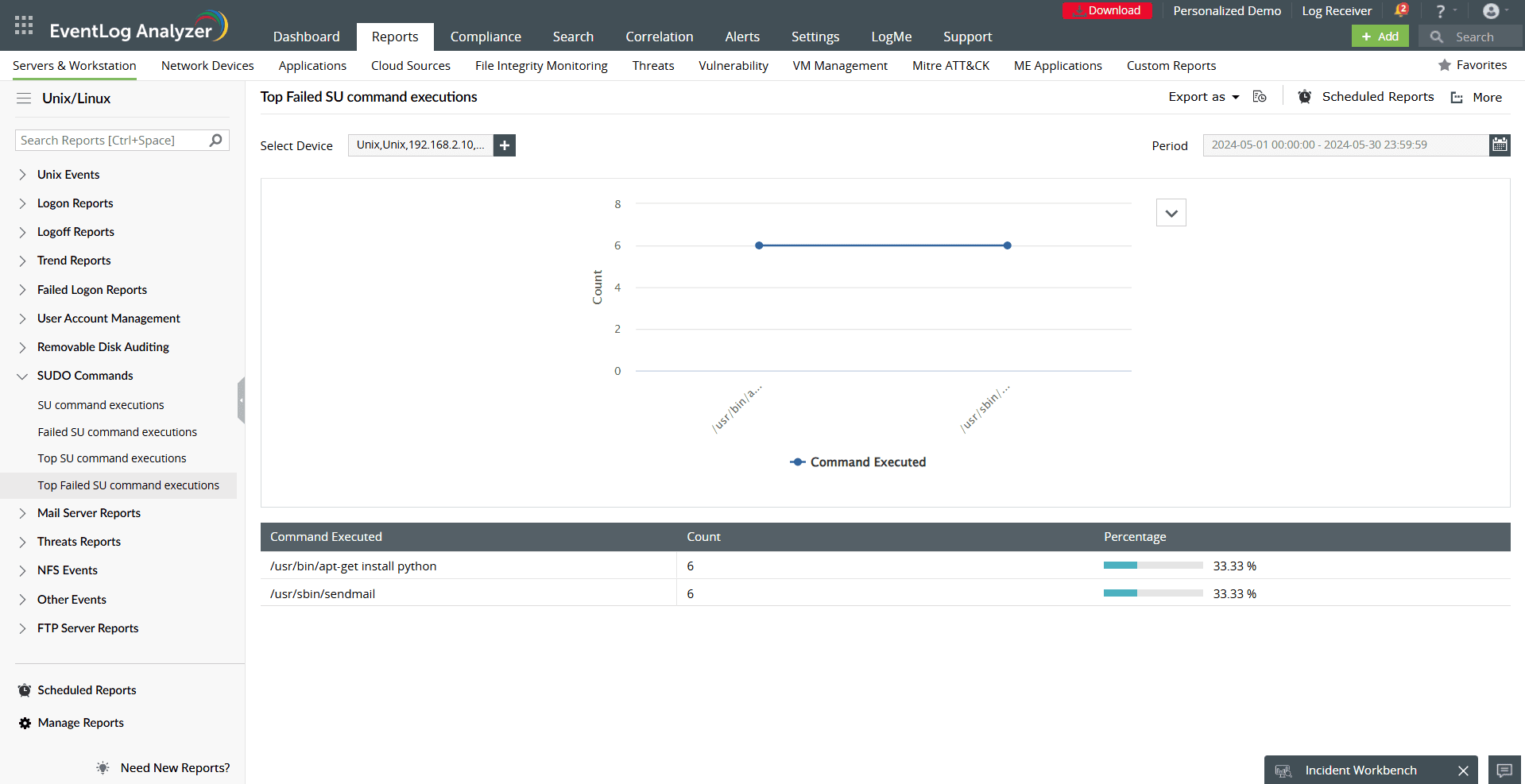
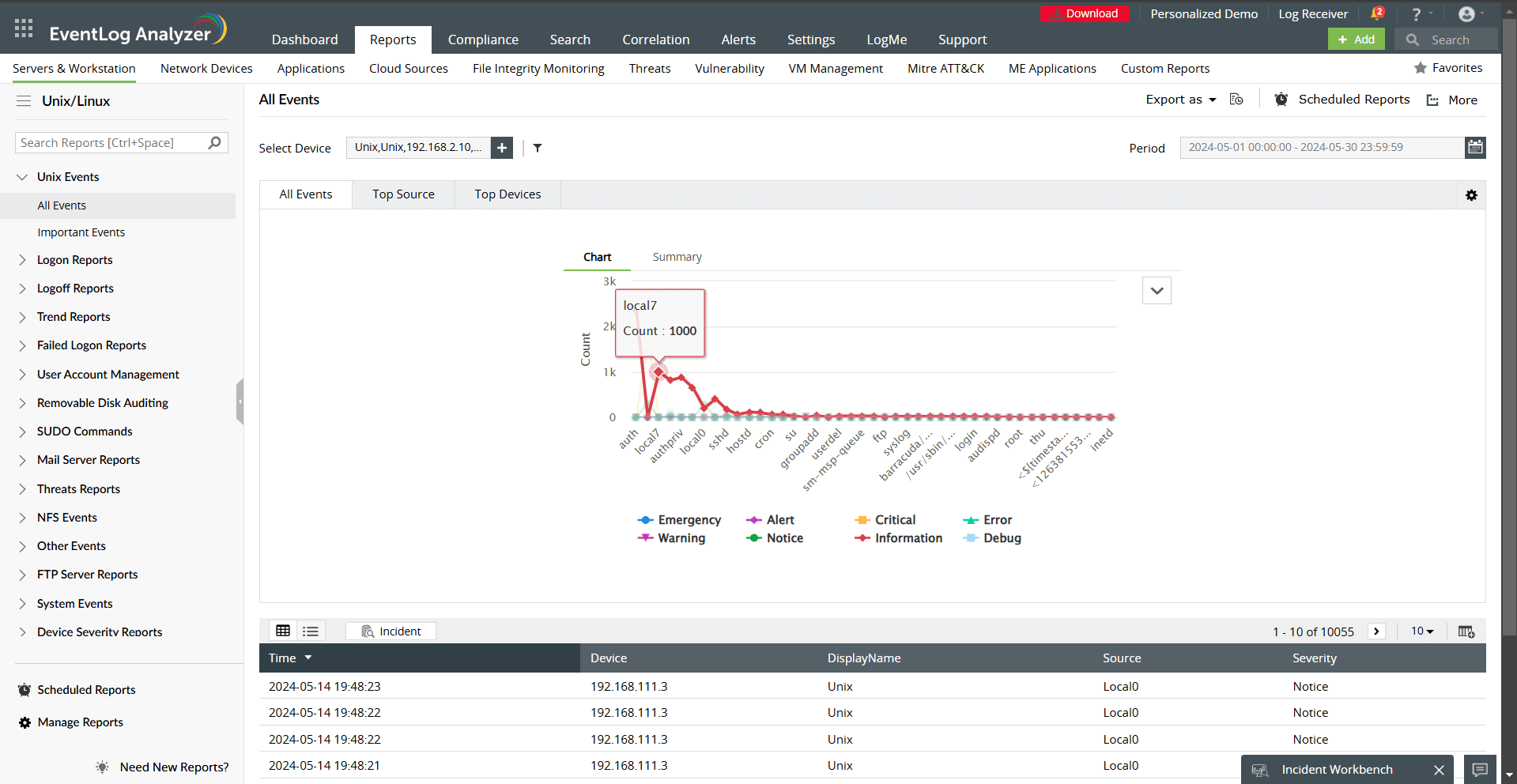
By providing detailed analytics and actionable insights, EventLog Analyzer simplifies grep usage monitoring, ensuring data security, system stability, and regulatory compliance.