
- Cloud Protection
- Compliance
- Data Leak Prevention
- Data Risk Assessment
- File Analysis
- File Audit
- Threat Glossary
Outbound email security
Key takeaways
- Outbound email security is the set of policies, controls, and technologies that govern what sensitive data can leave an organization through email—covering content inspection, DLP, encryption, and sender authentication.
- Every outgoing email is intercepted before delivery and evaluated in four stages: policy configuration, content inspection, context evaluation, and enforcement. This is followed by authentication via SPF, DKIM, and DMARC.
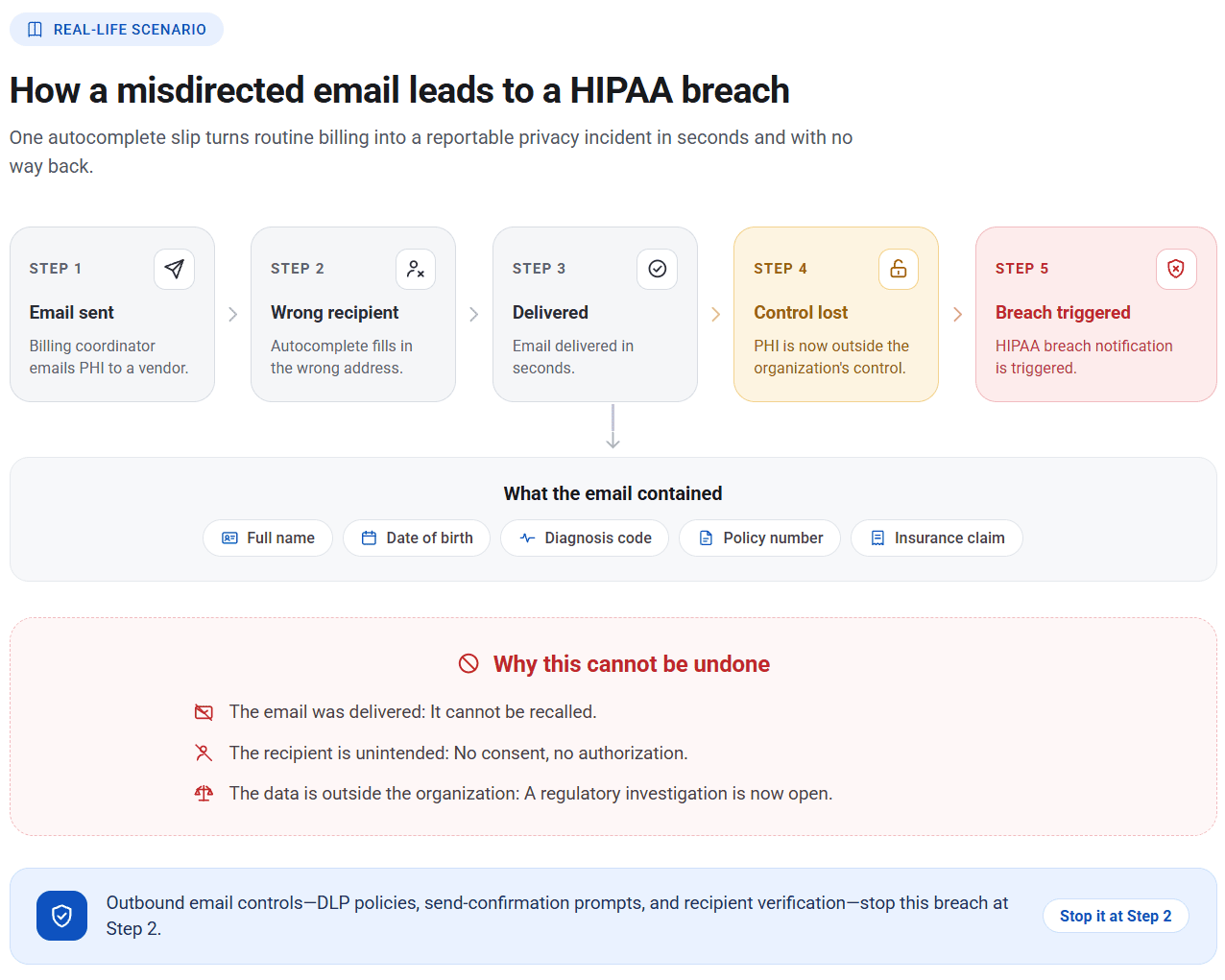
- Outbound breaches are often unrecoverable. A delivered email containing sensitive information cannot be recalled. Once an outbound email is breached, regulatory, financial, and reputational consequences compound quickly.
- The most common incidents do not stem from sophisticated attacks. They are misdirected emails, personal account forwarding, compromised accounts, malicious insiders, and unencrypted data in transit.
- Effective outbound email security requires seven practices: discovering and classifying data, inspecting content and not just metadata, scoping policies to users and endpoints, defining graduated enforcement, monitoring for slow-drip exfiltration, maintaining audit logs, and encrypting outbound emails while authenticating your domain.
What is outbound email security?
Outbound email security is the set of policies and controls that govern what sensitive data can leave an organization through email. While most email data protection strategies target inbound threats such as phishing, malware, and spam, the risks associated with outbound emails are just as significant and often more damaging. When an employee mistakenly sends a file to an external recipient, forwards a confidential report to a personal account, or attaches the wrong document to a client email, the result is the same as a targeted breach: sensitive data exposure.
Outbound email security addresses this by monitoring outgoing messages, inspecting content against defined DLP policies, and enforcing appropriate response actions like blocking the email, flagging it for review, or logging it for audit purposes. It also encompasses encryption controls that protect data in transit and sender authentication protocols—such as SPF (Sender Policy Framework), DKIM (DomainKeys Identified Mail), and DMARC (Domain-based Message Authentication, Reporting, and Conformance)—that verify the legitimacy of outgoing messages and prevent domain spoofing.
Outbound email security is increasingly recognized as a foundational layer of any serious email security posture and a critical component of a broader data protection strategy.
How outbound email security works
Outbound email security operates at the point of transmission, intercepting outgoing messages before delivery and evaluating them against a defined set of policies. It works in four stages:
- DLP policy configuration: Administrators define policies that specify the sensitive data to look for using data identifiers, keywords, or file fingerprinting. Policies can be targeted to specific users, departments, or AD groups and configured to trigger actions, such as blocking, quarantining, and encrypting , when a policy violation is detected.
- Content inspection: Every outgoing email is intercepted and its body, subject line, and attachments are checked for the presence of sensitive data, such as credit card numbers, national IDs, and healthcare records, as defined in the policy.
- Context evaluation: All configured non-content conditions are evaluated against the criteria defined in the policy, including sender attributes (identity, department, and group membership), recipient domains, attachment characteristics (size and file type), and classification labels.
- Enforcement: The response action configured in the matched policy is enforced. This may include logging the event, alerting stakeholders, encrypting the message, quarantining it, or blocking the email from being sent.
Once an email passes the policy checks and is approved for delivery, authentication protocols take control. SPF ensures that the sending server is authorized to send on behalf of the domain. DKIM attaches a cryptographic signature to the message that the receiving servers use to confirm it has not been altered in transit. DMARC ties both together, defining what action receiving servers should take when a message fails these checks.
The result is a layered security framework in which every outgoing email is screened for sensitive content, evaluated against policy-defined context, and authenticated before delivery, ensuring that only authorized and authenticated emails leave the organization.
Process flow
User composes email and selects Send
01Outbound security layer inspects content (body, subject, attachments)
02Data identifiers matched against active policy
04Policy match found
03Enforcement action applied
05Outbound vs. inbound email security
| Inbound security | Outbound security | |
|---|---|---|
| Protects against | External threat actors that use email as an entry point to execute attacks and steal data. | Sensitive data and unauthorized communications leaving the organization. |
| Key risks | Phishing, malware, spoofed senders. | Accidental sharing, compromised accounts, malicious insiders. |
| Security objective | Preventing account compromise and cyberattacks. | Preventing data loss and regulatory exposure. |
| Control approach | Automated and reactive, focusing on scanning incoming messages and acting on detected threats. | Policy -driven and proactive, focusing on controlling how sensitive data is shared. |
| Policy requirement | Minimal. Security controls rely on threat intelligence, known threat signatures, and reputation scores. | High. Admins must define sensitive data, permissible recipients, and actions to take when policies are violated. |
Impact of outbound email breaches
According to a Zivver Email Security Trends report, 66% of IT leaders acknowledge that outbound breaches cause more data loss than inbound attacks. However, only 39% have made email data loss prevention a priority in their investment strategy. The disconnect is striking.
Moreover, outbound breaches are damaging for reasons that go beyond the incident itself. When sensitive data leaves through email, it is often unencrypted, sent to an unintended recipient, and unrecoverable. Unlike a network intrusion, which may be contained and remediated, an email that has been delivered cannot be recalled. The regulatory consequences compound this. The GDPR issues penalties that can scale up to 4% of global annual revenue. HIPAA violations carry penalties exceeding $2 million per wrongful act. In industries like healthcare and financial services, a single misdirected email containing patient records or financial data can lead to a penalty that dwarfs the cost of the controls that would have prevented it.
There is also a reputational damage that rarely appears in cost models. Customers and partners who learn their data was sent to the wrong address or was accessible to unauthorized parties do not distinguish between a deliberate breach and an accidental one. The loss of trust is the same.
Outbound email threats: What security teams are up against
The threat landscape for outbound emails is broader than most organizations account for. The most common incidents are not sophisticated attacks, but simple mistakes.
| Key security risks | Description |
|---|---|
| Misdirected emails | An employee selects the wrong recipient from autocomplete, attaches the wrong file, or uses Reply All where it is not necessary. The data leaves instantly and cannot be recalled. |
| Personal account forwarding | Employees forward work emails or send attachments to personal email accounts for convenience. Corporate security controls are bypassed entirely. |
| Exfiltration through compromised accounts | An attacker who has taken over an internal email account uses it to exfiltrate sensitive data while masquerading to be a legitimate user. |
| Malicious insider activity | A departing employee, contractor, or disgruntled staff member deliberately sends confidential data to competitors to harm the organization or to profit from the information. |
| Unencrypted sensitive data | Regulated data such as PII, PHI, and financial records sent in plaintext without encryption creates compliance exposure even when the recipient is legitimate. |
Cost of outbound email security breaches
An outbound email security failure rarely stops at the incident itself—the financial, legal, and reputational consequences compound quickly and across categories. The IBM Cost of a Data Breach Report breaks down exactly where these costs land, making one thing clear: The cost of inadequate controls consistently outweighs the cost of putting them in place.
Compliancepenalties
- According to the report, a single data breach costs $4.44 million on average globally. With email being the primary vector for data exfiltration, the financial exposure is significant.
- Average breach costs reach $7.42 million in healthcare and $5.56 million in financial services. Both industries rely heavily on email to transmit their most sensitive data.
- Every record exposed through a misdirected email carries an average cost of $173. A 500-record breach is an $86,500 incident before legal fees, notifications, or fines are even accounted for.
- EU regulators collected over €1.2 billion in GDPR penalties in 20 25 alone , covering violations across all aspects of data protection compliance. A single outbound email reaching an unauthorized recipient is enough to trigger a violation.
- HIPAA fines for email security failures have exceeded $9 million in specific cases.
- Under PCI DSS, cardholder data transmitted over unencrypted email can result in card brand assessments, mandatory audits, and loss of payment processing privileges.
Breach response costs
- Forensic investigation, audit services, and crisis management cost $1.47 million per breach on average.
- Post-breach expenses, including regulatory fines, legal fees, and credit monitoring for affected individuals, can add over $1.20 million on average.
- Breach notification costs alone average $390,000, covering mandatory notices to regulators and affected individuals, call center staffing, and identity protection services.
Business impact
- An average breach takes eight months to contain, during which security and IT teams are diverted from all other priority tasks.
- Operational downtime, customer attrition, and revenue loss can cost millions. Email incidents that become public are among the fastest drivers of customer churn rate.
- Enterprise procurement teams routinely screen vendors against breach databases. A disclosed incident can disqualify an organization from high-value bids.
- Contracts with customers or partners that involve data handling obligations may be suspended or terminated if a breach involves their data.
7 ways to strengthen outbound email security
Deploying outbound email security effectively requires more than just installing a tool. The following best practices reflect what mature implementations look like in production.
1. Discover and classify data before you try to protect it
Before configuring outbound controls, build a clear inventory of what constitutes sensitive data in your organization—PII, ePHI, financial records, intellectual property, contractual information—and ensure it is classified consistently.
2. Inspect content, not just metadata
Metadata-only controls such as filtering by attachment classification, type, or file size are insufficient. Effective outbound email security inspects the body of the email, the subject line, and the content of attachments for regulated content using predefined data identifiers, keywords, and more.
3. Scope policies to users and endpoints
Applying a single global email DLP policy across an organization can produce excessive false positives, skew incident reporting, and disrupt legitimate workflows. An effective implementation instead scopes policies based on users and endpoints that interact with specific categories of data.
4. Define graduated enforcement actions
Not every policy match warrants a hard block. Use a tiered, escalating response strategy for enforcement such as logging low-risk incidents, alerting on or encrypting incidents that are medium-risk, and quarantining or blocking high-risk incidents to give security teams room to prioritize investigations and help demonstrate that controls are active, proportionate, and consistently applied.
5. Monitor for slow-drip exfiltration
Malicious insiders rarely exfiltrate large volumes of data in a single email. The more common pattern is low-volume forwarding to a personal account over days or weeks, to remain below alert thresholds. Detecting this requires behavioral analytics that track email sending patterns over time and identify anomalies during high-risk windows such as resignation periods and organization restructuring.
6. Maintain an audit log and review it
Review incident logs and the frequency of near -miss events where enforcement was almost triggered. Use this data to adjust policy thresholds. Outbound email risk evolves as the organization changes—new roles, new data types, new business partners—and the policy framework needs to evolve with it.
7. Encrypt outbound email and authenticate your domain
Configure TLS encryption on your outbound mail server to protect email content in transit. Set up SPF, DKIM, and DMARC records for your domain to verify sender identity and block attackers from spoofing the domain to send fraudulent emails in your organization's name.
Stop email data leaks with DataSecurity Plus
ManageEngine DataSecurity Plus gives security teams full control over what sensitive data can and cannot leave the organization through email. With its comprehensive email DLP solution, you can:
- Inspect every outbound email's body and subject content for sensitive da ta using over 100 predefined data identifiers, covering national IDs, financial records, healthcare data, and more, and enforce DLP controls such as blocking or alerting.
- Enable granular exit controls such as filtering by attachment name, attachment size, and data classification label, giving security teams the precision to block genuine risk without disrupting legitimate email workflows.
- Apply login controls to block users from signing into personal webmail accounts—Gmail, Outlook, Yahoo! Mail.
- Use URL filtering to detect and block access to email platforms or specific webmail URLs that fall outside approved communication channels.
Frequently asked questions
1. Is email secure for sensitive data?
Not by default. Standard email was built for communication, not confidentiality. Without additional security controls in place, it carries significant risk for sensitive data leakage. The core issue is that email in transit can be intercepted if it is not encrypted, and once delivered, the sender loses all control over what happens to it.
However, email can be made secure enough for sensitive data if the right controls are in place:
- Encrypt email in transit using TLS to prevent interception between mail servers.
- Apply end-to-end encryption for the most sensitive communications so only the intended recipient can read the message.
- Configure SPF, DKIM, and DMARC to verify sender identity and prevent domain spoofing.
- Use outbound DLP policies to detect and block any email containing sensitive data before it reaches an unintended recipient.
- Clas sify data using sensitivity and risk labels so the syste m knows which emails carry content that requires additional protection.
For highly regulated data such as PHI, payment card numbers, and legal documents, email should either be avoided in favor of a secure file transfer channel or protected with all of the above controls above before sending.
2. How do you prevent misdirected emails?
Misdirected emails cannot be eliminated through employee awareness or vigilance alone because the conditions that cause them, such as speed, autocomplete functionality, and use of similar contact names, are built into how email works. Effective prevention requires controls at the system level:
- Disable or delay autocomplete for external domains so employees are not defaulting to suggested addresses without verification.
- Configure outbound DLP policies to flag emails sent to domains outside the organization, particularly when attachments are included.
- Require a Send confirmation prompt for emails going to external recipients containing sensitive data.
- Classify sensitive data so the system can identify and block regulated content before it leaves the organization.
- Review access permissions regularly to ensure only the right people have access to sensitive files.
3. What is the difference between outbound email security and email DLP?
Email DLP (data loss prevention) is a core component of outbound email security, but the two are not synonymous. Outbound email security is the broader category that includes DLP, encryption, authentication protocols, and behavioral monitoring. Email DLP specifically refers to the policy-based controls that detect and prevent sensitive data from leaving through email. Most organizations use the terms interchangeably in practice, but a mature outbound security posture incorporates all these layers.
4. What are the security risks of sending confidential files via email?
Email was not designed with data security as a primary concern. The main risks are:
- Intercept ion: Un encrypted emails in transit can be read by anyone who gains access to the network path between sender and recipient.
- Misdelivery: Autocomplete errors, typos, and Reply All mistakes send files to unintended recipients instantly and irreversibly.
- Unauthorized forwarding: A recipient can forward a delivered email with sensitive content to outside parties, and the original sender has no control over where it goes next.
- Account compromise: If a recipient's account is breached, even previously received files become accessible to the attacker.
- Compliance violations: Sending regulated data such as PHI, PII, or payment card data without encryption or to unauthorized parties triggers mandatory breach notification requirements under the GDPR, HIPAA, and PCI DSS.
5. What sensitive data should not be sent via email?
Any data whose unauthorized disclosure would create legal, financial, or reputational harm should not be transmitted via unencrypted or uncontrolled email. This includes:
- Personally identifiable information (PII)—National ID numbers, dates of birth, and home addresses.
- Protected health information (PHI)—Patient records, diagnoses, and insurance information.
- Payment card data—Full card numbers, CVV codes, and expiry dates.
- Financial records—Bank account details, salary information, and audit reports.
- Login credentials—Passwords, API keys, and access tokens.
- Intellectual property—Product specifications, source code, and proprietary research.
- Legal documents—Contracts, litigation materials, and privileged communications.
If any of these must be shared over email, they should be blocked before transmission or encrypted in transit, sent only to verified recipients, and governed by an outbound DLP policy that enforces these controls automatically.
6. Does outbound email security affect legitimate business communication?
Well-scoped DLP policies targeted to specific users, data types, and recipient domains have minimal impact on legitimate workflows. The common problem is broad policies applied organization-wide, which generate false positives and lead employees to circumvent controls. Accurate policy design is what separates functional outbound security from one that erodes user trust.