- Knowledge base
- Active Directory management
- Active Directory reports
- Active Directoy integrations
- Active Directory automation
- Active Directory delegation
- Governance, risk, and compliance
- Microsoft 365 management and reporting
- AD migration
- Access certification
- Identity risk assessment
- Risk exposure management
- FAQs
- Pricing
- Online demo
- Request support
- Get quote
When an organization expands beyond a single location, Active Directory can start to show performance issues. For instance, users in one office authenticate against a domain controller in another city, logins feel slow even though all servers are healthy, and replication traffic consumes WAN bandwidth during business hours. These issues occur because, by default, Active Directory treats all domain controllers as equally reachable regardless of the organization's physical network layout.
While Active Directory Users and Computers (ADUC) takes care of Active Directory management, Active Directory Sites and Services becomes necessary when large numbers of users are authenticating from multiple physical locations. The tool allows administrators to define physical locations, associate them with network subnets, and control how domain controllers communicate with each other so authentication requests are handled locally.
What is Active Directory Sites and Services?
Active Directory Sites and Services manages the physical topology of an Active Directory environment, which includes sites, subnets, domain controllers, and Active Directory replication paths. It helps Active Directory:
- Identify where users and servers are located on the network.
- Map IP subnets to corresponding sites for accurate site detection.
- Route authentication requests to the nearest domain controller.
- Control how directory data flows between locations.
- Ensure predictable authentication behavior.
- Optimize replication in multi-location environments.

Key components of Active Directory Sites and Services
Sites
A site represents a physical location with fast and reliable network connectivity, such as a branch office or data center. Sites are used to group domain controllers that are close to each other on the network.
Sites do not contain users or computers. They contain domain controllers and replication rules.
Subnets
Subnets map IP address ranges to sites. When a user logs in, Active Directory checks the client's IP address, matches it to a subnet, and determines which site the user belongs to.
If subnet mappings are missing or incorrect, Active Directory may send users to remote domain controllers, causing slow logins.
Domain controllers
Domain controllers host copies of the Active Directory database and handle authentication and directory changes. Each domain controller belongs to a site, which influences how it participates in authentication and replication.
Site links
Site links represent the network connectivity between sites. They define how often replication occurs, which paths are preferred, and how replication traffic should be scheduled across WAN links.
A site link does not create a network connection. It represents how Active Directory should use an existing connection.
Global Catalog servers
Global Catalog (GC) servers are domain controllers that store a partial, searchable copy of objects from all domains in the forest. This allows users and applications to locate resources without contacting multiple domain controllers across sites.
GC servers play an important role during user logon and directory searches, especially in multi-site environments. Placing at least one GC server in each site helps ensure faster logons and reduces cross-site traffic.
Active Directory Sites and Services replication
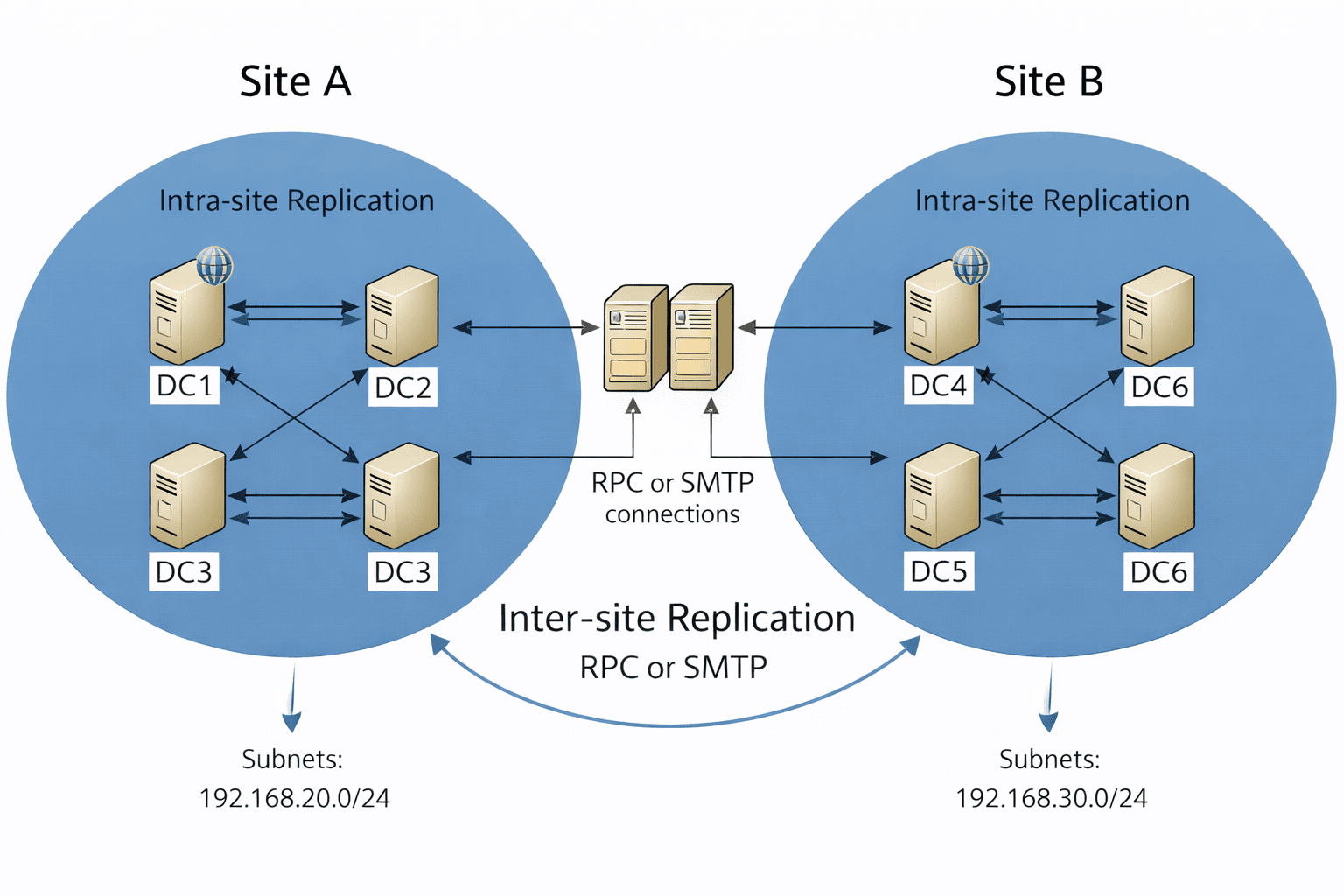
In an Active Directory environment, every domain controller holds a copy of the directory. When a change is made on one domain controller, such as creating a user, updating a group, or modifying a policy, that change must be shared with all other domain controllers in the domain. This synchronization process is called replication, and it's what keeps Active Directory consistent across locations.
Active Directory Sites and Services plays a key role in replication by defining how and where replication should occur. Sites can be thought of as a map that describes the most efficient routes for replication, while site links control the flow of replication traffic between those locations based on network connectivity.
An Active Directory site represents a location where network connectivity is fast and reliable. Replication that happens between domain controllers within the same site is called intra-site replication. Because bandwidth is assumed to be plentiful, intra-site replication occurs frequently and automatically, without a strict schedule, so changes are propagated quickly within the location.
When domain controllers are located in different sites, replication between them is called inter-site replication. This type of replication assumes limited or slower network links, such as WAN connections. To conserve bandwidth, inter-site replication is scheduled, compressed, and controlled using site links. Administrators can define how often replication occurs and which network paths are preferred.
Sites, subnets, and site links work together to decide whether replication happens as intra-site or inter-site, and how efficiently directory changes move across locations. When this configuration is incorrect, replication delays and authentication issues occur.
How to install Active Directory Sites and Services
Active Directory Sites and Services does not require a separate role installation. It becomes available automatically when Active Directory Domain Services (AD DS) or Remote Server Administration Tools (RSAT) is installed on the server.
Using Server Manager
- Log in to the server.
- Open Server Manager.
- Click Manage > Add Roles and Features.
- Ensure Active Directory Domain Services is installed.
- Complete the wizard and reboot if prompted.
If managing Active Directory remotely:
- Open Server Manager.
- Click Manage > Add Roles and Features.
- Select Role-based or feature-based installation.
- Under Features, expand Remote Server Administration Tools.
- Enable:
- AD DS Tools
- Active Directory Sites and Services Tools
- Complete the wizard.
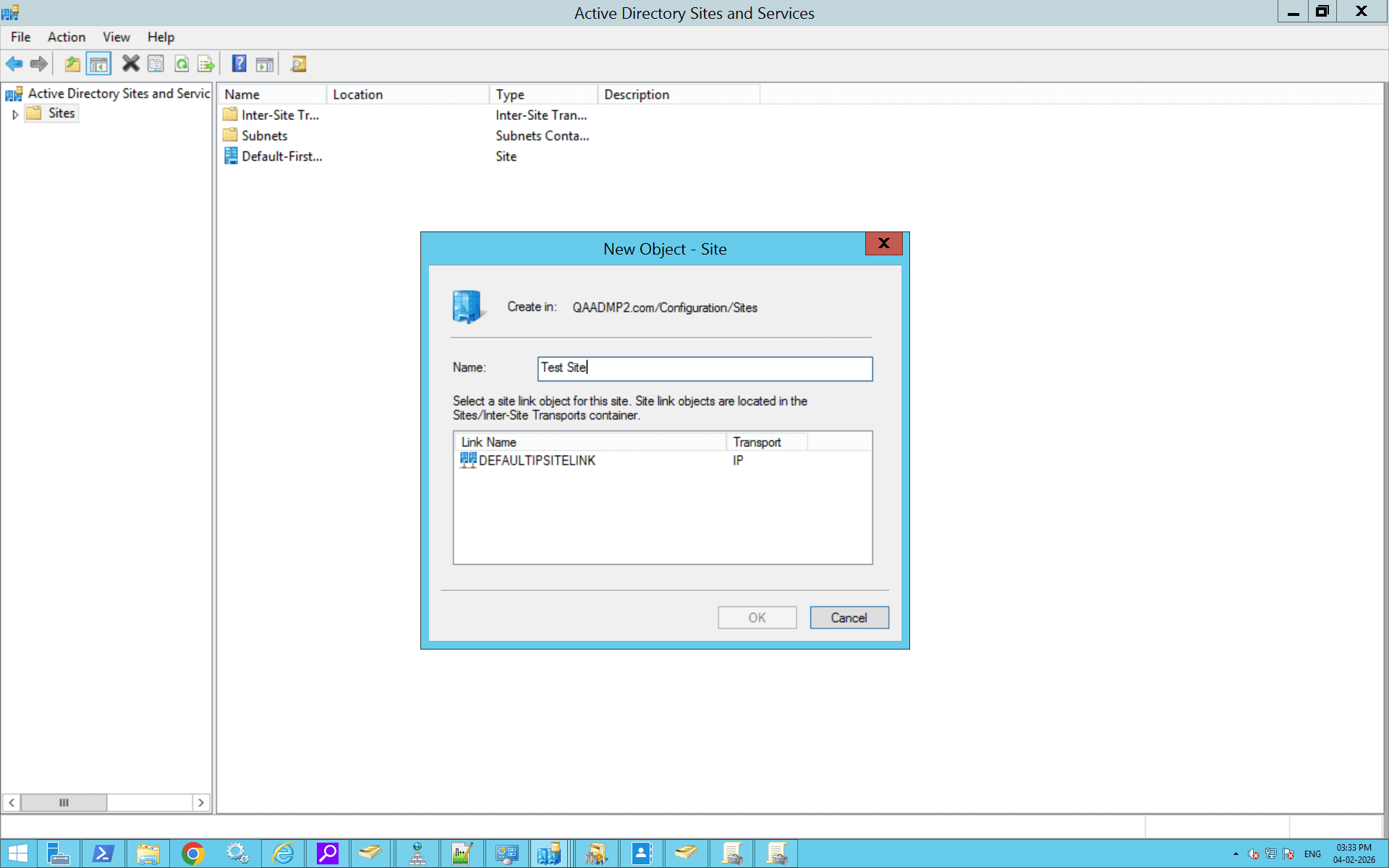
How to create a site using Active Directory Sites and Services
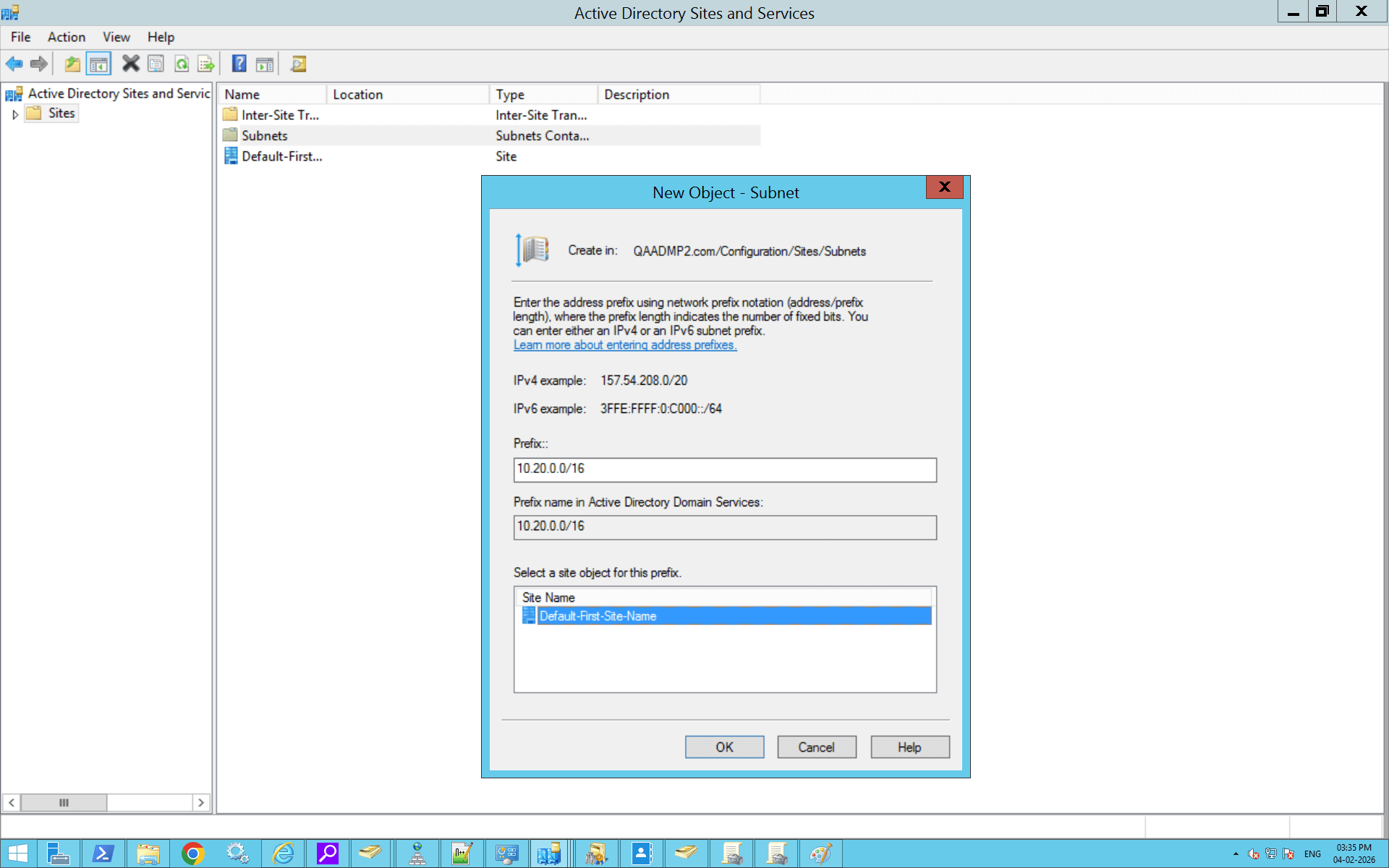
How to create subnets and associate them with sites using Active Directory Sites and Services
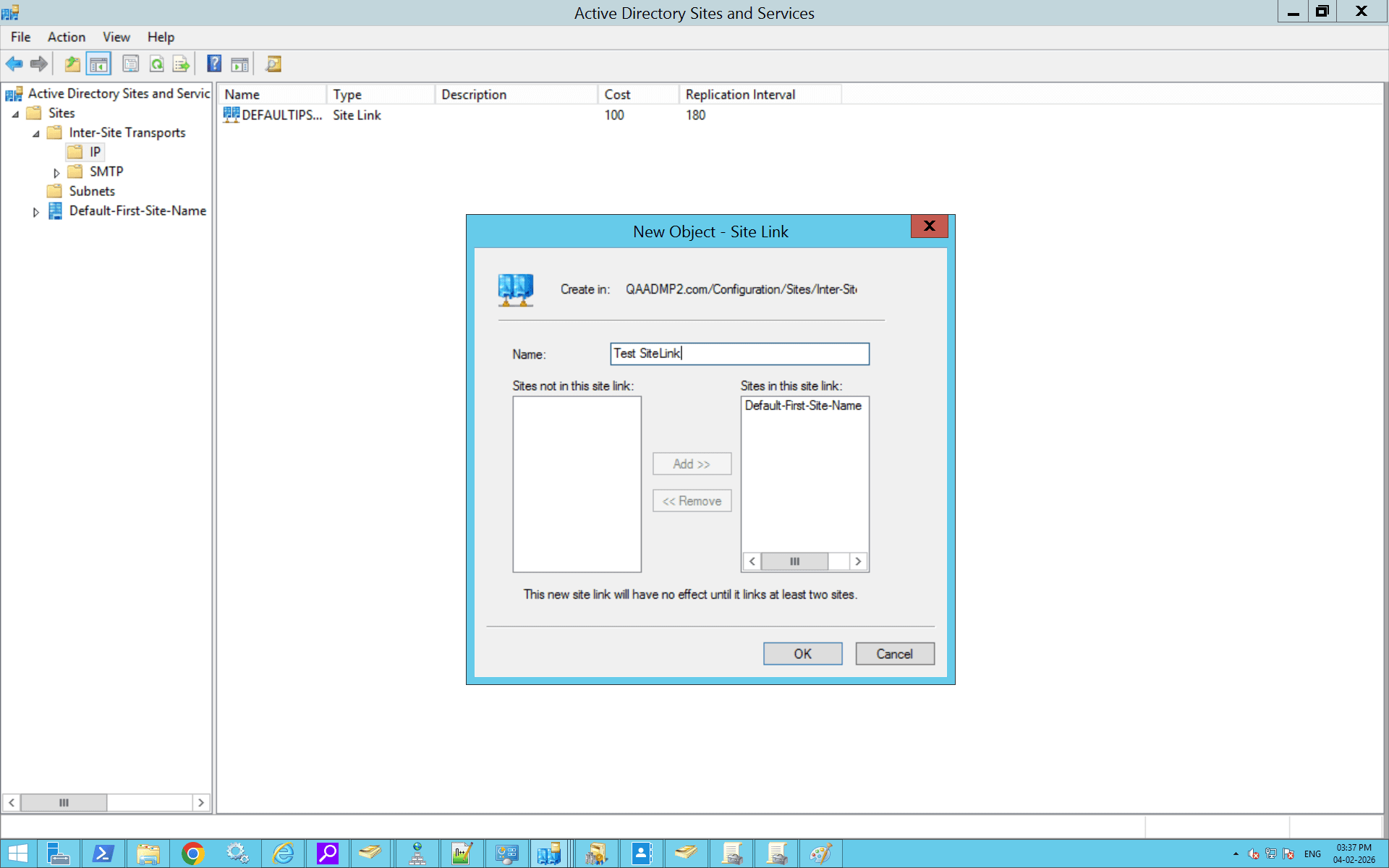
How to create site links using Active Directory Sites and Services
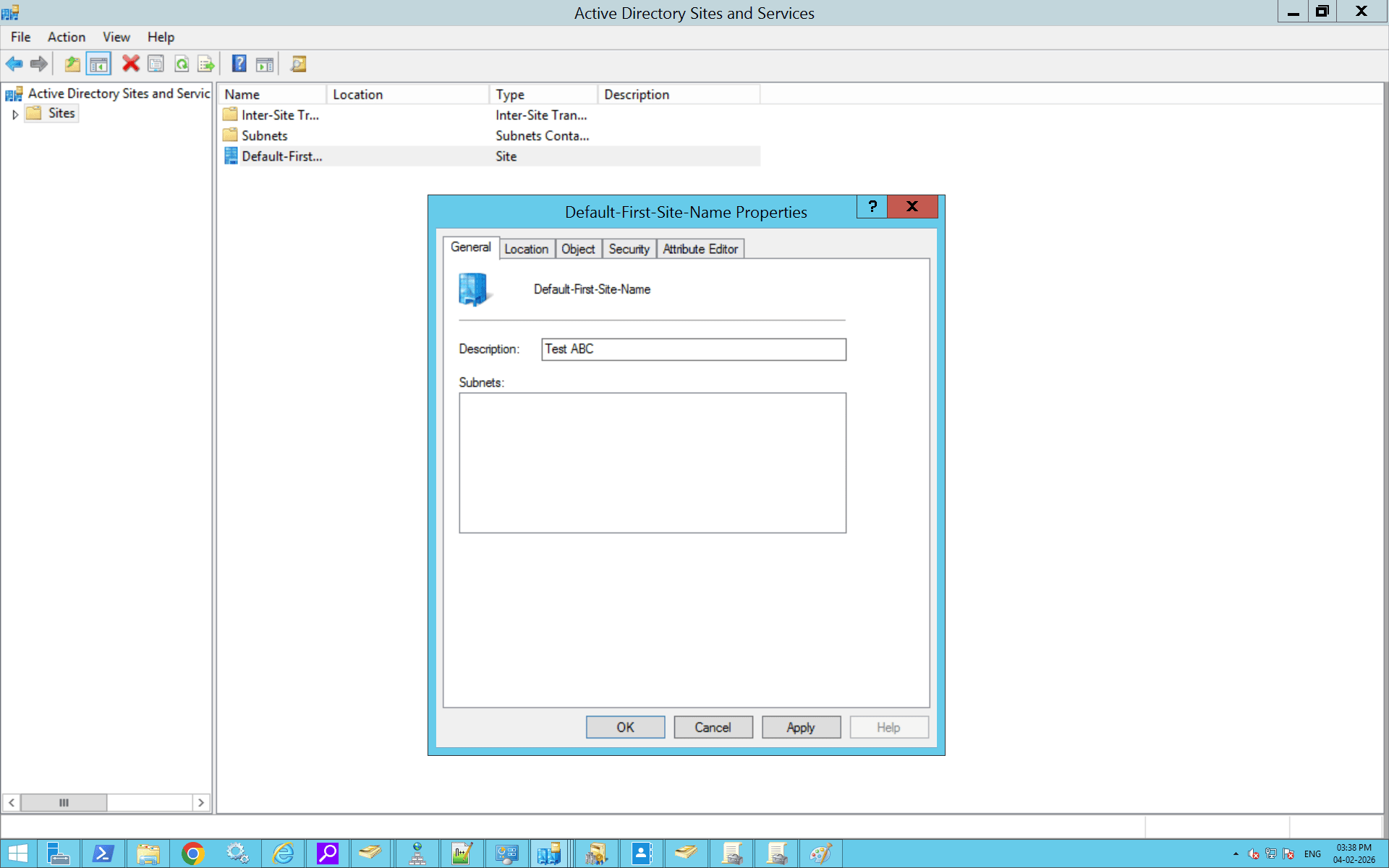
How to configure site properties using Active Directory Sites and Services
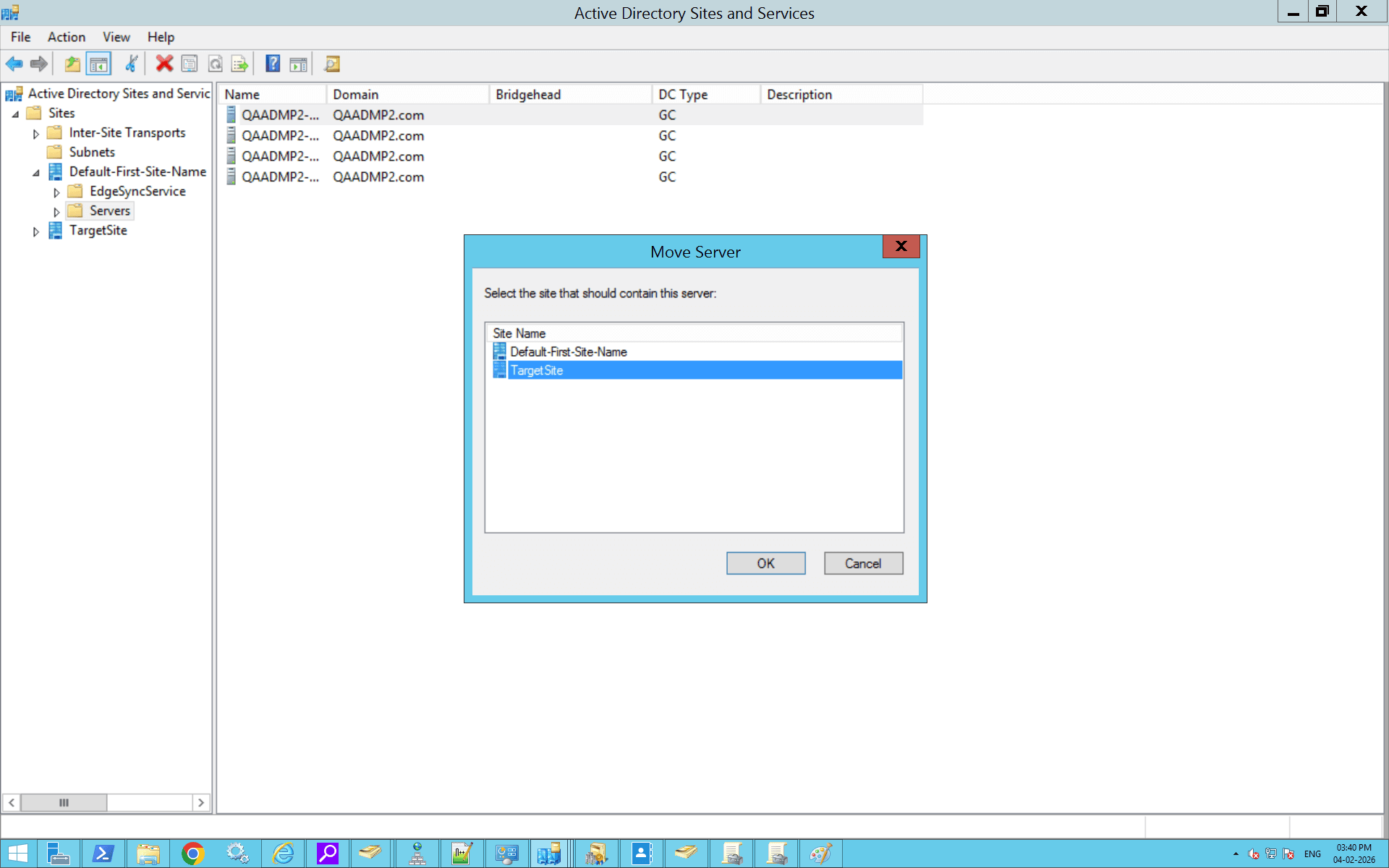
How to move servers between sites using Active Directory Sites and Services
How to create a site in Active Directory using PowerShell
How to create subnets and associate with a site in Active Directory using PowerShell
How to create site links in Active Directory using PowerShell
How to configure site properties in Active Directory using PowerShell
How to move servers between sites in Active Directory using PowerShell
Active Directory sites and services best practices
Design sites based on physical network boundaries
Sites should represent real physical locations that are connected by reliable, high-speed networks. Avoid creating sites based on departments or administrative needs. If two locations are connected through a slow or bandwidth-constrained WAN link, they should be placed in separate sites so Active Directory can optimize authentication and replication behavior accordingly.
Always define and maintain accurate subnet mappings
Subnet-to-site mapping is how Active Directory determines which site a client belongs to. Missing or incorrect subnet definitions are one of the most common causes of users authenticating against remote domain controllers. Every IP range used by clients must be mapped to exactly one site, and subnet mappings should be reviewed whenever network addressing changes.
Place at least one domain controller in each site
Each site should have a local domain controller to handle authentication and directory searches. This reduces WAN dependency and ensures users can log in even if connectivity to other sites is disrupted. For larger or critical locations, deploying multiple domain controllers improves fault tolerance and replication reliability.
Keep the site link design simple and meaningful
Overly complex site link designs make replication difficult to understand and troubleshoot. Use a simple topology that reflects actual network connectivity, such as hub-and-spoke or mesh, and assign site link costs based on relative link reliability rather than theoretical bandwidth values. Simpler designs are easier to manage and less error-prone.
Tune inter-site replication schedules carefully
Intra-site replication is optimized for fast networks and typically does not require tuning. Inter-site replication, however, should be scheduled based on WAN capacity and business requirements. Frequent replication improves convergence but increases bandwidth usage, while infrequent replication conserves bandwidth at the cost of delayed updates. Finding the right balance is key.
Monitor replication status regularly
Replication issues often go unnoticed until they impact users or applications. Regularly reviewing replication status helps identify delays, failures, or unreachable domain controllers early. As environments grow, having centralized visibility into replication health across all sites becomes increasingly important for proactive troubleshooting and ongoing governance.
Troubleshooting tips
- Error: Naming information cannot be located
Solution: Ensure subnets are correctly defined and associated with sites in Active Directory Sites and Services; run nltest /dsgetsite on clients to verify site detection and adjust subnet masks for precision.
- Error: The specified site does not exist
Solution: Create the missing site in Active Directory Sites and Services, associate relevant subnets, and move domain controllers to the correct site; force replication with repadmin /syncall to propagate changes.
- Error: Access denied when creating site link
Solution: Verify your account has Enterprise Admins or Domain Admins privileges; check if the site link object is protected from accidental deletion in its Properties tab and disable protection if needed.
- Error: Replication connection failed (RPC server unavailable)
Solution: Confirm network connectivity between sites with ping and telnet on ports 135, 389, 445; review firewall rules and restart Netlogon service on domain controllers.
- Error: Event ID 1925: No inbound replication partners available
Solution: Check site link configuration for correct costs and schedules in Active Directory Sites and Services; run repadmin /replsummary to identify gaps and regenerate topology with repadmin /kcc.
- Error: Clients authenticating to wrong site DC
Solution: Validate subnet-to-site mappings and client IP subnet alignment; use nltest /dsgetdc:domain.com /force to test DC discovery and clear netlogon cache with nltest /sc_reset.
- Error: Site link bridge not generating properly
Solution: Disable unnecessary manual site link bridges in Active Directory Sites and Services to let KCC auto-generate efficient paths; verify bridgehead server availability and run repadmin /bridgeheads.
How ADManager Plus can complement Active Directory Sites and Services
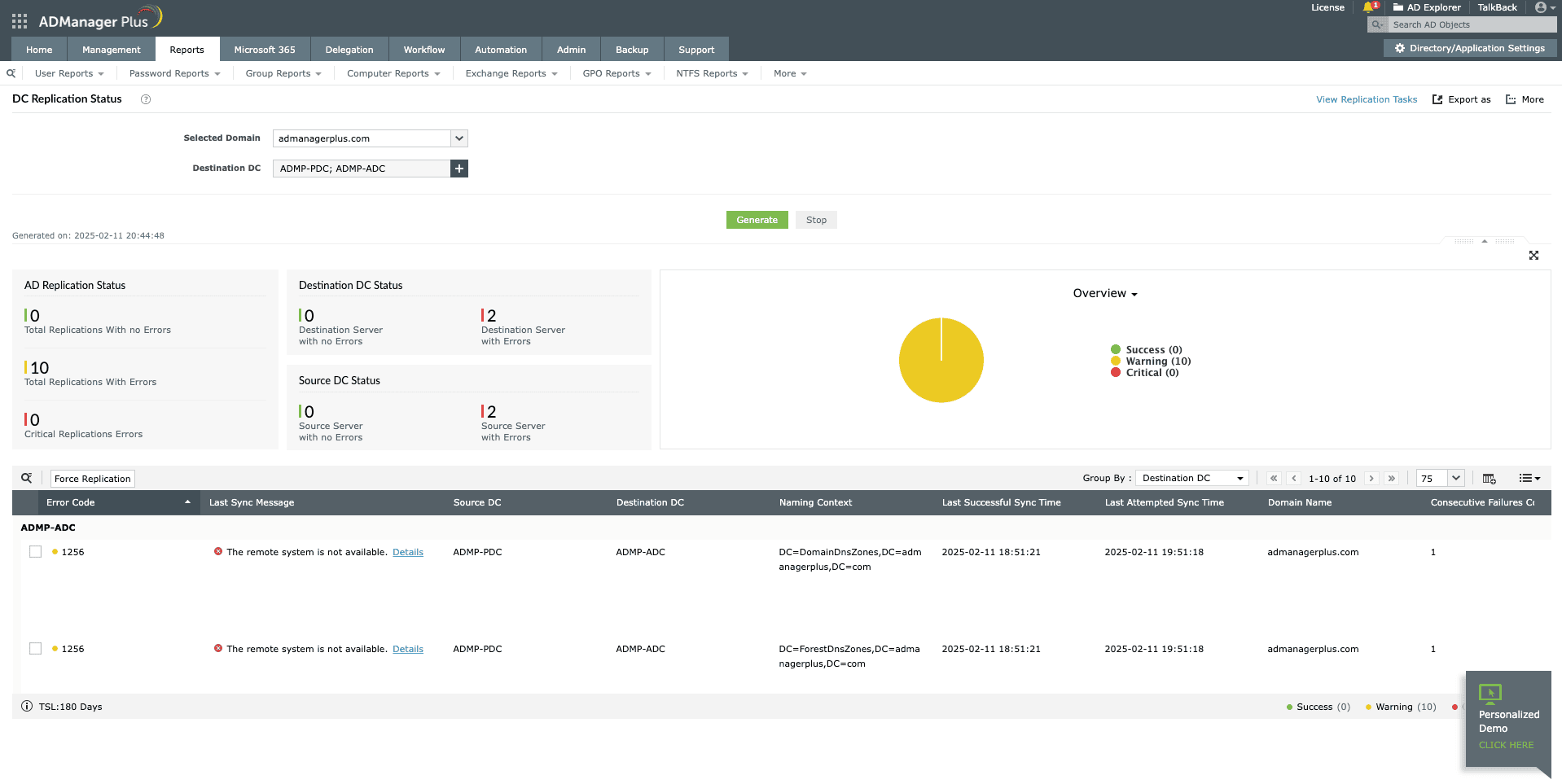
ADManager Plus' replication status tool complements Active Directory Sites and Services by helping administrators monitor replication health across sites and domain controllers from a centralized interface. This makes it easier to identify replication delays, failures, or unhealthy connections.
- Generate comprehensive reports and gain clear visibility into your Active Directory environment.
- Automate routine Active Directory operations such as user provisioning, deprovisioning, and group membership changes to reduce manual effort and minimize errors.
- Clean up Active Directory using customizable workflows.
- Delegate everyday Active Directory tasks to help desk teams without modifying native Active Directory permissions.
- Periodically review and certify user access to strengthen security.
- Identify and remediate risky objects to keep the environment secure and compliant.
FAQ
1. What are site link bridges?
Site link bridges control how replication flows between sites when not all sites are directly connected. By default, Active Directory assumes all site links can be used together for replication. Site link bridges let administrators explicitly define which site links should work together, ensuring replication follows actual network paths and avoids unreachable or undesired routes.
2. What is the difference between a Global Catalog and a site?
A Global Catalog (GC) is a domain controller role that stores a partial replica of all objects in the forest and is used for logon and directory searches.A site represents a physical network location. Sites control authentication routing and replication behavior, while GCs handle forest-wide object lookup. GC placement is independent of site creation but strongly influenced by it.
3. How do I force Active Directory replication?
Replication can be forced using either method:
Run repadmin /syncall /Ae from a domain controller to synchronize all partitions.
In Active Directory Sites and Services, right-click NTDS Settings under a domain controller and select Replicate Now.
Replication status can be verified using repadmin /showrepl.
4. What is Universal Group Membership Caching?
Universal Group Membership Caching allows domain controllers in sites without a GC to cache universal group memberships. This prevents repeated WAN queries during user logons after the initial refresh from the nearest GC. It is enabled in NTDS Site Settings.
5. What is the ISTG?
The Inter-Site Topology Generator (ISTG) is an Active Directory process responsible for creating and maintaining inter-site replication topology. One domain controller per site is automatically selected to run the ISTG and manage connection objects between sites.
6. How can replication health be monitored?
Replication health can be monitored using:
- repadmin /replsummary for overall status.
- repadmin /showrepl for detailed partner replication.
- Event Viewer replication logs.
- Tools like Active Directory Replication Status Tool, which help visualize failures and delays.
7. What is site link cost?
Site link cost is a numeric value that influences replication path selection when multiple routes exist. Lower costs are preferred. Costs range from 1 to 32,767, with 100 as the default, and represent relative link preference rather than actual bandwidth.
8. What is the difference between inter-site and intra-site replication?
Intra-site replication occurs within a site over high-speed networks and uses frequent change notifications.Inter-site replication occurs between sites, assumes limited bandwidth, and uses scheduled, compressed replication controlled by site links.
9. What is a bridgehead server?
A bridgehead server is a domain controller selected to handle all inter-site replication traffic for a site. Bridgehead servers are chosen automatically by the ISTG but can be manually designated if needed.
10. What is DEFAULTIPSITELINK?
DEFAULTIPSITELINK is the default site link created automatically in Active Directory. It connects all sites using IP transport with a default cost of 100 and a 180-minute replication interval. Administrators can modify or replace it to reflect real network topology.
Related Tools
Talk to our AD experts
Have questions about Active Directory configuration or management? Fill out this form and our specialists will reach out to assist you right away.
Thank you!
We've received your callback request and will get back to you shortly.