

- Home
- Play books
- Windows - Account lockout incident management
Windows - Account lockout incident management
In this page
Playbook Description
Manages account lockout by fetching user details, checking failed logons, and detecting malicious users. If confirmed, removes malicious processes, blocks IPs, terminates the session, and stops expired services.
MITRE ATT&CK mapping
| Tactics | Techniques | Sub-techniques |
|---|---|---|
| Credential Access(TA0006) | Brute Force(T1110) | Password Guessing(T1110.001) |
MITRE D3FEND mapping
| Tactics | Techniques | Sub-techniques |
|---|---|---|
| Restore(D3-Restore) | Restore Access(D3-RA) | Restore User Account Access(D3-RUAA) |
Playbook input type
Alert
Prerequisites
- VirusTotal connection - Need to connect with VirusTotal API to check IP reputation and calculate risk scores. Keep your API key secure and do not share it.
- Log360 Cloud - Connection to execute PowerShell scripts on the target Windows host for investigation and remediation actions.
- Privileges - Admin privileges on the target host are required.
Playbook creation input
- connectionName - Provide the VirusTotal connection name for executing the VirusTotal APIs.
Dependencies
Extensions - VirusTotal
- virustotal_ipReputation
- virustotal_calculateRiskScore
Utility functions:
- utility_convertTimeToUTC
- utility_getRequiredTime
- windows_detectMaliciousUser
- utility_sendMail
Scripts
| Script Name | Description | Arguments |
|---|---|---|
| FetchAndRemoveProcess.ps1 | Scans temporary directories for suspicious script files (.ps1, .bat, .vbs) containing credential-related keywords, kills any processes running those scripts, and deletes the files. | AdditionalKeywords |
| BlockIp.ps1 | Blocks an IP address by adding an iptables INPUT DROP rule. | IpString, Direction |
| FetchUserDetails.ps1 | Fetches detailed user information (password expiry, group memberships, admin status) for both domain (AD) and local users. | Name |
| TerminateSession.ps1 | Logs off one or more user sessions using logoff, with optional RDP-only filtering by remote IP. | Username |
| FetchPersistenceEntries.ps1 | Scans for persistence mechanisms including scheduled tasks, registry Run/RunOnce keys, startup folder entries, and services to identify potential malicious persistence. | - |
| FetchAndRemoveMappedDrives.ps1 | Detects SMB mapped drives in "Reconnecting" state and removes them. | - |
| FetchAndStopExpiredServices.ps1 | Finds and stops Windows services running under a specified user account (excluding built-in system accounts). | UserName |
Connections
VirusTotal connection - Need to connect with VirusTotal API and fetch access key to check the malware IP/URL/File details.
Sub playbooks
- Log360 Cloud - Create or update incident
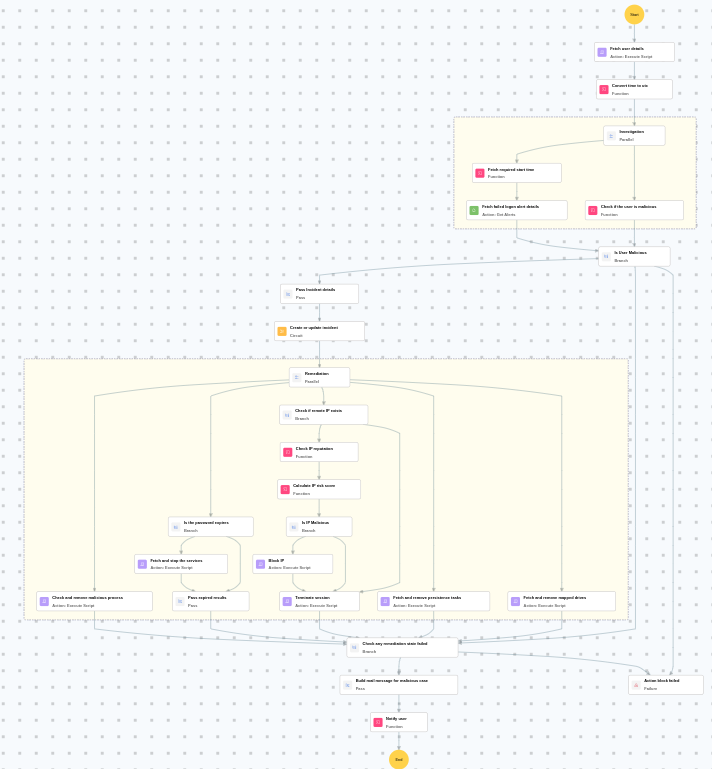
Execution workflow
Investigation:
- Fetches the user details.
- Fetches the failed logon alert details.
- Checks if the user is malicious.
Decision logic:
- Proceeds to remediation based on the following conditions:
- Related investigation findings are present.
- If suspicious but not confirmed malicious, sends a notification for manual review and stops further actions.
- If no malicious indicators are confirmed, the playbook ends with no further actions.
Remediation:
- Pass Incident details.
- Executes the "Log360 Cloud - Create or update incident" sub-playbook.
- Checks and removes malicious process.
- Fetches and removes persistence tasks.
- Fetches and removes mapped drives.
- Checks if remote IP exists.
- Checks the IP reputation.
- Calculates the IP risk score.
- Checks whether IP is malicious.
- Blocks the IP.
- Terminates the session.
- Checks whether the password expires.
- Fetches and stops the services.
- Pass expired results.
- Checks any remediation state failed.
- Builds the notification email with remediation details and findings.
- Sends a notification email regarding the actions taken and required next steps.
Post execution procedure
- Review the blocked source IP[value] to ensure no legitimate traffic was affected.
- Investigate whether the compromised account was used to access any sensitive resources.
- Review Windows security logs for any lateral movement or additional brute-force attempts.
- Consider enforcing additional MFA factors for user [value] before re-enabling access.
- Audit other accounts in the organization for similar account lockout patterns.

