

- Home
- Play books
- CrowdStrike Falcon - Block IP
CrowdStrike Falcon - Block IP
In this page
Playbook Description
This playbook automates perimeter defense by creating firewall policies for Windows, Linux, and macOS. It organizes all machines into a unified host group, then generates or updates OS-specific rule groups to deny traffic from malicious IPs. By attaching these rules to active policies, it ensures consistent, real-time IP blocking across all endpoints.
MITRE D3FEND mapping
| Tactics | Techniques | Sub-techniques |
|---|---|---|
| Isolate (D3 - Isolate) | D3 - NI | Network Traffic Filtering (D3 - NTF) |
Playbook input type
Log
Prerequisites
- Firewall management - Write, Read
- Host groups - Write
Playbook creation input
- linuxRuleGroupName - Provide the rule group name to create the rule group or update the rule group
- macRuleGroupName - Provide the rule group name to create the rule group or update the rule group
- windowsRuleGroupName - Provide the rule group name to create the rule group or update the rule group
- firewallPolicyName - Provide the firewall policy name to assign the rule group and policy
- hostGroupName - Provide the host group name to create the host group and assign the policy to the host group
Dependencies
Extensions - CrowdStrike
- crowdstrike_getRuleGroups
- crowdstrike_createFirewallPolicy
- crowdstrike_createRuleGroup
- crowdstrike_createHostGroups
- crowdstrike_performFirewallPolicyAction
- crowdstrike_updateFirewallPolicy
- crowdstrike_getRuleGroupDetails
- crowdstrike_updateRuleGroup
- crowdstrike_getRuleDetails
Utility functions
- crowdstrike_getFirewallPolicyIds
- crowdstrike_createRuleGroupBody
- crowdstrike_updateRuleGroupBody
- utility_extractFieldFromList
- utility_getListDifference
Connections
- CrowdStrike connection - OAuth2 connection with clientId and client secret along with region.
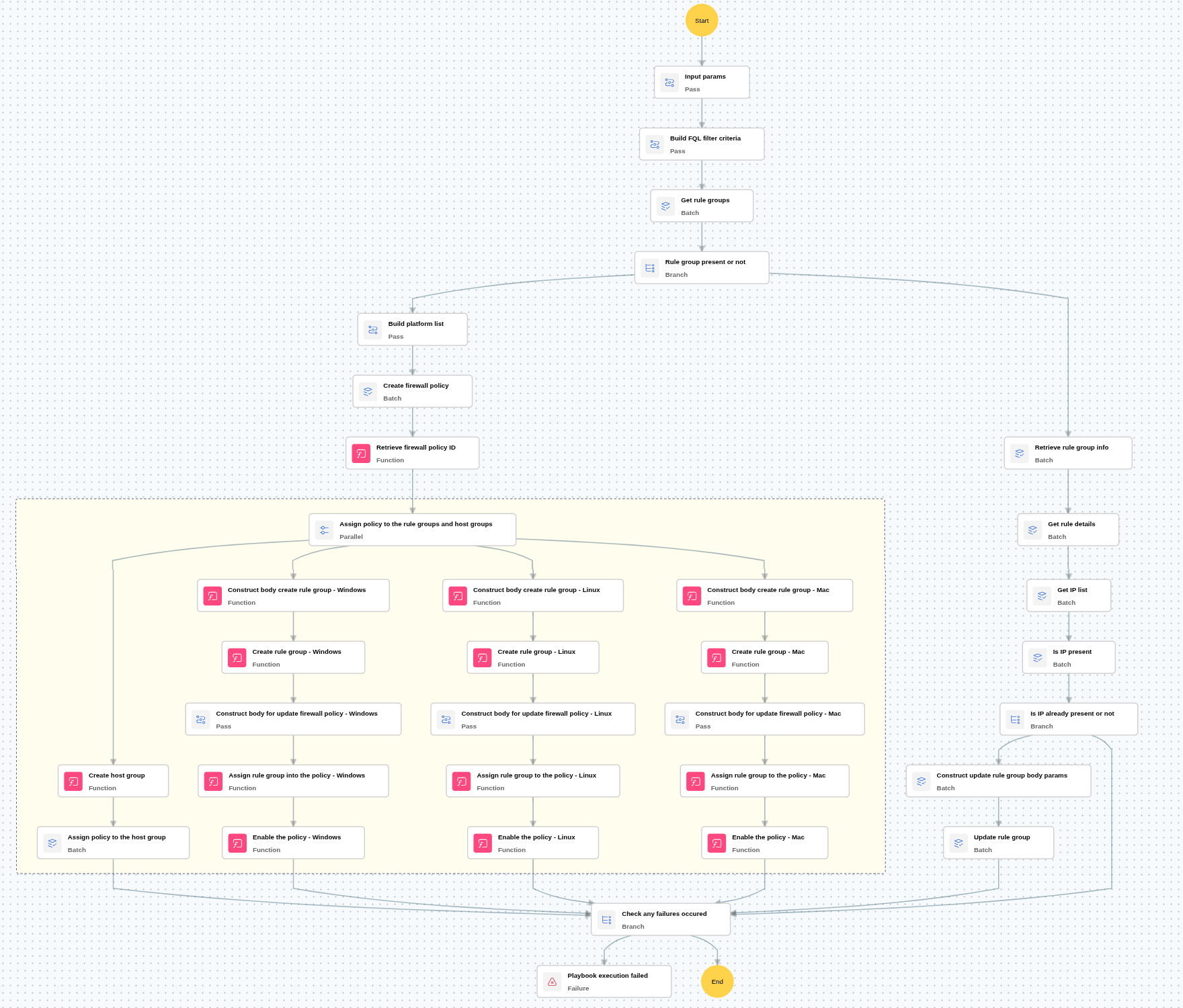
Execution workflow
- Checks whether the provided rule group is present.
- If the rule group is present:
- Adds the specified IP address to the existing rule group using the Update Rule Group action.
- If the rule group is not present:
- Creates the firewall policy for all platforms (Windows, Linux, and Mac).
- Creates the rule group dynamically.
- Adds the specified IP address to the newly created rule group.
- Creates the host group for the corresponding platform.
- Assigns the rule group to the firewall policy.
- Assigns the host group to the corresponding platform policy.
Post execution procedure
- Enable uninstall protection: Ensure CrowdStrike uninstall protection is enabled and password-protected to prevent unauthorized removal.
- Review role-based access controls (RBAC): Audit and tighten RBAC policies to prevent privilege escalation and restrict sensor management permissions.
- Handling false positives: If this alert is confirmed as a false positive, revert all associated remediation steps.
- Unblock the non-malicious IP.

