

- Home
- Play books
- Windows - Brute Force Investigation & Response
Windows - Brute Force Investigation & Response
In this page
Playbook Description
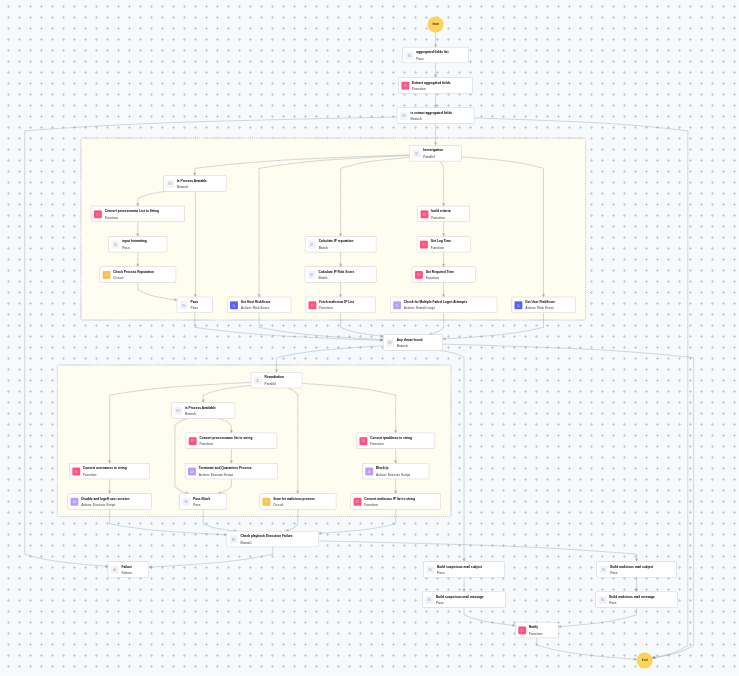
The brute force investigation and response playbook fetches IPreputation, failed logons, and successful logons on Windows devices. It also checks user, rule or group modifications, and checks if the account belongs to an Admin. If flagged, it terminates the session, and disables the user to remediate the attack.
MITRE ATT&CK mapping
| Tactics | Techniques | Sub-techniques |
|---|---|---|
| Credential Access(TA0006) | Brute Force(T1110) | - |
MITRE D3FEND mapping
| Tactics | Techniques | Sub-techniques |
|---|---|---|
| Isolate(D3-Isolate) | Network Isolation(D3-NI) | Network Traffic Filtering(D3-NTF) |
Playbook input type
Alert
Prerequisites
- VirusTotal connection - Create a connection for VirusTotal using API key.
- Windows Credentials - Go to Settings -> Devices -> Windows Devices. Provide/update the credentials of the respective Windows device with admin privileges.
Playbook creation input
- connectionName - Provide the VirusTotal connection name for executing the VirusTotal APIs
Dependencies
Extensions - VirusTotal
- virustotal_ipReputation
- virustotal_calculateRiskScore
Utility functions:
- utility_parseAggregateLog
- utility_convertToString
- utility_getRequiredTime
- utility_convertTimeToUTC
- utility_extractMaliciousEntitiesByRiskScore
- utility_buildQueryCriteria
- utility_sendMail
Scripts
| Script Name | Description | Arguments |
|---|---|---|
| TerminateSession.ps1 | Logs off one or more user sessions using logoff , with optional RDP-only filtering by remote IP | UserNames |
| StopAndQuarantineProcess.ps1 | # Terminates processes by PID (decimal/hex) or by executable file path, then quarantines the executable to a forensic directory. # Protects critical OS processes and the SOAR agent from termination. | ProcessIdentifiers |
| BlockIP.ps1 | Creates or updates Windows Firewall rules to block network traffic to/from one or more IPaddresses. Uses consolidated rules (SOAR_AutoBlock_IP_Inbound / SOAR_AutoBlock_IP_Outbound) — new IPs are merged into an existing rule rather than creating a rule per IP. Validates IPformat, checks firewall profile status, and reports per-IPresults. | IpString, Direction |
Connections
VirusTotal connection - Need to connect with VirusTotal API and fetch access key to check the malware IP/URL/File details.
Sub playbooks
- Windows - File enrichment
- Windows Defender quick scan
Execution workflow
Investigation:
- Extracts the aggregated fields.
Decision logic:
- Evaluates investigation findings and proceeds to remediation if malicious indicators are confirmed.
- If no malicious indicators are confirmed, the playbook ends with no further actions.
Remediation:
- Builds the criteria.
- Checks for multiple failed logon attempts.
- Calculates the IPreputation in batch.
- Calculates the IPrisk score in batch.
- Identifies malicious entities based on their risk scores.
- Checks whether the process is available.
- Formats input for process name.
- Executes the "Windows - File enrichment" sub-playbook.
- Passes process investigation.
- Retrieves the host risk score.
- Retrieves the User risk score.
- Checks if any threat is found.
- Executes the "Windows Defender quick scan" sub-playbook.
- Disables and logs off the user session.
- Checks whether the process is available.
- Terminates and quarantines the process.
- Passes the block action.
- Blocks the IP.
- Validates if all remediation actions are completed successfully.
- Builds the malicious mail subject.
- Builds the notification email with remediation details and findings.
- Sends a notification email regarding the actions taken and required next steps.
Post execution procedure
- Review blocked IPaddresses to ensure no legitimate traffic was affected.
- Investigate whether the compromised account was used to access sensitive resources.
- Review Windows security event logs for any signs of lateral movement.
- Consider enforcing additional MFA factors or account lockout policies for targeted accounts.
- Audit host and user risk scores and take additional action if elevated.
- Confirm that the affected user is notified about the actions taken before re-enabling access.

