

- Home
- Play books
- Windows - Excessive Process Termination & Service Disablement Mitigation
Windows - Excessive Process Termination & Service Disablement Mitigation
In this page
Playbook Description
This playbook mitigates attempts to disable critical services and terminate processes by killing suspicious processes, blocking network threats, and handling compromised accounts. It also fetches persistence, restores services, and notifies the security team.
MITRE ATT&CK mapping
| Tactics | Techniques | Sub-techniques |
|---|---|---|
| Defense Evasion(TA0005) | Impair Defenses(T1562) | Disable or Modify Tools(T1562.001) |
| Impact(TA0040) | Service Stop(T1489) | - |
| Defense Evasion(TA0005) | Impair Defenses(T1562) | Disable or Modify Tools(T1562.001) |
MITRE D3FEND mapping
| Tactics | Techniques | Sub-techniques |
|---|---|---|
| Detect(D3-Detect) | Process Analysis(D3-PA) | - |
| Evict(D3-Evict) | Process Termination(D3-PT) | - |
| Isolate(D3-Isolate) | Account Locking(D3-AL) | - |
| Restore(D3-Restore) | Sender Reputation Analysis(D3-SRA) | - |
Playbook input type
Alert
Prerequisites
- Windows Credentials - Go to Settings -> Devices -> Windows Devices. Provide/update the credentials of the respective Windows device with admin privileges.
Playbook creation input
- connectionName - Provide the VirusTotal connection name for executing the VirusTotal APIs.
Dependencies
Utility functions:
- utility_convertTimeToUTC
- utility_getRequiredTime
- windows_detectMaliciousProcessChain
- utility_parseAggregateLog
- windows_commandLineAnalysisTaskkillSc
- utility_convertToString
- windows_detectMaliciousUser
- utility_sendMail
Scripts
| Script Name | Description | Arguments |
|---|---|---|
| StopProcess.ps1 | Stops processes by PID or file path. Supports hex PIDs and comma-separated inputs. Skips protected PowerShell executables. | ProcessIdentifiers |
| FetchUserDetails.ps1 | Fetches detailed user information (password expiry, group memberships, admin status) for both domain (AD) and local users. | Name |
| EnableASRtoPreventLSASS.ps1 | Enables the Attack Surface Reduction (ASR) rule to block credential stealing from the LSASS process (Rule ID: 9e6ea9f3-2e94-4a2a-89e3-4c77b740ab4a). | - |
| FetchPersistenceEntries.ps1 | Scans for persistence mechanisms including scheduled tasks, registry Run/RunOnce keys, startup folder entries, and services to identify potential malicious persistence. | - |
| ReEnableServices.ps1 | Re-enables and starts Windows services that were maliciously disabled by an attacker (detected via sc.exe config <service> start= disabled). Uses a denylist to block 18 remote-access and hardening-risk services from being auto-started. Validates service existence before proceeding. | inputServices |
| TerminateSession.ps1 | Logs off one or more user sessions using logoff, with optional RDP-only filtering by remote IP. | UserNames |
Sub playbooks
- Windows - File enrichment
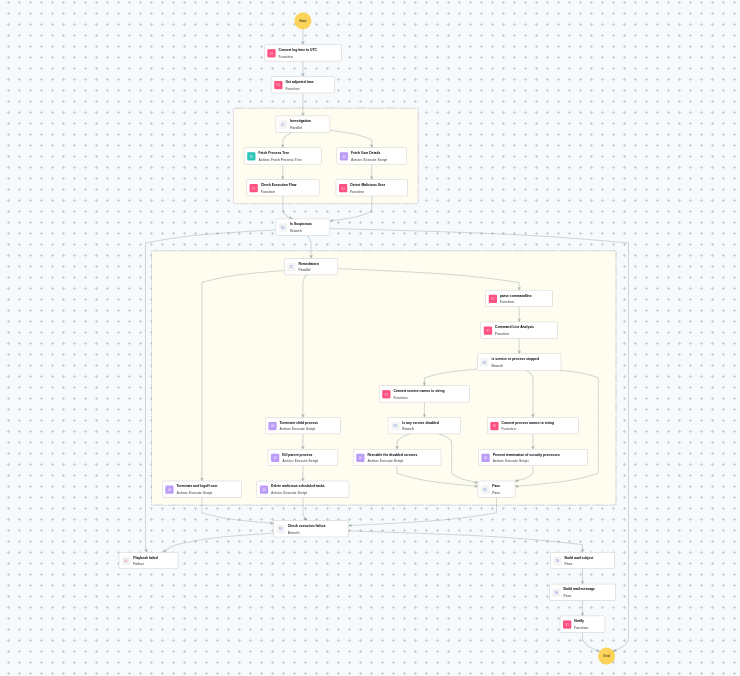
Execution workflow
Investigation:
- Fetches the process tree.
- Checks the execution flow.
- Fetches the user details.
- Detects the malicious user.
Decision logic:
- Proceeds to remediation based on the following conditions:
- A malicious execution flow was detected in the process tree.
- The user is flagged as malicious based on behavior analysis.
- If no malicious indicators are confirmed, the playbook ends with no further actions.
Remediation:
- Terminates and logs off the user.
- Terminates the child process.
- Terminates the parent process.
- Deletes malicious scheduled tasks.
- Parses the command line.
- Analyzes the command line for suspicious patterns, URLs, or file paths.
- Checks whether service or process stopped.
- Checks whether any service was disabled.
- Re-enables the disabled services.
- Pass process or service handling.
- Validates that all remediation actions are completed successfully.
- Builds the mail subject.
- Builds the notification email with the analysis results.
- Sends a notification email regarding the actions taken and required next steps.
Post execution procedure
- Verify if all disabled services have been successfully re-enabled and are running correctly.
- Investigate the root cause of the service disablement — check if it was part of a larger attack chain.
- Review terminated processes and scheduled tasks for any remaining persistence mechanisms.
- Audit the affected user account for unauthorized access or privilege escalation.
- Monitor the endpoint for recurring service tampering attempts.
- Review other endpoints for similar service disablement patterns.

