

- Home
- Play books
- Windows - Hidden local user account detection and mitigation
Windows - Hidden local user account detection and mitigation
In this page
Playbook Description
Detects hidden local user account creation, verifies legitimacy, and removes unauthorized accounts. It also terminates malicious processes, addresses persistence mechanisms, and notifies security teams.
MITRE ATT&CK mapping
| Tactics | Techniques | Sub-techniques |
|---|---|---|
| Persistence(TA0003) | Impair Defenses(T1562) | Local Account(T1136.001) |
MITRE D3FEND mapping
| Tactics | Techniques | Sub-techniques |
|---|---|---|
| Evict(D3-Evict) | Credential Eviction(D3-CE) | Credential Revocation(D3-CR) |
Playbook input type
Alert
Dependencies
Utility functions:
- utility_getRequiredTime
- utility_isEntityNew
- utility_extractFieldFromList
- utility_convertToString
- windows_detectMaliciousUser
- utility_convertTimeToUTC
- utility_sendMail
Scripts
| Script Name | Description | Arguments |
|---|---|---|
| StopAndQuarantineProcess.ps1 | Terminates processes by PID (decimal/hex) or by executable file path, then quarantines the executable to a forensic directory. Protects critical OS processes and the SOAR agent from termination. | ProcessIdentifiers |
| FetchUserDetails.ps1 | Fetches detailed user information (password expiry, group memberships, admin status) for both domain (AD) and local users. | Name |
| FetchPersistenceEntries.ps1 | Scans for persistence mechanisms including scheduled tasks, registry Run/RunOnce keys, startup folder entries, and services to identify potential malicious persistence. | - |
| TerminateSession.ps1 | Logs off one or more user sessions using logoff, with optional RDP-only filtering by remote IP. | UserNames |
Sub playbooks
- Windows - File enrichment
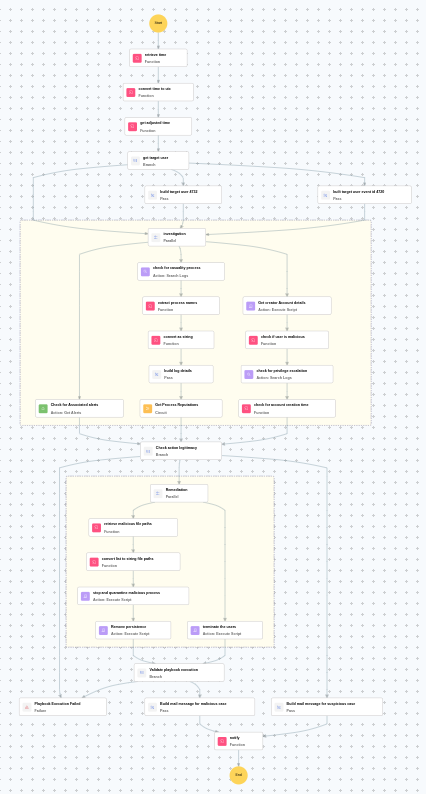
Execution workflow
Investigation:
- Evaluates investigation findings and proceeds to remediation if malicious indicators are confirmed.
Decision logic:
- If no malicious indicators are confirmed, the playbook ends with no further actions.
Remediation:
- Builds target user event ID 4720.
- Checks for associated alerts.
- Checks for causality process.
- Extracts the process names.
- Builds the log details.
- Executes the "Windows - File enrichment" sub-playbook.
- Retrieves the creator account details.
- Checks if user is malicious.
- Checks for privilege escalation.
- Checks whether the account was recently created.
- Checks the action legitimacy.
- Terminates the users.
- Retrieves the malicious file paths.
- Stops and quarantines malicious process.
- Removes persistence.
- Validates that all remediation actions are completed successfully.
- Builds the notification email with remediation details and findings.
- Sends a notification email regarding the actions taken and required next steps.
Post execution procedure
- Verify that the hidden account has been successfully disabled on [hostname].
- Investigate the creator account [user] for signs of compromise.
- Scan the endpoint for additional indicators of compromise.
- Review other endpoints for similar hidden user account creation patterns.

