

- Home
- Play books
- Windows - Ransomware containment and remediation
Windows - Ransomware containment and remediation
In this page
Playbook Description
This playbook investigates suspected ransomware by evaluating process reputation and detecting malicious process-chain behavior, then automatically remediates confirmed threats by stopping and quarantining ransomware processes and related children, terminating user sessions, checking for ransom notes and encrypted files, removing persistence mechanisms, and blocking external malicious IP addresses and C2 connections, while sending a manual-review notification for low-risk suspicious cases.
MITRE ATT&CK mapping
| Tactics | Techniques | Sub-techniques |
|---|---|---|
| Impact(TA0040) | Data Encrypted for Impact(T1486) | - |
MITRE D3FEND mapping
| Tactics | Techniques | Sub-techniques |
|---|---|---|
| Evict(D3-Evict) | Content Filtering(D3-CF) | File Content Decompression Checking(D3-FCDC) |
Playbook input type
Alert
Playbook creation input
- connectionName - Provide the VirusTotal connection name for executing the VirusTotal APIs
Dependencies
Extensions - VirusTotal
- virustotal_ipReputation
- virustotal_calculateRiskScore
Utility functions:
- utility_getRequiredTime windows_detectMaliciousProcessChain
- utility_convertToString
- utility_convertTimeToUTC
- utility_extractMaliciousEntitiesByRiskScore
- utility_buildSearchCriteria
- utility_extractFieldFromList
- utility_sendMail
Scripts
| Script Name | Description | Arguments |
|---|---|---|
| StopAndQuarantineProcess.ps1 | # Terminates processes by PID (decimal/hex) or by executable file path, then quarantines the executable to a forensic directory. # Protects critical OS processes and the SOAR agent from termination. | ProcessIdentifiers |
| TerminateSession.ps1 | Logs off one or more user sessions using logoff , with optional RDP-only filtering by remote IP | UserNames |
| FetchEncryptedFiles.ps1 | Analyzes files for encryption indicators using entropy calculation, printable character ratio, and file header magic bytes | FilePaths |
| FetchPersistenceEntries.ps1 | Scans for persistence mechanisms including scheduled tasks, registry Run/RunOnce keys, startup folder entries, and services to identify potential malicious persistence | - |
| GetExternalConnections.ps1 | Lists all established non-loopback TCP connections with their local/remote addresses, ports, PIDs, and unique remote IPsummary. | - |
| BlockIP.ps1 | Creates or updates Windows Firewall rules to block network traffic to/from one or more IPaddresses. Uses consolidated rules (SOAR_AutoBlock_IP_Inbound / SOAR_AutoBlock_IP_Outbound) — new IPs are merged into an existing rule rather than creating a rule per IP. Validates IPformat, checks firewall profile status, and reports per-IPresults. | IpString, Direction |
Connections
VirusTotal connection - Need to connect with VirusTotal API and fetch access key to check the malware IP/URL/File details.
Sub playbooks
- Windows - File enrichment
- Windows Defender quick scan
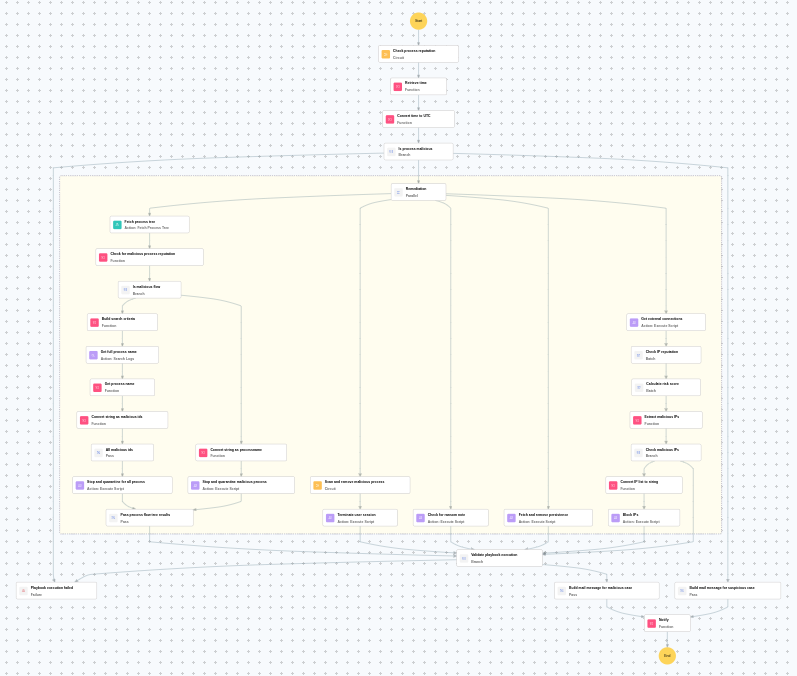
Execution workflow
Investigation:
- Executes the "Windows - File enrichment" sub-playbook.
Decision logic:
- Proceeds to remediation based on the following conditions:
- The file or process reputation indicates high risk.
- The file or process reputation indicates medium or higher risk.
- If suspicious but not confirmed malicious, sends a notification for manual review and stops further actions.
- If no malicious indicators are confirmed, the playbook ends with no further actions.
Remediation:
- Fetches the process tree.
- Checks for malicious process reputation.
- Checks whether malicious flow exists.
- Builds the search criteria.
- Retrieves all data based on the search criteria.
- Retrieves the process name based on the search criteria.
- Retrieves all malicious IDs.
- Stops and quarantines all processes.
- Passes process flow tree results.
- Executes the "Windows Defender quick scan" sub-playbook.
- Terminates the user session.
- Checks for ransom note.
- Fetches and removes persistence.
- Retrieves the external connections.
- Checks the IP reputation in batch.
- Calculates the risk score in batch.
- Identifies malicious entities based on their risk scores.
- Checks the malicious IPs.
- Blocks the IPs.
- Validates that all remediation actions are completed successfully.
- Builds the notification email with remediation details and findings.
- Sends a notification email regarding the actions taken and required next steps.
Post execution procedure
- Verify that all ransomware processes have been completely stopped on [hostname].
- Check for file encryption damage and initiate restore from backup if needed.
- Investigate the infection vector — check email attachments, downloads, and phishing indicators.
- Scan all connected endpoints for signs of lateral movement.
- Review and strengthen endpoint protection and backup policies.

