

- Home
- Play books
- Windows - Ryuk WoL execution mitigation
Windows - Ryuk WoL execution mitigation
In this page
Playbook Description
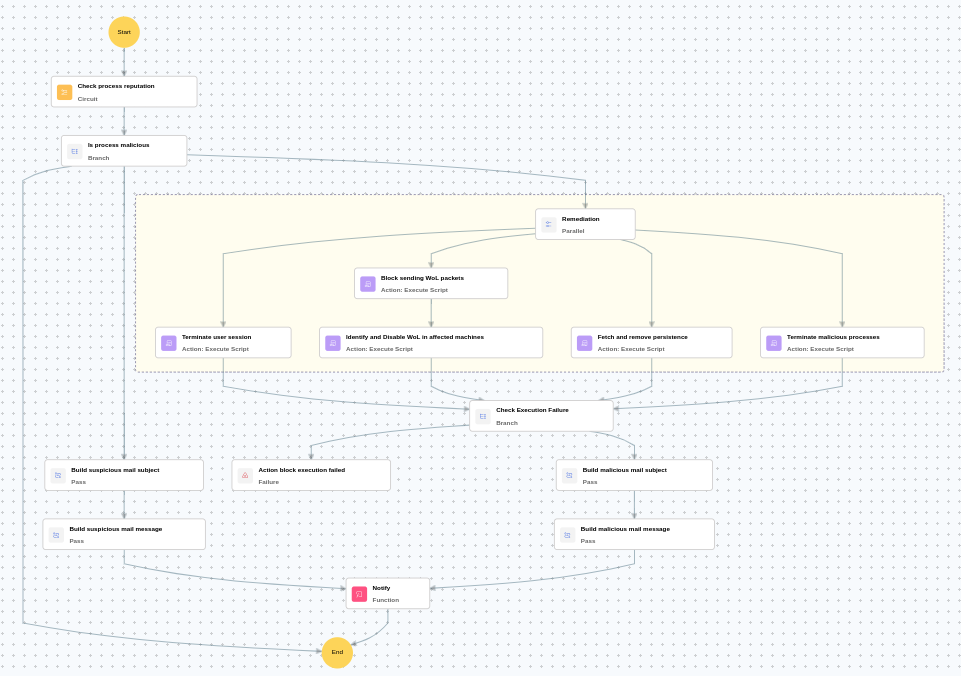
This playbook investigates alert by evaluating process file reputation, then — for high-risk processes — automatically remediates by terminating and quarantining the malicious process, removing persistence mechanisms, blocking outgoing Wake-on-LAN packet transmission, disabling WoL functionality on affected network machines to prevent lateral spread, and terminating the compromised user's session, while sending a manual-review notification for medium-risk cases.
MITRE ATT&CK mapping
| Tactics | Techniques | Sub-techniques |
|---|---|---|
| Execution(TA0002) | Command and Scripting Interpreter(T1059) | - |
MITRE D3FEND mapping
| Tactics | Techniques | Sub-techniques |
|---|---|---|
| Isolate(D3-Isolate) | Network Isolation(D3-NI) | - |
| Detect(D3-Detect) | Process Analysis(D3-PA) | - |
Playbook input type
Alert
Prerequisites
- Windows Credentials - Go to Settings -> Devices -> Windows Devices. Provide/update the credentials of the respective Windows device with admin privileges.
Dependencies
Utility functions:
- utility_sendMail
Scripts
| Script Name | Description | Arguments |
|---|---|---|
| StopAndQuarantineProcess.ps1 | Terminates processes by PID (decimal/hex) or by executable file path, then quarantines the executable to a forensic directory. Protects critical OS processes and the SOAR agent from termination. | ProcessIdentifiers |
| FetchPersistenceEntries.ps1 | Scans for persistence mechanisms including scheduled tasks, registry Run/RunOnce keys, startup folder entries, and services to identify potential malicious persistence. | - |
| BlockWOLPackets.ps1 | Creates a Windows Firewall outbound rule to block Wake-on-LAN packets (UDP ports 7 and 9). Prevents the machine from being used as a WoL sender to wake other machines on the network. Idempotent — skips if the rule already exists. Validates all firewall profiles are enabled before proceeding. | - |
| IdentifyAndDisableWOLMachines.ps1 | Identifies machines with Wake-on-LAN enabled on network adapters and disables it to prevent unauthorized remote wake-up. | - |
| TerminateSession.ps1 | Logs off one or more user sessions using logoff, with optional RDP-only filtering by remote IP. | UserNames |
Sub playbooks
- Windows - File enrichment
Execution workflow
Investigation:
- Executes the "Windows - File enrichment" sub-playbook.
Decision logic:
- Proceeds to remediation based on the following conditions:
- The file or process reputation indicates high risk.
- If suspicious but not confirmed malicious, sends a notification for manual review and stops further actions.
- If no malicious indicators are confirmed, the playbook ends with no further actions.
Remediation:
- Terminates the malicious processes.
- Fetches and removes persistence.
- Blocks sending WoL packets.
- Identifies and disables WoL in affected machines.
- Terminates the user session.
- Validates that all remediation actions are completed successfully.
- Builds the malicious mail subject.
- Builds the notification email with remediation details and findings.
- Sends a notification email regarding the actions taken and required next steps.
Post execution procedure
- Verify that WoL (Wake-on-LAN) has been successfully disabled on all affected machines.
- Investigate whether the ransomware payload was executed before containment.
- Check for any encrypted files or ransomware artifacts on the affected endpoints.
- Review persistence mechanisms across connected systems for similar Ryuk indicators.
- Audit network segmentation to prevent further lateral spread.
- Initiate backup recovery procedures if data encryption is confirmed.