

- Home
- Play books
- Windows - Injected File Threat Remediation
Windows - Injected File Threat Remediation
In this page
Playbook Description
This playbook investigates file injection threats by analyzing process behavior, checking file reputation, and evaluating user activity. If a threat is confirmed, it initiates remediation steps including terminating malicious processes, quarantining files, removing persistence mechanisms, and notifying the security teams.
MITRE ATT&CK mapping
| Tactics | Techniques | Sub-techniques |
|---|---|---|
| Lateral Movement(TA0008) | Remote Service Session Hijacking(T1563) | RDP Hijacking(T1563.002) |
MITRE D3FEND mapping
| Tactics | Techniques | Sub-techniques |
|---|---|---|
| Harden(D3-Harden) | Access Mediation(D3-AMED) |
Playbook input type
Alert
Prerequisites
- Log360 Cloud - Connection to execute PowerShell scripts on the target Windows host for investigation and remediation actions.
- Privileges - Admin privileges on the target host are required.
Dependencies
Utility functions:
- utility_convertTimeToUTC
- utility_getRequiredTime
- utility_convertToString
- utility_setKeyValue
- windows_decodeCommand
- windows_commandLineAnalysis
- windows_detectMaliciousProcessChain
- windows_detectMaliciousUser
- utility_sendMail
Scripts
| Script Name | Description | Arguments |
|---|---|---|
| FetchUserDetails.ps1 | Fetches detailed user information (password expiry, group memberships, admin status) for both domain (AD) and local users | Name |
| EnableASARuleForMaliciousDownloadViaWeb.ps1 | Enables the ASR rule to prevent malicious web downloads (Rule ID: BE9BA2D9-53EA-4CDC-84E5-9B1EEEE46550) | - |
| CheckAndRemoveFiles.ps1 | Checks for suspicious or malicious files in specified paths and removes them if found | FolderPath, Extensions |
| TerminateSession.ps1 | Logs off one or more user sessions using logoff , with optional RDP-only filtering by remote IP | UserNames |
| FetchPersistenceEntries.ps1 | Scans for persistence mechanisms including scheduled tasks, registry Run/RunOnce keys, startup folder entries, and services to identify potential malicious persistence | - |
| StopProcess.ps1 | Stops processes by PID or file path. Supports hex PIDs and comma-separated inputs. Skips protected PowerShell executables. | ProcessIdentifiers |
| FetchAndRemoveProcess.ps1 | Scans temporary directories for suspicious script files (.ps1, .bat, .vbs) containing credential-related keywords, kills any processes running those scripts, and deletes the files | AdditionalKeywords |
| BlockURLTraffic.ps1 | Blocks traffic to a given URL by resolving its domain to IPaddresses, creating inbound and outbound Windows Firewall block rules (via New-NetFirewallRule ) for each resolved IP, and flushing the DNS cache. | Url |
| QuarantineFiles.ps1 | Moves one or more files to a quarantine directory ( %USERPROFILE%\Forensic_Quarantine ), strips inherited permissions via .NET ACL API, and grants read-only access to Administrators. Skips protected PowerShell executables. | FilePaths |
Sub playbooks
- Log360 Cloud - Create or update incident
- Windows - File enrichment
- VirusTotal - URL reputation check
Execution workflow
Investigation:
- Decodes the encoded command.
- Fetches the user details.
- Detects the malicious user.
- Checks if no decoded command exists.
- Passes command line input.
- Analyzes the command line for suspicious patterns, URLs, or file paths.
- Checks whether URL exists.
- Passes URL reputation input.
- Executes the "VirusTotal - URL reputation check" sub-playbook.
- Checks whether file exists.
- Executes the "Windows - File enrichment" sub-playbook.
- Passes command analysis results.
- Fetches the process tree execution.
- Detects the malicious process chain.
- Checks if any user alerts exists.
Decision logic:
- Proceeds to remediation based on the following conditions:
- The file or process reputation indicates high risk.
- Malicious IPaddresses are identified.
- The user is flagged as malicious based on behavior analysis.
- A malicious execution flow was detected in the process tree.
- Related investigation findings are present.
- If no malicious indicators are confirmed, the playbook ends with no further actions.
Remediation:
- Terminates the user session.
- Checks whether colorcpl attack exists.
- Checks and removes loaded malicious files.
- Passes colorcpl file results.
- Terminates the process execution.
- Terminates the parent process.
- Fetches and removes malicious processes.
- Checks whether URL is malicious.
- Blocks the malicious URL.
- Checks whether malicious file is found.
- Quarantines the files.
- Blocks the malicious downloads.
- Checks and removes persistence tasks.
- Checks if any remediation failed.
- Builds the notification email with remediation details and findings.
- Sends a notification email regarding the actions taken and required next steps.
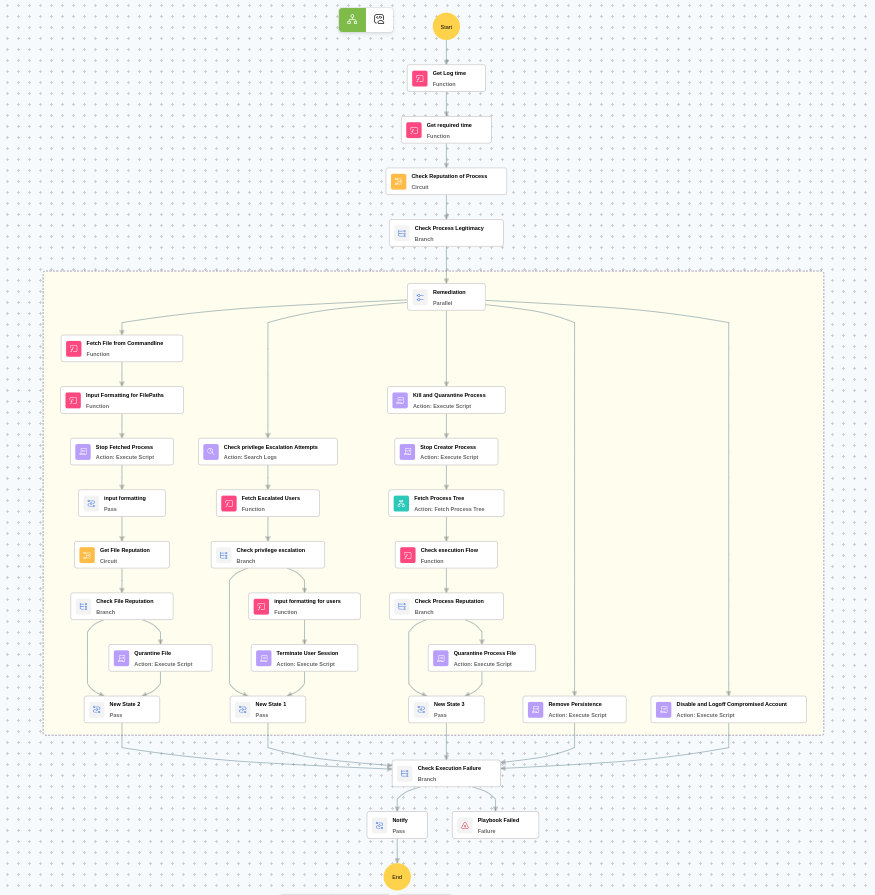
Post execution procedure
- Review the quarantined files and blocked URLs for threat intelligence extraction.
- Investigate whether the inject file payload was executed before remediation.
- Check for any additional encoded command execution attempts by user.
- Review persistence mechanisms across the organization for similar attack patterns.
- Consider performing a full endpoint scan on the affected host and connected systems.

