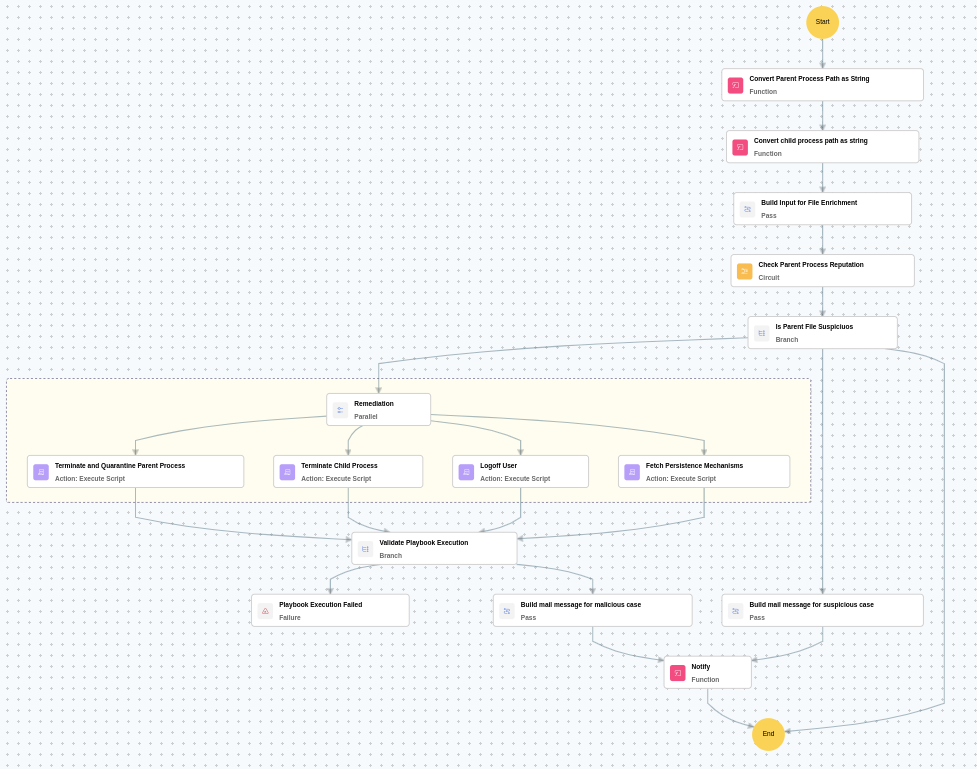
This playbook identifies suspicious parent process spawning by checking process reputation and terminates or quarantines the malicious parent processes to prevent further propagation. It also remediates the incident by terminating the child processes, removing persistence mechanisms, and logging off affected user sessions.
MITRE ATT&CK mapping
Tactics
Techniques
Sub-techniques
Defense Evasion(TA0005)
Masquerading(T1036)
-
Execution(TA0002)
User Execution(T1204)
Malicious File(T1204.002)
MITRE D3FEND mapping
Tactics
Techniques
Sub-techniques
Detect(D3-Detect)
Process Analysis(D3-PA)
Process Spawn Analysis(D3-PSA)
Evict(D3-Evict)
Process Eviction(D3-PE)
Process Termination(D3-PT)
Playbook input type
Alert
Prerequisites
PowerShell 3.0+
Script Execution Policy
Provide credentials with domain/local admin privileges.
Windows Credentials - Go to Settings -> Devices -> Windows Devices. Provide/update the credentials of the respective Windows device with admin privileges.
Dependencies
Utility functions:
utility_convertToString
utility_sendMail
Scripts
Script Name
Description
Arguments
FetchPersistenceEntries.ps1
Scans for persistence mechanisms including scheduled tasks, registry Run/RunOnce keys, startup folder entries, and services to identify potential malicious persistence.
-
StopProcess.ps1
Stops processes by PID or file path. Supports hex PIDs and comma-separated inputs. Skips protected PowerShell executables.
ProcessIdentifiers
StopAndQuarantineProcess.ps1
Terminates processes by PID (decimal/hex) or by executable file path, then quarantines the executable to a forensic directory. Protects critical OS processes and the SOAR agent from termination.
ProcessIdentifiers
TerminateSession.ps1
Logs off one or more user sessions using logoff, with optional RDP-only filtering by remote IP.
UserNames
Sub playbooks
Windows - File enrichment
Execution workflow
Figure: Execution workflow of the playbook
Post execution procedure
Review the quarantined parent process file for further forensic analysis.
Investigate whether the suspicious process created or modified any files on the system.
Check for any additional indicators of compromise on the affected host.
Review Windows event logs for any signs of lateral movement or privilege escalation.
Confirm that the affected user is notified about the actions taken.