

- Home
- Play books
- VirusTotal - URL reputation check
VirusTotal - URL reputation check
In this page
Playbook Description
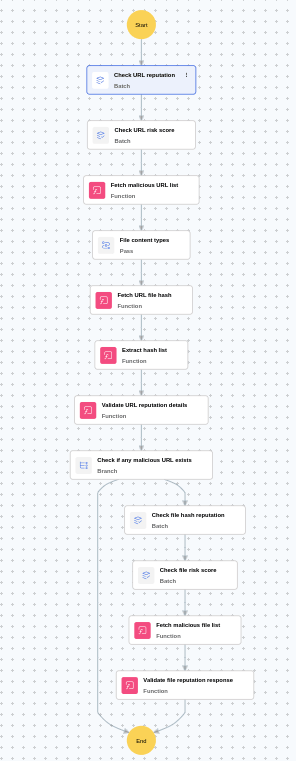
This playbook checks url reputation, calculates risk score, Fetch malicious url list, Fetch url hash, if hash found, check hash reputation, check risk score, fetch malicious file list, validate file reputation response.
MITRE D3FEND mapping
| Tactics | Techniques |
|---|---|
| D3-Detect | D3-UA |
Playbook input type
Log
Prerequisites
Virustotal basic license
Playbook creation input
connectionName - Connection name of VirusTotal
Dependencies
Extensions - VirusTotal
- virustotal_urlReputation
- virustotal_fileReputation
- virustotal_calculateRiskScore
Connections
VirusTotal connection - Need to connect with VirusTotal API and fetch access key to check the malware URL/File details.
Execution workflow
- Checks the URL reputation.
- Calculates the risk score.
- Fetches malicious URL list.
- Fetches the URL file hash.
- If file hash exists, checks file hash reputation.
- Checks file hash risk score.
- Fetches malicious file list.
Post execution procedure
- Review the URL and file-hash reputation results with calculated risk scores, and confirm IOC severity before containment decisions.
- Correlate the URL/hash verdicts with internal alerts and endpoint telemetry to identify affected users, hosts, and potential spread.
- If malicious confidence is high, initiate downstream containment actions through relevant response playbooks/tools and continue monitoring for repeat hits.

