

- Home
- Play books
- Windows - Shadow Copy deletion remediation
Windows - Shadow Copy deletion remediation
In this page
Playbook Description
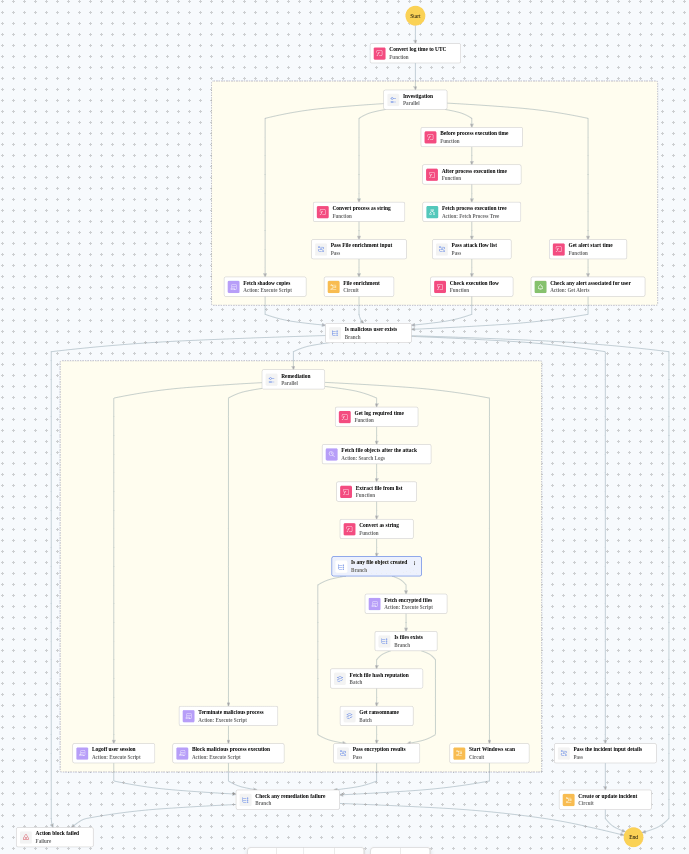
Investigates shadow copy deletion by checking file reputation, process tree, and alerts. If malicious, logs off the user, terminates the process, checks encrypted files for ransomware, and notifies the team.
MITRE ATT&CK mapping
| Tactics | Techniques | Sub-techniques |
|---|---|---|
| Defense Evasion(TA0005) | Obfuscated Files or Information(T1027) | Steganography(T1027.003) |
MITRE D3FEND mapping
| Tactics | Techniques | Sub-techniques |
|---|---|---|
| (Restore) D3-Restore | (Restore Object) D3-RO | (Restore Database) D3-RD |
Playbook input type
Alert
Prerequisites
Windows device configuration - Please provide Windows Administrator credentials in Windows device configuration page. Username: DOMAIN\Administrator or .\Administrator (for local accounts). Password: .
Playbook creation input
- connectionName - Provide the VirusTotal connection name for executing the VirusTotal APIs.
Dependencies
Extensions:
- virustotal_fileReputation.
Utility:
- utility_getRequiredTime
- utility_convertTimeToUTC
- utility_extractFieldFromList
- windows_detectMaliciousProcessChain
- utility_convertToString
- virustotal_extractRansomwareByHash
Scripts
| Script Name | Description | Arguments |
|---|---|---|
| StopProcess.ps1 | Stops processes by PID or file path. Supports hex PIDs and comma-separated inputs. Skips protected PowerShell executables. | ProcessIdentifiers |
| FetchEncryptedFiles.ps1 | Analyzes files for encryption indicators using entropy calculation, printable character ratio, and file header magic bytes | FilePaths, EntropyThreshold |
| TerminateSession.ps1 | Logs off one or more user sessions using logoff , with optional RDP-only filtering by remote IP | UserNames, RemoteIP |
| FetchShadowCopies.ps1 | Retrieves all Volume Shadow Copy (VSS) snapshots on the system via WMI | - |
| AddSoftwareRestrictionPolicy.ps1 | Creates Software Restriction Policy (SRP) rules in the Windows registry to block execution of programs from specified paths. For each path, it checks if an SRP rule already exists — if so and it's not set to "Disallowed", it updates the existing rule; otherwise it creates a new GUID-keyed rule under HKLM:\SOFTWARE\Policies\Microsoft\Windows\Safer\CodeIdentifiers\0\Paths. Enables SRP enforcement (TransparentEnabled=1, PolicyScope=0) on each run. | RestrictedPath |
Connections
VirusTotal connection - Need to connect to VirusTotal API and fetch access key to check the malware IP/URL/file details.
Sub playbooks
- Log360 Cloud - Create or update incident
- Windows - File enrichment
- Windows Defender quick scan
Execution workflow
Investigation:
- Fetches the shadow copies.
- Executes the "Windows - File enrichment" sub-playbook.
- Fetches the process execution tree.
- Pass attack flow list.
- Checks the execution flow.
- Checks the any alert associated for user.
Decision logic:
- Proceeds to remediation based on the following conditions:
- The file or process reputation indicates high risk.
- The file or process reputation indicates medium or higher risk.
- A malicious execution flow was detected in the process tree.
- Related investigation findings are present.
- Volume Shadow Copy (VSS) deletion activity was detected.
- If no malicious indicators are confirmed, the playbook ends with no further actions.
Remediation:
- Logoff user session.
- Terminates the malicious process.
- Blocks the malicious process execution.
- Fetches the file objects after the attack.
- Extracts the file from list.
- Checks whether string data exists.
- Fetches the encrypted files.
- Checks whether files exists.
- Fetches the file hash reputation in batch.
- Retrieves the ransomname in batch.
- Pass encryption results.
- Executes the "Windows Defender quick scan" sub-playbook.
- Validates that all remediation actions completed successfully.
- Builds the notification email with remediation details and findings.
- Sends a notification email regarding the actions taken and required next steps.
Post execution procedure
- Check for any additional encrypted files or ransomware artifacts on the affected host.
- Investigate whether the ransomware has spread to other systems in the network.
- Review backup integrity and initiate recovery procedures if necessary.
- Audit user [user] account for any unauthorized access or privilege escalation.
- Consider performing a full endpoint scan on the affected host and connected systems.

