How to perform an Azure AD self-service password reset
Self-service password reset enables users to verify their identity through enrolled verification options and
reset
their own passwords without administrator or help desk involvement, reducing IT overhead and closing the
productivity gap between a lockout and recovery. This guide covers how to perform self-service password reset
for
Microsoft Entra ID (formerly Azure AD) using the native SSPR portal and also takes you through the secure
self-service password reset process with ManageEngine ADSelfService Plus.
Method 1: How to perform an Entra ID self-service password reset using the SSPR portal
Prerequisites:
Ensure your account is licensed under Microsoft 365 Business Standard or higher for cloud-only password
reset,
or Microsoft 365 Business Premium or Microsoft Entra ID P1/P2 for hybrid password reset with on-premises
writeback.
Ensure Entra ID SSPR registration is complete before attempting a reset.
Steps to natively reset Microsoft Entra ID self-service password reset:
Go to https://aka.ms/sspr or click Forgot
my password on the Microsoft Entra ID login page.
Enter your work email address or username and complete the CAPTCHA, then click Next.
Select your first verification method, SMS, email one-time passcode, Microsoft Authenticator app
notification,
software or hardware OATH token, or voice call, based on your registered authentication methods.
Enter the verification code or approve the push notification to pass the first identity check.
If your Entra ID SSPR policy requires two verification methods, complete a second identity check using a
different registered method. Administrator accounts are subject to Microsoft's administrator SSPR policy,
which
generally requires two authentication methods.
Enter and confirm your new password, then click Finish. The password must meet your
organization's complexity requirements.
You can now sign in with your new password.
Account unlock without password reset: If your administrator has enabled this option in the SSPR
policy, you may see Unlock my account alongside the reset flow, enabling you to unlock a locked
on-premises Active Directory account without changing your password. Particularly useful in hybrid identity
environments where on-premises lockouts need to be resolved from the cloud portal.
SSPR notifications: After a successful reset, you will receive an email confirming the change.
If
your administrator has enabled admin alerts, all global administrators are also notified when any admin account
performs a reset.
Limitations of native Entra ID SSPR
Login-screen self-service password reset is supported on Windows 7, 8, 8.1, 10, and 11, excluding Windows
Home
editions. macOS and Linux users must use a browser.
No dedicated mobile app, users on mobile devices must access the SSPR portal through a mobile browser.
Password complexity requirements are not displayed in real time at the point of entry, error messages are
intentionally generic, leaving users unable to identify which specific rule their new password failed.
After a successful reset, notifications are email-only, no SMS or push confirmation is sent to users or
administrators.
Method 2: Entra ID self-service password reset using ADSelfService Plus
ManageEngine ADSelfService Plus is a unified SSPR, MFA, and SSO solution that offers native Entra ID self-service
password reset. This is particularly valuable in hybrid identity environments, multi-platform workforces, and
environments that require stronger identity verification than native Entra ID SSPR supports.
Prerequisites:
Ensure your administrator has enabled self-service password reset in the ADSelfService Plus admin console
and
scoped the policy to your OU, group, or domain.
Ensure you have completed enrollment at the ADSelfService Plus self-enrollment portal and registered at
least
the minimum number of authentication methods required by your policy.
If you're resetting passwords across both on-premises AD and Microsoft Entra ID, ensure your administrator
has
configured password synchronization to your Entra ID account in ADSelfService Plus.
Steps to reset Entra ID passwords using ADSelfService Plus:
Open the ADSelfService Plus portal from your Windows, macOS, or Linux login screen, iOS or Android mobile
app,
or any browser.
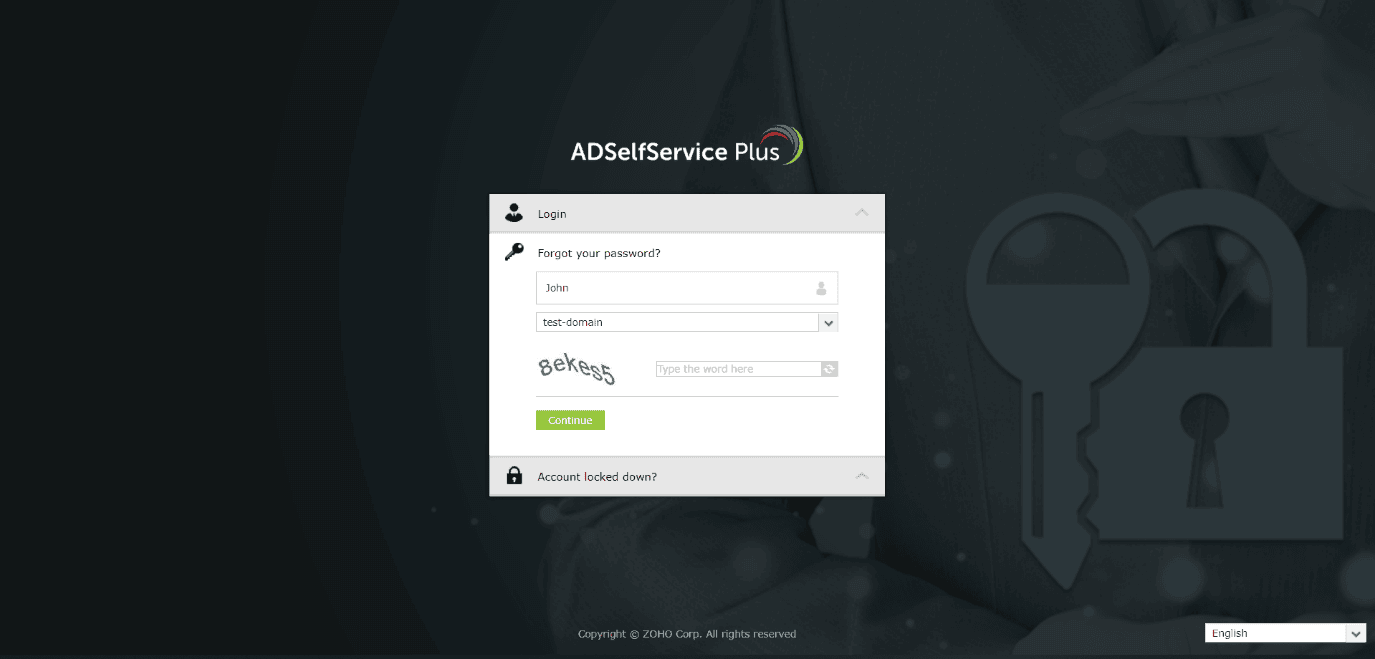
Click Forgot your password?
Enter your username and select the directory, if prompted, and click Continue. Image 1. ADSelfService Plus’ Forgot your password? tab.
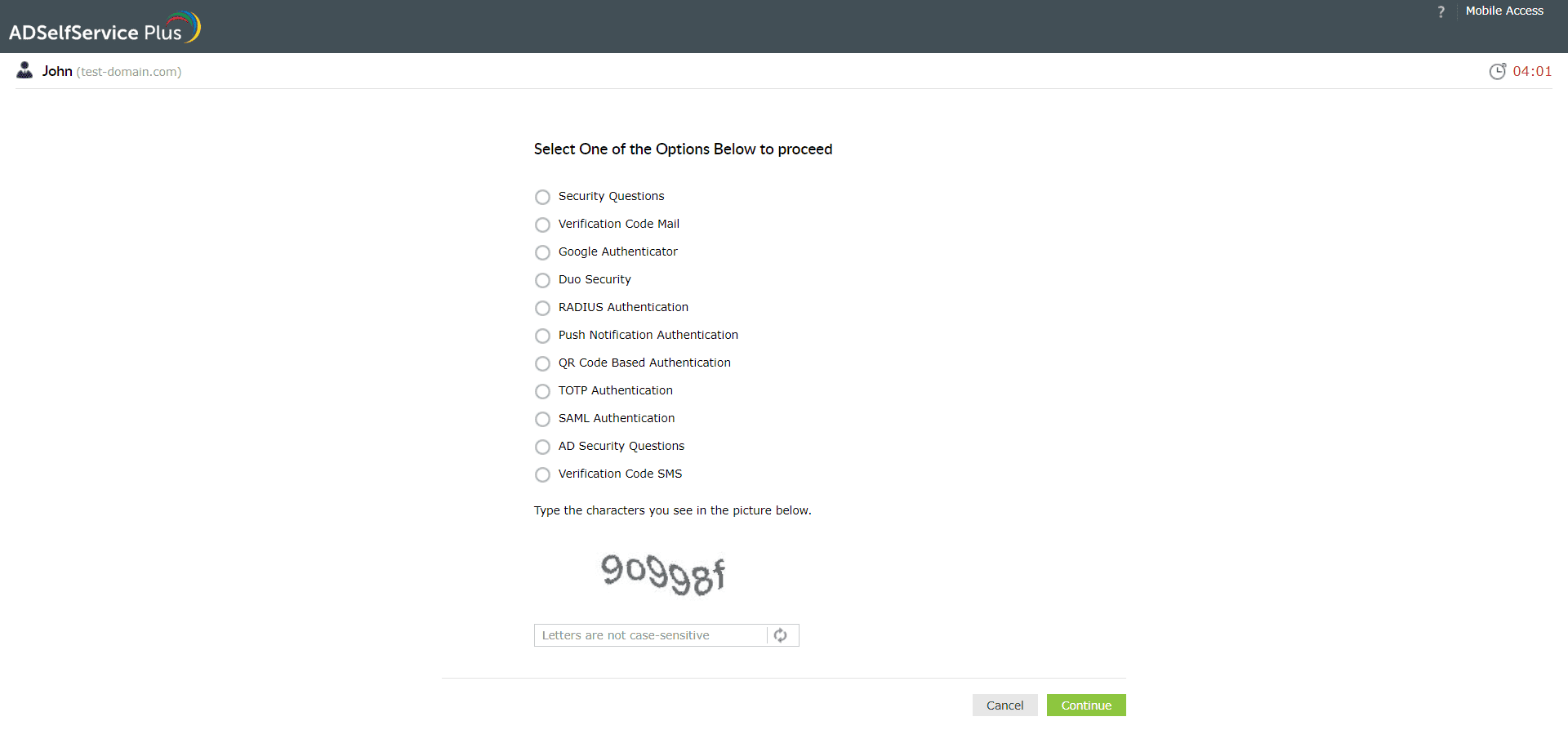
Complete identity verification through your configured methods, any combination of more than 20 supported
options including biometrics (fingerprint and Face ID), Google Authenticator, YubiKey, Microsoft
Authenticator,
software and hardware OATH tokens, and security questions. Image 2. Authentication method selection screen during self-service password reset.
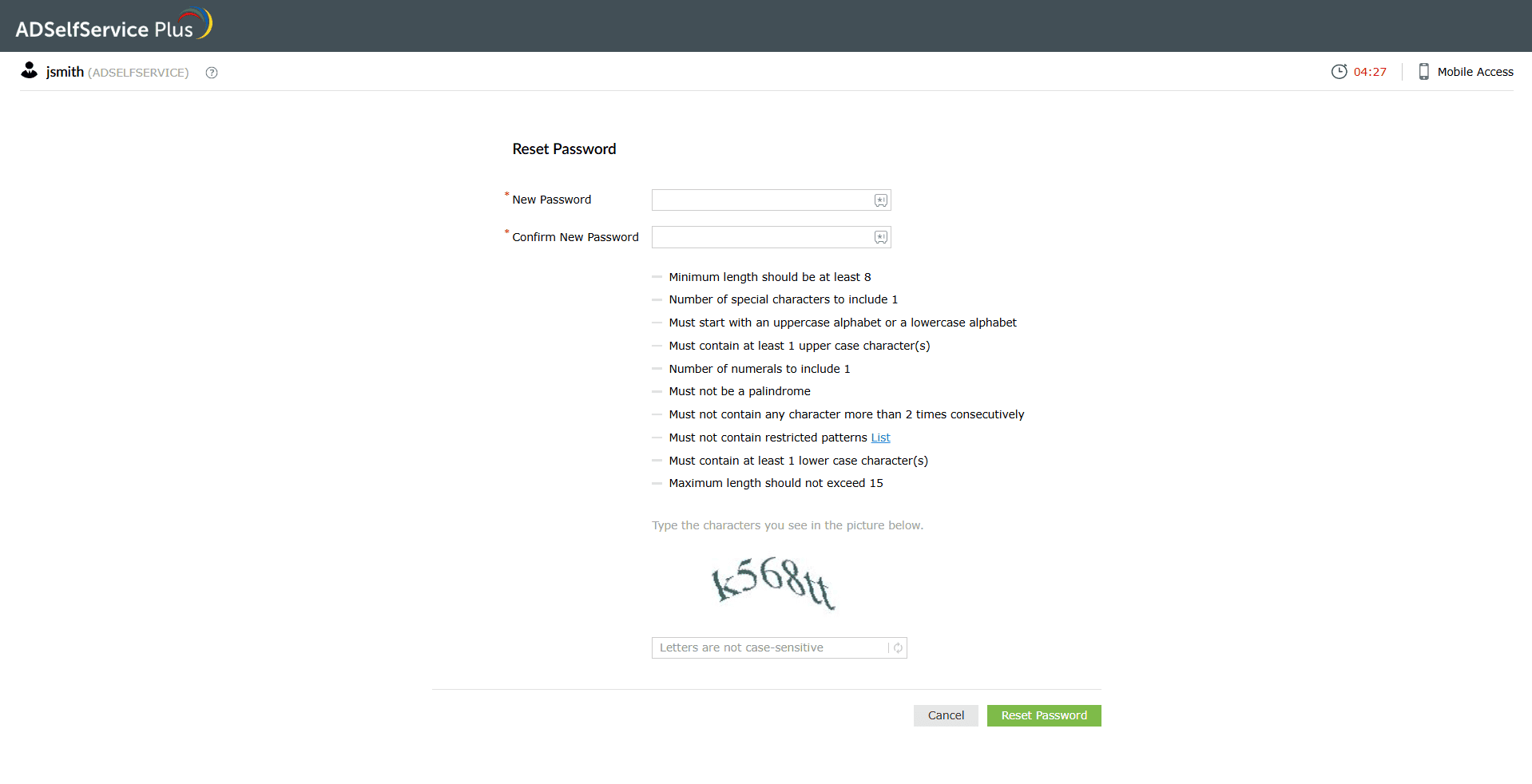
Enter your new password.
Once the password meets all complexity requirements enforced by the Password Policy Enforcer, you will see
confirmation of a successful reset, simultaneously across your on-premises AD and Entra ID account, with no
sync
delay. Image 3. ADSelfService Plus: Reset Password Screen with Password Policy Enforcer.
ADSelfService Plus notifications: After a successful reset, notifications are sent via SMS,
email,
or push, to the user, the administrator, or both, depending on how your admin has configured alerts.
Why organizations choose ADSelfService Plus over native Entra ID SSPR
Native Microsoft Entra ID SSPR covers the basics— but whether your environment is cloud-only or hybrid, it
leaves meaningful gaps. Cloud-only organizations get four verification methods, no approval workflows, no reset
frequency controls, and no login-screen SSPR beyond Windows. Hybrid organizations carry all of that plus
writeback
configuration overhead and no clear error messaging when on-premises password filters reject a reset.
ADSelfService
Plus addresses all of it, for every deployment type, from a single admin console.
Hybrid sync: Real-time password sync between on-premises AD and Microsoft Entra ID
natively, no
writeback configuration required. When on-premises password filters reject a new password, the specific
rejection reason is surfaced to the user in plain language.
Advanced password policy: Enforces granular password complexity rules at the point of
reset,
including minimum length, special character requirements, palindrome restrictions, banned patterns, and
consecutive character limits. Users see exactly which rules their new password must meet before submitting,
reducing failed reset attempts.
Adaptive authentication: 20 and more authentication methods with MFA enforceable as a hard
requirement, and not an optional prompt. Conditional access based on IP, device, location, and business
hours
implements a security baseline that dynamically heightens or lowers authentication guardrails based on risk.
Platform coverage: Login-screen self-service password reset on Windows, macOS, and Linux;
plus
dedicated iOS and Android mobile apps.
Administrative control: Entra ID tenant, group, and domain-level policy scope allows for
self-service password reset to be enabled for specific users based on role and privilege.
Secure every Entra ID password reset with ADSelfService Plus.
1. How do I reset my Entra ID self-service password?
Visit https://aka.ms/sspr, enter your username, and verify your identity through your registered
verification options. You must have completed SSPR registration at https://aka.ms/setupsecurityinfo
before a reset is possible.
2. Can I unlock my account without resetting my password?
Yes, if your administrator has enabled the account unlock without password reset option in the SSPR
policy. This enables you to unlock a locked on-premises AD account independently without triggering a
full password change.
3. What verification options can I use to reset my password?
Available options depend on what your administrator has configured and what you registered during SSPR
registration, typically Microsoft Authenticator app, SMS, voice call, email one-time passcode, software
OATH tokens, hardware OATH tokens, or FIDO2 security keys.
4. Does my password reset sync to
on-premises Active Directory?
Yes, if your organization has configured password writeback via Microsoft Entra Connect. In hybrid
identity environments using federated authentication or password hash synchronization, allow up to two
minutes for the change to propagate on-premises.
5. Why did my password reset fail with
no clear reason?
If your organization uses third-party on-premises password filters, native SSPR will notify you that the
password doesn't meet policy but cannot surface the specific rule that triggered the rejection.
ADSelfService Plus resolves this by showing the exact rejection reason in plain language.
6. Will I be notified after a
successful reset?
Yes. Native SSPR sends an email confirmation after a successful reset, with optional admin alerts for
administrator account resets. ADSelfService Plus supports SMS, email, and push notifications to users
and administrators.
ADSelfService Plus trusted by
A single pane of glass for complete self service password management