
CrowdStrike Falcon
Last updated on:
In this page
Overview
CrowdStrike Falcon is a cloud-based endpoint protection platform that provides real-time detection, prevention, and response capabilities.
The CrowdStrike Event Streams API integration allows you to collect Falcon detection and audit events and ingest them into the product for long-term storage, advanced analysis, and compliance reporting.
This integration allows you to centralize CrowdStrike event logs across your environment providing features such as:
- Extended log retention
Store CrowdStrike audit and detection events for long-term compliance and auditing needs.
- Advanced correlation
Combine CrowdStrike alerts with logs from other sources to reduce false positives and gain broader incident context.
- Prebuilt analytics
Leverage out-of-the-box reports, alert profiles, dashboards, and detection rules tailored for CrowdStrike data.
- Centralized security insights
Analyze CrowdStrike activity alongside endpoint, network, and user events for a comprehensive view of threats.

Supported event types
The integration ingests a variety of Falcon events, including:
- Detection Summary Events
- Authentication Audit Events
- User Activity Audit Events
- Firewall Match Events
- Remote Response Session Events
By integrating CrowdStrike Event Streams, security teams can centralize the CrowdStrike logs for advanced analytics, correlation with SIEM (Security Information and Event Management) events, and compliance reporting.
Prerequisites
- Falcon API credentials
You must have a CrowdStrike Falcon account with Administrator privileges to create the API credentials.
- Create API client
- In the Falcon console, navigate to Support → API Clients and Keys and add a new OAuth2 API client.
- Assign a name and description, then enable the following read scopes:
- Detections
- Hosts
- Event Streams.
- After creation, record the Client ID and Client Secret securely (the secret is shown only once). These credentials will be later used to authenticate the product to the CrowdStrike API.
- Network connectivity
Ensure that the outbound access from the product/agent to the CrowdStrike Event Streams API endpoints is allowed.
Workflow architecture

Configuration steps
- Add CrowdStrike Falcon Application
- In the product console, go to Settings > Applications > Other Applications.
- Click +Add Other Applications and select CrowdStrike Falcon from the log source list.
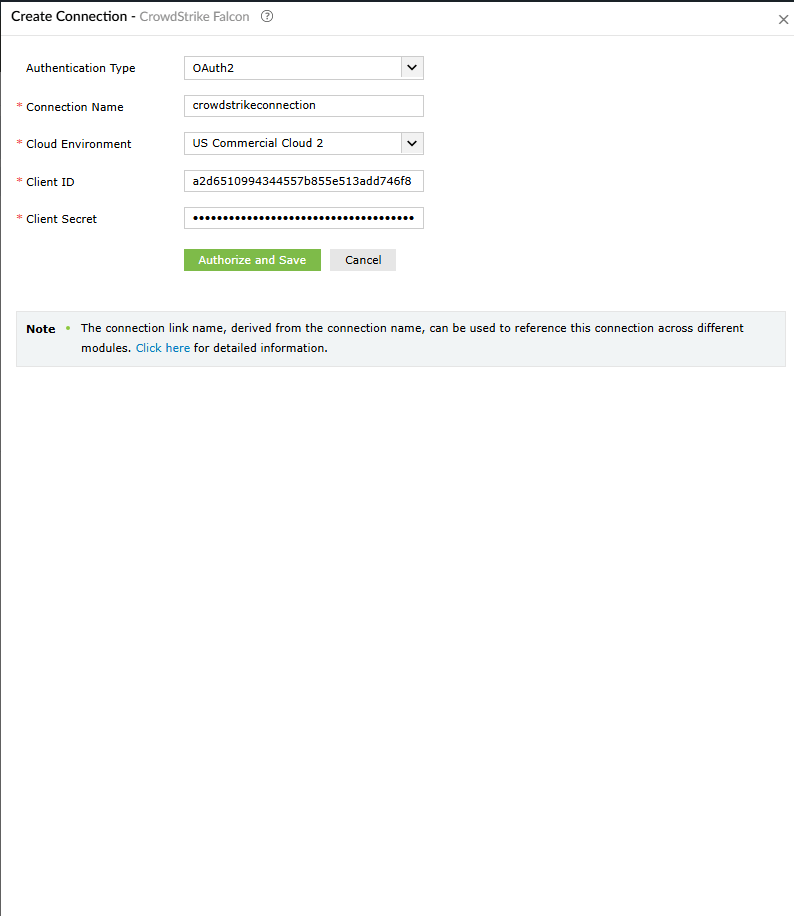
- Enter API Details
Provide the following information:
- Name: A display name for this configuration to help identify the log source.
- Cloud environment: Select the appropriate Falcon cloud environment (for example, US Commercial Cloud). The available options from this field drop-down are:
- EU Cloud
- US GovCloud
- US Commercial Cloud
- US Commercial Cloud 2
- Client ID: The OAuth2 Client ID obtained from the CrowdStrike Falcon console.
- Client Secret: The corresponding client secret associated with the Client ID.
- Application ID: Each Event Stream request must include an Application ID. This ID is mandatory on the CrowdStrike Falcon application and is used to uniquely identify each active event stream. It enables CrowdStrike to monitor individual streams, detect performance delays, and troubleshoot issues by clearly distinguishing one stream from another. The field input must be an alphanumeric string with a maximum length of 32 characters.
- Ingest from: Specifies whether data collection should retrieve the oldest available historical logs or start collecting logs only from the first event generated at the time of the initial API connection. (This option can be selected only during initial configuration. ) The available options from this field drop-down are:
- Oldest Available Event (Historical)
- Configured Time (Starting Now)
NOTE Each active event stream must have a unique AppID. Using a duplicate AppID for a second stream will result in authentication errors. - Save and Start Collection
Complete the setup in the product. The system will use the provided credentials and AppID to connect to the CrowdStrike Event Streams API and begin collecting events.
Once configured, the product will continuously ingest CrowdStrike detection and audit events for further analysis and reporting.
Outcome of the integration
- Log management and Auditing
- All the CrowdStrike Falcon events like the detections, logins, API sessions, etc, are centralized in the product.
- Logs are retained for a long-term to meet the necessary compliance and auditing requirements.
- Advanced correlation
- CrowdStrike events are correlated with other SIEM data, for example- network logs and other endpoint events.
- This helps reduce false positives and uncovers the broader context of security incidents.
- For example: Linking a Falcon detection with a suspicious login from another system.
- Prebuilt analytics
- You will be provided with dedicated reports, alert profiles, dashboards, and detection rules for CrowdStrike data.
- These out-of-the-box tools enable faster threat detection and investigation without the need to build custom analytics from scratch.
- Incident workbench widgetsInteractive widgets like Device Summary, Recent Detections allow security analysts to pivot on CrowdStrike events during incident investigations.
Reports
You will be provided with a comprehensive set of built-in reports for CrowdStrike Falcon data. These include:
| Report category | Report type | Description |
|---|---|---|
| CrowdStrike Events | All Events | A general report covering all types of events. |
| Important Events | Consolidates key events such as detections, anomalies, and audit actions. | |
| Detection Reports | All Detections | Lists all Falcon detection summary events. |
| Detection Trend | Displays detection counts over time. | |
| Detection Summary | Breaks down detections by type. | |
| Detections by Severity | Summarizes detections by severity level. | |
| Allowed Detections | Filters for allowed or low-risk detections. | |
| Blocked Detections | Filters for blocked or high-risk detections. | |
| Detection Status Updates | Tracks detection status changes such as scan or quarantine updates. | |
| Detection and Latest Status Overview | Provides a consolidated view of all detections along with their most recent status updates. | |
| Device Based Detection Summary | Summarizes detection activity for each device, highlighting the count and type of detections associated with individual endpoints. | |
| Device Based Detection Status | Shows the current status of detections on a per-device basis, helping identify devices with active, resolved, or pending detection states. | |
| EDR Security Reports | DNS Request Activity | Reports detections involving DNS requests. |
| Anomalous Network Access Report | Identifies detections involving unusual network access. | |
| Quarantine File Insights | Lists files that have been sent to quarantine. | |
| File Access Overview | Tracks file read/access activity related to detections. | |
| File Write Behavior | Reports file creation or writing behavior during incidents. | |
| Firewall Match | Details CrowdStrike’s network firewall match events. | |
| User Account Management | Users Created | Reports on newly created user accounts. |
| Users Deleted | Tracks deleted user accounts. | |
| User Altered | Logs user account updates. | |
| Password Changes | Tracks password changes for user accounts. | |
| Password Resets | Logs password reset events. | |
| Authentication Secret Resets | Tracks authentication secret resets. | |
| Role Management Reports | Roles Created | Logs when new user roles are created. |
| Dropped roles | Reports on roles that have been dropped. | |
| Granted roles | Lists roles that have been granted to users. | |
| Revoked roles | Lists roles that have been revoked from users. | |
| Policy Management Reports | Policy Added | Reports on when new policies are created. |
| Policy Modified | Tracks updates made to existing policies. | |
| Enabled Policy | Lists policies that have been enabled. | |
| Disabled Policy | Lists policies that have been disabled. | |
| Policy Deleted | Reports when policies are deleted. | |
| Policy Precedence Updates | Tracks updates to the precedence of policies. | |
| Network Rule Containment | Containment Requested | Logs requests for host containment actions. |
| Containment Lift Requests | Tracks requests for lifting host containment. | |
| Remote Access & API Session | Remote Response Sessions Started | Logs the start of a remote response session. |
| Remote Response Sessions Ended | Logs the end of a remote response session. | |
| Logon Reports | Successful Logons | Tracks successful user logins. |
| Failed Logons | Logs failed user login attempts. | |
| Logon Trends | Displays a trend summary of logon events. | |
| TFA Authenticated Logons | Tracks logins that require two-factor authentication. |
These preconfigured reports allow security teams to quickly access key CrowdStrike Falcon data including events, detections, user activities, etc for monitoring and compliance purposes.

Alert profiles
The product includes several default alert profiles for CrowdStrike Falcon to notify on important conditions. Below are some of the predefined alert profiles:
| Alert profile | Description |
|---|---|
| Credential Dumping Prevention |
|
| Advanced Remediation |
|
| Suspicious Process Prevention |
|
| Suspicious Script & Command Prevention |
|
| FalconAdmin Role Granted |
|
| Tamper Protection Disabled |
|
| Sensor Uninstall and Maintenence Disabled |
|
| Detect On Write Disabled |
|
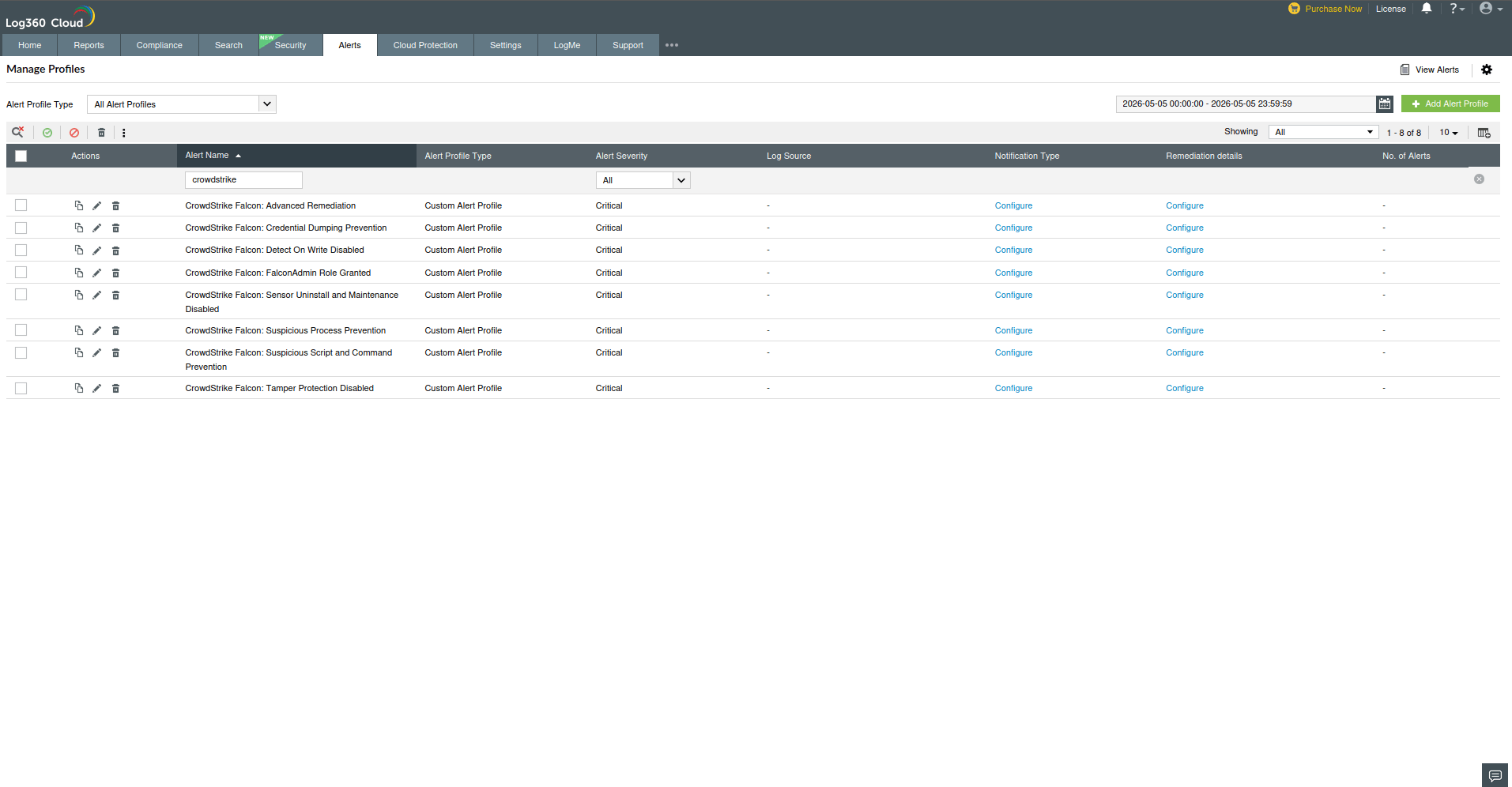
These alert profiles automatically monitor CrowdStrike policy and configuration statuses, notifying administrators if key protections are off or critical roles are granted.
Dashboard widgets
The product provides prebuilt dashboard widgets for visualizing CrowdStrike Falcon data. Some of the available widgets include:
- All CrowdStrike Events
- Total CrowdStrike Detections
- Allowed CrowdStrike Detections
- Blocked CrowdStrike Detections
- Top 5 Devices with CrowdStrike Detections
- Top 10 Files with CrowdStrike Detections
- Recent CrowdStrike Detections
- Top 5 Users with CrowdStrike Detections
- Top 10 CrowdStrike Detections by Name
- CrowdStrike Events Over Time
- CrowdStrike Detections by Objective
- CrowdStrike Detections by Tactic
- CrowdStrike Detection by Type
These widgets can be added to the product dashboard for real-time monitoring of CrowdStrike activity and detection trends.

Detection rules
Several detection rules are provided to detect complex attack patterns by combining CrowdStrike events with SIEM events:
- Concurrent Login By Same UserDetects if the same CrowdStrike user account logs in from two different machines/endpoints at the same time.
- Memory Heist Preparation Detected
- Combines SIEM and EDR (Endpoint Detection and Response) criteria to catch preparation for credential theft.
- For example, SIEM looks for registry changes that disable LSA credential protections or enable shadow copy deletion:Event ID 13/4657 with specific Object Names like Control\lsa, LocalDumps\lsass.exe, or wdigest\UseLogonCredential being modified.
- Simultaneously, the EDR rule watches for a CrowdStrike detection named “credential theft.”
- GhostUAC Using Trusted Binary
- Identifies potential UAC bypass using Windows binaries. This rule has two parts:
- EDR Detection: Triggers when CrowdStrike detects a “privilege escalation” involving trusted binaries (reg.exe or regedit.exe) launching the ms-settings\shell\open\command.
- SIEM Event: Triggers on Windows process creation events (Event ID 1 or 4688) where a parent process (fodhelper.exe or Computerdefaults.exe) spawns a child process not matching itself, indicating potential silent execution.
- Identifies potential UAC bypass using Windows binaries. This rule has two parts:
- LOLBin Escalation Vector
- Detects use of living-off-the-land binaries (LOLbins) for privilege escalation. It has two actions:
- SIEM Event: Triggers on processes such as PsExec.exe, PsExec64.exe, nircmd.exe, paexec.exe, etc., being executed (Event IDs 1 or 4688).
- EDR Detection: Triggers on any CrowdStrike “suspicious activity” detection with tactic = “privilege escalation” and technique = “abuse elevation control mechanism”, especially if the process is run by a system account (user name ending with $).
NOTE If the executed binary's hash is known malicious, the alert is high priority. If not, a medium priority alert is triggered to review the use of that tool. - Detects use of living-off-the-land binaries (LOLbins) for privilege escalation. It has two actions:
- Trusted Binary Weaponized (CrowdStrike detection)
- Triggers on a CrowdStrike “suspicious activity” event involving trusted binaries (e.g., regsvr32.exe) with network access.
- Specifically, it looks for execution (command line contains http) with tactic = “command and control” or “execution”.
- If a URL is detected, it should be checked against ATA (Advanced Threat Analytics)- Default threat feeds.
- Fileless/Obfuscated LOLBin Attack Chain Detected
- Detects advanced file-less attack chains. It combines:
- EDR Detection: A high-severity “attacker methodology” detection with tactic = “Execution” or “AI Powered IOA” and severity above 60.
- SIEM Event: A process creation event for regsvr32.exe (Event ID 1 or 4688) with a command line invoking scrobj.dll (which is commonly used to silently execute scripts).
- Detects advanced file-less attack chains. It combines:
These detection rules leverage both CrowdStrike EDR detections and Windows event logs to identify sophisticated threats like credential theft, UAC bypasses, and fileless attacks. To learn more about this extension-specific detection rules, refer to the Rule Library page.

Incident workbench widgets
In the Incident Workbench, the following CrowdStrike-specific widgets help analysts investigate alerts:
| Widget | Description |
|---|---|
| CrowdStrike Device Summary | Provides a breakdown of threats detected per device. Offers insights into the number of threats detected on each device. |
| Recent Detections | Lists the most recent CrowdStrike detections across the network. Displays the latest detection events happening across the network. |
| Top 5 Files with Most Detections | Highlights which files triggered the most CrowdStrike alerts. Identifies the files that have caused the most alert activity. |
| Detection Summary by Type | Shows a chart of detections grouped by detection type (e.g., malware, intrusion). Categorizes detections based on type, such as malware or intrusion. |
These widgets give analysts quick visibility into CrowdStrike activity when handling security incidents.


If data ingestion or connectivity issues occur, refer to the Troubleshooting CrowdStrike Falcon extension errors page for detailed resolution steps and error explanations.
Pre-requisites
- Before creating a connection for a pre-defined service, ensure that the corresponding integration/extension is installed in Log360 Cloud.
- Only after installing the extension, the service will appear in the Connections page for connection setup.
Configuring VirusTotal integration via Connections
To enable communication between Log360 Cloud and Crowdstrike, a connection must be configured.
- Log in to the product console.
- Navigate to the Settings tab and select Admin.
- Under Integrations, select Connections.
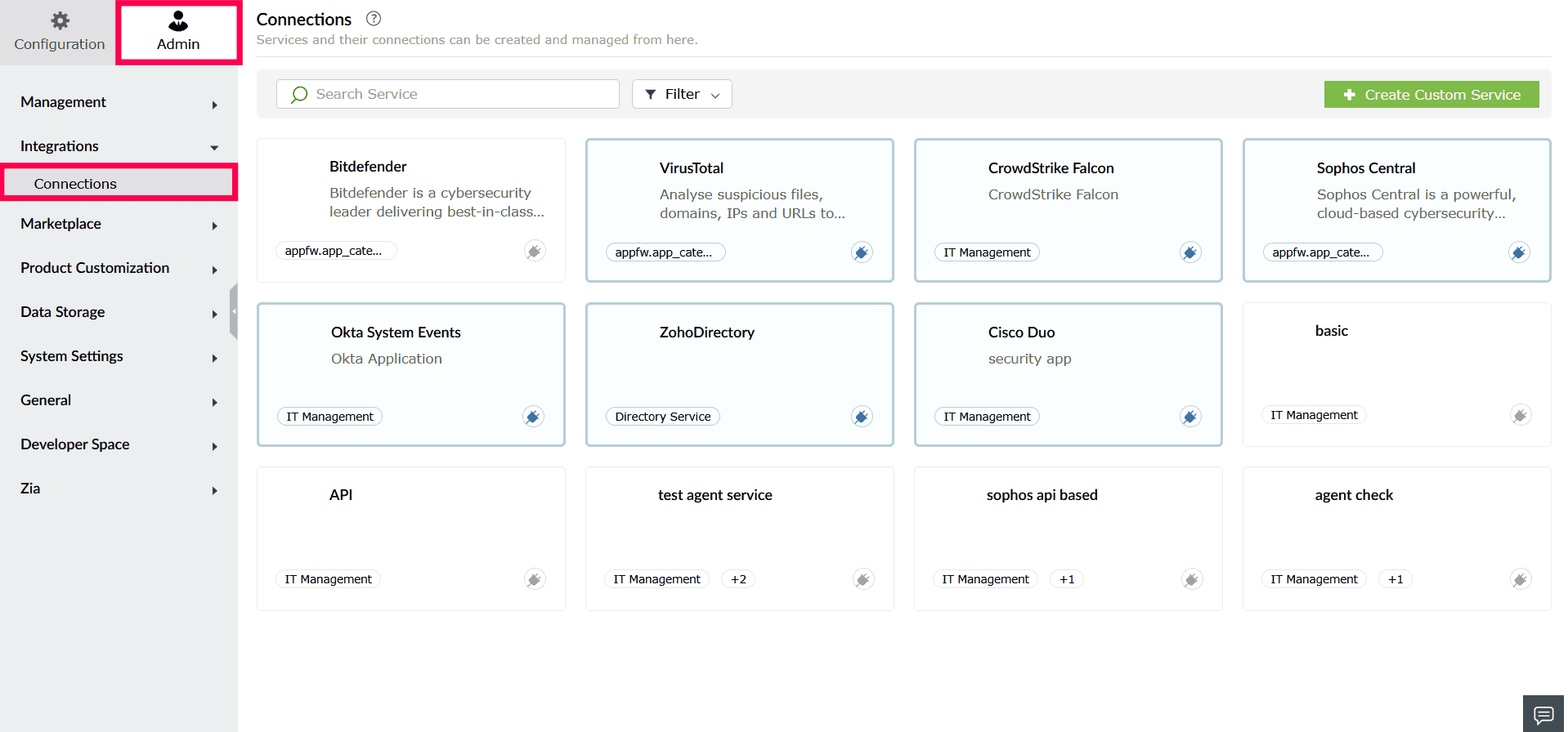
Image : Accessing connections - From the list of available integrations, select Crowdstrike.
- In the window that opens, click Create Connection.
- In the Create Connection - Crowdstrike window, provide the following details:
- Authentication Type: This is preselected based on the integration.
- Connection Name: Enter a name to identify the connection.
- Cloud Environment: Specify the data region associated with your Crowdstrike account.
NOTE For detailed steps on creating API key, refer to this document.
- Client ID: Enter the Client ID generated from the Crowdstrike Admin portal.
- Client Secret: Enter the corresponding Client Secret.
- Application ID: Provide the Tenant ID from the Crowdstrike portal.
- Ingest from: Specify whether log collection should start from historical data or only from live events at the time of configuration.
- Under Select Scope(s), choose the required scope. You can also use the search bar to locate the required scope.
- Click Authorize and Save to complete authentication and create the connection.
Supported SOAR functionalities
The CrowdStrike Falcon extension provides a comprehensive set of custom functions that enable playbooks to interact with CrowdStrike APIs. These functions allow security teams to retrieve host and alert data, manage users and policies, perform endpoint containment, and execute real-time response actions across endpoints.
The integration supports both read (investigation) and write (response/remediation) operations, enabling automated threat detection, enrichment, and containment directly from the product console.
1. crowdstrike_searchDevice
| Parameter | Parameter Type | Param Description | Mandatory |
|---|---|---|---|
| connectionName | Connection | Name of the connection created for CrowdStrike Falcon | Yes |
| deviceIds | List | List of deviceId identifiers. Supports up to a maximum 5000 IDs. | Yes |
Reference link: POST /devices/entities/devices/v2
2. crowdstrike_searchAlerts
| Parameter | Parameter Type | Param Description | Mandatory |
|---|---|---|---|
| connectionName | Connection | Name of the connection created for CrowdStrike Falcon | Yes |
| compositeIds | List | List of compositeId identifiers | Yes |
| includeHidden | Bool | Allows previously hidden alerts to be retrieved | No |
Reference link: POST /alerts/entities/alerts/v2
3. crowdstrike_searchMLExclusions
| Parameter | Parameter Type | Param Description | Mandatory |
|---|---|---|---|
| connectionName | Connection | Name of the connection created for CrowdStrike Falcon | Yes |
| ids | List | The ids of the exclusions to retrieve | Yes |
Reference link: GET /policy/entities/ml-exclusions/v1
4. crowdstrike_endpointInformation
| Parameter | Parameter Type | Param Description | Mandatory |
|---|---|---|---|
| connectionName | Connection | Name of the connection created for CrowdStrike Falcon | Yes |
| hostIds | List | List of host IDs | Yes |
Reference link: GET /devices/entities/devices/v2
5. crowdstrike_getAvailableRoleIds
| Parameter | Parameter Type | Param Description | Mandatory |
|---|---|---|---|
| connectionName | Connection | Name of the connection created for CrowdStrike Falcon | Yes |
| userUuid | String | User UUID to retrieve available roles for | No |
| cid | String | Customer ID to get available role IDs for | No |
| action | String | Actionable purpose of the query | No |
Reference link: GET /user-management/queries/roles/v1
6. crowdstrike_getHostGroups
| Parameter | Parameter Type | Param Description | Mandatory |
|---|---|---|---|
| connectionName | Connection | Name of the connection created for CrowdStrike Falcon | Yes |
| hostGroupIds | List | List of hostGroupId identifiers | Yes |
Reference link: GET /devices/entities/host-groups/v1
7. crowdstrike_getRuleGroupDetails
| Parameter | Parameter Type | Param Description | Mandatory |
|---|---|---|---|
| connectionName | Connection | Name of the connection created for CrowdStrike Falcon | Yes |
| ids | List | List of rule group IDs to be retrieved | Yes |
Reference link: GET /fwmgr/entities/rule-groups/v1
8. crowdstrike_getRuleGroups
| Parameter | Parameter Type | Param Description | Mandatory |
|---|---|---|---|
| connectionName | Connection | Name of the connection created for CrowdStrike Falcon | Yes |
| sort | String | FQL Syntax formatted sort filter | No |
| filter | String | FQL Syntax formatted filter to limit results | No |
| metaDataSearch | String | Free text search across indexed fields | No |
| offset | Int | Offset for pagination | No |
| limit | Int | Limit for pagination | No |
| after | String | Pagination token | No |
Reference link: GET /fwmgr/queries/rule-groups/v1
9. crowdstrike_getDetectionforIncident
| Parameter | Parameter Type | Param Description | Mandatory |
|---|---|---|---|
| connectionName | Connection | Name of the connection created for CrowdStrike Falcon | Yes |
| incidentIds | List | Incident ID(s) to retrieve | Yes |
Reference link: POST /incidents/entities/incidents/GET/v1
10. crowdstrike_getQuarantinedFiles
| Parameter | Parameter Type | Param Description | Mandatory |
|---|---|---|---|
| connectionName | Connection | Name of the connection created for CrowdStrike Falcon | Yes |
| ids | List | List of Quarantine IDs to retrieve | Yes |
Reference link: POST /quarantine/entities/quarantined-files/GET/v1
11. crowdstrike_queryODSScanHosts
| Parameter | Parameter Type | Param Description | Mandatory |
|---|---|---|---|
| connectionName | Connection | Name of the connection created for CrowdStrike Falcon | Yes |
| hostIds | List | List of host agent IDs to be retrieved | Yes |
Reference link: GET /ods/entities/scan-hosts/v1
12. crowdstrike_retrieveDetection
| Parameter | Parameter Type | Param Description | Mandatory |
|---|---|---|---|
| connectionName | Connection | Name of the connection created for CrowdStrike Falcon | Yes |
| includeHidden | Bool | Allows previously hidden alerts to be retrieved | No |
| offset | Int | Offset for pagination | No |
| limit | Int | Limit for pagination | No |
| sort | String | Sort parameter (<field | direction>) |
| filter | String | FQL query filter | No |
| metaDataSearch | String | Metadata search parameter | No |
Reference link: GET /alerts/queries/alerts/v2
13. crowdstrike_retrieveUserInfo
| Parameter | Parameter Type | Param Description | Mandatory |
|---|---|---|---|
| connectionName | Connection | Name of the connection created for CrowdStrike Falcon | Yes |
| userUuid | List | User UUID identifier (max 5000) | Yes |
Reference link: POST /user-management/entities/users/GET/v1
14. crowdstrike_retrieveUserUuid
| Parameter | Parameter Type | Param Description | Mandatory |
|---|---|---|---|
| connectionName | Connection | Name of the connection created for CrowdStrike Falcon | Yes |
| filter | String | FQL filter | No |
| offset | Int | Offset for pagination | No |
| limit | Int | Max records (1–500) | No |
| sort | String | Sort criteria | No |
Reference link: GET /user-management/queries/users/v1
15. crowdstrike_getUserRoleId
| Parameter | Parameter Type | Param Description | Mandatory |
|---|---|---|---|
| connectionName | Connection | Name of the connection created for CrowdStrike Falcon | Yes |
| userUuid | String | User UUID to retrieve role id | Yes |
| cid | String | Customer ID | No |
| directOnly | Bool | Request direct role grants only | No |
| filter | String | Filter criteria | No |
| offset | Int | Pagination offset | No |
| limit | Int | Pagination limit | No |
| sort | String | Sort criteria | No |
Reference link: GET /user-management/combined/user-roles/v2
16. crowdstrike_queryODSScan
| Parameter | Parameter Type | Param Description | Mandatory |
|---|---|---|---|
| connectionName | Connection | Name of the connection created for CrowdStrike Falcon | Yes |
| scanIds | List | List of ODS scan IDs to be retrieved | Yes |
Reference link: GET /ods/entities/scans/v2
17. crowdstrike_queryODSMaliciousFiles
| Parameter | Parameter Type | Param Description | Mandatory |
|---|---|---|---|
| connectionName | Connection | Name of the connection created for CrowdStrike Falcon | Yes |
| fileIds | List | List of ODS scan-file IDs to be retrieved | Yes |
Reference link: GET /ods/entities/malicious-files/v1
18. crowdstrike_queryCombinedSensorUpdatePolicy
| Parameter | Parameter Type | Param Description | Mandatory |
|---|---|---|---|
| connectionName | Connection | Name of the connection created for CrowdStrike Falcon | Yes |
| filter | String | Filter expression to limit results | No |
| offset | Int | Offset to start retrieving records | No |
| limit | Int | Limit for pagination (1–5000) | No |
| sort | String | Sort criteria | No |
Reference link: GET /policy/combined/sensor-update/v2
19. crowdstrike_createHostGroups
| Parameter | Parameter Type | Param Description | Mandatory |
|---|---|---|---|
| connectionName | Connection | Name of the connection created for CrowdStrike Falcon | Yes |
| hostGroupName | String | Name for Host Group | Yes |
| description | String | Description for the Host Group | No |
| assignmentRule | String | Assignment rule to apply | No |
| groupType | String | Type of the host group to create | Yes |
Reference link: POST /devices/entities/host-groups/v1
20. crowdstrike_updateHostGroup
| Parameter | Parameter Type | Param Description | Mandatory |
|---|---|---|---|
| connectionName | Connection | Name of the connection created for CrowdStrike Falcon | Yes |
| hostGroupId | String | ID of the group to update | Yes |
| name | String | New name of the group | No |
| description | String | New description of the group | No |
| assignmentRule | String | New assignment rule (not applicable for static groups) | No |
Reference link: PATCH /devices/entities/host-groups/v1
21. crowdstrike_deleteHostGroups
| Parameter | Parameter Type | Param Description | Mandatory |
|---|---|---|---|
| connectionName | Connection | Name of the connection created for CrowdStrike Falcon | Yes |
| hostGroupIds | List | ID(s) of Host Groups to delete | Yes |
Reference link: DELETE /devices/entities/host-groups/v1
22. crowdstrike_isolateEndpoint
| Parameter | Parameter Type | Param Description | Mandatory |
|---|---|---|---|
| connectionName | Connection | Name of the connection created for CrowdStrike Falcon | Yes |
| ids | List | List of Endpoint IDs to isolate | Yes |
Reference link: POST /devices/entities/devices-actions/v2
23. crowdstrike_unisolateEndpoints
| Parameter | Parameter Type | Param Description | Mandatory |
|---|---|---|---|
| connectionName | Connection | Name of the connection created for CrowdStrike Falcon | Yes |
| ids | List | Host agent IDs to lift containment | Yes |
Reference link: POST /devices/entities/devices-actions/v2
24. crowdstrike_createFirewallPolicy
| Parameter | Parameter Type | Param Description | Mandatory |
|---|---|---|---|
| connectionName | Connection | Name of the connection created for CrowdStrike Falcon | Yes |
| cloneId | String | Firewall Policy ID to clone | No |
| description | String | Description for the firewall policy | No |
| name | String | Name of the firewall policy | Yes |
| platformName | String | Platform for the firewall policy | Yes |
Reference link: POST /policy/entities/firewall/v1
25. crowdstrike_updateFirewallPolicy
| Parameter | Parameter Type | Param Description | Mandatory |
|---|---|---|---|
| connectionName | Connection | Name of the connection created for CrowdStrike Falcon | Yes |
| bodyParams | String | JSON string containing firewall policy update parameters | Yes |
Reference link: PUT /fwmgr/entities/policies/v2
26. crowdstrike_performFirewallPolicyAction
| Parameter | Parameter Type | Param Description | Mandatory |
|---|---|---|---|
| connectionName | Connection | Name of the connection created for CrowdStrike Falcon | Yes |
| actionName | String | Action to perform | Yes |
| actionParamName | String | Name for action parameter | Yes |
| actionParamValue | String | Value for action parameter | Yes |
| policyIds | List | List of policy IDs | Yes |
Reference link: POST /policy/entities/firewall-actions/v1
27. crowdstrike_createIOC
| Parameter | Parameter Type | Param Description | Mandatory |
|---|---|---|---|
| connectionName | Connection | Name of the connection created for CrowdStrike Falcon | Yes |
| bodyParams | String | Parameter for bodyParams | Yes |
| retroDetects | Bool | Submit retrodetects flag | No |
| ignoreWarnings | Bool | Ignore warnings flag | No |
Reference link: POST /iocs/entities/indicators/v1
28. crowdstrike_createMLExclusion
| Parameter | Parameter Type | Param Description | Mandatory |
|---|---|---|---|
| connectionName | Connection | Name of the connection created for CrowdStrike Falcon | Yes |
| comment | String | Comment describing exclusion | Yes |
| excludedFrom | List | Group IDs excluded from exclusion | Yes |
| hostGroupIds | List | Host group IDs | Yes |
| valueToMatch | String | Value to match for exclusion | Yes |
Reference link: POST /policy/entities/ml-exclusions/v1
29. crowdstrike_updateMLExclusion
| Parameter | Parameter Type | Param Description | Mandatory |
|---|---|---|---|
| connectionName | Connection | Name of the connection created for CrowdStrike Falcon | Yes |
| bodyParams | String | Parameter for bodyParams | Yes |
Reference link: PATCH /policy/entities/ml-exclusions/v1
30. crowdstrike_deleteMLExclusion
| Parameter | Parameter Type | Param Description | Mandatory |
|---|---|---|---|
| connectionName | Connection | Name of the connection created for CrowdStrike Falcon | Yes |
| ids | List | IDs of exclusions | Yes |
| comment | String | Reason for deletion | No |
Reference link: DELETE /policy/entities/ml-exclusions/v1
31. crowdstrike_updateDetects
| Parameter | Parameter Type | Param Description | Mandatory |
|---|---|---|---|
| connectionName | Connection | Name of the connection created for CrowdStrike Falcon | Yes |
| bodyParams | String | Parameter for bodyParams | Yes |
| includeHidden | Bool | Allows hidden alerts to be retrieved | No |
Reference link: PATCH /alerts/entities/alerts/v3
32. crowdstrike_refreshSession
| Parameter | Parameter Type | Param Description | Mandatory |
|---|---|---|---|
| connectionName | Connection | Name of the connection created for CrowdStrike Falcon | Yes |
| deviceId | String | Host agent ID for RTR session | Yes |
| origin | String | Origin parameter | No |
| queueOffline | Bool | Queue session if host offline | No |
Reference link: POST /real-time-response/entities/refresh-session/v1
33. crowdstrike_deleteSession
| Parameter | Parameter Type | Param Description | Mandatory |
|---|---|---|---|
| connectionName | Connection | Name of the connection created for CrowdStrike Falcon | Yes |
| sessionId | String | RTR Session ID | Yes |
Reference link: DELETE /real-time-response/entities/sessions/v1
34. crowdstrike_createBatchSession
| Parameter | Parameter Type | Param Description | Mandatory |
|---|---|---|---|
| connectionName | Connection | Name of the connection created for CrowdStrike Falcon | Yes |
| hostids | List | Host agent IDs for batch session | Yes |
| queueOffline | Bool | Queue session if host offline | Yes |
| existingBatchId | String | Existing batch ID | No |
| timeout | Int | Timeout in seconds | No |
| timeoutDuration | String | Timeout duration | No |
| hostTimeOutDuration | String | Host processing timeout | No |
Reference link: POST /real-time-response/combined/batch-init-session/v1
35. crowdstrike_getScript
| Parameter | Parameter Type | Param Description | Mandatory |
|---|---|---|---|
| connectionName | Connection | Name of the connection created for CrowdStrike Falcon | Yes |
| scriptIds | List | File IDs | Yes |
Reference link: GET /real-time-response/entities/scripts/v1
36. crowdstrike_deleteScript
| Parameter | Parameter Type | Param Description | Mandatory |
|---|---|---|---|
| connectionName | Connection | Name of the connection created for CrowdStrike Falcon | Yes |
| scriptId | String | File ID | Yes |
Reference link: DELETE /real-time-response/entities/scripts/v1
37. crowdstrike_runCommand
| Parameter | Parameter Type | Param Description | Mandatory |
|---|---|---|---|
| connectionName | Connection | Name of the connection created for CrowdStrike Falcon | Yes |
| baseCommand | String | Active-Responder command type (e.g., get, cp) | Yes |
| commandString | String | Full command string (e.g., get some_file.txt) | Yes |
| sesionId | String | RTR Session id | Yes |
| deviceId | String | Host agent ID for RTR session | No |
| persist | Bool | Whether to persist the action | No |
Reference link: POST /real-time-response/entities/admin-command/v1
38. crowdstrike_runBatchcommand
| Parameter | Parameter Type | Param Description | Mandatory |
|---|---|---|---|
| connectionName | Connection | Name of the connection created for CrowdStrike Falcon | Yes |
| optionalHosts | List | Subset of hosts to run command on | Yes |
| batchId | String | Batch ID for execution | Yes |
| timeout | Int | Timeout in seconds | No |
| timeourDuration | String | Timeout duration | No |
| hostTimeOutDuration | String | Host processing timeout | No |
| baseCommand | String | Active-Responder command type | Yes |
| commandString | String | Full command string | Yes |
| pesistAll | Bool | Parameter for persistAll | No |
Reference link: POST /real-time-response/combined/batch-admin-command/v1
39. crowdstrike_listNetworkStats
| Parameter | Parameter Type | Param Description | Mandatory |
|---|---|---|---|
| connectionName | Connection | Name of the connection created for CrowdStrike Falcon | Yes |
| deviceId | String | Host agent ID for RTR session | Yes |
| sessionId | String | RTR Session id | Yes |
| persist | Bool | Whether to persist the action | Yes |
Reference link: POST /real-time-response/entities/active-responder-command/v1
40. crowdstrike_killProcess
| Parameter | Parameter Type | Param Description | Mandatory |
|---|---|---|---|
| connectionName | Connection | Name of the connection created for CrowdStrike Falcon | Yes |
| deviceId | String | Host agent ID for RTR session | Yes |
| sessionId | String | RTR Session id | Yes |
41. crowdstrike_listProcesses
| Parameter | Parameter Type | Param Description | Mandatory |
|---|---|---|---|
| connectionName | Connection | Name of the connection created for CrowdStrike Falcon | Yes |
| deviceId | String | Host agent ID for RTR session | Yes |
| sessionId | String | RTR Session id | Yes |
| persist | Bool | Whether to persist the action | Yes |
Reference link: POST /real-time-response/entities/active-responder-command/v1
42. crowdstrike_getCloudRequestIdResponse
| Parameter | Parameter Type | Param Description | Mandatory |
|---|---|---|---|
| connectionName | Connection | Name of the connection created for CrowdStrike Falcon | Yes |
| cloudRequestId | String | Cloud request identifier | Yes |
Reference link: GET /real-time-response/entities/active-responder-command/v1
43. crowdstrike_listAllSessions
| Parameter | Parameter Type | Param Description | Mandatory |
|---|---|---|---|
| connectionName | Connection | Name of the connection created for CrowdStrike Falcon | Yes |
| offset | Int | Offset for pagination | No |
| limit | Int | Limit for pagination | No |
| sort | String | Sort criteria for results | No |
| filter | String | Filter criteria for the query | No |
Reference link: GET /real-time-response/queries/sessions/v1
44. crowdstrike_createSession
| Parameter | Parameter Type | Param Description | Mandatory |
|---|---|---|---|
| connectionName | Connection | Name of the connection created for CrowdStrike Falcon | Yes |
| deviceId | String | Host agent ID for RTR session | Yes |
| queueOffline | Bool | Queue session if host offline | Yes |
| origin | String | Origin of the request | No |
| timeout | Int | Timeout in seconds | No |
| timeoutDuration | String | Timeout duration | No |
Reference link: POST /real-time-response/entities/sessions/v1
45. crowdstrike_readRegistry
| Parameter | Parameter Type | Param Description | Mandatory |
|---|---|---|---|
| connectionName | Connection | Name of the connection created for CrowdStrike Falcon | Yes |
| deviceId | String | Host agent ID for RTR session | Yes |
| sessionId | String | RTR Session id | Yes |
| persist | Bool | Whether to persist the action | Yes |
Reference link: POST /real-time-response/entities/active-responder-command/v1
46. crowdstrike_createRuleGroup
| Parameter | Parameter Type | Param Description | Mandatory |
|---|---|---|---|
| connectionName | Connection | Name of the connection created for CrowdStrike Falcon | Yes |
| bodyParams | String | Parameter for bodyParams | Yes |
Reference link: POST /fwmgr/entities/rule-groups/v1
47. crowdstrike_updateRuleGroup
| Parameter | Parameter Type | Param Description | Mandatory |
|---|---|---|---|
| connectionName | Connection | Name of the connection created for CrowdStrike Falcon | Yes |
| bodyParams | String | Parameter for bodyParams | Yes |
| comment | String | Audit log comment | No |
Reference link: PATCH /fwmgr/entities/rule-groups/v1
48. crowdstrike_revokeUserRole
| Parameter | Parameter Type | Param Description | Mandatory |
|---|---|---|---|
| connectionName | Connection | Name of the connection created for CrowdStrike Falcon | Yes |
| cid | String | Customer ID | Yes |
| expiresAt | String | Expiration date time (RFC3339) | No |
| roleIds | List | List of role IDs | Yes |
| uuid | String | UUID identifier | Yes |
Reference link: POST /user-management/entities/user-role-actions/v1
49. crowdstrike_createSensorPolicy
| Parameter | Parameter Type | Param Description | Mandatory |
|---|---|---|---|
| connectionName | Connection | Name of the connection created for CrowdStrike Falcon | Yes |
| bodyParams | String | Parameter for bodyParams | Yes |
Reference link: POST /policy/entities/sensor-update/v2
50. crowdstrike_applyQuarantineFileAction
| Parameter | Parameter Type | Param Description | Mandatory |
|---|---|---|---|
| connectionName | Connection | Name of the connection created for CrowdStrike Falcon | Yes |
| action | String | Action to apply on quarantined file | Yes |
| comment | String | Comment for the action | No |
| ids | List | List of Quarantine IDs | Yes |
Reference link: PATCH /quarantine/entities/quarantined-files/v1
51. crowdstrike_createODSScan
| Parameter | Parameter Type | Param Description | Mandatory |
|---|---|---|---|
| connectionName | Connection | Name of the connection created for CrowdStrike Falcon | Yes |
| bodyParams | String | Parameter for bodyParams | Yes |
Reference link: POST /ods/entities/scans/v1
52. crowdstrike_deleteODSScheduledScan
| Parameter | Parameter Type | Param Description | Mandatory |
|---|---|---|---|
| connectionName | Connection | Name of the connection created for CrowdStrike Falcon | Yes |
| scanIds | List | List of scheduled scan IDs | Yes |
| filter | String | Filter for scheduled scans | No |
Reference link: DELETE /ods/entities/scheduled-scans/v1
53. crowdstrike_createODSScheduledScan
| Parameter | Parameter Type | Param Description | Mandatory |
|---|---|---|---|
| connectionName | Connection | Name of the connection created for CrowdStrike Falcon | Yes |
| bodyParams | String | Parameter for bodyParams | Yes |
Reference link: POST /ods/entities/scheduled-scans/v1
54. crowdstrike_updatePreventionPolicy
| Parameter | Parameter Type | Param Description | Mandatory |
|---|---|---|---|
| connectionName | Connection | Name of the connection created for CrowdStrike Falcon | Yes |
| description | String | Description of policy | No |
| policyId | String | Policy ID | Yes |
| name | String | Policy name | No |
| settingsId | String | Settings ID | Yes |
| settingsValue | String | Settings value structure | Yes |
Reference link: PATCH /policy/entities/prevention/v1
55. crowdstrike_performSensorUpdatePolicyAction
| Parameter | Parameter Type | Param Description | Mandatory |
|---|---|---|---|
| connectionName | Connection | Name of the connection created for CrowdStrike Falcon | Yes |
| actionName | String | Action to perform | Yes |
| actionParamName | String | Parameter name | Yes |
| actionParamValue | String | Parameter value | Yes |
| sensorPolicyIds | List | List of sensor policy IDs | Yes |
Reference link: POST /policy/entities/sensor-update-actions/v1
56. crowdstrike_updateSensorPolicy
| Parameter | Parameter Type | Param Description | Mandatory |
|---|---|---|---|
| connectionName | Connection | Name of the connection created for CrowdStrike Falcon | Yes |
| bodyParams | String | Parameter for bodyParams | Yes |
Reference link: PATCH /policy/entities/sensor-update/v2
57. crowdstrike_resetUserPassword
| Parameter | Parameter Type | Param Description | Mandatory |
|---|---|---|---|
| connectionName | Connection | Name of the connection created for CrowdStrike Falcon | Yes |
| userUuids | List | List of user UUIDs | Yes |
| actionParamValue | String | Value for the action | No |
Reference link: POST /user-management/entities/user-actions/v1
58. crowdstrike_deleteFile
| Parameter | Parameter Type | Param Description | Mandatory |
|---|---|---|---|
| connectionName | Connection | Name of the connection created for CrowdStrike Falcon | Yes |
| fileId | String | File identifier | Yes |
| sessionId | String | RTR Session id | Yes |
Reference link: DELETE /real-time-response/entities/file/v1
59. crowdstrike_getAvailableDeviceIds
| Parameter | Parameter Type | Param Description | Mandatory |
|---|---|---|---|
| connectionName | Connection | Name of the connection created for CrowdStrike Falcon | Yes |
| offset | Int | Offset to start retrieving records | No |
| limit | Int | Maximum records (1–5000) | No |
| sort | String | Sort property | No |
| filter | String | Filter expression | No |
Reference link: GET /devices/queries/devices/v1
Read also
This page explained how to integrate CrowdStrike Falcon Event Streams with the product to collect and analyze Falcon detection and audit events. To explore related integrations and advanced analytics, refer to the following pages: