Direct Inward Dialing: +1 408 916 9890
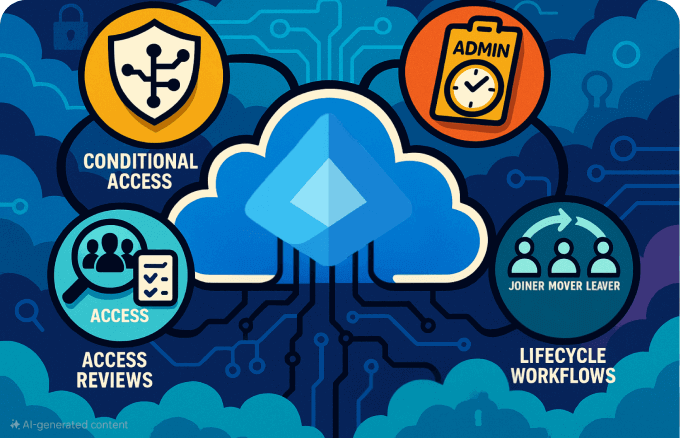
Effective Azure AD management (now Microsoft Entra ID) is at the center of modern identity and access strategies. Microsoft Entra ID provides a unified platform for managing users, devices, applications, and security policies across cloud and hybrid environments.
For IT administrators accustomed to traditional on-premises Active Directory, understanding Entra ID management is the key to unlocking secure, streamlined operations. This guide provides a practical overview of Microsoft Entra ID's management concepts, key features, and common use cases, designed for professionals looking to leverage its full potential. Here are the topics we will discuss in detail.
Microsoft Entra ID extends beyond a simple directory service. It is a comprehensive IAM platform designed for the cloud era, providing a robust foundation for your entire technology stack.
The identity is the new security perimeter. With Entra ID, access decisions are based on who you are, the health of your device, and where you are connecting from, not just whether you’re “inside the network.” By assessing contextual signals like user behavior and device health, Entra ID enforces adaptive access controls that reduce the risk of breaches, supporting secure, remote work from anywhere.
This shifts security from network-based controls to modern, risk-based access policies that evaluate user behavior, device health, and location in real time. It ensures that only verified users on compliant devices can access sensitive data, regardless of where they are.
Your workforce likely uses dozens of applications, some from Microsoft, others from third parties. Entra ID serves as the central identity provider for all of them, enabling secure single sign-on (SSO), so users can access all apps with one login, improving productivity and reducing password fatigue.
Entra ID offers deep integration with Microsoft 365 services, such as Exchange Online, SharePoint, and Teams along with thousands of pre-integrated SaaS apps.

Many organizations still use on-premises Active Directory (AD) but want the flexibility and reach of the cloud. Entra ID’s synchronization capabilities let you keep both worlds connected, giving users a seamless sign-in experience while allowing IT to enforce consistent security policies across on-premises and cloud environments.
Microsoft Entra Connect securely synchronizes objects like user accounts, groups, and passwords between on-premises AD and Entra ID.

Collaborating with partners, suppliers, or contractors often means granting them access to company resources. Entra ID makes this secure and straightforward. External users can access resources using their own credentials while still being governed by your Conditional Access policies, reducing setup time and protecting sensitive data.
Entra ID supports business-to-business (B2B) guest access, replacing the complex trust relationships required in traditional AD.
For example, an external auditor receives guest access to a SharePoint site, authenticates via their corporate identity provider, and is automatically subject to MFA before viewing confidential files.

Effective Entra ID management hinges on leveraging its rich feature set to automate tasks, enforce security policies, and streamline operations.
Managing who has access to what is a constant challenge in any organization. Entra ID streamlines this by automating group membership and permissions, ensuring employees get the right access from day one and lose it the moment they leave. This improves productivity, reduces security risks, and cuts down on manual admin work.
Entra ID offers flexible tools for managing user and group objects, whether they are created in the cloud or synchronized from on-premises AD.
Security threats are no longer just “outside the firewall.” Entra ID applies a Zero Trust model, meaning every user, device, and request is verified. This keeps sensitive data safe, supports compliance, and reduces breach risk without slowing down productivity.
Entra ID combines several tools to enforce security at every step:
MFA: Entra ID's native MFA service strengthens user sign-ins by requiring a second form of verification. It integrates seamlessly into the login flow and supports various methods, including authenticator app notifications, biometrics, and FIDO2 security keys, and is tightly integrated with other Entra ID security features.
Conditional Access policies: This serves as a powerful if-then policy engine that uses real-time signals such as device compliance, user risk, and location to determine access. For example, a policy can be set to require MFA and a compliant device when a user accesses a sensitive application from an untrusted network.
Azure RBAC: Azure RBAC is a permissions model that grants access based on a user's role within the organization. Entra ID has numerous built-in roles (e.g., Global Administrator, User Administrator, Security Reader, and more) and a provision to create more that allows you to implement the principle of least privilege by giving administrators only the permissions they need.
Privileged identity management (PIM): Instead of granting permanent administrator rights, Entra ID PIM allows users to request elevated roles for a limited time. This process can require approvals, justifications, and notifications, dramatically reducing the risks associated with standing privileged access.
These controls minimize attack surfaces and support compliance requirements for your organization.

Every device that connects to your systems is a potential entry point for attackers. Entra ID helps ensure only secure, compliant devices can access corporate resources, whether they’re company-issued or personal (BYOD). This reduces security risks, supports remote work, and enforces consistent protection across the workforce.
Entra ID assigns a unique device identity to every asset and uses that identity in security policies and access decisions.

Your business runs on a mix of applications, from Microsoft 365 to specialized industry tools. Entra ID centralizes how users access all these apps, ensuring security policies are applied consistently and employees don’t waste time juggling multiple logins. This improves productivity, reduces IT workload, and strengthens your security posture.
Entra ID acts as the central hub for managing and securing your Entra ID application access by consolidating application management into a secure platform, improving user experience while maintaining strict control over who gets in.

Manual account setup and removal are slow, error-prone, and risky. Entra ID automates the entire identity life cycle from onboarding to offboarding. Employees get instant access to what they need on day one, and their access is removed the moment they leave. This boosts productivity, reduces IT workload, and closes dangerous security gaps.
Entra ID’s life cycle automation ensures employees are productive from day one, access stays up to date, and former employees can’t slip through security cracks.

As your organization grows, adding employees, expanding into new regions, or adopting new ways of working becomes a hectic schedule to keep up without adding complexity or cost. Entra ID’s cloud-native architecture scales automatically, ensuring high availability and global performance without requiring you to manage physical servers.
Understanding the features is one thing; applying them to solve real-world problems is another. From fast employee onboarding to secure remote work, Entra ID helps organizations operate efficiently while protecting sensitive data. These real-world scenarios show how Entra ID management works in practice.
While the technical details of Microsoft Entra ID are crucial for IT administrators, the platform's true value is measured in its contributions to improving business operations, risk prevention, and workforce productivity. By centralizing Entra ID management, an organization can reap tangible benefits that extend far beyond easing the IT department.
Security should not slow people down. Entra ID makes secure access seamless, helping employees and partners work efficiently from anywhere.
From fast employee onboarding to secure remote work, Entra ID helps organizations operate efficiently while protecting sensitive data. These real-world scenarios show how the security features of Entra ID work in practice.
Automating identity management frees IT teams from repetitive tasks, so they can focus on projects that drive business value.
This automation frees up staff to focus on strategic initiatives rather than reactive and repetitive administrative tasks.
As your workforce changes or your organization enters new markets, your identity platform must adapt without costly overhauls.
Works equally well in fully cloud-based deployments or hybrid environments that keep certain workloads on-premises. This allows gradual migration strategies without disrupting daily operations.
Microsoft’s globally distributed data centers ensure resilience. Built-in failover mechanisms keep authentication and access services running even during regional outages.
Entra ID can integrate with or migrate identities from other platforms, streamlining the process of uniting IT systems after an acquisition or partnership.
Built-in threat detection and Microsoft’s global security telemetry help mitigate emerging risks quickly, even for enterprises.
Even with Microsoft Entra ID’s strong capabilities, organizations often run into recurring challenges when identity management is not standardized. The good news: most of these issues have direct solutions built into Entra ID.
Challenge: Users retain old permissions and licenses after role changes, wasting funds and widening the attack surface.
Solution: Regular access review campaigns in Entra ID allow managers and application owners to confirm whether users still need their current access.
Challenge: Contractors and partners often retain access after projects end.
Solution: Automate cleanup with life cycle workflows. For example, setting an expiration date for guest accounts or triggering offboarding actions when a project closes.
Challenge: Overlapping or incomplete policies can either block legitimate users or leave loopholes open (e.g., legacy authentication).
Solution: Use Conditional Access policy templates and identify your weak points from the Conditional Access insights and reporting workbook to design, test, and monitor policies safely.
Challenge: Global Admin or Exchange Admin rights left permanently active create high-value targets for attackers.
Solution: Implement Entra ID PIM to grant just-in-time admin rights with approval workflows and auditing.
By mapping challenges directly to the right Entra ID features, organizations can reduce risk, enforce least privilege, and maintain a healthier identity environment.
Managing Microsoft Entra ID can be done through a mix of native portals, scripting interfaces, and third-party solutions. Each tool serves a slightly different purpose depending on the size of the environment and the depth of management required.
This is the dedicated portal for identity and access management. It provides interfaces for user and group administration, Conditional Access, app assignments, and device registration. This is the central hub for most Entra ID operations.
For bulk administration, automation, and advanced configurations, PowerShell is indispensable. The modern Microsoft Graph PowerShell SDK offers a unified way to script identity management, application assignments, and policy enforcement beyond what the GUI provides.
The Azure portal includes all identity-related settings under the Microsoft Entra ID sidebar, giving administrators access to advanced configurations, integration points, and security controls. For identity-first admins, the Entra admin center is key; the Azure Portal is better for cloud admins managing a mix of Azure resources, such as Blob Storage and VMs.
Third-party platforms extend management capabilities by consolidating tasks across services and simplifying repetitive operations. For instance, ManageEngine M365 Manager Plus provides identity life cycle automation, delegation, and bulk operations across Entra ID and other Microsoft 365 services, helping admins avoid repetitive tasks without juggling multiple admin portals.
Microsoft Entra ID delivers centralized identity and access management that strengthens security, simplifies administration, and enables secure collaboration across cloud and hybrid environments. By combining granular access controls, seamless application integration, automated life cycle workflows, and a globally scalable architecture, Entra ID supports both day-to-day productivity and long-term growth.