- What is Android Mobile Device Management
- How it is different from general MDM solutions
- Why businesses need Android MDM
- BYOD challenges and compliance
- Security risks without MDM
- Core features of ManageEngine's android MDM software
- Benefits of using Android MDM in organizations
- Getting started with Android MDM
- How Android MDM fits into broader IT management
Share:




Key Takeaways
Android MDM is essential for modern businesses managing diverse Android device fleets, offering specialized solutions that address unique challenges in today's mobile-first workplace.
- Device diversity and fragmentation:
Unlike Apple's controlled ecosystem, the Android world has thousands of device models from many manufacturers, each with different capabilities and security profiles.
- Update inconsistency:
Many Android manufacturers customize the operating system, so updates need customization too. This leads to less frequent patches and sometimes outdated security protocols.
- Security vulnerability exposure:
Android devices face higher malware risks since users can easily install apps from outside official channels.
- Business optimization needs:
Android devices are built for consumers first and need extra setup to work well in business settings.
Standard device management solutions don't deal very well with the unique challenges of managing Android devices throughout your organization. Android MDM serves as specialized software built for Android operating systems. This software lets IT administrators remotely control, secure, and optimize Android devices used for work, whether company-owned or personal.
With organizations increasingly adopting Android devices across their workforce—from smartphones and tablets to rugged field devices and kiosks—the need for a centralized management solution has never been greater. ManageEngine Mobile Device Manager Plus empowers IT teams to simplify Android device management, enforce security configurations, and maintain compliance across corporate and employee-owned devices alike.
While Android calls for a dedicated management approach, Mobile Device Manager Plus unifies control across iOS, Windows, macOS, and Chrome OS as well.The software empowers IT teams to handle everything remotely from a central console. They can deploy apps, set security rules, track device usage, and safeguard company data. Android mobile device management proves especially valuable with BYOD (Bring Your Own Device) setups. Organizations need to standardize security protocols on Android devices of all types to stay compliant and efficient.
What is Android Mobile Device Management (MDM)?
Definition of Android MDM
Android Mobile Device Management (MDM) is specialized software that monitors, manages, and secures Android devices within an organization. This technology helps IT administrators control Android smartphones, tablets, interactive kiosks, point-of-sale devices, and handheld scanners from one central console.
Android MDM serves as a command center that lets businesses:
- Deploy security policies across multiple devices at once
- Manage applications and their permissions
- Monitor device status and location
- Execute remote actions like wiping lost devices
- Enforce compliance with organizational standards
With Mobile Device Manager Plus, administrators can go beyond basic control. The solution integrates seamlessly with Managed Google Play, automates app deployment, and enforces device-wide policies for Wi-Fi, VPN, and certificates—all from a unified web console. The platform also supports role-based access control, ensuring only authorized admins can manage specific device groups.
How it is different from general MDM solutions
Unlike generic MDM solutions that offer surface-level Android support, MDM Plus leverages the Android Enterprise framework to manage devices in different provisioning modes—fully managed, dedicated (kiosk), and work profile (BYOD). This flexibility allows IT teams to tailor management based on ownership type and security posture.
Why Android needs its own MDM solution
The Android ecosystem creates unique challenges that need tailored management solutions. Android needs its own mobile device management because:
- Device diversity and fragmentation:
Unlike Apple's controlled ecosystem, the Android world has thousands of device models from many manufacturers, each with different capabilities and security profiles.
- Update inconsistency:
Many Android manufacturers customize the operating system, so updates need customization too. This leads to less frequent patches and sometimes outdated security protocols.
- Security vulnerability exposure:
Android devices face higher malware risks since users can easily install apps from outside official channels.
- Business optimization needs:
Android devices are built for consumers first and need extra setup to work well in business settings.
MDM Plus addresses these challenges by providing automated patch management, remote troubleshooting, and compliance alerts that close visibility gaps created by OS fragmentation. The platform helps ensure devices stay secure and up to date, regardless of manufacturer or Android version.
Mobile device management keeps growing at a rate of nearly 23% through 2028, which shows how important specialized Android management solutions have become. Organizations with BYOD policies find Android MDM crucial to make personal devices business-ready and secure.
Whether your organization operates rugged field devices or BYOD smartphones, MDM Plus bridges Android diversity with consistent management, making it a trusted solution across sectors such as retail, logistics, healthcare, and education.
Why businesses need Android MDM
Mobile technology changes faster than ever, creating major challenges for businesses that manage Android devices. Android MDM solutions have become vital tools that modern organizations cannot do without.
Device diversity and OS fragmentation
- Android's open-source nature has created unmatched device diversity in the marketplace. Research shows 38 officially supported Android device vendors with 18,796 different Android-based hardware devices in circulation. This number represents a 35% increase from previous reports. Such extreme fragmentation makes device management complex for IT departments.
- IT administrators and developers face a real challenge. About 86% of developers call Android fragmentation their biggest problem. Manufacturers customize Android's foundation heavily. This creates unique system behaviors that need special handling.
- Companies that deploy various Android devices face practical challenges. Their fleet might include everything from rugged field tablets to executive smartphones. Regular management tools often fail to handle this variety. Security patches might work differently on each device type. Some devices remain vulnerable even after updates.
- Mobile Device Manager Plus solves these issues by offering policy-based configurations, automatic patch distribution, and dynamic grouping that organizes Android devices by department, OS version, or ownership model ensuring uniform compliance across your Android ecosystem.
MDM Plus addresses these challenges by providing automated patch management, remote troubleshooting, and compliance alerts that close visibility gaps created by OS fragmentation. The platform helps ensure devices stay secure and up to date, regardless of manufacturer or Android version.
Mobile device management keeps growing at a rate of nearly 23% through 2028, which shows how important specialized Android management solutions have become. Organizations with BYOD policies find Android MDM crucial to make personal devices business-ready and secure.
Whether your organization operates rugged field devices or BYOD smartphones, MDM Plus bridges Android diversity with consistent management, making it a trusted solution across sectors such as retail, logistics, healthcare, and education.
BYOD challenges and compliance
- Android powers more than 85% of the world's smartphones. Companies must support these devices in their Bring Your Own Device (BYOD) programs. BYOD policies promised to save money at first. Support costs for managing different device types can quickly eat up these savings.
- Organizations that skip proper Android MDM solutions face serious compliance risks. They cannot enforce user compliance on mobile devices but remain responsible for following regulations. Well-configured Android MDM software helps businesses implement consistent policies that meet industry regulations.
- Using Android Enterprise’s work profile feature, MDM Plus allows admins to apply encryption, password, and app controls while respecting user privacy. Organizations can maintain GDPR, HIPAA, or ISO 27001 compliance with minimal manual oversight.
- Containerization plays a vital role by creating separate work and personal profiles on one device. This separation stops employees from copying sensitive corporate data to personal apps by accident.
Security risks without MDM
- Unmanaged Android devices pose clear security threats. Users working from unmanaged devices face 71% more malware infections. Organizations without proper management tools cannot see their devices' security status.
- Unsecured Android devices create many weak points. These range from unsafe networks to untrusted applications. Lost or stolen devices without remote management can expose company data. Employees often download risky apps that cybercriminals use to break in.
- Unmanaged Android devices pose clear security threats. Users working from unmanaged devices face 71% more malware infections. Organizations without proper management tools cannot see their devices' security status.
- These problems go beyond technical issues. Security breaches damage business reputation and destroy customer trust. One security professional put it simply: "When devices aren't managed well, they aren't secure from outside threats. Period."
- Mobile Device Manager Plus mitigates these risks through features like remote lock and full/partial wipe, real-time threat detection, and automated compliance alerts. It also integrates with enterprise security tools to extend zero-trust principles to mobile endpoints.
Core features of ManageEngine's android MDM software
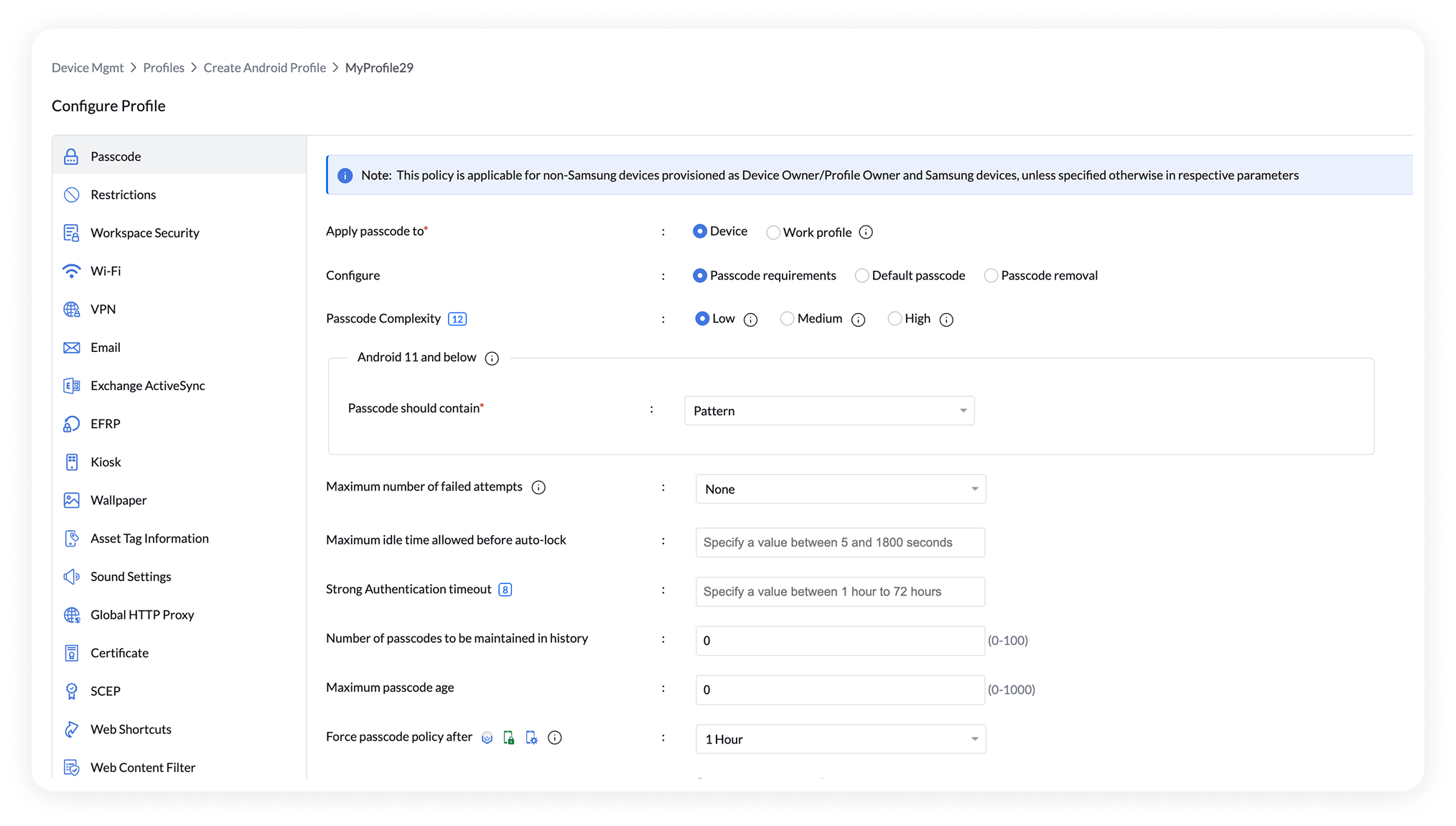
ManageEngine Mobile Device Manager Plus is a comprehensive Android MDM software solution that empowers IT teams to manage, secure, and monitor every Android device in their organization—from smartphones and tablets to rugged handhelds and kiosks.
This Android device management software provides complete lifecycle control, from device onboarding to app deployment, security enforcement, and real-time troubleshooting, all from a single centralized console.
1. Streamlined Device Enrollment
The first step in Android device management is seamless enrollment—and Mobile Device Manager Plus makes it effortless.
The software supports multiple Android Enterprise enrollment methods that fit every deployment scenario:
- Zero-touch enrollment: Preconfigure Android Enterprise devices purchased through authorized resellers to auto-enroll with policies on first boot.
- QR code enrollment: Simplify onboarding by scanning a unique QR code from the MDM console.
- NFC enrollment: Transfer setup configurations to new devices using NFC bumping for fast deployment.
- EMM token (afw#setup) enrollment: Let users enter a setup code to automatically connect their device to MDM.
- Google account–based sign-in: Integrate with Google Workspace for seamless work email registration.
Whether the devices are company-owned or employee-owned, ManageEngine’s Android MDM software ensures quick, consistent, and policy-compliant onboarding across the enterprise.
2. Secure BYOD Containerization
Modern businesses often support Bring Your Own Device (BYOD) environments. Mobile Device Manager Plus addresses this through Work Profile–based containerization, a key capability of Android Enterprise MDM.
- It creates an encrypted corporate workspace separate from personal data and apps.
- IT teams can manage, monitor, and wipe only work data while preserving employee privacy.
- Data-sharing controls prevent unauthorized transfers between personal and work profiles.
This approach ensures corporate data protection and user privacy, allowing organizations to confidently implement BYOD without compliance risks.
3. Kiosk Mode and App Management
ManageEngine’s Android MDM software offers full-fledged kiosk management capabilities that turn devices into dedicated-purpose endpoints for business use.
- Configure single-app or multi-app kiosk modes for POS terminals, self-service stations, or educational tablets.
- Lock down device settings by disabling hardware buttons, status bar, and notifications.
- Customize device UI with your company logo, wallpaper, and shortcuts.
- Push or update business apps silently via Managed Google Play integration.
These features help industries such as retail, logistics, manufacturing, and healthcare deploy Android devices securely and efficiently for frontline operations.
4. Remote Troubleshooting and Support
Downtime costs time and money. With Mobile Device Manager Plus, IT teams can remotely view, control, and fix Android devices in real time:
- Perform remote actions such as lock, reboot, locate, or wipe. Additional capabilities include restarting devices, clearing app data, and resetting passcodes—even when the device is offline.
- Gain remote access to any device under full management, without OEM limitations.
- Transfer files or chat with end users for quicker issue resolution.
This eliminates the need for physical intervention, cutting support costs and accelerating issue resolution—especially for distributed workforces.
5. Location Tracking and Geofencing
This solution provides advanced location tracking capabilities using GPS, Wi-Fi, and cellular data.
- Track real-time device locations directly from the dashboard.
- Set geofences—virtual boundaries—to trigger automated alerts or actions when devices move outside designated zones.
- Maintain location history logs for auditing, compliance, or recovery.
These features are invaluable for logistics, transportation, and field service teams, where tracking device movement ensures accountability and operational efficiency.
6. Advanced Reporting and Analytics
ManageEngine Mobile Device Manager Plus includes powerful reporting and analytics tools that help IT administrators maintain visibility and compliance.
Generate detailed reports on:
- Device compliance status and policy adherence.
- App usage and installation trends.
- Security incidents, such as rooted devices or policy violations.
- Enrollment statistics to identify unmanaged endpoints.
7. Advanced Compliance and Specialized Device Management
ManageEngine Mobile Device Manager Plus goes beyond conventional Android MDM capabilities by addressing real-world enterprise challenges such as compliance enforcement, closed-network management, and Google-free environments.
- Context-aware compliance: Automate policy enforcement based on geolocation, device inactivity (for instance, when a device remains offline for extended periods), management status, or device integrity checks such as rooting and SafetyNet attestation.
- Closed-network support: Manage and secure devices operating in isolated or air-gapped environments—ideal for defense, government, or other high-security organizations that prohibit external connectivity.
- Non-FCM device management: Seamlessly manage Android devices that do not rely on Google services or Firebase Cloud Messaging (FCM), including rugged or specialty devices and those used in regions like China where Google services are restricted.
These capabilities make Mobile Device Manager Plus a versatile solution for organizations with diverse security needs, ensuring compliance and control across every Android deployment scenario.
Benefits of using Android MDM in organizations
Android MDM solutions give organizations huge advantages to optimize their mobile device strategy. These platforms create measurable business value through better control and security, not just solving problems.
Improved device visibility
Device visibility is a key benefit of Android MDM implementation. IT teams can track and monitor device locations in real time to find devices quickly if they're lost or stolen. The centralized dashboards let administrators see hardware details, installed apps, OS versions, and security status all in one place Yes, it is much easier for IT departments to keep accurate device records without spending time on manual tracking.
Centralized IT control
Android MDM gives unified control over device fleets of all types, which eliminates scattered management approaches. Administrators can set up and manage devices from anywhere. Teams can enforce consistent policies on all endpoints and save time by automating routine tasks like patching and installing apps. IT teams cut response times by 60% with remote troubleshooting tools that fix technical issues without touching the device.
Enhanced data security
Data protection makes Android MDM implementation vital. These platforms encrypt sensitive device information to minimize data breach risks. Administrators enforce strong password policies and can lock or wipe compromised devices remotely. Advanced security features include immediate compliance monitoring that alerts automatically for non-compliant activities. Organizations keep tight control over corporate data while meeting regulatory requirements in industries of all types.
Separation of work and personal data
Work Profile functionality creates clear lines between work and personal content on Android devices. Work apps and data stay isolated in an encrypted workspace while personal information remains private. IT administrators can only see and manage work content, which protects employee privacy on BYOD devices. Companies can remove just the corporate data when employees leave, and personal content stays untouched. This balance makes BYOD more appealing by addressing security and privacy needs.
Scalability for growing teams
MDM platforms grow naturally with expanding device fleets. Solutions support cloud, on-premises, or hybrid deployments to fit different IT infrastructure needs. Android MDM handles many device types at once, from smartphones to specialized hardware like point-of-sale terminals. Businesses maintain consistent security as their device ecosystem grows and changes over time.
Getting started with Android MDM
A successful Android MDM implementation needs proper planning and execution. The deployment's success depends on good preparation in several important areas.
Evaluating your device environment
Start with a full inventory of your Android devices. Document hardware models, OS versions, and user groups. Think over which devices are company-owned versus personal (BYOD) and spot current security gaps. Your next step is to define specific management needs—from simple email security to full device control.
Selecting the right MDM Android platform
The right Android mobile device management software should give you flexible deployment options (cloud, on-premises, or hybrid). Review pricing structures and compare per-device versus per-user models. Look beyond cost to check vendor reliability through customer reviews and support quality. Your future needs are vital for growth planning.
Steps to deploy and configure
The deployment process includes creating user groups, setting up policies, and configuring enrollment. Most companies test with a pilot program before full implementation. Set up clear security policies for authentication, app management, and data protection. Device enrollment happens through QR codes or email invitations.
Training staff and monitoring usage
Create clear training materials that explain Android MDM's importance and proper usage. Your management console helps track device compliance and usage patterns after implementation. User feedback helps you fine-tune policies to balance security and usability effectively.
How Android MDM fits into broader IT management
Android MDM software serves as a crucial component in enterprise IT ecosystems, going well beyond basic deployment. A clear understanding of system interconnections and specialized toolsets helps companies make the most of their technology investments.
Integration with Unified Endpoint Management (UEM)
UEM platforms enhance Android MDM's capabilities by bringing all endpoint types into one management framework. These endpoints include desktops, laptops, IoT devices, and mobile hardware. The integration will give you consistent security policies that work across every device accessing company resources. UEM delivers better breach prevention through centralized control and visibility. Advanced analytics help spot suspicious patterns in your network.
Within the ManageEngine UEM suite, Mobile Device Manager Plus integrates seamlessly with Endpoint Central, Patch Manager Plus, and Analytics Plus. This interconnected ecosystem provides a 360° view of device health, patch compliance, and asset utilization.
Combining MDM with RMM tools
Android mobile device management paired with Remote Monitoring & Management (RMM) creates a powerful IT ecosystem. RMM tools focus on servers, workstations, and networks, while MDM excels at mobile device control. These systems work together to create a complete management solution. Healthcare providers, to name just one example, use both systems to maintain HIPAA compliance. RMM takes care of infrastructure monitoring as Android MDM locks down clinical mobile devices.
Choosing the right Android MDM vendor
The right Android MDM provider should match your specific needs, technical capabilities, and budget limits. Many vendors now provide "single pane of glass" solutions. These combine MDM with broader IT management tools, which makes administration simpler and reduces your technology stack's complexity.
ManageEngine’s proven record in endpoint management ensures enterprises get continuous updates aligned with Google’s evolving Android Enterprise standards. The solution is ISO 27001 certified, backed by round the clock technical support, and trusted by over 30,000 organizations worldwide.
 Meet the author
