
- What is iOS MDM?
- Why do businesses need iOS MDM?
- What does iOS MDM actually do?
- How Does iOS MDM Work?
- BYOD vs. COPE vs. Fully Managed
- Features of Apple MDM Software
- Why iOS MDM Matters for Enterprises
- Why is ManageEngine MDM the best iOS MDM?
Share:




Is your team running on Apple? Are you finding it hard to manage multiple Apple devices across your team? Things can get chaotic very quickly. Updates get missed, data can be lost, and device access may not stay secure at all times. This is where an iOS MDM solution makes a real difference. In this article, we explain what iOS MDM is, how it helps businesses stay secure, organized, and in control, and how to choose the right iOS MDM solution for your business.
What is iOS MDM?
iOS Mobile Device Management (MDM) is the Apple-defined management framework that lets organizations control and secure Apple devices through an iOS MDM solution to solve the problem of managing and securing multiple apple devices. It allows organizations to remotely enroll, configure, and secure iPhones, iPads, macOS from a single, centralized dashboard. By leveraging Apple's native management architecture , businesses can ensure that every device stays updated, compliant, and equipped with the right tools for the job no matter where they are.
Why do businesses need iOS MDM?
When you are managing hundreds of Apple devices, doing it without a centralized management system quickly becomes both a security risk and an administrative nightmare. Without control, devices get lost, settings drift, apps go unpatched, and sensitive data ends up exposed.
Organizations use iOS MDM for three main reasons.
- Security and data protection
If a device is lost or stolen, a managed iPhone or Mac can be remotely locked or wiped. iOS MDM also lets IT enforce passcodes, encryption, and security policies, so company data stays protected even when the device is not.
- Scalability and automation
Manually setting up hundreds of iPhones, iPads, or Macs takes a huge amount of time. With iOS MDM, devices can be enrolled and configured automatically using zero-touch deployment, so they arrive ready to use straight out of the box without IT needing to handle each one.
- Compliance
Industries like healthcare, finance, and education must follow strict data protection and privacy regulations. iOSMDM provides audit trails, security controls, and device restrictions that help organizations prove they are meeting these compliance requirements.
What does iOS MDM actually do?
Think of iOS MDM as a remote control for your company’s Apple devices. It manages the entire lifecycle of a device, from the moment it is set up to the day it is retired.
- Initial setup
Devices can be enrolled using zero-touch enrollment, Apple Configurator, or selfenrollment. Once enrolled, security settings, Wi-Fi, email, and other configurations can be applied centrally.
- App distribution
MDM lets IT push required work apps directly to devices and keep them updated in the background, without users needing to do anything.
- Feature restrictions
Admins can disable features like the camera, AirDrop, or Game Center to prevent distractions, data leaks, or misuse.
- Inventory and visibility
MDM gives real-time insight into every device, including OS versions, installed apps, and compliance status. This makes it much easier to spot risks and keep the entire fleet secure.
Platforms like ManageEngine Mobile Device Manager Plus bring these iOS MDM capabilities to life through a single dashboard.
How Does iOS MDM Work?
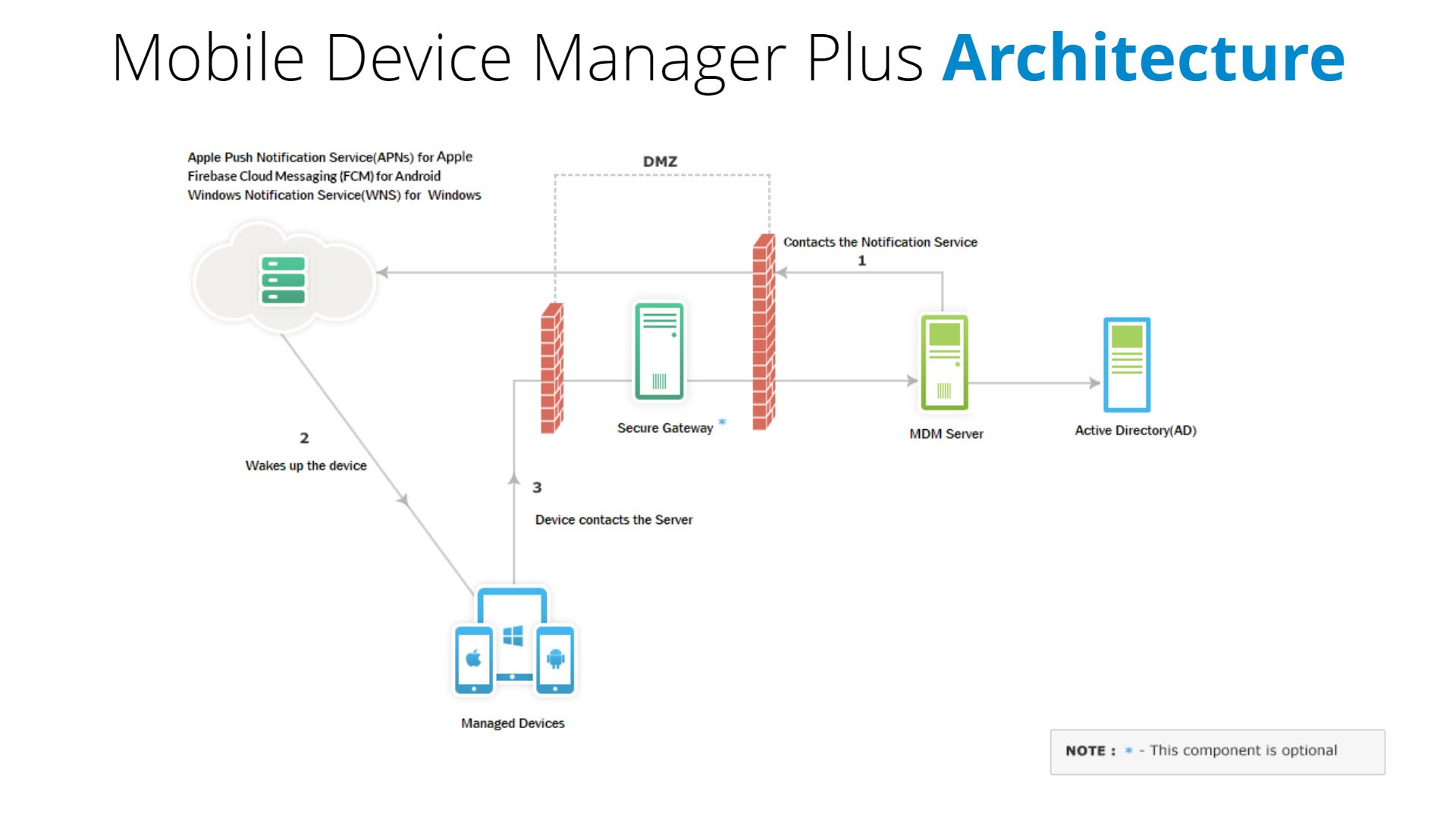
At a high level, iOS MDM works through a secure communication loop between three components: the MDM server, Apple Push Notification service (APNs), and the iOS device. Each part plays a specific role in making sure devices can be managed remotely, safely, and in real time.
The technical flow
iOS MDM works through a secure communication loop between three parts: the MDM server, Apple Push Notification service (APNs), and the device itself.
The MDM server is the control center. This is where IT admins create policies, push updates, deploy configurations, and send commands like lock or wipe.
Apple Push Notification service, or APNs, acts as the messenger. When the MDM server needs to send a command to a device, it sends a notification or a ping through APNs. APNs does not carry any sensitive data or the command itself. It simply tells the device that a new instruction is waiting.
The device then receives this notification and connects to the MDM server to download and execute the command, whether it is installing an app, changing a setting, or reporting status. This design ensures that Apple devices stay secure with real time monitoring and management.
APNs and trust establishment
For an MDM server to command any Apple device, authorization from Apple is essential. This authorization is obtained by generating an APNs certificate.
The organization creates an APNs certificate by linking its MDM server to an Apple ID through the Apple Push Certificate Portal. Without a valid APNs certificate, the server cannot signal devices, and no management actions can be delivered. Learn how to create an APNs certificate and add it to ManageEngine’s Apple MDM solution, Mobile Device Manager Plus.
Device enrollment and the MDM profile
Once the APNs trust is in place, devices can be enrolled into MDM. Enrollment is the process of installing an MDM profile on the device. This profile is a signed configuration profile that links the device to the organization’s MDM server and grants it management authority.
There are several enrollment methods, depending on ownership and use case.
Automated Device Enrollment (ADE)
Used for corporate-owned devices bought through Apple or authorized resellers. Devices automatically enroll into MDM during setup and become supervised, with the MDM profile locked in place.
Apple Configurator enrollment
Used for devices not purchased through Apple Business Manager. IT manually assigns and supervises the device using a Mac before handing it to the user.
User-based enrollment
Designed for BYOD. Users enroll their own devices through a portal, and only work apps and data are managed using containerization.
Across all the enrollment methods, same thing happens. An MDM profile is created in the server is installed in the device. This profile contains the organization's security policies, restrictions and management configurations and can be used across for multiple devices or device groups and can be updated based on the requirement.
BYOD vs. COPE vs. Fully Managed: Understanding User Privacy
Apple is known for its privacy policies and its MDM framework is designed to respect the boundary between work and life. How much control an IT department has depends on the "Ownership Model" and the level of containerization used.
1. BYOD (Bring Your Own Device)
On an employee owned device, Apple creates a separate volume on the disk where corporate data will be stored securely. This process is called containerization. BYOD devices are unsupervised.
- Privacy
IT cannot see personal photos, messages, browsing history, or personal apps.
- Control
Management is limited to the "Work Container." If an employee leaves, IT can perform a Selective Wipe, deleting only work emails, data and applications while leaving personal photos and data untouched.
2. COPE (Corporate Owned, Personally Enabled)
COPE is the middle ground in the modern mobile device management where the organization own the hardware but allows the employees to use it as their primary mobile. And like BYOD devices, containerization is used to segregate organaization data and personal data.
3. Fully Managed (Supervised Devices)
Corporate-owned devices operate differently. When a company issues a device and enrolls it using Automated Device Enrollment or Apple Configurator, it becomes supervised. Supervision removes the need for containerization because the entire device is considered corporate property.
On a supervised, corporate-owned device, IT has full control. It can silently install and remove apps, enforce OS updates, block features like AirDrop and iCloud, restrict system services, and remotely wipe the entire device if needed. This level of control is essential for regulated industries, shared devices, and high-security environments.
iOS MDM Ownership Models Comparison
| Feature | BYOD | COPE | Fully Managed |
|---|---|---|---|
| Device ownership | Employee | Organization | Organization |
| Enrollment type | User-based enrollment | Automated or Configurator | Automated or Configurator |
| Supervision | No (Unsupervised) | Usually supervised | Yes (Supervised) |
| Containerization | Yes | Yes | Not required |
| Separation of work and personal data | Yes | Yes | Entire device is corporate |
| IT access to personal data | No | No | No(but IT can erase it via full wipe) |
| Silent app installation | No | Limited | Yes |
| Selective wipe (work data only) | Yes | Yes | No |
| Full device wipe | No | Yes | Yes |
| OS update enforcement | Limited | Moderate | Full |
| Feature restrictions (AirDrop, iCloud, etc.) | Limited | Moderate | Full |
| Best suited for | BYOD programs | Mixed-use corporate devices | High-security, regulated environments |
Features of Apple MDM Software
An effective Apple MDM software or iOS device management solution must support a comprehensive set of features to securely manage, monitor, and control Apple devices such as iPhones, iPads, Macs, and Apple TVs in an enterprise environment. Below are the essential features every Apple MDM solution should offer.
Apple Device Enrollment
Apple MDM solutions simplify device onboarding by enabling remote and automated enrollment methods.
- Remotely enroll Apple devices using over-the-air (OTA) enrollment.
- Control the number of devices that can be enrolled per user.
- Authenticate users using one-time passcodes or enterprise credentials such as Active Directory.
- Automate bulk device enrollment using Apple Business Manager and Apple Configurator
- Enroll BYOD devices using Automated User Enrollment while ensuring user privacy and data separation.
- Seamlessly enroll devices using Managed Apple IDs assigned by the organization.
Watch our videos on how to enroll iPhone into our Apple MDM with Apple Configurator and Apple DEP. Also, learn how to enroll Apple TV into ABM using Apple Configurator.
Apple Profile Management
Apple profile management allows IT teams to enforce configurations and policies across devices.
- Create and deploy configuration profiles in bulk to devices and groups.
- Separate work and personal apps using containerization and policy restrictions.
- Restrict non-productive features and apps such as camera, YouTube, AirDrop, iCloud Photos, and Safari.
- Configure passcodes, Wi-Fi, VPN, Touch ID, App Lock, AirDrop, and Global HTTP Proxy.
- Deploy iPhones and iPads in Kiosk Mode directly from the MDM console.
Apple App Management
Apple MDM solutions enable centralized and secure application management.
- Silently deploy App Store and in-house apps without requiring Apple IDs or user interaction.
- Prevent users from installing unauthorized or untrusted applications.
- Manage and distribute app licenses using Apple Business Manager.
- Purchase and deploy apps based on departments or locations using location tokens.
- Track app license usage and availability through detailed reports.
- Control app updates and approve fixes or upgrades without disrupting users.
- Publish apps to an internal App Catalogue for self-service installation.
- Blocklist system apps, user-installed apps, and MDM-installed apps when required.
Apple Asset Management
Gain complete visibility into Apple devices across your organization
- View device summaries including hardware details, configuration status, and installed apps.
- Monitor network usage and device compliance information.
- Track feature-level data such as Activation Lock and location services.
- Access ready-to-use reports for device inventory and usage insights.
Apple Security Management
Apple MDM software ensures enterprise-grade security for managed devices.
- Enforce strong passcode policies with limits on failed attempts.
- Automate iOS and iPadOS updates using managed OS update policies.
- Remotely lock devices to prevent unauthorized access.
- Detect and automatically remove jailbroken devices from the network.
- Enable Lost Mode for missing devices and perform full or corporate-only data wipes to protect sensitive information.
Audit and Reporting
Advanced reporting helps IT teams maintain control and compliance.
- Generate detailed audit reports for iOS and iPadOS devices.
- Monitor app installation and compliance status across devices.
- Customize reports based on device model, installed apps, users, or groups.
Why iOS MDM Matters for Enterprises
iOS devices are built for consumers by default. MDM is what turns them into enterprisegrade endpoints.
Without MDM:
- Devices are manually set up
- Apps are unmanaged
- Data can be lost
- Lost phones become security incidents
With MDM:
- Devices are deployed in minutes
- Security policies are enforced automatically
- Compliance is continuous
- IT retains control even when devices are remote
For enterprises running sales teams, frontline staff, healthcare workers, or distributed employees, iOS MDM is what makes Apple devices scalable, secure, and governable at business level.
Why is ManageEngine Mobile Device Manager Plus the best iOS MDM for Apple devices?
Comprehensive Apple MDM Support: ManageEngine Mobile Device Manager Plus supports all Apple devices, including iPhones, iPads, MacBooks, and Apple TVs, allowing organizations to easily enroll, configure, and secure devices running iOS, iPadOS, macOS, and tvOS.
Unified Console for Multi-Platform Management: In addition to managing Apple devices, the platform extends its capabilities to Android, Windows, and Chrome devices, providing a single, unified management console for all device types.
Simplified Enrollment and Deployment: Streamlined enrollment processes make it easy to onboard devices quickly, reducing IT workload and ensuring a smooth deployment for businesses of all sizes.
Enhanced Security and Compliance: Robust security features help organizations enforce policies, protect sensitive data, and meet compliance requirements with ease, ensuring your Apple devices remain secure.
Efficient App and Content Management: Manage and distribute apps and content seamlessly across Apple devices, ensuring that employees have access to the tools they need, when they need them.
Scalable Solution for Businesses of All Sizes: Whether you're a small business or a large enterprise, Mobile Device Manager Plus is designed to scale with your organization's needs, offering flexible and effective device management solutions.
