What is automated network mapping?
Although topology maps are the most visible output, automated network mapping is fundamentally about maintaining the underlying network model. Visualization, monitoring, and operational workflows all draw from this same source of network information.
In this article, we'll cover why organizations automate network mapping, how the discovery and modeling process works, what information it collects, and how the resulting network model supports day-to-day operations, and what makes an effective automated network mapping solution.
Why organizations automate network mapping
Enterprise networks evolve continuously as devices are added, replaced, reconfigured, or retired across campuses, branch offices, cloud environments, and virtual infrastructure. As these changes accumulate, manually maintained diagrams become progressively less reliable, making them difficult to trust for troubleshooting, planning, or documentation.
Organizations automate network mapping to keep network information synchronized with the infrastructure itself. Instead of relying on periodic manual updates, automated discovery continuously identifies devices, detects relationship changes, and refreshes the network model as the environment evolves. The result is an accurate, continuously maintained representation of the network that operational teams can rely on without manually updating diagrams or documentation.
Automated network mapping vs. manual network mapping
| Automated | Manual |
|---|---|
| Continuously updated | Requires manual edits |
| Discovery-driven | Diagram-driven |
| Scales with network changes | Becomes outdated over time |
| Supports monitoring & visualization | Primarily documentation |
| Better for dynamic networks | Suitable for small, static networks |
How automated network mapping works
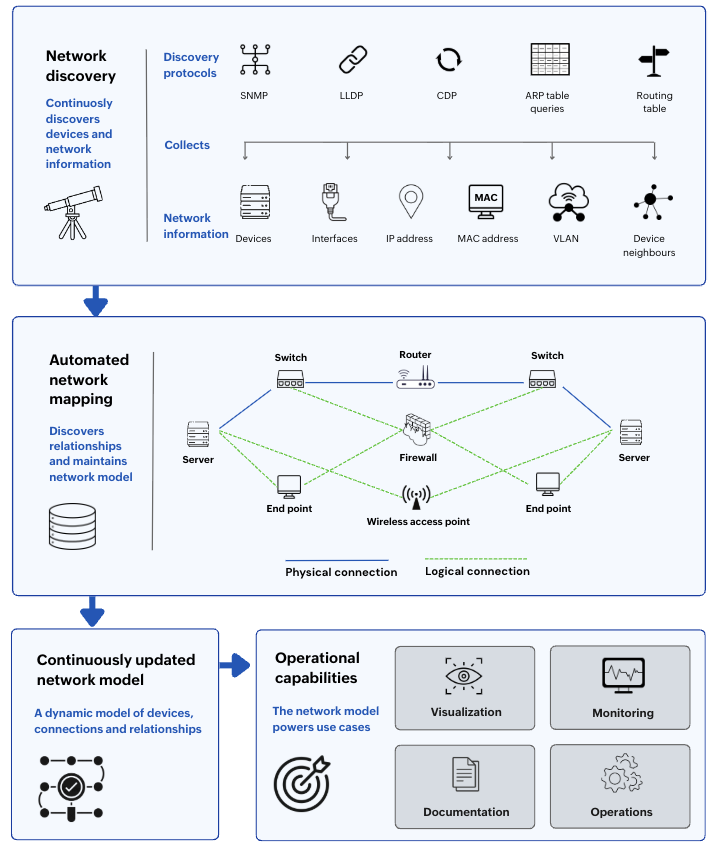
Automated network mapping follows a straightforward workflow: discovery identifies network devices, relationship discovery determines how those devices connect, and the collected information is consolidated into a network model that visualization, monitoring, and documentation tools consume.
Discovery commonly begins with SNMP, which identifies devices and collects inventory information. LLDP and CDP establish neighbor relationships by identifying which devices connect directly to one another. ARP table queries associate IP addresses with MAC addresses, while routing tables extend visibility beyond directly connected networks by revealing Layer 3 paths.
Together, this information builds a structured network model containing devices, interfaces, attributes, and Layer 2 and Layer 3 relationships. As discovery runs periodically, the model stays synchronized with the network, allowing topology maps, monitoring, documentation, and other operational workflows to reflect current infrastructure automatically.
What triggers a rediscovery cycle?
Keeping the network model current depends on rediscovery. Most automated network mapping solutions support several approaches, depending on how frequently the environment changes and how quickly updates are needed.
- Scheduled rediscovery runs at predefined intervals (for example, daily or weekly) to detect newly added, removed, or reconfigured devices.
- Change-triggered rediscovery updates the network model after infrastructure changes or network events, where supported.
- On-demand rediscovery allows admins to refresh part or all of the network immediately after planned maintenance or troubleshooting.
If a device is temporarily unreachable because of a network outage, maintenance window, or unavailable credentials, it may not be fully rediscovered during that cycle. Most solutions attempt discovery again during the next scheduled or manually initiated rediscovery.
What information does automated network mapping collect?
Automated network mapping collects multiple categories of network information to build an accurate network model.
| Data collected | What it contributes |
|---|---|
| Devices | Establishes the inventory of network assets |
| Interfaces | Identifies connection points on each device |
| IP addresses | Provides Layer 3 addressing information |
| MAC addresses | Correlates hardware with Layer 2 communication |
| VLANs | Identifies logical network segmentation |
| Device neighbors | Establishes direct connectivity between devices |
| Layer 2 adjacencies | Maps switching relationships |
| Layer 3 routing paths | Shows traffic flow across routed networks |
| Physical links | Represents cabling and wireless connectivity |
| Logical relationships | Organizes infrastructure around services or business context |
Together, these data points form the network model that supports visualization, monitoring, troubleshooting, documentation, planning, security investigations, and compliance reporting.
How automated network mapping supports network operations
Organizations automate network mapping because operational decisions depend on an accurate, continuously updated view of the network.
Faster troubleshooting through continuously updated topology
During a network issue, admins need to identify where the fault originated and which downstream devices or services are affected. A topology map built from the current network model, combined with live monitoring data, quickly narrows the investigation to the affected network segment.
Accurate network documentation through automated discovery
Manual documentation reflects the network only at the time it was created. As automated discovery updates the network model, documentation generated from it remains aligned with the live environment, reducing maintenance effort while improving audit readiness and compliance reporting that depend on accurate network documentation.
Capacity planning using a live network model
As networks grow, administrators need to understand both where infrastructure is deployed and how heavily it is being used. Topology, rack, and floor views provide deployment context, while utilization data layered onto the network model highlights capacity constraints and suitable expansion points.
Security investigations with network context
When suspicious activity is detected, security teams need to understand where the affected device sits within the network and what other systems it communicates with. An accurate network model helps investigators quickly identify neighboring devices, potential lateral movement paths, and affected infrastructure, reducing the time required to assess the scope of an incident.
Safer change management with current dependency mapping
Before planned changes such as firmware upgrades, VLAN reconfigurations, or device replacements, the network model identifies affected devices and dependencies. After implementation, monitoring validates that those devices continue operating normally, reducing the risk of unnoticed service disruption.
Example: During a planned branch office switch replacement, the next discovery cycle automatically updates the device inventory, interface relationships, and topology. Maps, documentation, and operational views reflect the new infrastructure without requiring manual edits.
Note: Automated network mapping is only as accurate as the discovery process. Devices that are unreachable or unavailable for discovery may not appear completely in the resulting network model.
ManageEngine OpManager: Comprehensive network monitoring with automated network mapping
ManageEngine OpManager is a comprehensive network monitoring solution that includes automated network mapping as one of its core capabilities. Through automated discovery, it continuously maintains an up-to-date network model that powers Layer 2 and Layer 3 topology maps, business views, site maps, rack and floor views, while providing the structural context for dashboards, performance monitoring, fault management, dependency analysis, and troubleshooting. By combining network mapping, visualization, and monitoring in a single platform, OpManager gives administrators a unified view of both how the network is built and how it is performing.
FAQ
Does automated network mapping replace network documentation?
It significantly reduces the effort required to maintain infrastructure documentation by keeping the underlying network model current. Organizations still maintain architecture diagrams, design standards, and implementation documentation that extend beyond automatically discovered topology.
Can automated network mapping work in a multi-vendor network?
How often should an automated network map be updated?
Network discovery, mapping and monitoring made simple
ManageEngine OpManager for enterprise network monitoring
Download nowBy Javith Razvi,
ManageEngine Team