
ManageEngine Patch Manager Plus helps you to protect your computers from WannaCrypt ransomware. After detecting the computers that are vulnerable, Patch Manager Plus lets you identify the computers that are missing critical patches and then deploy those patches immediately. WannaCrypt ransomware targets computers that are out of date, so you will have to verify that all the critical security patches are deployed on all the computers. Patch Manager Plus has already released the security patches below. You can now be assured that your network is secure from WannaCrypt ransomeware attack.
Download free e-book: Six best practices for escaping ransomware
Which computers are targeted?
WannaCrypt ransomware is a worm that targets computers running Windows operating systems that are not up-to-date. Refer this article for more details on the ransomware and its effects.
Patch Manager Plus has already released the following security patches.
For computers running Windows XP, Windows Vista, Windows Server 2003, Windows Server 2008 and Windows 8:
| Patch ID 22058 | Security Update for Windows Vista (KB4012598) |
| Patch ID 22059 | Security Update for Windows Vista for x64-based Systems (KB4012598) |
| Patch ID 22060 | Security Update for Windows Server 2008 (KB4012598) |
| Patch ID 22061 | Security Update for Windows Server 2008 for x64-based Systems (KB4012598) |
| Patch ID 22513 | Security Update for Windows XP SP3 (KB4012598) |
| Patch ID 22516 | Security Update for Windows XP SP2 for x64-based Systems (KB4012598) |
| Patch ID 22514 | Security Update for Windows Server 2003 (KB4012598) |
| Patch ID 22517 | Security Update for Windows Server 2003 for x64-based Systems (KB4012598) |
| Patch ID 22515 | Security Update for Windows 8 (KB4012598) |
| Patch ID 22518 | Security Update for Windows 8 for x64-based Systems (KB4012598) |
| Patch ID 22062 | March, 2017 Security Only Quality Update for Windows 7 (KB4012212) |
| Patch ID 22063 | March, 2017 Security Only Quality Update for Windows 7 for x64-based Systems (KB4012212) |
| Patch ID 22064 | March, 2017 Security Only Quality Update for Windows Server 2008 R2 for x64-based Systems (KB4012212) |
| Patch ID 22044 | March, 2017 Security Monthly Quality Rollup for Windows 7 (KB4012215) |
| Patch ID 22045 | March, 2017 Security Monthly Quality Rollup for Windows 7 for x64-based Systems (KB4012215) |
| Patch ID 22046 | March, 2017 Security Monthly Quality Rollup for Windows Server 2008 R2 for x64-based Systems (KB4012215) |
| Patch ID 22070 | March, 2017 Security Only Quality Update for Windows Server 2012 (KB4012214) |
| Patch ID 22150 | March, 2017 Security Monthly Quality Rollup for Windows Server 2012 (KB4012217) |
| Patch ID 22065 | March, 2017 Security Only Quality Update for Windows 8.1 (KB4012213) |
| Patch ID 22066 | March, 2017 Security Only Quality Update for Windows 8.1 for x64-based Systems (KB4012213) |
| Patch ID 22067 | March, 2017 Security Only Quality Update for Windows Server 2012 R2 (KB4012213) |
| Patch ID 22047 | March, 2017 Security Monthly Quality Rollup for Windows 8.1 (KB4012216) |
| Patch ID 22148 | March, 2017 Security Monthly Quality Rollup for Windows 8.1 for x64-based Systems (KB4012216) |
| Patch ID 22149 | March, 2017 Security Monthly Quality Rollup for Windows Server 2012 R2 (KB4012216) |
| Patch ID 22509 | 2017-05 Cumulative Update for Windows Server 2016 for x64-based Systems (KB4019472) | KB4013429 > KB4015438 > KB4016635 > KB4015217 > KB4019472 |
| Patch ID 22507 | 2017-05 Cumulative Update for Windows 10 Version 1607 for x86-based Systems (KB4019472) | KB4013429 > KB4015438 > KB4016635 > KB4015217 > KB4019472 |
| Patch ID 22508 | 2017-05 Cumulative Update for Windows 10 Version 1607 for x64-based Systems (KB4019472) | KB4013429 > KB4015438 > KB4016635 > KB4015217 > KB4019472 |
| Patch ID 22345 | Cumulative Update for Windows 10 Version 1511 (KB4019473) | KB4013198 > KB4016636 > KB4015219 > KB4019473 |
| Patch ID 22346 | Cumulative Update for Windows 10 Version 1511 for x64-based Systems (KB4019473) | KB4013198 > KB4016636 > KB4015219 > KB4019473 |
| Patch ID 22340 | Cumulative Update for Windows 10 (KB4015221) | KB4012606 > KB4016637 > KB4015221 |
| Patch ID 22341 | Cumulative Update for Windows 10 for x64-based Systems (KB4015221) | KB4012606 > KB4016637 > KB4015221 |
How do you secure the network from WannaCrypt using Patch Manager Plus?
Deploying the critical patches to respective computers
- Ensure that your Patch Vulnerability database is up to date. To update, click Patch Mgmt >> Update Now in the bottom left
- After syncing the database, scan the managed computers. To scan click Patch Mgmt >> Systems >> Scan Systems >> Scan All.
- You can detect if these patches are missing by following these steps: Click Patch Mgmt >> Choose Patches >> Choose Applicable Patches(Detailed View) >> Search 'WannaCrypt' in the Patch Description box >> You can identify the computers that are missing the critical patches or already have the patches installed on them.
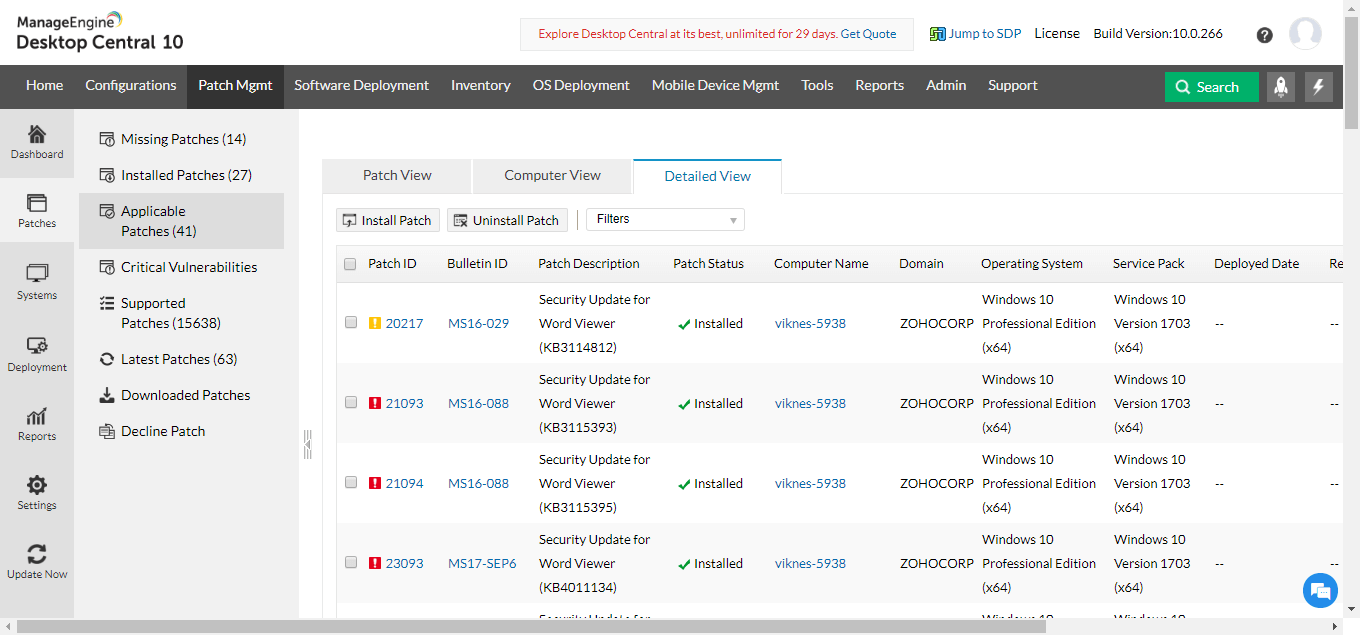

You can now feel assured that your network is secure from WannaCrypt ransomer attack.
Don't have Patch Manager Plus? Try our free edition and manage 25 computers and 25 mobile devices for free.
Training video
