

You’ve set up Kerberos, secured user credentials, and restricted admin rights. But attackers can still abuse legitimate Windows features like constrained delegation to move laterally and compromise critical systems. Let’s look at how this attack works and how to stop it.
What is a constrained delegation attack?
Constrained delegation is a Kerberos feature that allows a service to impersonate users and access specific resources on their behalf. It is used in environments where a front-end service needs to interact with back-end services using the original user's identity. Administrators control which services can be accessed, making the delegation limited or constrained.
A constrained delegation attack occurs when an attacker compromises a computer or user/service account that has been configured for constrained delegation. The attacker can then impersonate any user in the domain, including privileged accounts, and request Kerberos service tickets to access sensitive resources. Since the attack uses legitimate authentication mechanisms, it can be difficult to detect.
How is constrained delegation configured?
Windows environments configure constrained delegation via Active Directory Users and Computers (ADUC) or PowerShell, allowing specific accounts to impersonate users only to designated services on target systems.
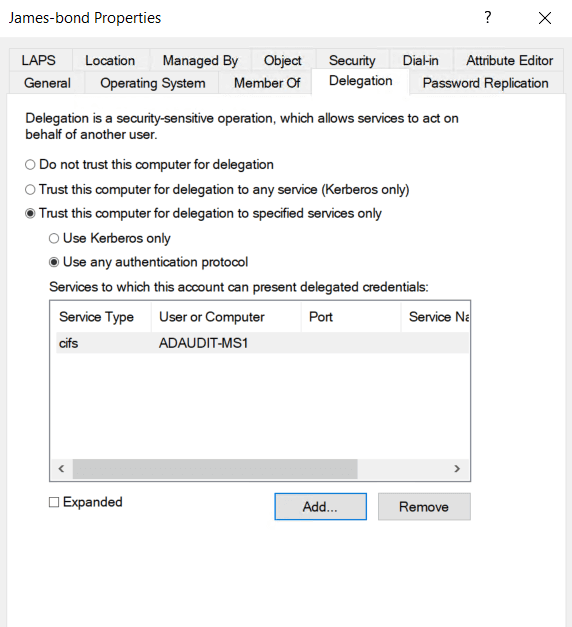
Here’s how to configure constrained delegation to a service (like CIFS) using the ADUC GUI.
- Open ADUC.
- Find the computer or service account you want to grant delegation to.
- Right-click it and choose Properties.
- Go to the Delegation tab.
- Select Trust this computer for delegation to specified services only.
- Choose either:
- Use Kerberos only (for traditional constrained delegation), or
- Use any authentication protocol (includes support for non-Kerberos protocols)
- Click Add, then choose the target service and server (e.g., cifs/server.domain.com for SMB).
Here’s how to configure constrained delegation to a service (like CIFS) using PowerShell.
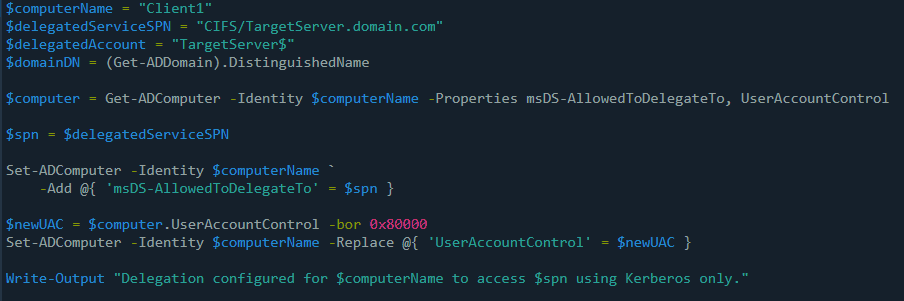
Define the delegation settings
Start by specifying the source computer that will be granted delegation (for example, Client1) and the target service (e.g., CIFS) it should access (for example, TargetServer).
$computerName = "Client1"
$delegatedServiceSPN = "CIFS/TargetServer.domain.com"
Retrieve the computer object from Active Directory
This loads the delegation settings and account control properties for the computer:
$computer = Get-ADComputer -Identity $computerName -Properties msDS-AllowedToDelegateTo, UserAccountControl
Set the service the computer is allowed to delegate to
This step configures Client1 to be allowed to delegate credentials to the specified CIFS service:
Set-ADComputer -Identity $computerName -Add @{ 'msDS-AllowedToDelegateTo' = $delegatedServiceSPN }
Enable constrained delegation (Kerberos only)
Update the UserAccountControl flag with the TRUSTED_TO_AUTH_FOR_DELEGATION value (0x80000) to enable Kerberos-only delegation:
$newUAC = $computer.UserAccountControl -bor 0x80000
Set-ADComputer -Identity $computerName -Replace @{ 'UserAccountControl' = $newUAC }
Confirm the configuration
This outputs a message to let you know that constrained delegation is now active:
Write-Output "Delegation configured for $computerName to access $delegatedServiceSPN using Kerberos only."
Constrained vs. unconstrained delegation attack
Constrained and unconstrained delegation attacks both abuse Kerberos delegation features to impersonate users. Here's how they differ:
| Constrained delegation attack | Unconstrained delegation attack |
|---|---|
| Limited to specific services explicitly allowed | Allows delegation to any service without restriction |
| Admins must specify allowed services (via msDS-AllowedToDelegateTo) | All services are implicitly trusted when delegation is enabled |
| More restrictive, lower risk if configured properly | Higher risk due to unrestricted access and TGT exposure |
| Ticket granting ticket (TGT) not stored on the intermediate system | TGT is stored in memory on the delegated system |
How a Kerberos constrained delegation attack works
Attackers typically follow these steps to carry out a constrained delegation attack:
1. Gaining access to a trusted computer or service
Attackers first find a computer or service account that has permission to impersonate users when accessing a specific service. For example, a web server might be trusted to talk to a database. If attackers can take control of this account, either by stealing its password, exploiting other vulnerabilities, or getting admin rights on the machine, they can begin the attack.
2. Checking which services it can talk to
Once they have control of the account, the attacker checks with which services it is allowed to impersonate users. This information is stored in a setting called msDS-AllowedToDelegateTo.
For example:
CIFS/JamesBond
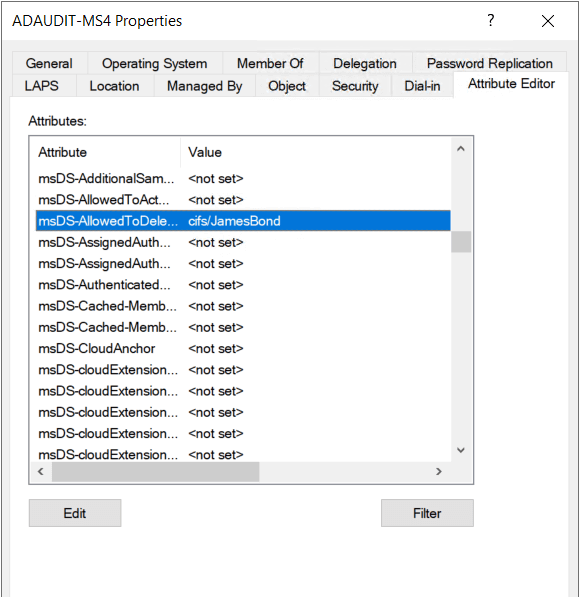
This tells them the account is allowed to act as other users when accessing the file share service on the JamesBond server.
3. Pretending to be another user
Next, the attacker uses tools like Rubeus or Impacket to generate Kerberos tickets that let them impersonate another user—usually someone with high privileges like a domain admin. They do not need to know the user’s password to do this.
This is done in two steps:
- S4U2Self is used to request a service ticket on behalf of another user.
- S4U2Proxy then uses that ticket to request access to a specific back-end service (like SQL) as if the impersonated user were making the request.
4. Accessing the target service
Now the attacker has a valid ticket that lets them access the target service, like a database or file share, as if they were the impersonated user. Because the service trusts the front-end system for delegation, it accepts the ticket without question.
5. Doing damage silently
The attacker now has access as a privileged user and can steal data, move through the network, or make changes without triggering any alarms. Since all the activity follows normal Kerberos behavior, it blends in with regular traffic. This makes the attack difficult to detect, and it can remain unnoticed for a long time.
How to detect constrained delegation attacks
Constrained delegation attacks can be detected by monitoring Kerberos ticket activity and changes to delegation-related account attributes. Watch for unusual service ticket requests, unexpected account modifications, and signs of privilege escalation or lateral movement across systems.
Key Windows event logs to monitor
- Event ID 4769: A Kerberos service ticket was requested.
- Event ID 4738: A user account was changed.
- Event ID 4672: Special privileges assigned to a new logon.
- Event ID 5136: A directory service object was modified.
How to prevent constrained delegation attacks
- Use resource-based constrained delegation
Resource-based constrained delegation allows the target service to control which accounts can delegate to it, making it harder for attackers to abuse. While more secure than traditional delegation, it should still be used with caution and regularly reviewed for potential risks.
- Limit delegation to specific services
Don’t allow services to delegate to any service unnecessarily. Constrain delegation to only the specific protocols or services required, like CIFS or HTTP. This limits the impact if a delegated account is compromised.
- Apply the principle of least privilege
Only allow delegation when it's truly required for a business function. Regularly review who has these rights and remove unused permissions. The fewer accounts that can delegate, the smaller your attack surface.
- Audit delegation settings regularly
Start by scanning Active Directory for accounts with constrained or unconstrained delegation rights. Use tools like PowerShell or ADAudit Plus to identify risky configurations. Regular audits help you catch misconfigurations before attackers do.
How ADAudit Plus helps detect constrained delegation attacks
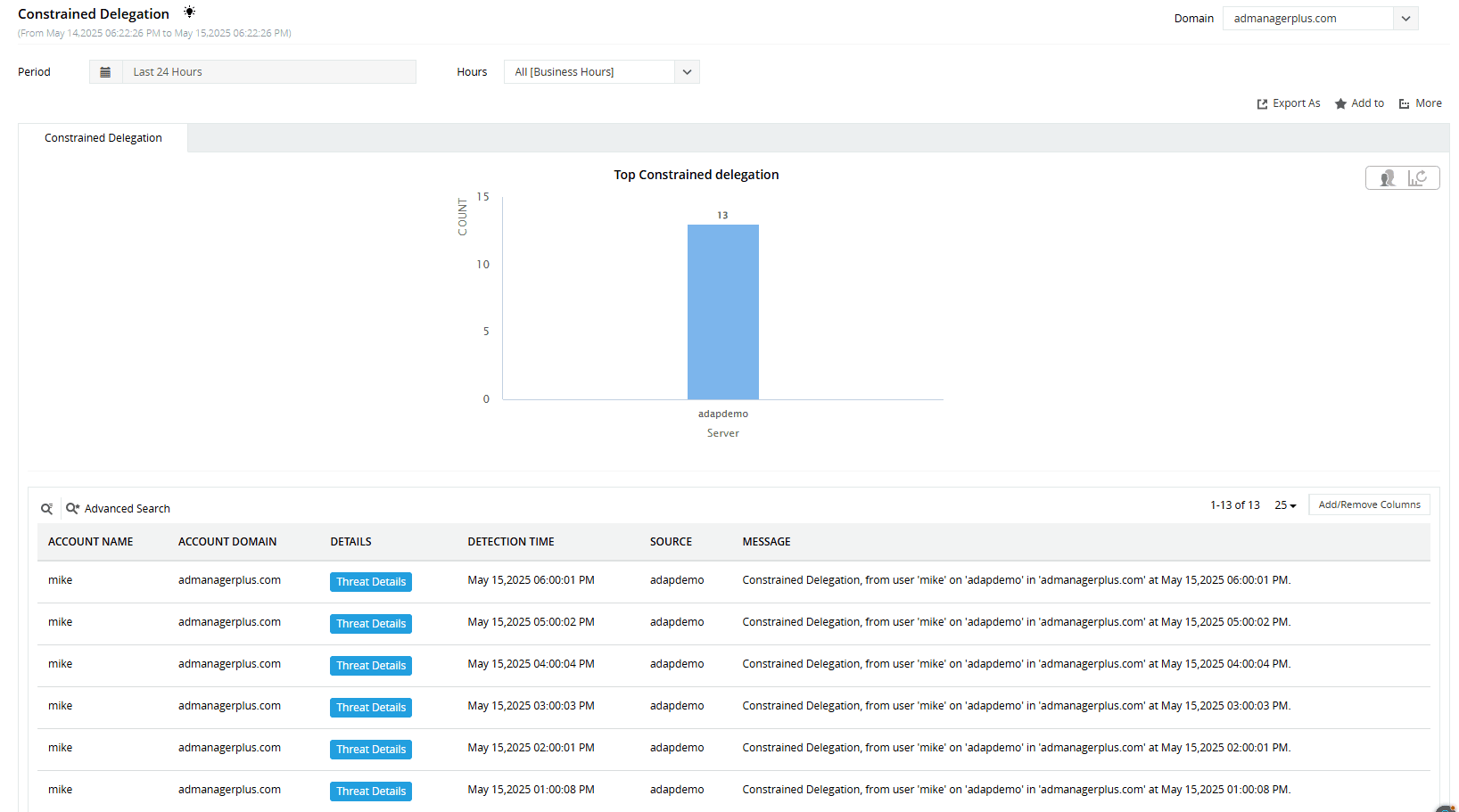
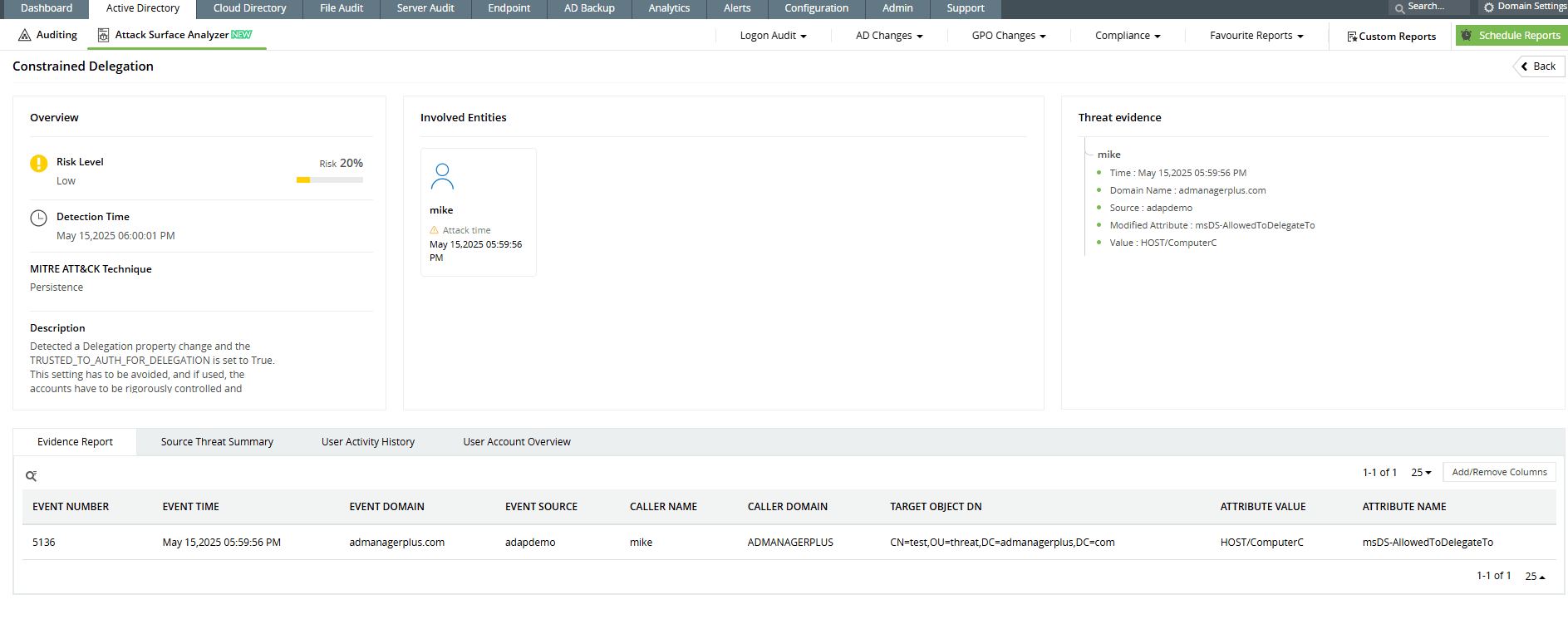
ADAudit Plus continuously monitors Kerberos ticket requests and Active Directory changes related to delegation settings. ADAudit Plus’ Attack Surface Analyzer generates real-time alerts and detailed reports on suspicious behaviors, such as unusual service ticket requests or modifications to delegation attributes. These detection capabilities help you spot and respond to constrained delegation attacks before they cause harm.
-
Track delegation attribute modifications to identify potential constrained delegation attacks.
-
Quickly pinpoint and respond to sudden constrained delegation changes before they impact your network.
Start protecting your on-premises and cloud AD resources with ADAudit Plus
Detect over 25 different AD attacks and identify potential misconfigurations within your Azure, GCP, and AWS cloud environments with the Attack Surface Analyzer.
See the Attack Surface Analyzer in actionWe're thrilled to be recognized as a Gartner Peer Insights Customers' Choice for Security Incident & Event Management (SIEM) for the fourth year in a row.









