

We all know the golden rule: Never share your password. But what if someone could take it without asking and without even needing to guess it? That is the reality of password extraction, where attackers do not crack passwords but collect them directly from your systems. Let’s break down how this stealthy tactic works and why it is so dangerous.
What is a password extraction attack?
A password extraction attack involves directly retrieving password data from a system’s memory, storage, or files, either in plaintext or hashed form, without the need for guessing. Unlike brute-force attacks, which attempt to crack passwords, extraction methods pull credentials from where they are already stored or cached.
These attacks often require privileged access, meaning they typically occur after an attacker has already infiltrated a system and is moving laterally or escalating privileges.
Here’s why you should care:
of organizations still use traditional password authentication for systems 1
of breaches involve compromised passwords 2
million is the average cost for a breach that involves stolen passwords 3
How does a password extraction attack work?
1. Gaining high-level access
The attacker first needs access to a system with elevated privileges. This could be a domain controller, a file server, or any machine where users log in. Admin rights are commonly required because password data is protected by the system.
2. Locating password data
Once inside, the attacker looks for places where password information is stored. In Windows systems, this is often in the Local Security Authority Subsystem Service (LSASS) process, which holds password hashes and sometimes plaintext passwords of logged-in users.
3. Dumping the credentials
The attacker uses tools like Mimikatz, ProcDump, or memory dumps of the lsass.exe process to extract credential data directly from memory. This allows them to pull out sensitive information such as plaintext passwords (if they are cached), NTLM hashes, and Kerberos tickets that belong to users who have logged in to the system.
4. Reusing credentials
Once the attacker has obtained the credentials, they can reuse them directly in attacks like pass-the-hash or pass-the-ticket attacks to move laterally across the network. Often, cracking is not even necessary because just having the hash is enough to impersonate the user and access other systems.
5. Expanding access
With valid credentials in hand, the attacker can move laterally, escalate privileges, or access sensitive data. Since the credentials are real, many security tools will not detect anything unusual.
Why are password extraction attacks effective?
- Credentials stored in memory: Many systems store credentials in RAM, especially when users log in interactively.
- Administrative access: Once attackers gain admin rights, built-in protections can often be bypassed.
- A lack of credential protection: Older or misconfigured systems don’t use Credential Guard or Secure Boot.
- Weak monitoring: Memory scraping and dumping tools often fly under the radar without endpoint detection solutions.
Real-world examples of password extraction attacks
- NotPetya attack (2017): Malware spread through a compromised software update from a Ukrainian provider, using stolen hashed credentials and Windows exploits to quickly move across networks. It caused permanent data loss by overwriting master boot records, disrupted global businesses, and was later linked to Russian-state-sponsored actors.
- SolarWinds hack (2020): In the 2020 SolarWinds breach, the APT29 threat group used password extraction to steal hashes and carried out pass-the-hash attacks. This allowed stealthy lateral movement across United States agencies and firms. The attack led to massive data theft and espionage.
- The New York Times source code leak (2024): Attackers gained unauthorized access to The New York Times' GitHub repositories using leaked credentials, exposing source code and password hashes for about 1,500 users.
How to detect password extraction attempts
Detect password extraction by monitoring for suspicious access to credential stores, creations of known dumping tools, and unusual login types using stolen or hashed credentials.
Key Windows event logs to monitor
- Event ID 4724: An attempt was made to reset an account's password.
- Event ID 4782: The password hash of an account was accessed.
- Event ID 4688: A new process was created—look for tools like mimikatz.exe or procdump.exe.
- Event ID 4663: An attempt was made to access an object.
- Event ID 4656: A handle to an object was requested .
How to prevent password extraction attacks
Enable Credential Guard
Microsoft Credential Guard uses virtualization-based security to isolate secrets from the rest of the OS, making it significantly harder for attackers to extract credentials from LSASS memory.
Apply Local Security Authority protection
Enable Local Security Authority (LSA) protection to run LSASS as a protected process. This strengthens the LSA by blocking untrusted tools from accessing LSASS memory and helps prevent credential dumping with tools like Mimikatz.
Restrict privileged access
Limit administrative privileges and avoid interactive logins with highly privileged accounts. Use just-in-time access and tiered admin models to reduce credential exposure.
Use Secure Boot and disk encryption
Enable BitLocker and Secure Boot to protect the integrity of authentication files and prevent offline dumping of SAM or ntds.dit files.
Monitor for abnormal memory and process activity
Utilize UBA-driven solutions to establish baselines and detect suspicious access to LSASS memory or attempts to dump credentials. Configure real-time alerts for unusual process behavior and deviations from typical access patterns.
How ADAudit Plus can help you detect password extraction activity
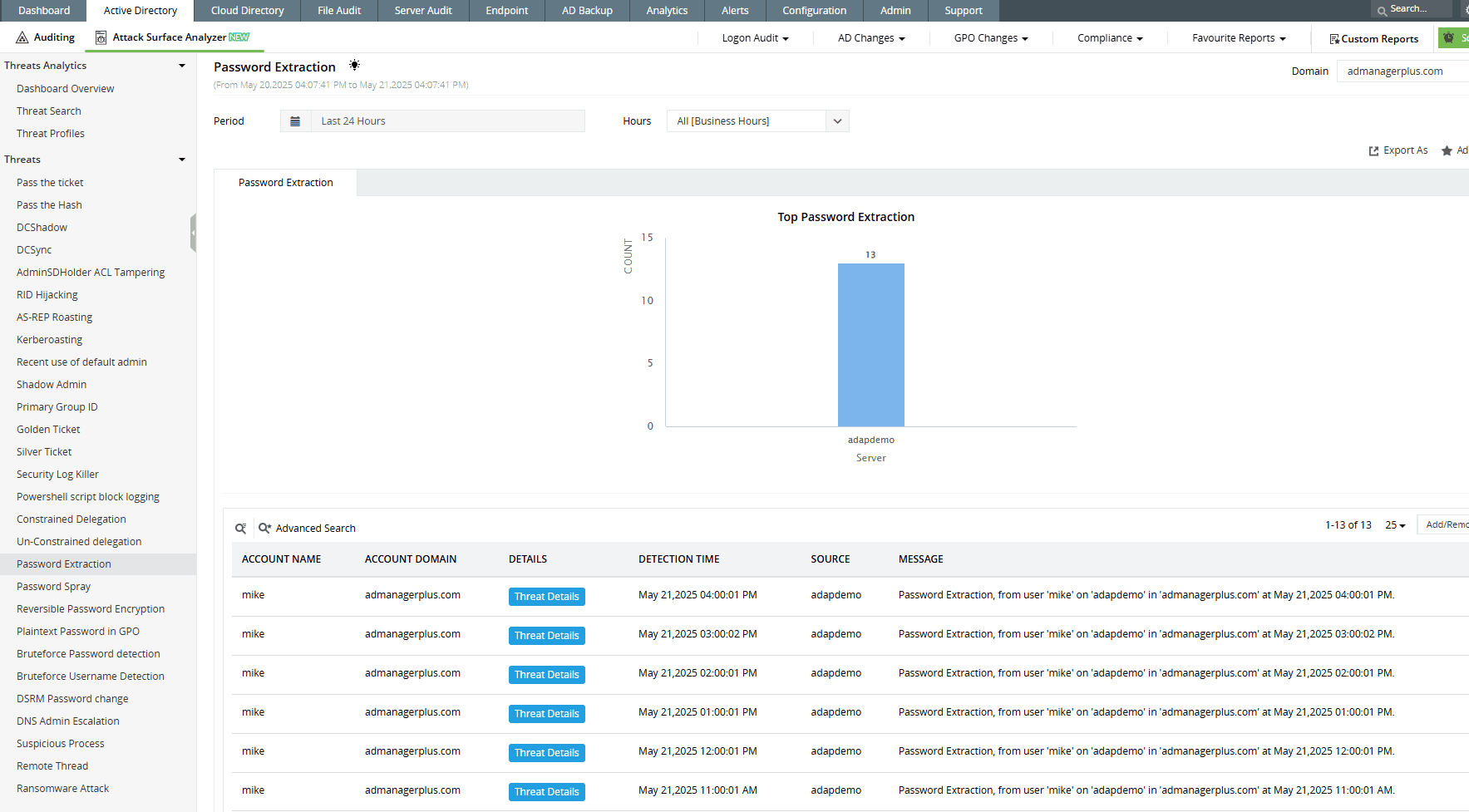
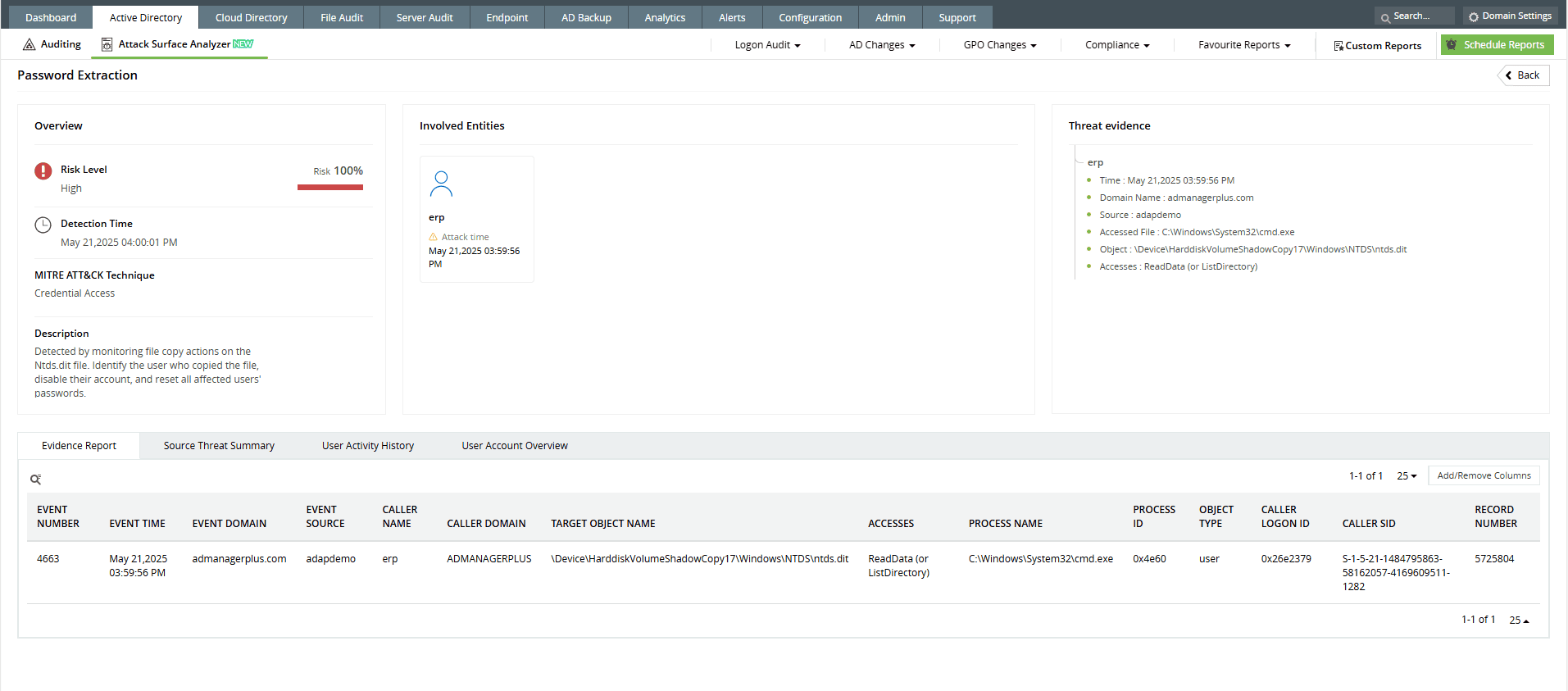
ADAudit Plus’ Attack Surface Analyzer offers curated dashboards and detection rules aligned with MITRE ATT&CK® to identify password extraction attempts in real time. It highlights suspicious behaviors, such as the execution of high-risk process creations, and anomalous login activity. With these insights and real-time alerts, security teams can investigate potential credential theft and respond before attackers gain a foothold through lateral movement.
-
Identify credential theft attempts with real-time alerts on suspicious process activity, privilege use, and unusual login patterns.
-
Correlate user behavior, login types, and process creation events to uncover stealthy password extraction techniques—all from a centralized dashboard.
Start protecting your on-premises and cloud AD resources with ADAudit Plus
Detect over 25 different AD attacks and identify potential misconfigurations within your Azure, GCP, and AWS cloud environments with the Attack Surface Analyzer.
See the Attack Surface Analyzer in actionWe're thrilled to be recognized as a Gartner Peer Insights Customers' Choice for Security Incident & Event Management (SIEM) for the fourth year in a row.









