Internet Protocol Security (IPSec) protects communications over IP networks using cryptographic security. IPSec uses a security association (SA) to track all the security parameters values such as security keys, a destination address, a unique security parameter index (SPI), and attributes like IPSec lifetime, concerning a given IPSec communication session.
The Internet Key Exchange (IKE) protocol is generally used as a method of exchanging encryption keys through unsecure mediums like the Internet as IKE provides secure encryption. It also Authenticated Internet Protocol (AuthIP) is a second authentication protocol that boosts the security and deployability of IPsec VPNs.
IPSec Quick Mode establishes IPSec SAs. When the lifetime of an IPSec SA expires, Quick Mode is used to renegotiate for a new IPSec SA. Quick Mode also derives shared secret keying material via IPSec security algorithms and negotiates a shared IPSec policy.
Audit IPsec Quick Mode is a security policy setting that enables you to audit events generated by Internet Key Exchange protocol and Authenticated Internet Protocol during Quick Mode negotiations.
The parameters in Quick Mode negotiations include:
- Encryption algorithm (DES, 3DES, AES)
- Hashing algorithm (MD5, SHA-1, SHA-2)
- Encapsulation protocol (AH or ESP)
- Security Association lifetime (time in seconds or data transfer in kilobytes)
- Mode (Tunnel or Transport)
Why enable Audit IPsec Quick Mode?
Enabling this policy setting can help troubleshoot and monitor the Quick Mode operations. For example, if a device constantly records event ID 4977, it signifies invalid negotiation packages. This could be caused by a network issue, or even a potential external attempt to modify packets. Therefore it is important to monitor such IPsec events.
How to enable Audit IPsec Quick Mode?
- Open Server Manager on your Windows server.
- Under the Manage tab, select Group Policy Management to view the Group Policy Management Console.
- Navigate to Forest -> Domain -> Your Domain -> Domain Controllers.
- Either create a new group policy object or you can edit an existing GPO.
- In the group policy editor, navigate to Computer Configuration -> Windows Settings -> Security Settings -> Advanced Audit Policy Configuration.
Expand the node and select Logon/Logoff. Click on Audit IPsec Quick Mode. Enable auditing for 'Success' and 'Failure'.
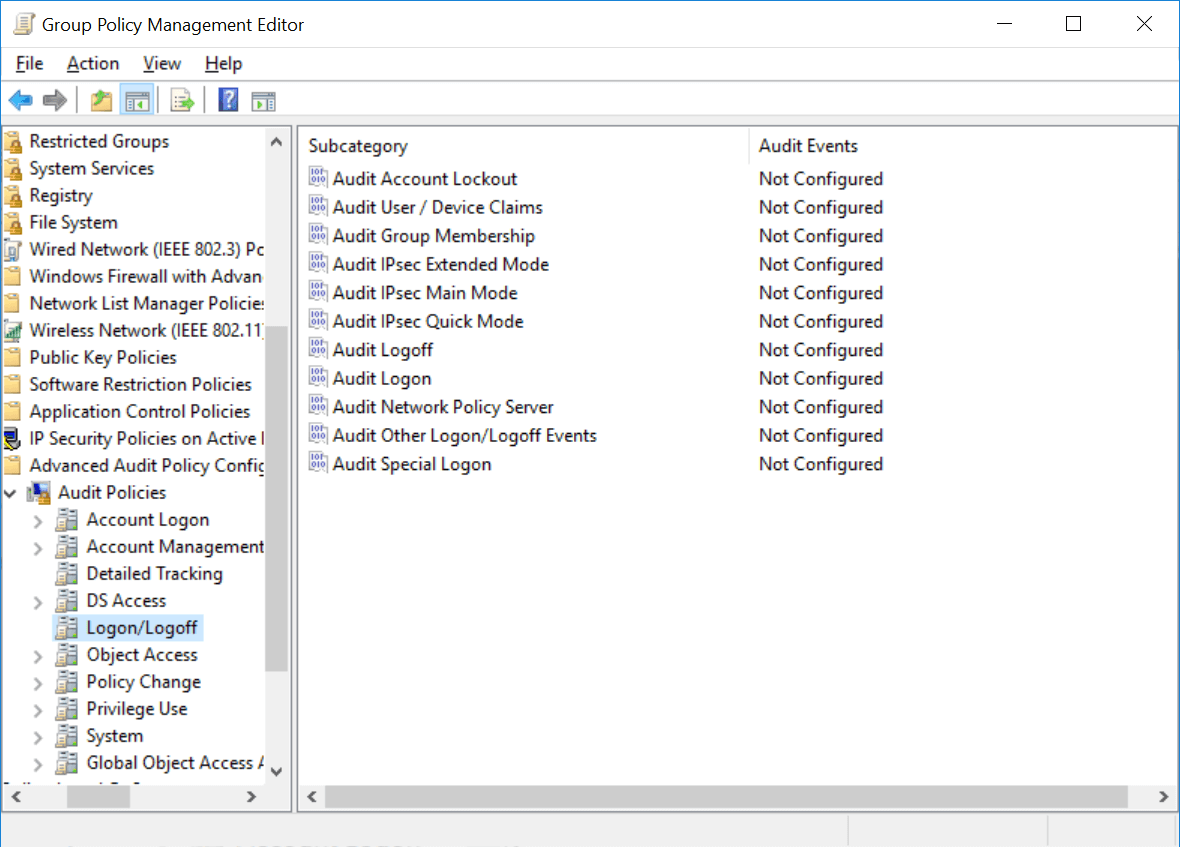
The following events are IPsec Quick Mode events, and what they indicate, along with their respective event IDs:
- Event ID 4654: The failure of IPsec Quick Mode negotiation.
- Event ID 4977: An invalid negotiation packet received by IPSec during Quick Mode negotiation. If this problem persists, it could indicate a network issue or an attempt to modify or replay this negotiation.
- Event ID 5451: The establishment of an IPsec Quick Mode security association.
- Event ID 5452: The termination of an IPsec Quick Mode security association.
Viewing specific events in Event Viewer
To filter the required event IDs,
- Click Start -> Administrative Tools -> Event Viewer.
- On the left side, double-click Event Viewer -> Windows Logs -> Security.
- On the right side, under Security, click Filter Current Log. Type the required event ID to get the respective logs.
Audit IPsec with ADAudit Plus
ADAudit Plus is a real-time Active Directory auditing tool that can track all the changes across the AD network. This tool can therefore monitor audit policy changes on the network. ADAudit Plus will raise an alert if an unauthorized user manages to modify the audit policy changes. For reports on group policy modifications in ADAudit Plus:
- Log on to the web console of ADAudit Plus.
- Navigate to Reports -> GPO Settings Changes.
- Select the Windows Settings Changes report.
The screenshot below from ADAudit Plus shows a sample report of changes made to Windows Settings:
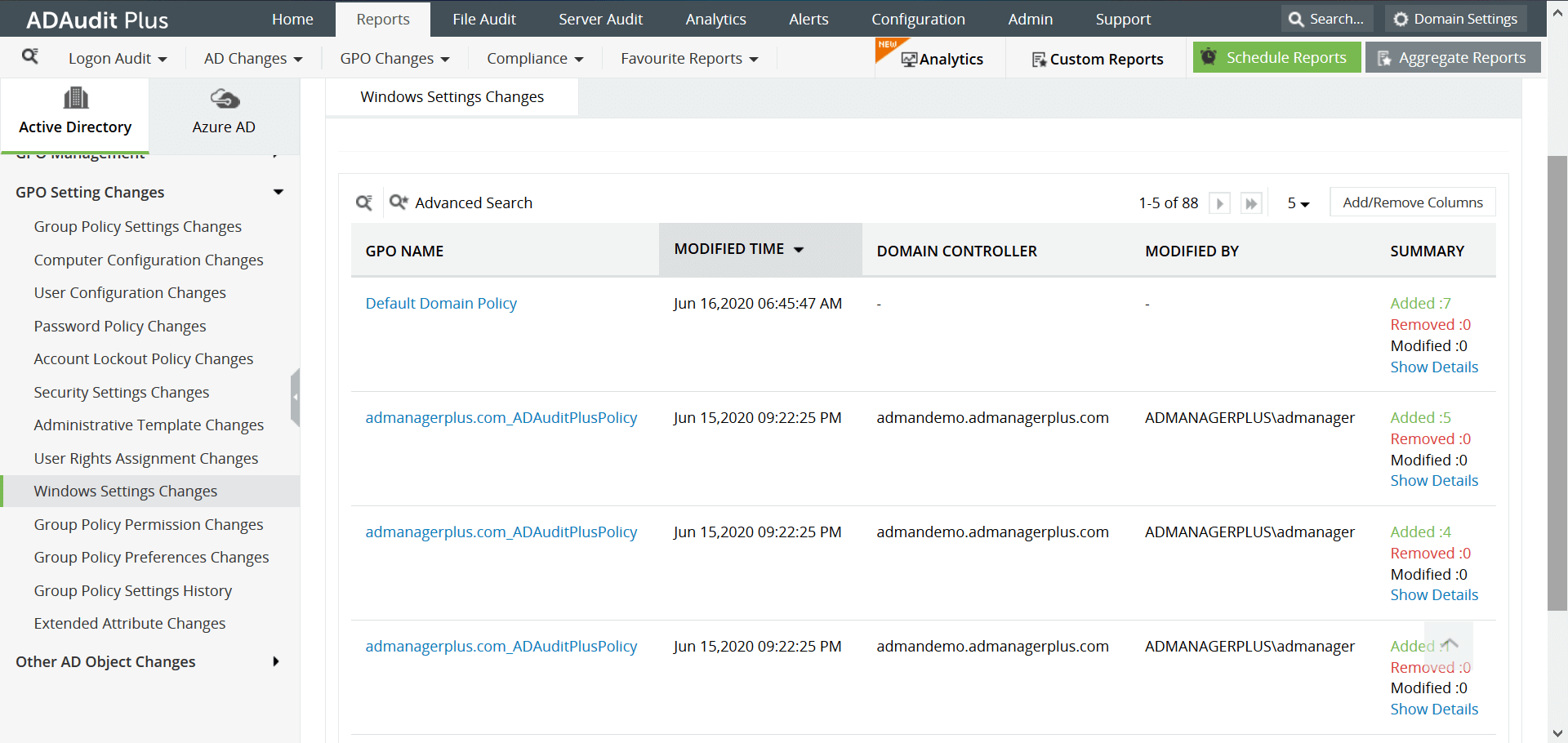
This report provides the following information:
- The name of the GPO that was modified
- The user who modified it
- The name of the domain controller
- The time of the modification
- The exact modification that was made
The ADAudit Plus difference
Download ManageEngine's ADAudit Plus, a real-time Active Directory auditing tool, that offers reports and instant email alerts. It is a useful tool to understand employee behavior with regards to IT, and thwart insider and outsider attacks. It can also be used to keep track of all changes to GPO settings and audit policies.
✕
Native auditing becoming a little too much?
Try ADAudit Plus login monitoring tool to audit, track, and respond to malicious login and logoff actions instantaneously.
Try ADAudit Plus for free
 Free Edition










