What are Audit Policy Change Events?
Audit Other Policy Change Events is a security policy setting that ascertains if the OS generates logs when modifications are made to the security policy, that are otherwise not audited in this category. The following are a couple of examples of Other Policy Change Events and their importance:
- Trusted Platform Module (TPM) configuration changes - A TPM chip is a secure crypto-processor that is designed to generate, store, or limit the usage of cryptographic keys such as passwords, signatures or certificates. It is important to audit the changes made to a TPM's configuration from a security stand-point.
- Windows Filtering Platform (WPF) filter changes - WFP is a development platform to create network filtering applications. The filters can be used to reduce network traffic at any layer in the system, implement callouts (or specialized filtering), and for other such configurations. The Windows Firewall is layered on top of WFP, making it important to monitor and also audit the changes made to the WPF filter.
How to enable Audit Other Policy Change Events?
- Open Server Manager on your Windows server.
- Under the Manage tab, select Group Policy Management to view the Group Policy Management Console.
- Navigate to Forest > Domain > Your Domain > Domain Controllers.
- Either create a new group policy object or you can edit an existing GPO.
- In the group policy editor, navigate to Computer Configuration > Windows Settings > Security Settings > Advanced Audit Policy Configuration.
- In the group policy editor, navigate to Computer Configuration > Windows Settings > Security Settings > Advanced Audit Policy Configuration. Expand the node and select Policy Change. Click on Audit Other Policy Change Events and enable it for Success and Failure.
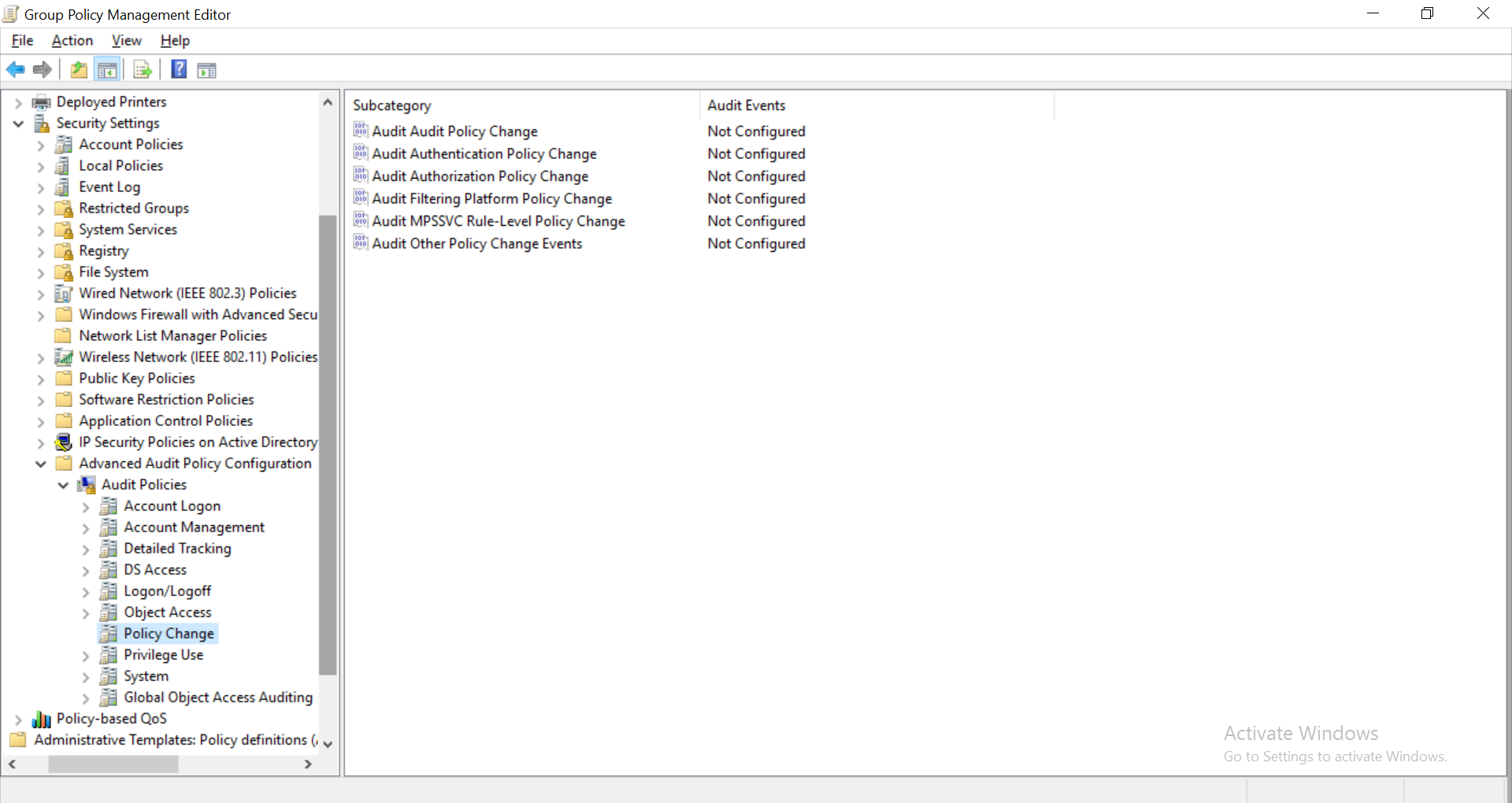
By default, this policy setting is not configured. The following events are generated if the Audit Other Policy Change Events setting is configured:
- 4714: The modification of encrypted data recovery policy.
- 4819: The modification of Central Access Policies on the machine.
- 4826: The loading of Boot Configuration Data.
- 4909: The modification of local policy settings for the TBS.
- 4910: The modification of group policy settings for the TBS.
- 5063: The attempt of a cryptographic provider operation.
- 5064: The attempt of a cryptographic context operation.
- 5065: The attempt of a cryptographic context modification.
- 5066: The attempt of a cryptographic function operation.
- 5067: The attempt of a cryptographic function modification.
- 5068: The attempt of a cryptographic function provider operation.
- 5069: The attempt of a cryptographic function property operation.
- 5070: The attempt of a cryptographic function property modification.
- 5447: The modification of a Windows Filtering Platform filter.
- 6144: The successful application of Security policy in the group policy objects.
- 6145: The occurrence of one or more errors while processing security policy in the group policy objects.
Audit Other Policy Change Events with ADAudit Plus
ADAudit Plus is an Active Directory auditing solution that can audit and generate reports on all the users and entities on the network, in real-time. This tool has the capability to audit AD objects that have audit policies applied on them, as well as the audit policies themselves. It has a section for GPO settings changes, which has multiple reports on the various group policy changes including modifications to audit policy. Unlike Windows Event Viewer, this tool provides all the necessary information in one place.
ADAudit Plus reports provide the following details of an event in one glance:
About the subject:
- Security ID
- Account Name
- Account Domain
- Logon ID
Configuration parameters:
- Scope
- Context
- Interface
- Function
- Position
About ADAudit Plus
ADAudit Plus is a real-time, web-based Windows Active Directory change reporting software that audits, tracks, reports and alerts on Windows (Active Directory, workstations logon/logoff, file servers and servers), NetApp filers and EMC servers to help meet the demands of the much-needed security, audit and compliance, including FISMA compliance. With ADAudit Plus, track authorized/unauthorized AD management changes, access of users, GPO setting changes, groups, computer, OU. Track every file, folder modifications, access and permissions changes with 200+ detailed event-specific reports and get instant email alerts. You can also export the results to XLS, HTML, PDF and CSV formats to assist in interpretation and computer forensics. For more information on ADAudit Plus, visit https://www.manageengine.com/active-directory-audit/.
✕
Native auditing becoming a little too much?
Try ADAudit Plus login monitoring tool to audit, track, and respond to malicious login and logoff actions instantaneously.
Try ADAudit Plus for free
 Free Edition










