

Microsoft Intune is used to manage and secure devices and applications across an organization. IT administrators use it to enroll devices, push configuration settings, enforce compliance policies, deploy applications, and remotely wipe or lock devices. It supports company-owned and personal (BYOD) devices across Windows, macOS, iOS, Android, and Linux.
- What Intune is
- What it does
- Intune vs Azure
- Licensing
- What employers can see
- Monitoring with ADAudit Plus
- FAQ
Microsoft Intune is how organizations manage every device that accesses corporate resources, regardless of platform or location. It works for company-owned devices and personal devices, on Windows, macOS, iOS, Android, and Linux.
What is Microsoft Intune?
Microsoft Intune is a cloud-based unified endpoint management (UEM) solution. It is available as a standalone product and is included in Microsoft 365 E3, E5, F1, F3, and Business Premium subscriptions. Administrators manage everything through the Microsoft Intune admin center at intune.microsoft.com.
The product has been renamed several times. Microsoft introduced it as Windows Intune in 2010, extended it to other platforms and renamed it Microsoft Intune in 2014, briefly grouped it under the Microsoft Endpoint Manager umbrella in 2020, then returned to the Microsoft Intune name in 2022 with the launch of the Intune Suite.
What does Microsoft Intune do?
Intune sits between IT and every managed device. When a device enrolls, Intune can push settings, deploy apps, check compliance, and take remote action. The scope of control depends on the enrollment type.
| Capability | What it does |
|---|---|
| Device enrollment | Register devices with Intune via Windows Autopilot, Apple Business Manager, or Android Enterprise. Supports Windows, macOS, iOS, Android, and Linux. |
| Configuration policies | Push device settings across thousands of options: passwords, Wi-Fi, VPN, encryption, browser behaviour, app restrictions, and more via the Settings Catalog. |
| Compliance policies | Define the minimum security requirements a device must meet. Devices that fail are marked noncompliant and can be blocked from corporate resources via Conditional Access. |
| App management | Deploy, update, and remove apps on enrolled devices. Protect corporate data in apps on personal devices without full device enrollment. |
| Windows Autopilot | Provision new Windows devices out of the box. Devices ship directly to employees and configure themselves on first sign-in with no IT hands-on required. |
| Remote actions | Lock, wipe, restart, or reset a device from the admin center. Corporate data can be selectively removed from personal devices without wiping the device. |
| Endpoint analytics | Identify hardware or policy issues that slow devices down, track startup performance, and reduce help desk calls with proactive remediation. |
| Copilot in Intune | AI-assisted policy analysis powered by Microsoft Security Copilot. Summarizes existing policies, flags potential conflicts, and provides recommended setting values. |
MDM vs MAM: two ways to manage devices
Intune supports two distinct management modes. The right choice depends on whether you own the device and how much control you need over it.
| Mobile Device Management (MDM) | Mobile Application Management (MAM) | |
|---|---|---|
| Scope of control | Full device | Corporate apps and data only |
| Typical use | Company-owned devices | Personal (BYOD) devices |
| What IT can manage | Device settings, all apps, OS updates, encryption, compliance | App policies, data sharing rules, selective corporate data wipe |
| User privacy impact | Higher: IT can see device inventory, all installed apps, location | Lower: IT cannot see personal apps or data outside managed apps |
| Enrollment required? | Yes | No: MAM policies apply without enrolling the device into MDM |
Many organizations use both. Company-owned devices enroll in MDM for full control. Personal devices get MAM-only policies that protect corporate data in apps like Outlook and Teams without touching personal content.
Key integrations: Zero Trust, Autopilot, and Defender
Intune is most effective when paired with the rest of Microsoft's endpoint security stack. These integrations are what make it a Zero Trust platform rather than just a device management tool.
Microsoft Entra ID and Conditional Access
Entra ID (formerly Azure AD) provides the identity layer. When a device checks in with Intune, its compliance status is shared with Entra ID. Conditional Access policies then use that status to allow or block access to Microsoft 365, Azure, and connected SaaS applications. A noncompliant device loses access until it remediates. This is the core mechanism of Zero Trust device verification in a Microsoft environment.
Microsoft Defender for Endpoint
Intune integrates with Defender for Endpoint to share threat intelligence. Defender signals device risk levels to Intune, which can trigger compliance failures and access blocks automatically based on detected threats. Organizations can create compliance policies that mark a device noncompliant if its Defender risk score exceeds a defined threshold.
Windows Autopilot
Autopilot handles zero-touch provisioning for new Windows devices. IT pre-registers device serial numbers or hardware hashes in Intune. When a new device powers on and the user signs in with corporate credentials, Autopilot automatically joins it to Entra ID, enrolls it in Intune, and applies all assigned configuration policies and apps. No imaging, no manual setup, no IT hands-on required.
Microsoft Configuration Manager (co-management)
Organizations with on-premises Configuration Manager (SCCM) can co-manage devices: Configuration Manager handles on-premises workloads like OS deployment and software distribution, while Intune handles cloud policy, compliance, and app protection. Workloads can be migrated from SCCM to Intune incrementally, allowing a phased transition to cloud-native management.
What is the difference between Microsoft Intune and Azure?
Azure and Intune are separate products. Azure is Microsoft's cloud infrastructure platform for virtual machines, storage, databases, and services. Intune is a device management product for managing endpoints across an organization.
Both connect to Microsoft Entra ID for identity, which causes confusion because Intune appears alongside Azure services in the same admin ecosystem. The distinction is practical: if you are managing cloud servers and workloads, that is Azure. If you are managing laptops, phones, and tablets for employees, that is Intune.
Microsoft Intune licensing
Intune is available in three plans since March 2023. Plan 2 and the Intune Suite are add-ons; neither includes Plan 1 automatically.
| Plan | What is included |
|---|---|
| Intune Plan 1 | Core endpoint management: MDM, MAM, compliance policies, configuration policies, app management, Windows Autopilot, Conditional Access integration. Included with Microsoft 365 E3, E5, F1, F3, Business Premium, and EMS E3/E5. Standalone price: $8 per user, per month. |
| Intune Plan 2 | Everything in Plan 1 plus advanced endpoint management: Microsoft Tunnel for MAM, Endpoint Privilege Management, and specialized device management for frontline workers. Add-on to Plan 1. |
| Microsoft Intune Suite | Everything in Plan 2 plus Remote Help, advanced endpoint analytics, cloud PKI, and enterprise app management. Add-on to Plan 1. Designed for organizations that need the full portfolio. |
Conditional Access licensing note
Conditional Access, which is the mechanism that blocks noncompliant devices from corporate resources, requires Microsoft Entra ID P1 or P2 licensing. This is included in Microsoft 365 E3, E5, and Business Premium but not in F1 or lower-tier plans. Organizations without P1/P2 can configure compliance policies for reporting but cannot enforce device blocking.
What can employers see with Microsoft Intune?
This is the most searched question about Intune from employees, particularly those on BYOD programs. The answer depends on the enrollment type.
On fully MDM-enrolled devices
IT administrators can see the device name, model, manufacturer, serial number, IMEI, OS version, installed apps and versions, compliance status, last sync time, storage capacity, and location if a location policy is configured.
On personal devices with MAM only
IT can see activity within managed apps but cannot see personal apps, personal messages, personal photos, call logs, or browsing history outside managed browsers.
What employers cannot see
Regardless of enrollment type, Intune cannot access personal text messages, personal emails, personal photos, call logs, personal browsing history, or personal app content. Microsoft documents this explicitly in its Intune privacy documentation for both employees and administrators.
Security risks in Microsoft Intune environments
CISA advisory: March 2026
On March 18, 2026, CISA issued an alert following a cyberattack against US-based medical technology firm Stryker Corporation that targeted their Microsoft Intune environment. CISA urged all organizations to harden Intune configurations immediately, citing misuse of legitimate endpoint management software as the attack vector. Key recommendations include: least-privilege RBAC, phishing-resistant MFA for Intune admin accounts, Multi Admin Approval for sensitive actions, and Privileged Identity Management (PIM) for Intune and Entra ID roles.
Beyond external attacks, internal misconfigurations and unauthorized changes are the most common source of Intune-related security incidents. The Intune admin center does not send real-time alerts when policies change, making detection dependent on manual log review.
Compliance policy weakened
Lowering a minimum OS version threshold or removing an encryption requirement causes previously noncompliant devices to pass immediately. If Conditional Access was blocking those devices, they regain access at the next check-in with no notification to the security team.
Configuration policy removed
Removing a configuration policy assignment does not notify the device. Settings the policy was enforcing either persist at their last value or revert to device defaults, either way potentially removing security controls IT was relying on the policy to maintain.
Overprivileged Intune admin roles
Intune uses role-based access control (RBAC) with built-in and custom roles. Admins assigned broad roles such as Intune Service Administrator can modify any policy, enroll or wipe any device, and change tenant-wide settings. Over-provisioning admin access is the most common configuration weakness CISA identified in the March 2026 advisory.
Multi Admin Approval not configured
Microsoft Intune supports Multi Admin Approval, which requires a second administrator to approve changes to sensitive or high-impact actions such as device wiping, RBAC changes, and configuration profile modifications. Most organizations do not configure this, leaving a single compromised admin account able to make destructive changes unilaterally.
All policy changes are recorded in the Intune audit log under Tenant administration > Audit logs. ManageEngine ADAudit Plus monitors these events in real time and sends immediate alerts when any compliance policy, configuration policy, or RBAC change occurs, with before-and-after values for every modified setting.
Monitoring Microsoft Intune with ADAudit Plus
- Compliance policy changes: creation, modification, deletion, and assignment changes with before-and-after values
- Configuration policy changes: setting modifications, scope changes, and profile reassignments
- RBAC changes: role assignment additions or removals, including Intune Service Administrator role changes
- App protection policy changes: rule changes and policy removal
- Tenant-wide setting changes: default compliance behavior and enrollment restriction modifications
- Multi Admin Approval activity: approval requests, approvals, and rejections for sensitive actions
| Capability | Native Intune | ADAudit Plus |
|---|---|---|
| Real-time policy alerts | No alerts; manual log review required | Immediate email and SMS on any policy change |
| Before-and-after values | Target(s) field in audit log | Old and new values side by side |
| RBAC change monitoring | Audit log, no alerting | Real-time alerts on role assignment changes |
| Log retention | 2 years (then auto-deleted) | Configurable long-term archive beyond Microsoft limits |
| Compliance reports | No pre-built reports for SOX, HIPAA, PCI DSS | Out-of-the-box reports for SOX, HIPAA, PCI DSS, GDPR, FISMA, GLBA |
| Cross-platform visibility | Intune portal only | Unified view: Intune, Entra ID, on-premises AD, file servers, workstations |
- Audit device enrollments
- Log sync requests
- Track app and policy activity
- Create custom alerts
1
Identify the user and timestamp associated with the enrollment.
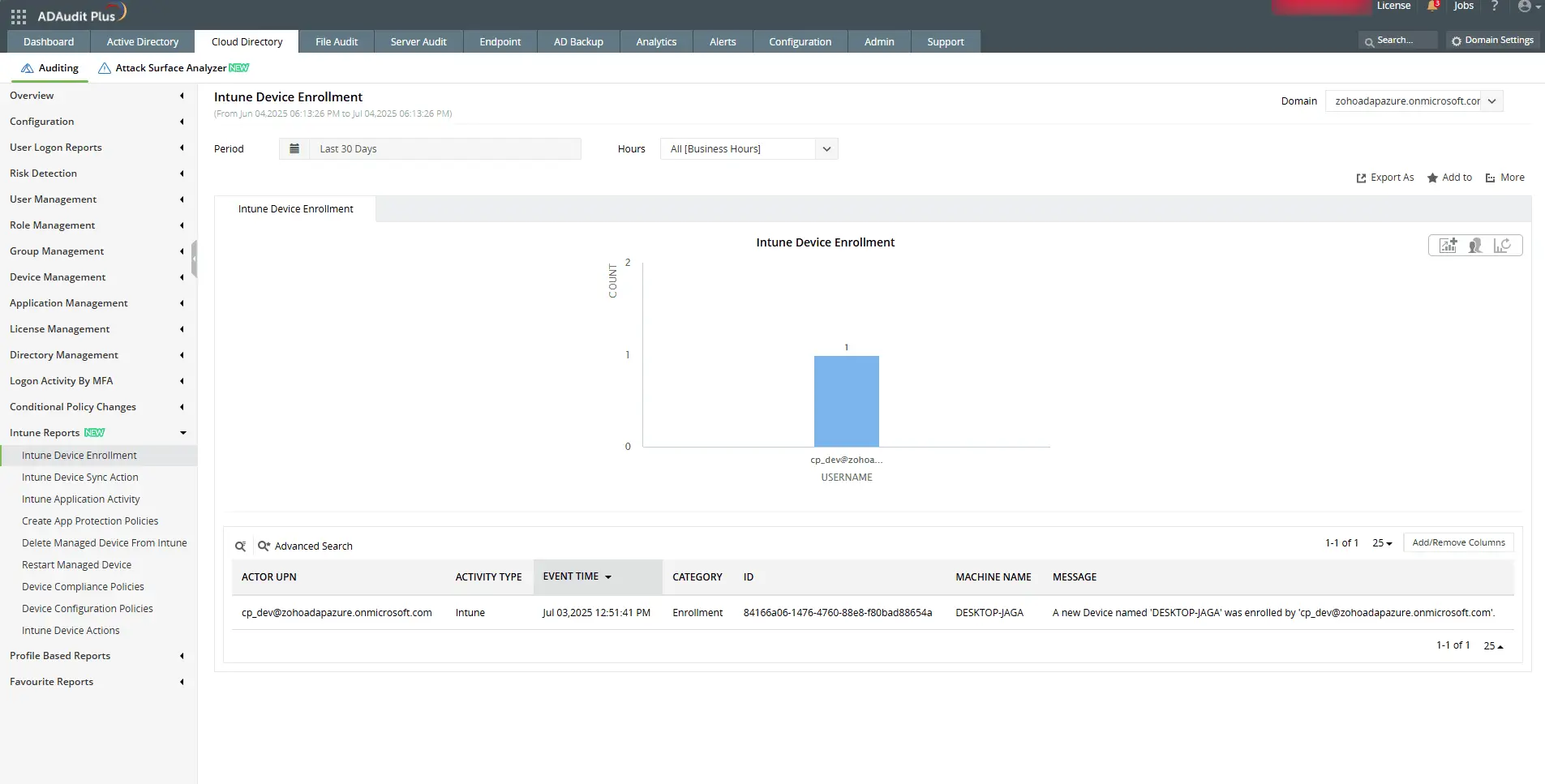
Identify the user and timestamp associated with the enrollment.
1
Check who initiated a sync and when it was triggered in the Intune portal.
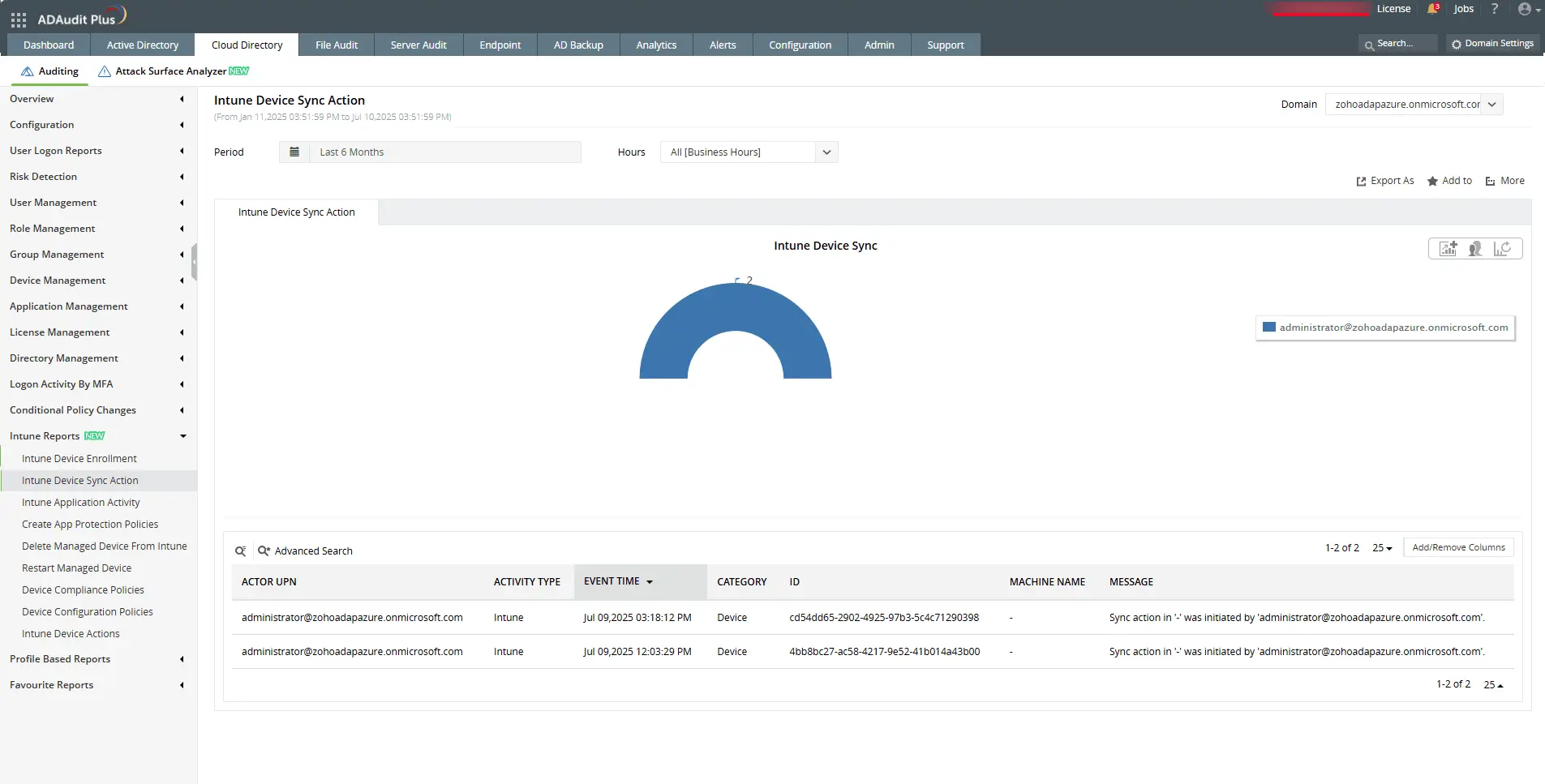
Check who initiated a sync and when it was triggered in the Intune portal.
1
View detailed changes made to device configuration policy settings.
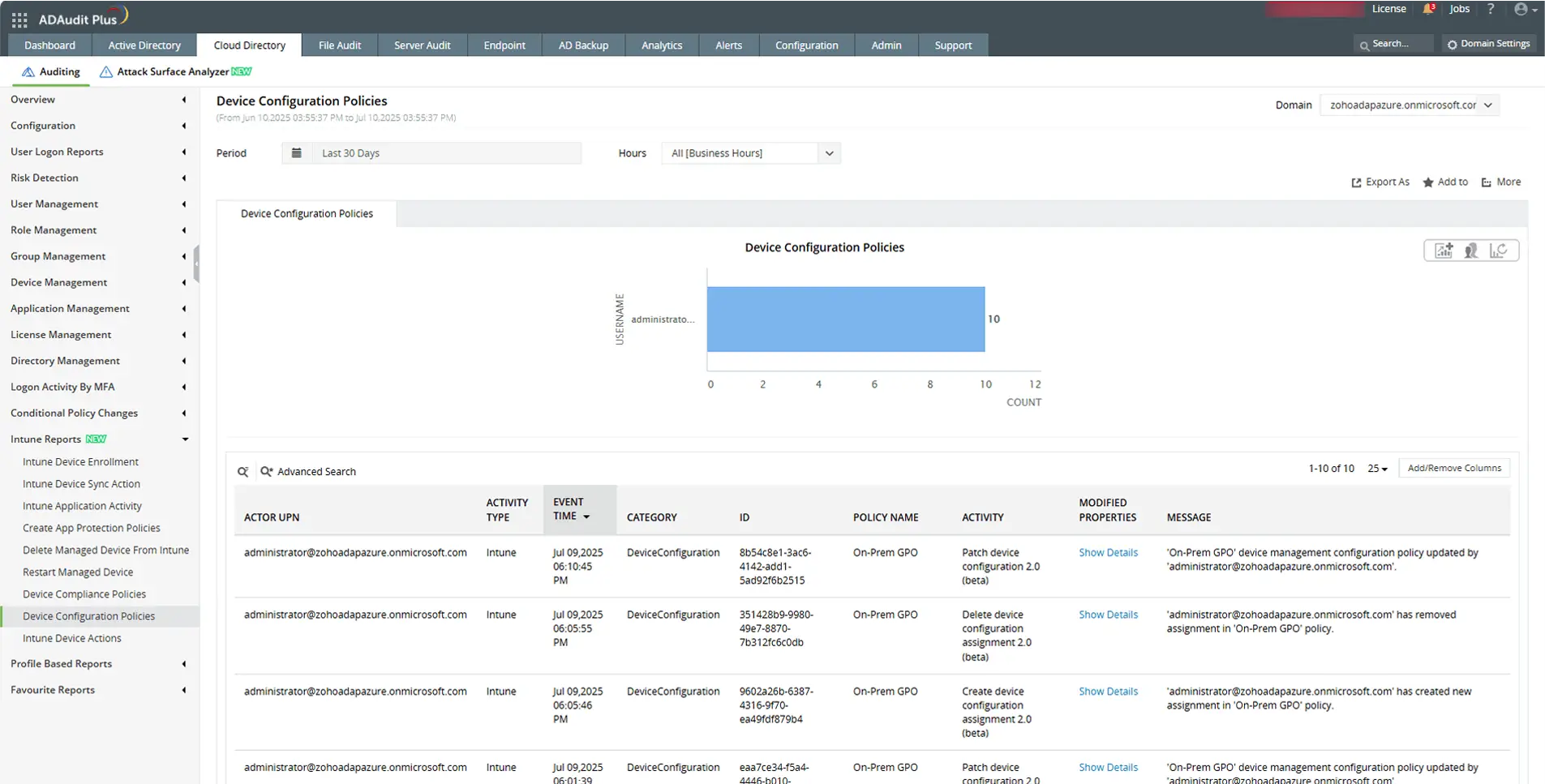
View detailed changes made to device configuration policy settings.
1
Send email and SMS alerts, and execute scripts automatically for faster response.
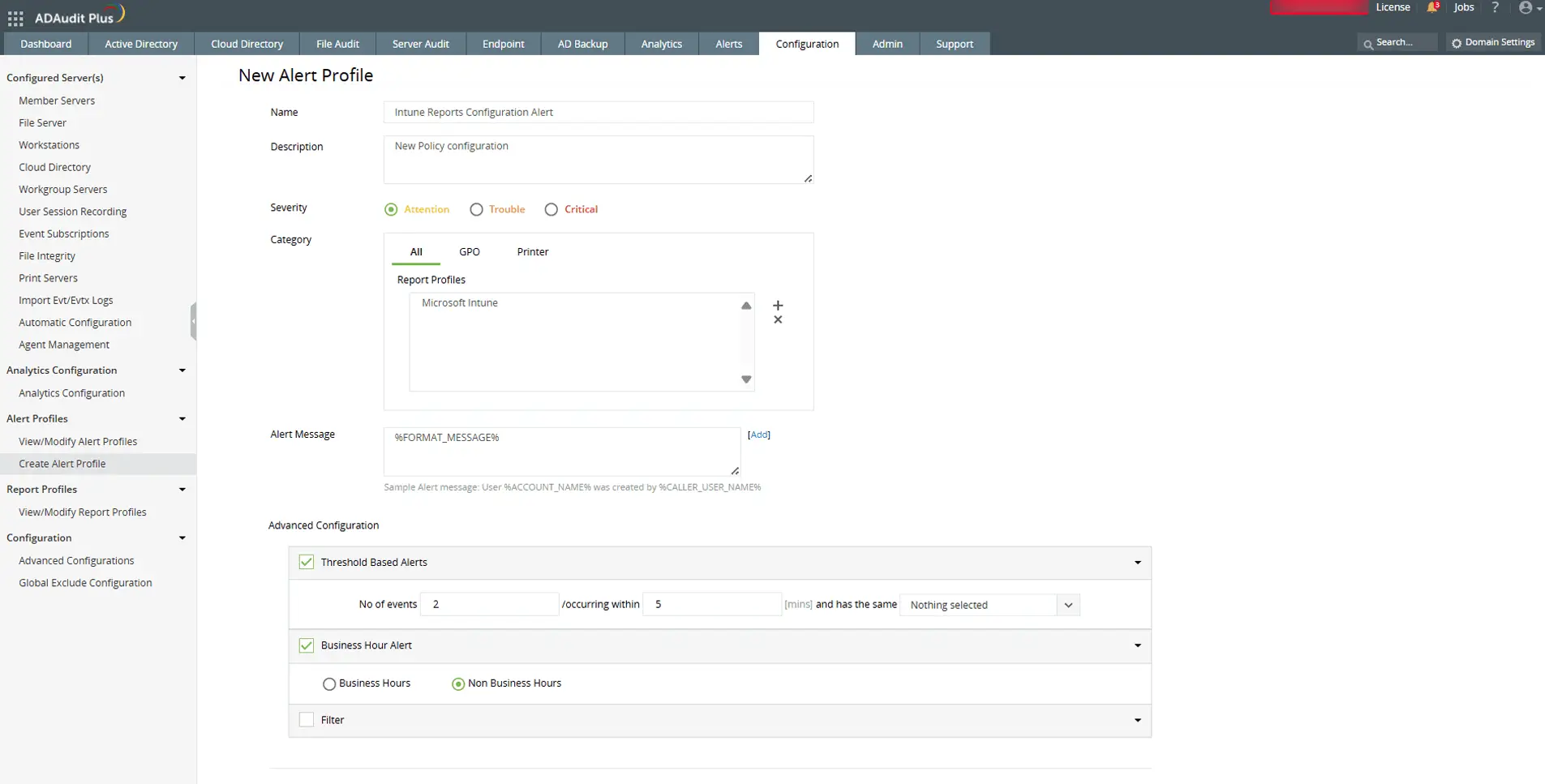
Send email and SMS alerts, and execute scripts automatically for faster response.
Audit every change in your Intune and Active Directory environment
Try ADAudit Plus free for 30 days. No credit card required.
Frequently asked questions
Intune's purpose is to give IT consistent control over every device that accesses corporate resources, regardless of platform or location. It enforces security policies, checks device compliance, and enables Zero Trust access control by sharing device health signals with Microsoft Entra Conditional Access. Organizations in regulated industries use it to demonstrate device compliance for SOX, HIPAA, and PCI DSS audits.
No. Microsoft's design prevents Intune from accessing personal browsing history, personal emails, personal messages, personal photos, or personal app content on any enrollment type. On fully MDM-enrolled devices, Intune can monitor activity within managed browsers if a browser configuration policy is in place, but personal browsing in a personal browser outside managed profiles is not accessible. Microsoft documents this in its Intune privacy guidance for employees.
Azure is Microsoft's cloud infrastructure platform for running servers, storage, and services. Intune is a device management product for managing laptops, phones, and tablets. They are separate products that share Microsoft Entra ID as a common identity layer. If you manage cloud workloads and virtual machines, that is Azure. If you manage employee devices and apps, that is Intune.
The most cited limitations are complex initial setup for administrators new to cloud endpoint management; the need for Microsoft Entra ID P1 or P2 to enforce Conditional Access (not included in all Microsoft 365 plans); limited native long-term audit reporting for compliance frameworks like SOX or HIPAA without additional tooling; and a split admin interface where some settings still live in legacy portals. On the security side, the March 2026 CISA advisory highlighted overprivileged admin roles and missing Multi Admin Approval configuration as the most common weaknesses in Intune deployments.
Experience
ADAudit Plus for free
With ADAudit Plus, you can:
- Get full visibility into logons
- Monitor employee attendance
- Detect attacks like Kerberoasting
- Generate logon audit trails
- And much more









