What is NTFS?
New Technology File System is a file storage system that the Windows operating system uses for storing, organizing, and finding files on a hard disk efficiently. It was first introduced by Microsoft in 1993 and is the primary file system in Windows 10, Windows 8, Windows 7, Windows Vista, Windows XP, Windows 2000, and Windows NT operating systems.
NTFS features
- Performance: File compression, a salient feature of NTFS, allows files to be stored in a compressed fashion enabling your organization access to increased storage space on a disk and enhanced performance.
- Disk space utilization: In addition to file compression, NTFS also permits management of disk quotas. This feature allows organizations to have better control over storage space.
- File system journaling: File system journaling refers to NTFS's ability to monitor and audit activities such as addition, modification, and deletion of files on a drive. These changes made to a drive are stored in a log called the Master File Table (MFT).
- Security access control: NTFS allows you to improve security stature of your organization by setting up permissions and restricting access to mission-critical data.
- Reliability: NTFS focuses on the consistency of the file system so that in the event of a mishap like power loss or system failure, you can quickly restore your data.
What is FSRM?
File Server Resource Manager (FSRM) is a Windows server role. It enables you to classify files automatically, perform operations based on these classifications and effectively manage storage space and the data stored on file servers. FSRM was launched by Microsoft in 2003 and initially used in Windows Server 2003 R2 edition.
FSRM features
- Quota management allows you to limit the amount of space given to certain folders or volumes. You can create quota templates that can be used to assign space for files and folders. Judicious quota management can prevent unimportant files or certain file types from taking up too much space on your server.
- File classification infrastructure simplifies data management by automating the file classification process. The files are classified into groups and the security policy is applied to the whole group. This way, new files can be added to the different groups depending on the security policies they need.
- File screening management allows you to place restrictions on the type of files that can be saved on a server. The types of extensions that can be added to a shared file can be controlled. For example, you set a file screen that doesn't allow files with FLV extensions to be saved on the server.
- Storage reports help you find the details about disk storage use. For example, it can tell you the type of files that take up the maximum amount of space. These reports can help you administer your file server more efficiently.
Difference between NTFS and FSRM quotas
Both NTFS and FSRM allow storage quota management. NTFS Quotas works at the drive level as opposed to FSRM which works at the folder level. With NTFS , the only way to apply quotas is to place the files and folders on individual drives. This means a bit more planning and organization from the administrator in order to separate data that needs to be storage-restricted from the rest. Since FSRM can work on the folder level, all data can be stored on the same disk, in separate folders. While quota tracking in NTFS is based on per user or per disk, in FSRM it is done on a folder or volume basis. FSRM supports additional features like reports, e-mail alerts and script executions.
Simplify File server auditing and reporting with ADAudit Plus.
Continuous monitoring of files and folders enables an organization to protect critical assets by keeping track of every file access and permission change. This helps IT administrators detect anomalous activities, meet compliance requirements, mitigate threats and accelerate forensic analysis in case of a mishap.
ADAudit Plus simplifies file/folder activity tracking by offering you predefined File Audit reports along with intuitive graphical representation of the same for the ease of comprehension. It also provides you the option to generate custom reports and export them in your preferred format (.pdf, .xls, .html and .csv).
Once ADAudit Plus has been installed, it can automatically configure audit policies required for Active Directory file auditing. To enable automatic configuration: Log in to the ADAudit Plus web console → Domain Settings → Audit Policy: Configure.
Steps to audit NTFS permissions using ADAudit Plus
- Login to ADAudit Plus web console.
- Select the required Domain from the dropdown list.
- Go to the File Audit tab.
- Navigate to File Audit Reports.
- Select the desired report from the File Audit Reports section.
For example, here's the screenshot of the Folder Permission Changes report:
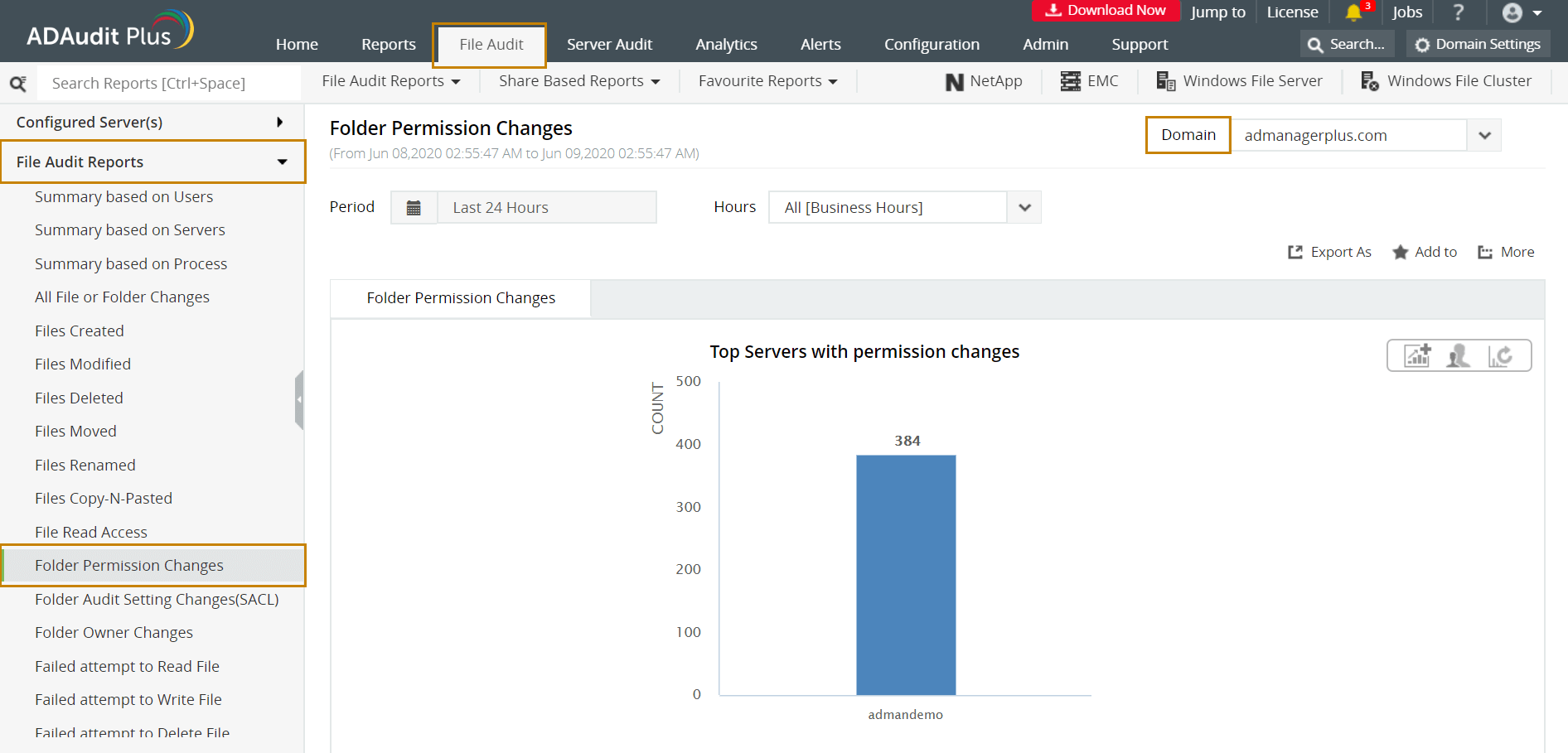
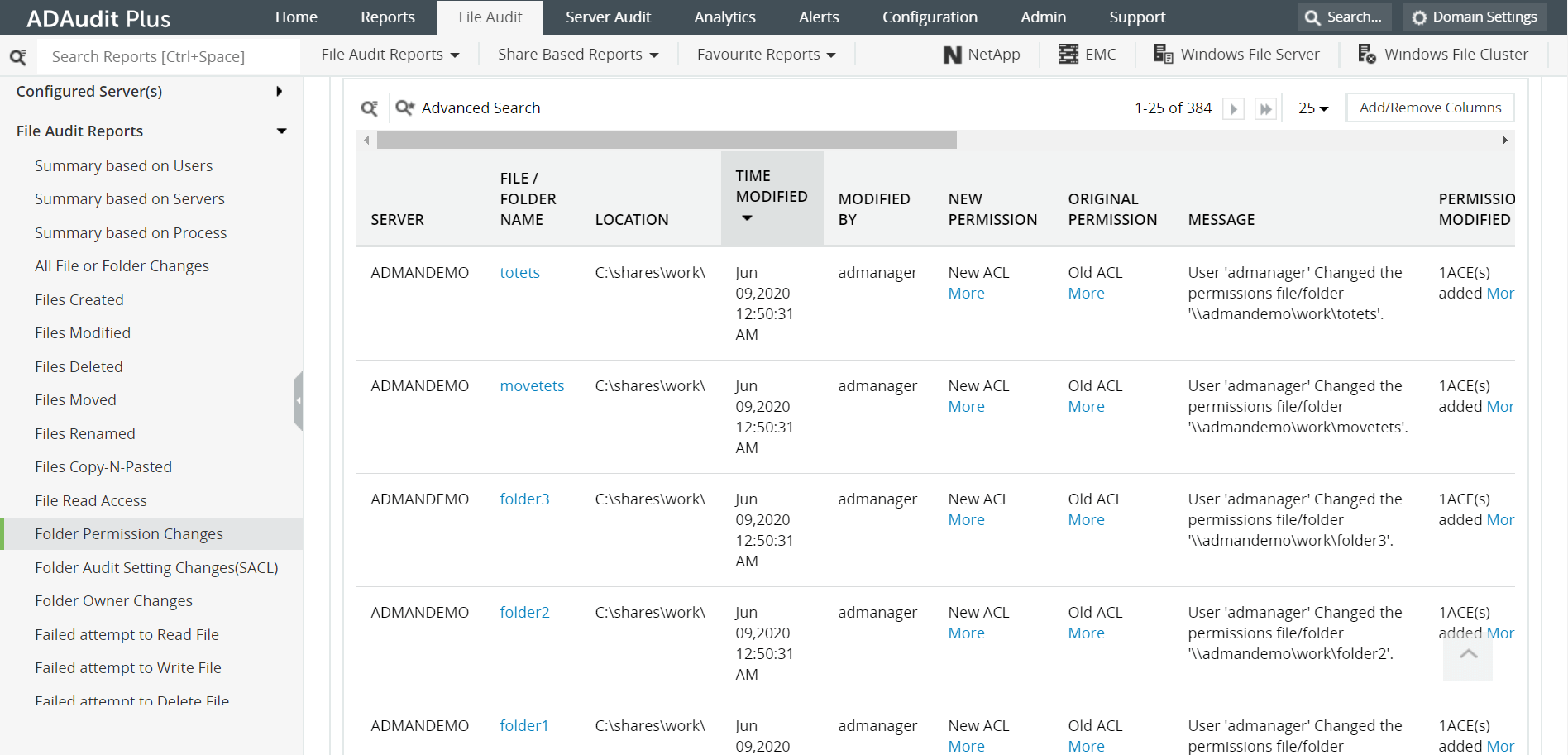
The following are some of the details provided by the Folder Permission Changes report:
- Name of the folder whose permission has been altered.
- The modified folder's path.
- The user who initiated the permission change.
- The time when the folder permission was changed.
- The previous and new permission changes.
- A description of the nature of permission change.
The other reports under File Audit tab that help monitor file/folder changes are:
- Files Modified - This helps you monitor all new file changes that have been made along with who made the change and when.
- File Read Access - This report provides information about who has accessed a file along with the time of access, location of the file, and file type.
- The file read or write requests that weren't successful can be found under Failed Attempt to Read File or Failed Attempt to Write File reports.
About ADAudit Plus
ADAudit Plus is a real-time, web-based Windows Active Directory (AD) change reporting software that audits and reports Active Directory, Windows servers and workstations, and NAS storage devices to meet the demands of security, and compliance requirements. It helps in file server monitoring and auditing changes in file systems such as NTFS and FSRM. ADAudit Plus comes bundled with more than 200 predefined reports that make AD auditing easier. The solution also sends real-time alerts for critical events and helps you to secure your network from threats and boosts your IT security posture. Check out the capabilities of ADAudit Plus here.
 Free Edition










