Direct Inward Dialing: +1 408 916 9892
The Payment Card Industry Data Security Standard (PCI DSS) is a security compliance mandate launched in 2004 by Visa, MasterCard, Discover Financial Services, JCB International and American Express. It applies to any entity that processes, stores, and/or transmits cardholder information. Its primary goal is to ensure that the card payment ecosystem is safe and secure. So, if your business accepts or processes card payments, then it must comply with PCI DSS standard.
PCI DSS compliance mandate has six control objectives with 12 requirements. They are:Requirement 1. Install and maintain a firewall to protect cardholder data. The firewall can be used to scan network traffic and block untrusted networks from accessing the system.
Requirement 2. Change the default system passwords and other security parameters supplied by vendors, as these are easily discoverable and can be misused by malicious people to gain unauthorized entry into the network.
Requirement 3. Protect stored cardholder data. Encryption, masking, hashing and truncation are popular methods to safeguard cardholder information.
Requirement 4. Encrypt transmission of cardholder information over open, public networks. This reduces the risk of getting hacked.
Requirement 5. Use and regularly update anti-virus and anti-malware programs.
Requirement 6. Develop and maintain secure systems and applications. With vulnerable systems and applications, malicious people can exploit them and gain access to sensitive cardholder data.
Requirement 7. Restrict employees' access to cardholder data depending on their job profile and business needs.
Requirement 8. Assign a unique ID to each person with computer access. This ensures that every individual's actions can be traced and they feel accountable for their actions.
Requirement 9. Restrict physical access to cardholder data.
Requirement 10. Track and monitor all access to network resources and cardholder data. This can be achieved by logging user activities across the network.
Requirement 11. Regularly test security systems and processes to ensure they are working as expected and also to identify any new vulnerabilities.
Requirement 12. Maintain a policy that addresses information security for all personnel. Understanding the sensitivity of the data handled by employees and the responsibility they have towards protecting it is a key part of a strong security policy.
Being PCI DSS compliant shows that the systems are secure and customers can trust you with their sensitive cardholder data.
It can have a positive impact on your brand in the eyes of customers, clients, acquirers and payment brands.
Complying to PCI DSS standards means having security systems such as firewalls, anti-virus software, penetration tests, encryption of cardholder data, and more in place, which protect your organization.
ADAudit Plus provides a number of reports to ensure compliance with PCI DSS protocols. To view all the reports related to PCI DSS:
Open ADAudit Plus console.
Navigate to Reports tab.
Select Compliance reports. A list of seven compliance mandates will appear. Choose PCI DSS to view the various reports.
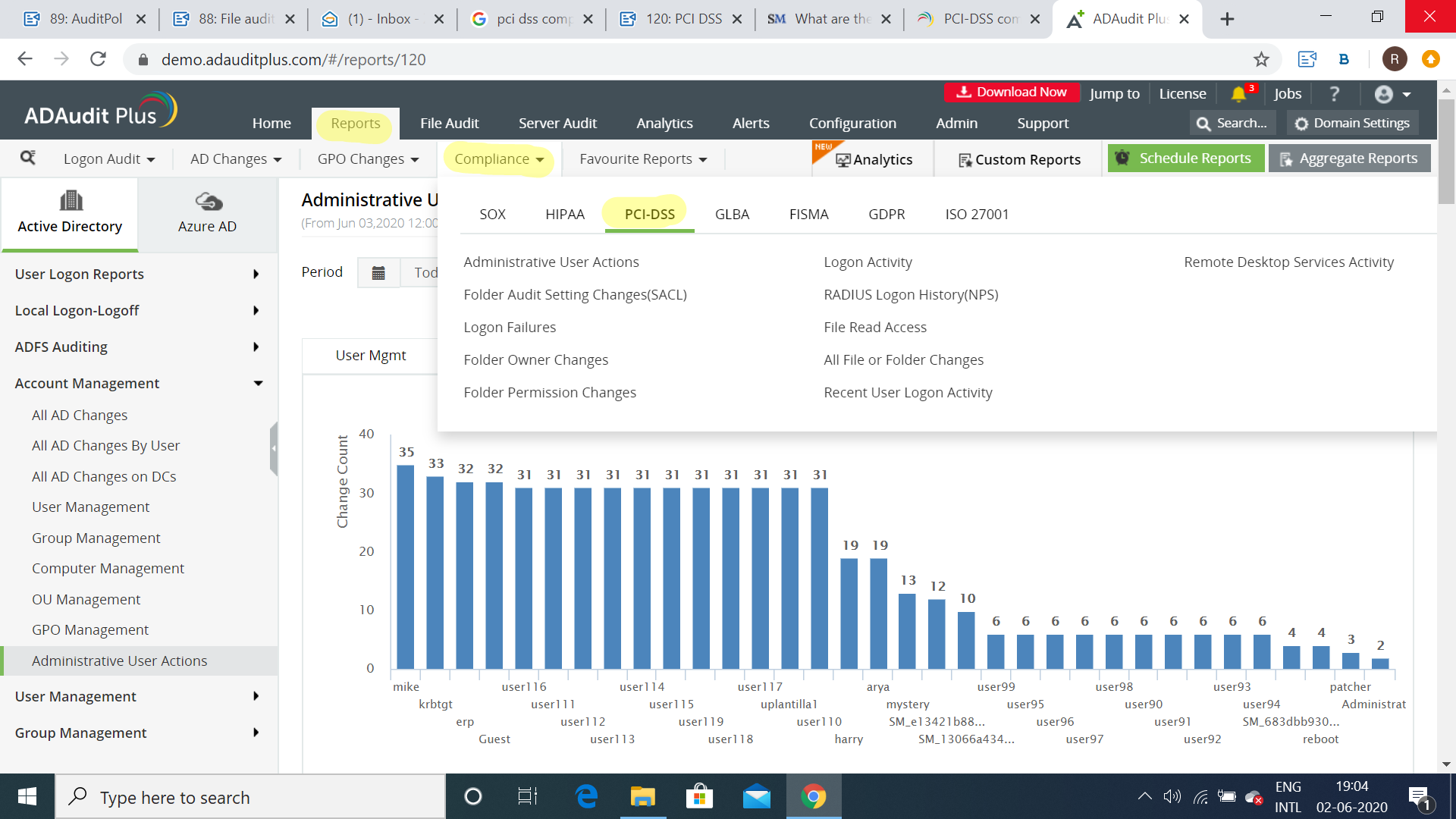
Track the actions of privileged users in your organization including modifications made to user accounts, files, accounts, passwords, attributes etc.
Identify who modified and what modifications are made to audit permissions in any server. The new and original security descriptor values are also displayed.
Detect brute force attacks, the source of account lockouts, unauthorized login activity, and malicious users in your Active Directory.
Get to know the new and original owners of folders, and also the history of the folders' owners.
Keep track of who has access to business critical files, and modifications made to them.
Understand who has logged on or attempted to log on to each computer and at what time.
Determine who logged in to a local computer using VPN.
Know who attempted to read any specific file, and identify whether they are authorized to do so by checking for success or failure.
Ascertain what changes have been made to a file or folder, by whom it was made, and what permissions they have over that file or folder.
Obtain the list of all the successful and failed user logon activities in a specified time period.
Find who logged in, when, which computer they logged in to, and from where.
These reports can be exported to CSV, HTML, XLS and TXT formats, and also scheduled to be automatically generated at regular intervals, and delivered to your inbox. You can also configure alerts to notify you when permissions of critical files/folders are changed. This helps you identify and act upon the situation immediately.
Try ADAudit Plus login monitoring tool to audit, track, and respond to malicious login and logoff actions instantaneously.
Try ADAudit Plus for free Free Edition










