How to get file integrity reports?
Written by Lakshmi, IT security team, ManageEngine Updated on November 2025
Continuous file access monitoring is your organization's best defense against internal and external threats to data security and integrity. You can get file integrity information using Windows PowerShell. Alternatively, you can use a comprehensive AD and file server auditing solution like ADAudit Plus that will make things simpler for you.
This article compares the method of getting file integrity information using Windows PowerShell and ADAudit Plus.
Windows PowerShell
Steps to get file integrity information using PowerShell:
- To retrieve file integrity information for a particular file we can use the Get-FileIntegrity cmdlet.
PS C:\>Get-FileIntegrity -FileName
'D:\Testscripts\New Text Document.txt'
- To get integrity information for multiple files, the Get-Item cmdlet is used to get all the files in the specified folder, and then it passes them to the Get-FileIntegrity cmdlet.
PS C:\>Get-Item -Path 'D:\Testscripts\*'
| Get-FileIntegrity
ADAudit Plus
To obtain the report,
- Log in to the ADAudit Plus web console.
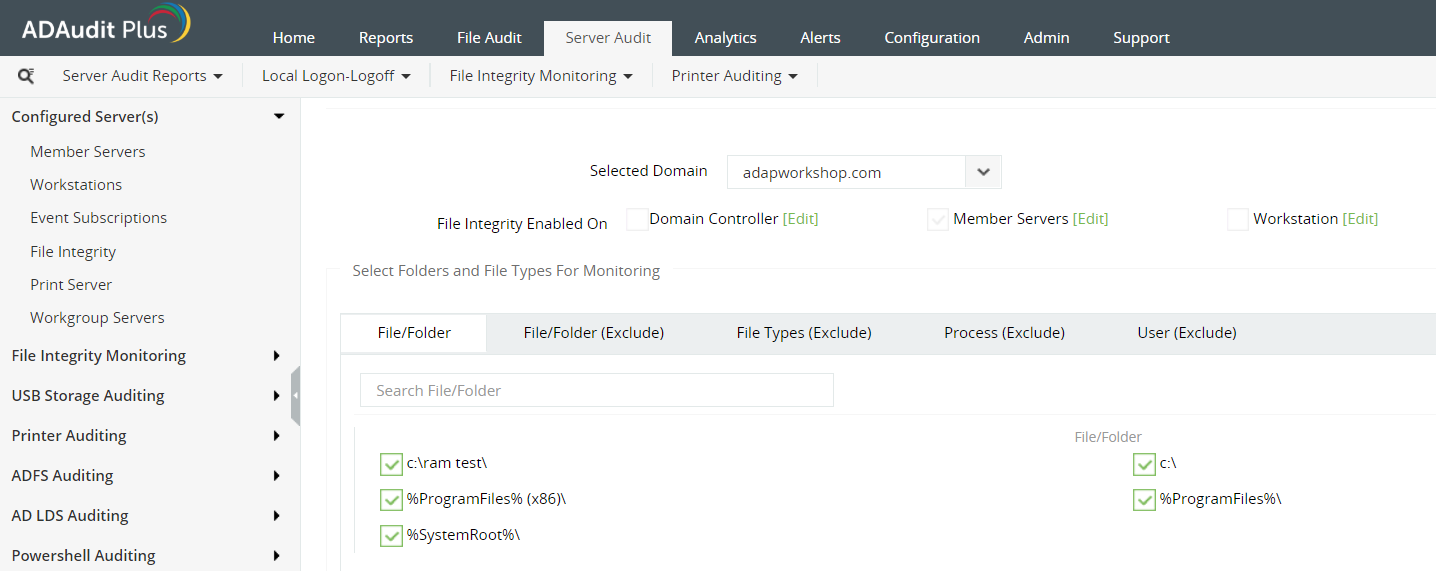
- To see what's configured already for file integrity monitoring, you need to navigate to Server audit > Configured Servers > File Integrity.
- View the DCs configured for file integrity monitoring.
- You can Modify FIM Configuration under Actions to view the different components that are configured for file integrity monitoring.
- These components also include the files and folders that are configured.
Screenshot:
Why ADAudit Plus is the better solution for you?
- Comprehensive dashboard so you can compare and correlate reports.
- ADAudit Plus allows you to export reports in the desired format with a single click easily.
- Advanced filter options to save you the trouble of creating complex LDAP queries to fetch only the information reports.
On the other hand, ADAudit Plus will quickly scan all the DCs in the domain and gets you the the entire history of users' logons in the form of an intuitive report.