How to detect USB usage history using PowerShell and ADAudit Plus
Written by Lakshmi, IT security team, ManageEngine Updated on November 2025
USB storage devices can be used to upload deleterious codes onto networked machines in an organization. It can also be used to copy critical files and result in intellectual property (IP) theft. To check for such malicious activities, system administrators need to track the history of USB devices connected to any of the networked computers.
The following is a comparison between obtaining the USB usage history report with Windows PowerShell and ADAudit Plus:
Windows PowerShell
Steps to obtain the USB usage history date using PowerShell:
- Identify the domain from which you want to retrieve the report.
- Identify the LDAP attributes you need to fetch the report.
- Identify the primary DC to retrieve the report.
- Compile the script.
- Execute it in Windows PowerShell.
Sample Windows PowerShell Script:
Get-ItemProperty -Path
'HKLM:\SYSTEM\CurrentControlSet\Enum\USBSTOR\*\*' | Select FriendlyName
Sample output:
ADAudit Plus
To obtain the report,
- Login to ADAudit Plus web console as an administrator.
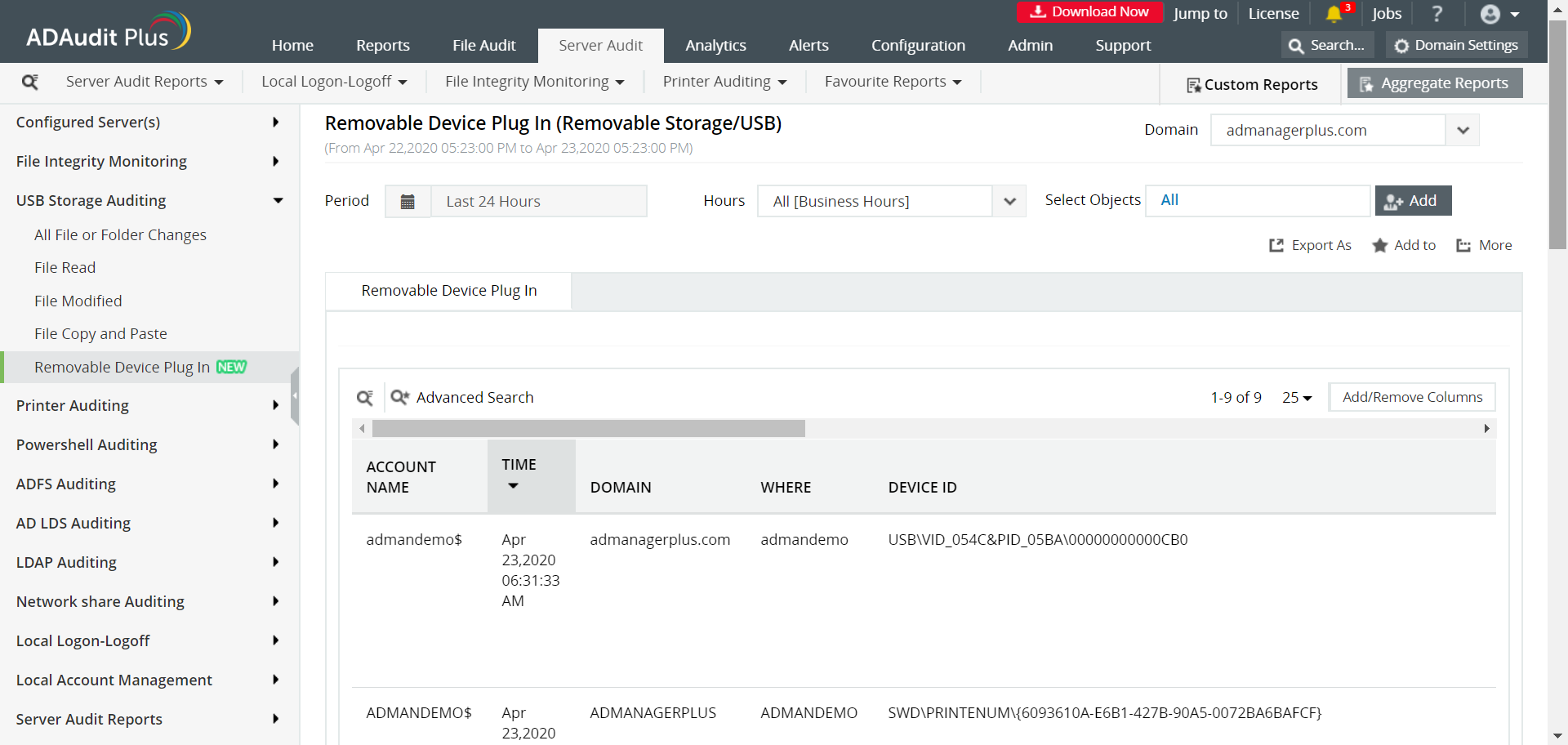
- Navigate to the Server Audit tab and from the USB Storage Auditing section in the left pane, select Removable Device Plug In.
- Select the domain and click Generate.
- Select Export As to export the report in any of the preferred formats (CSV, PDF, HTML, CSVDE and XLSX).
As you can see in the figure, ManageEngine ADAudit Plus provides an extensive yet simple report with all the details required for a system administrator to identify the source of a potential attack:
- The computer account name
- Date and time
- Domain name
- The type of external storage device used and its ID
The following are the limitations of obtaining a report on USB usage history using Windows PowerShell:
- The data obtained cannot be deciphered at one glance.
- It's difficult to generate the report for different time zones and date formats.
- It is difficult to export the report in file formats other than CSV.
- Applying more filters, like OU or 'User name starts with' will increase the LDAP query complexity.
On the other hand, ADAudit Plus will generate the report of USB usage history and display it in a simple and intuitively designed UI.