

- Free Edition
- Quick links
- Active Directory management
- Active Directory reporting
- Active Directory delegation
- Active Directory permissions management and reporting
- Active Directory automation
- Governance, risk, and compliance
- Microsoft 365 management and reporting
- Microsoft 365 management and reporting
- Microsoft 365 management
- Microsoft 365 reports
- Microsoft 365 user management
- Microsoft 365 user provisioning
- Microsoft 365 license managementn
- Microsoft 365 license reports
- Microsoft 365 group reports
- Dynamic distribution group creation
- Dynamic distribution group reports
- Exchange management and reporting
- Active Directory integrations
- Popular products
Adding Active Directory users
Adding users to Active Directory (AD) is an essential IT practice in Windows-based organizations. By adding users to AD, administrators can efficiently control and manage access to network resources and components. Typically, administrators use the New-ADUser PowerShell command, Active Directory Users and Computers, and other conventional methods to add users to AD and manage them. While these tools allow administrators to create and manage users, they can be limiting due to the steep learning curve and the complex scripting required.
ADManager Plus, an AD management and reporting solution, allows admins to add users to AD in bulk by offering an intuitive interface. It allows IT teams to add users to AD with ease, minimizing manual work and reducing errors. ADManager Plus supports bulk user management with smart templates, automations, and more, making it ideal for organizations with frequent employee onboarding.
How can users be added to AD using ADManager Plus?
ADManager Plus provides an efficient way to add users to AD, eliminating the need for manual entry. By using preconfigured templates, administrators can quickly create users or even upload a CSV file for bulk user additions. Here are the ways in which you can add users to AD using ADManager Plus:
- Template-based user creationThrough predefined templates, administrators can prefill user attributes, group memberships, organizational attributes specific to each department or role, and more. They can also configure conditions based on which user attributes can be dynamically filled. This approach ensures that all user profiles are created consistently, reducing manual input and minimizing errors associated with repetitive tasks.
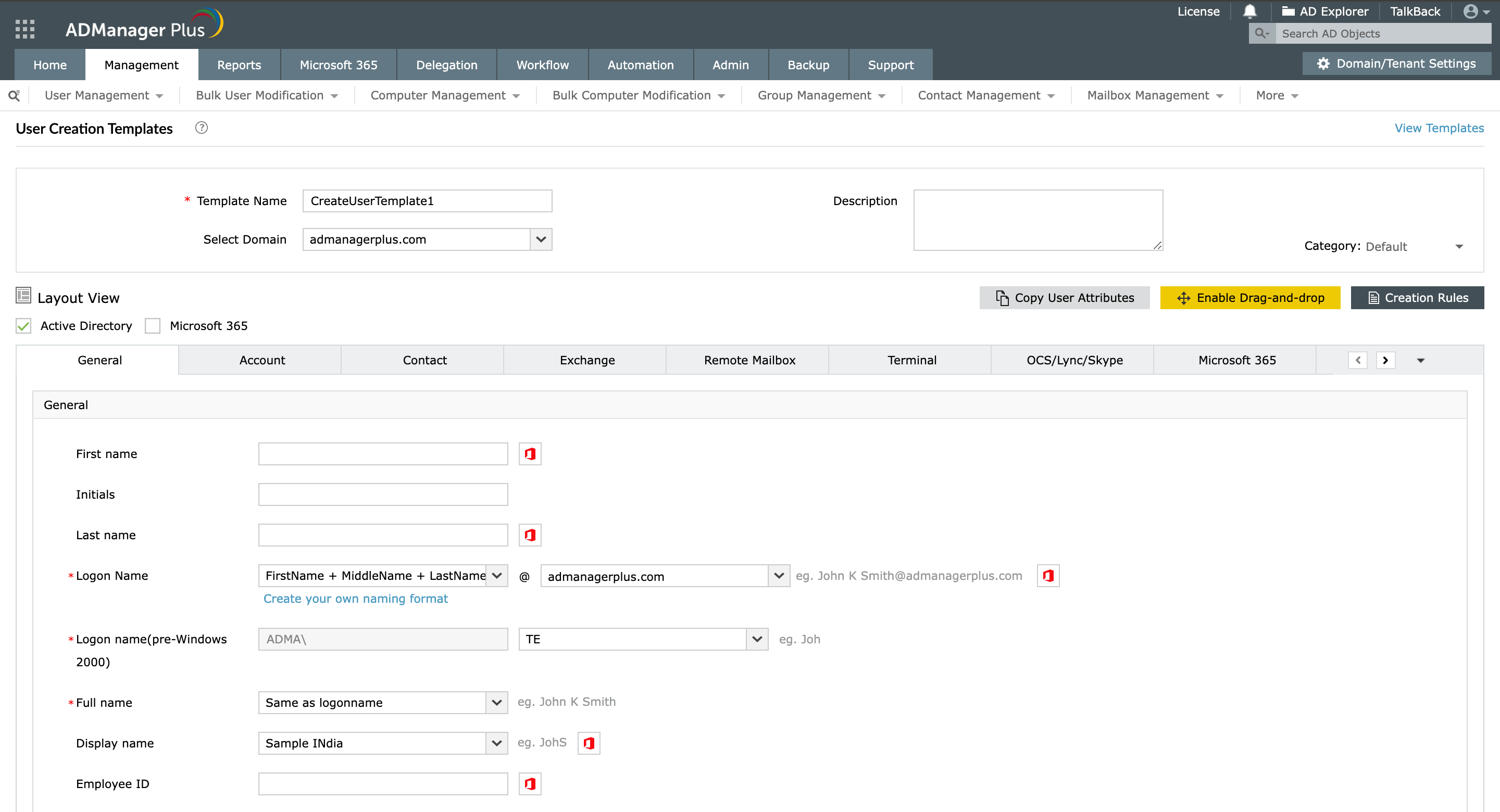
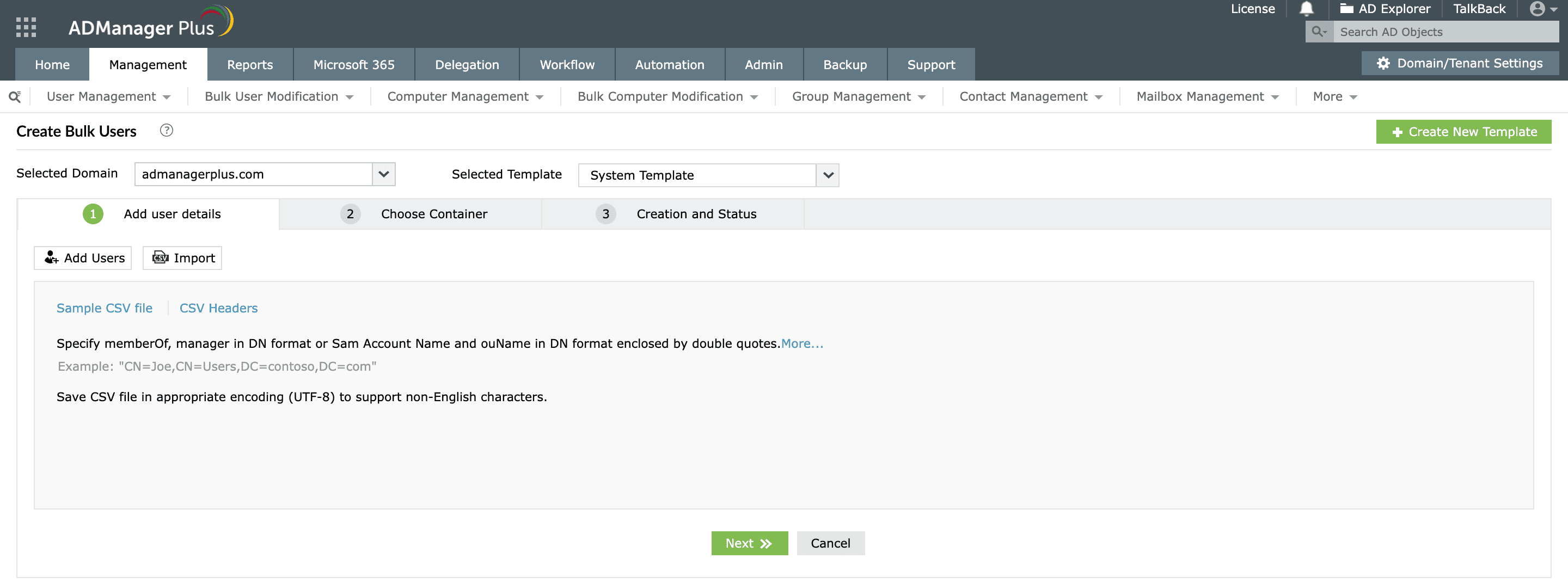
- CSV-based user creation Using CSV files, administrators can streamline bulk user creation and updates. This capability eliminates the need for manual entry of each user's details, making it especially useful for organizations handling frequent onboarding, seasonal hiring, or department restructuring.
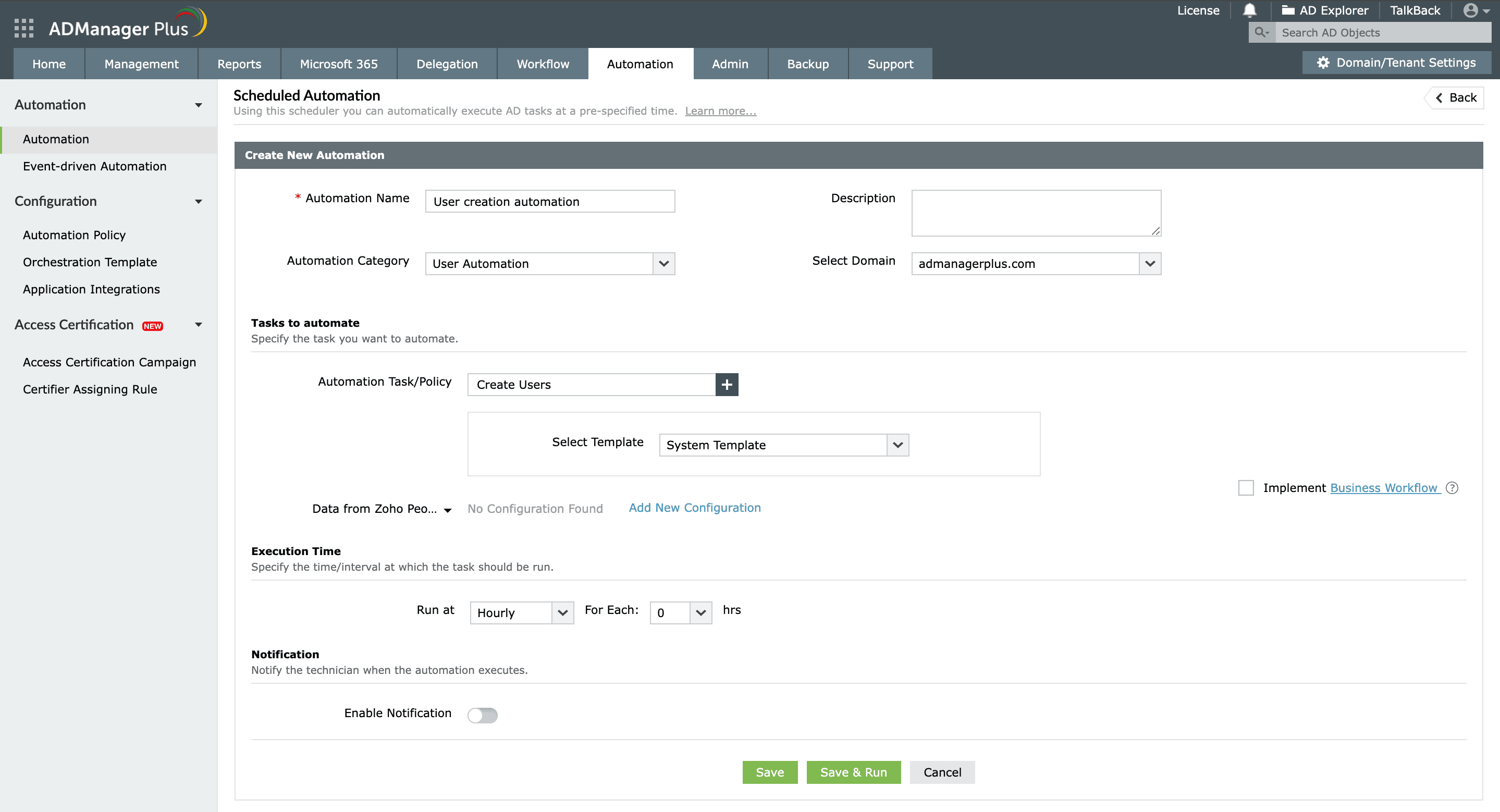
- Automated user creation With automation, administrators can add users from HCM applications, databases, and more by using REST and SOAP APIs or by adding new hires' information to a CSV file and automating the entire process. Administrators can also automatically add users to AD groups and manage users' group memberships during user creation itself.


Benefits of using ADManager Plus to add users to AD
Using ADManager Plus to add users to AD offers numerous benefits that enhance and streamline the user onboarding process. Here are some key advantages:
Streamlined user creation
ADManager Plus streamlines the user onboarding process, allowing administrators to create individual or multiple users quickly, thereby significantly reducing the time spent on manual entry.
Minimized data entry errors
By employing CSV files, predefined templates, and customized automations, ADManager Plus minimizes the risk of human error associated with manual data entry.
Bulk user creation
With bulk user creation capabilities, administrators can onboard a large number of users in minutes, reducing the workload.
Seamless application integrations
You can integrate ADManager Plus with existing HCM applications and databases, enabling automatic user provisioning based on HR data. This ensures that new hires are added promptly and accurately without manual intervention.
Other features
Active Directory User Reports
Exhaustive reporting on Active Directory Users and user-attributes. Generate reports in user-activity in your Active Directory. Perform user-management actions right from the report interface!
Active Directory Compliance Reports
Active Directory reports to assist you for compliance to Government Regulatory Acts like SOX, HIPAA, GLBA, PCI, USA PATRIOT...and much more! Make your organization compliance-perfect!
Active Directory Management
Make your everyday Active Directory management tasks easy and light with ADManager Plus's AD Management features. Create, modify and delete users in a few clicks!
Terminal Services management
Configure Active Directory Terminal Services attributes from a much simpler interface than AD native tools. Exercise complete control over technicians accessing other domain users' computers.
Active Directory Cleanup
Get rid of the inactive, obsolete and unwanted objects in your Active Directory to make it more secure and efficient...assisted by ADManager Plus's AD Cleanup capabilities.
Active Directory Automation
A complete automation of AD critical tasks such as user provisioning, inactive-user clean up etc. Also lets you sequence and execute follow-up tasks and blends with workflow to offer a brilliant controlled-automation.


