

- Free Edition
- Quick links
- Active Directory management
- Active Directory reporting
- Active Directory delegation
- Active Directory permissions management and reporting
- Active Directory automation
- Governance, risk, and compliance
- Microsoft 365 management and reporting
- Microsoft 365 management and reporting
- Microsoft 365 management
- Microsoft 365 reports
- Microsoft 365 user management
- Microsoft 365 user provisioning
- Microsoft 365 license managementn
- Microsoft 365 license reports
- Microsoft 365 group reports
- Dynamic distribution group creation
- Dynamic distribution group reports
- Exchange management and reporting
- Active Directory integrations
- Popular products
Group Policy Objects (GPOs) make policy management easier, because GPOs can be applied to all objects such as OUs, domains, or sites at once. AD administrators often rely on native AD tools like Active Directory Users and Computers and the Group Policy Management Console (GPMC) to create and modify AD objects and configure group policies.
However, toggling between these two consoles multiple times a day is a time-consuming affair. Moreover, when managing GPOs in bulk using the GPMC, group policies can only be applied to one object at a time. ManageEngine ADManager Plus, an AD GPO management tool, enables admins to create AD objects and apply GPOs in bulk instantly from the same window.
What is GPO inheritance?
GPO inheritance offers flexibility, allowing administrators to set specific policies at the OU level. The concept of GPO inheritance is especially useful in large and complex AD environments where the OUs containing users or computers frequently require different GPO settings than what is configured at the domain level. Blocking or unblocking GPO inheritance by selecting each OU individually in the GPMC can quickly become monotonous.
Managing GPO inheritance
Using ADManager Plus, admins can block or unblock inheritance in Group Policy by any domain or OU from its parent container in just a few mouse clicks. Admins can also generate detailed reports that list all the objects for which the inheritance of GPO settings has been blocked—all without any PowerShell scripts.
-
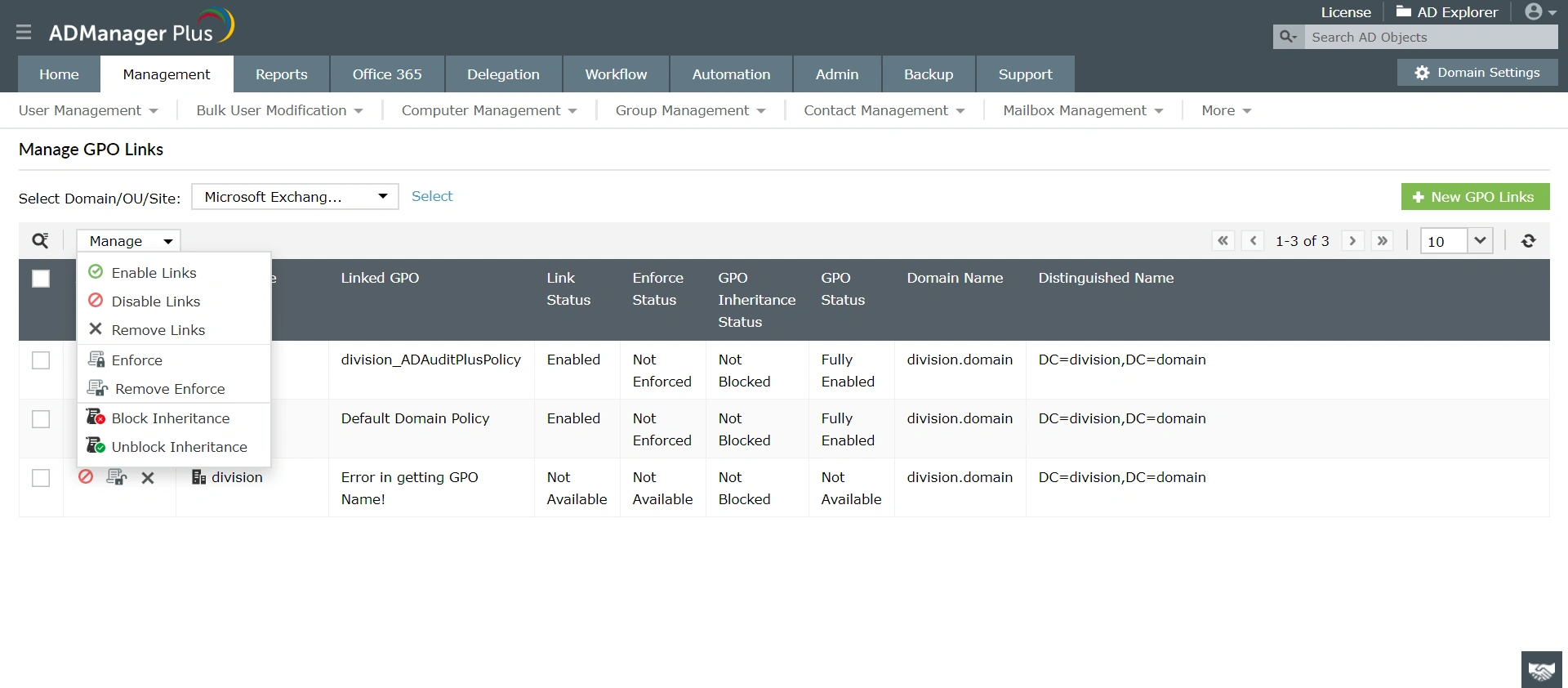 Block or unblock GPO inheritance instantly using these options.This column displays the current GPO inheritance status of all the objects in the specified domain, OU, or site.
Benefits of using ADManager Plus to block or unblock Group Policy inheritance:
- Manage GPOs in bulk from a unified web-based console.
- Delegate GPO inheritance management to help desk technicians.
- Eliminate the need for PowerShell scripts.
Other features
Bulk User Management
Fire a shotgun-shell of AD User Management Tasks in a Single Shot. Also use csv files to manage users. Effect bulk changes in the Active Directory, including configuring Exchange attributes.
Active Directory Workflow
A mini Active Directory ticket-management and compliance toolkit right within ADManager Plus! Define a rigid yet flexible constitution for every task in your AD. Tighten the reins of your AD Security.
Active Directory Cleanup
Get rid of the inactive, obsolete and unwanted objects in your Active Directory to make it more secure and efficient...assisted by ADManager Plus's AD Cleanup capabilities.
Active Directory Password Management
Reset password and set password propertied from a single web-based console, without compromising on the security of your AD! Delegate your password-reset powers to the helpdesk technicians too!
Microsoft Exchange Management
Create and manage Exchange mailboxes and configure mailbox rights using ADManager Plus's Exchange Management system. Now with support for Microsoft Exchange 2010!!
Active Directory Automation
A complete automation of AD critical tasks such as user provisioning, inactive-user clean up etc. Also lets you sequence and execute follow-up tasks and blends with workflow to offer a brilliant controlled-automation.
Need Features? Tell Us
If you want to see additional features implemented in ADManager Plus, we would love to hear. Click here to continue


