

- Free Edition
- Quick links
- Active Directory management
- Active Directory reporting
- Active Directory delegation
- Active Directory permissions management and reporting
- Active Directory automation
- Governance, risk, and compliance
- Microsoft 365 management and reporting
- Microsoft 365 management and reporting
- Microsoft 365 management
- Microsoft 365 reports
- Microsoft 365 user management
- Microsoft 365 user provisioning
- Microsoft 365 license managementn
- Microsoft 365 license reports
- Microsoft 365 group reports
- Dynamic distribution group creation
- Dynamic distribution group reports
- Exchange management and reporting
- Active Directory integrations
- Popular products
The need for delegating Active Directory user management tasks
Active Directory delegation is a core strategy for building an efficient, secure, and responsive IT team. By securely delegating routine Active Directory tasks, you can free up senior admins so they can focus on high-impact projects. It also empowers your help desk, giving technicians the specific tools they need to resolve issues instantly without relying on senior technicians or admins. This leads to improved response times; when users are locked out, they receive a near-instant resolution instead of waiting in a ticket queue. Most importantly, proper delegation helps enhance security by enforcing the principle of least privilege: you are granted limited, task-specific rights rather than broad permissions.
ADManager Plus, an Active Directory delegation tool, provides role-based delegation, enabling admins to delegate tasks without ever compromising on security.
Commonly delegated Active Directory user management tasks
The daily tasks that consume the most IT time are often the simplest. Using ADManager Plus, delegate Active Directory user management tasks to the right people with the right permissions, all while maintaining complete audit trails and compliance.
Password resets and account unlocks
ADManager Plus empowers you to authorize help desk technicians or even HR staff to instantly reset forgotten passwords and unlock locked-out accounts for specific OUs or domains. This eliminates frustrating delays for users and frees up administrators from handling these high-volume, low-complexity tickets, ensuring continuous productivity across the organization.
User creation
ADManager Plus enables you to provide technicians or HR personnel with user creation templates that ensure all new user accounts are created consistently, with all necessary attributes, group memberships, and home folders configured correctly from day one. This controlled delegation prevents errors, enforces naming policies, and accelerates the integration of new employees into your Active Directory environment.
Account status management
Safely empower managers or HR to instantly enable or disable Active Directory accounts as needed. This capability is crucial for promptly handling new hires, departures, or long-term leaves, ensuring that access rights are always aligned with current employment status, thereby significantly bolstering organizational security.
Modify attributes
Delegate control to change user attributes and ensure that users' information is accurate and up-to-date at all times without granting full administrative rights. Whether it's updating a phone number, changing a job title, or adjusting office locations, ADManager Plus ensures these modifications are handled through a controlled workflow. This maintains data integrity and empowers departmental representatives to manage their own team's information directly.
How to delegate a user management task in Active Directory
- Create role
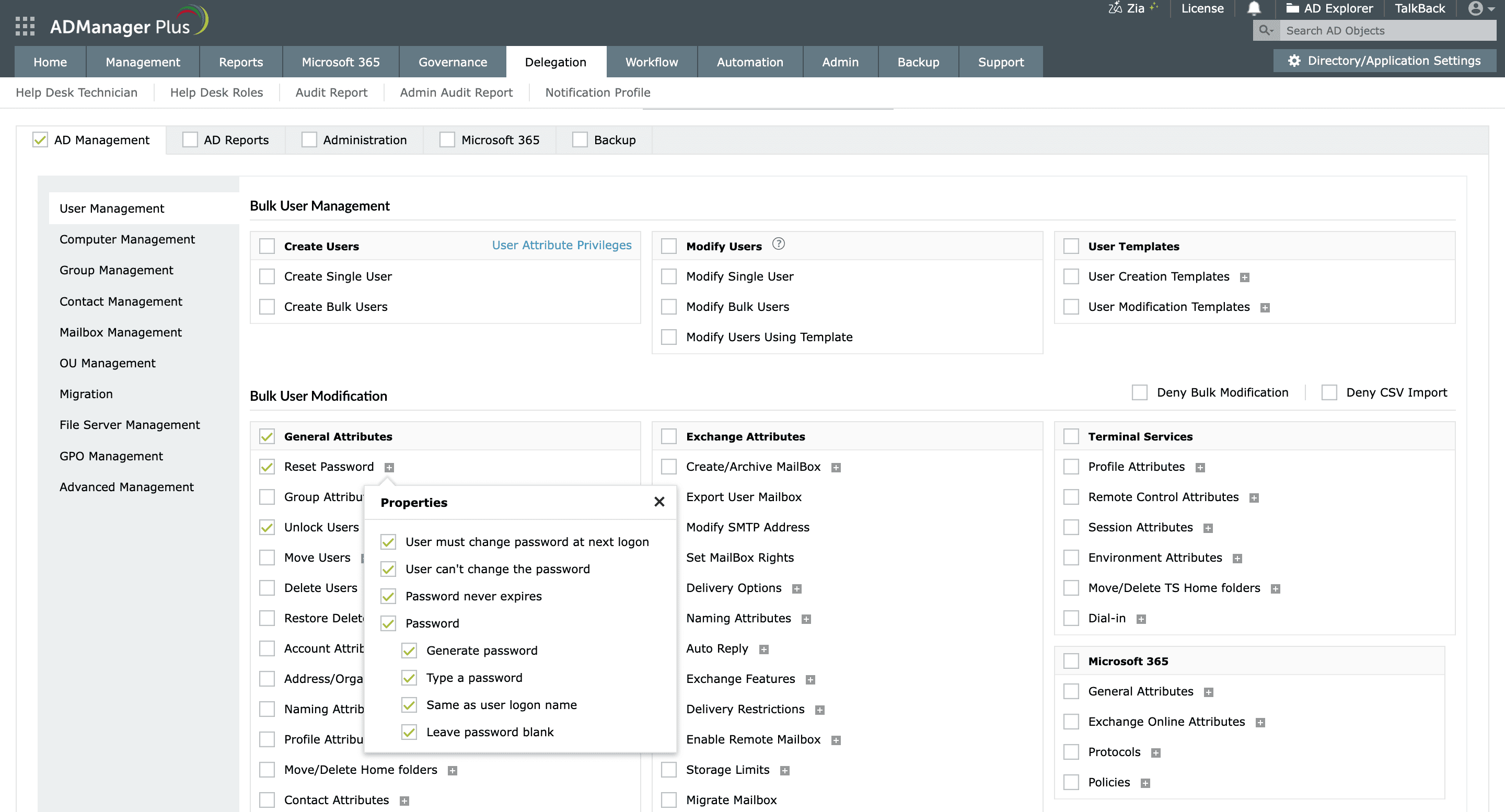
Create a password reset help desk role in ADManager Plus.
- Add technicians
Select the user or group to whom you would like to assign this role.
- Define scope
Select the target OU over which the delegated technician can perform the password reset action.

Secure and simplify Active Directory user management delegation
- Role-based delegation : Create custom help desk roles and assign only the actions help desk technicians need to complete a task. For instance, delegate control only to unlock user accounts, not delete or edit their attributes.
- Scope definition: Restrict technicians to specific OUs or AD containers based on a help desk role.
- Multi-level approval workflows: Ensure sensitive tasks are executed after admin's approval with customizable workflows.
- Audit reports : Track who did what, when, and on which object with technician audit reports.


