AI Agents
Overview
An AI agent is the assistant you talk to in Ask Zia. Each agent has its own purpose, its own GenAI model, and its own set of tools that fetch data from Applications Manager. When you ask a question, the selected agent decides which of its tools to use and composes the answer from the data they return.
Applications Manager ships with a set of default agents that are ready to use once a GenAI integration is configured. You can also create custom agents for specific areas of work by giving each a description, a system prompt, and access to only the tools it needs.
Prerequisites
- A GenAI integration must be configured, with at least one model available. Go to Settings → Product Settings → Integrations (Add-On Settings). For details, refer to AIOps Integrations.
- You must be logged in as an Admin user.
Accessing and Managing AI Agents
Go to Settings → Product Settings → AI Settings and open the AI Agents tab. You can also reach it from the Zia AI tab in the header by choosing AI Agents. The page lists the default agents shipped with the product and the custom agents you create, along with their description and status.
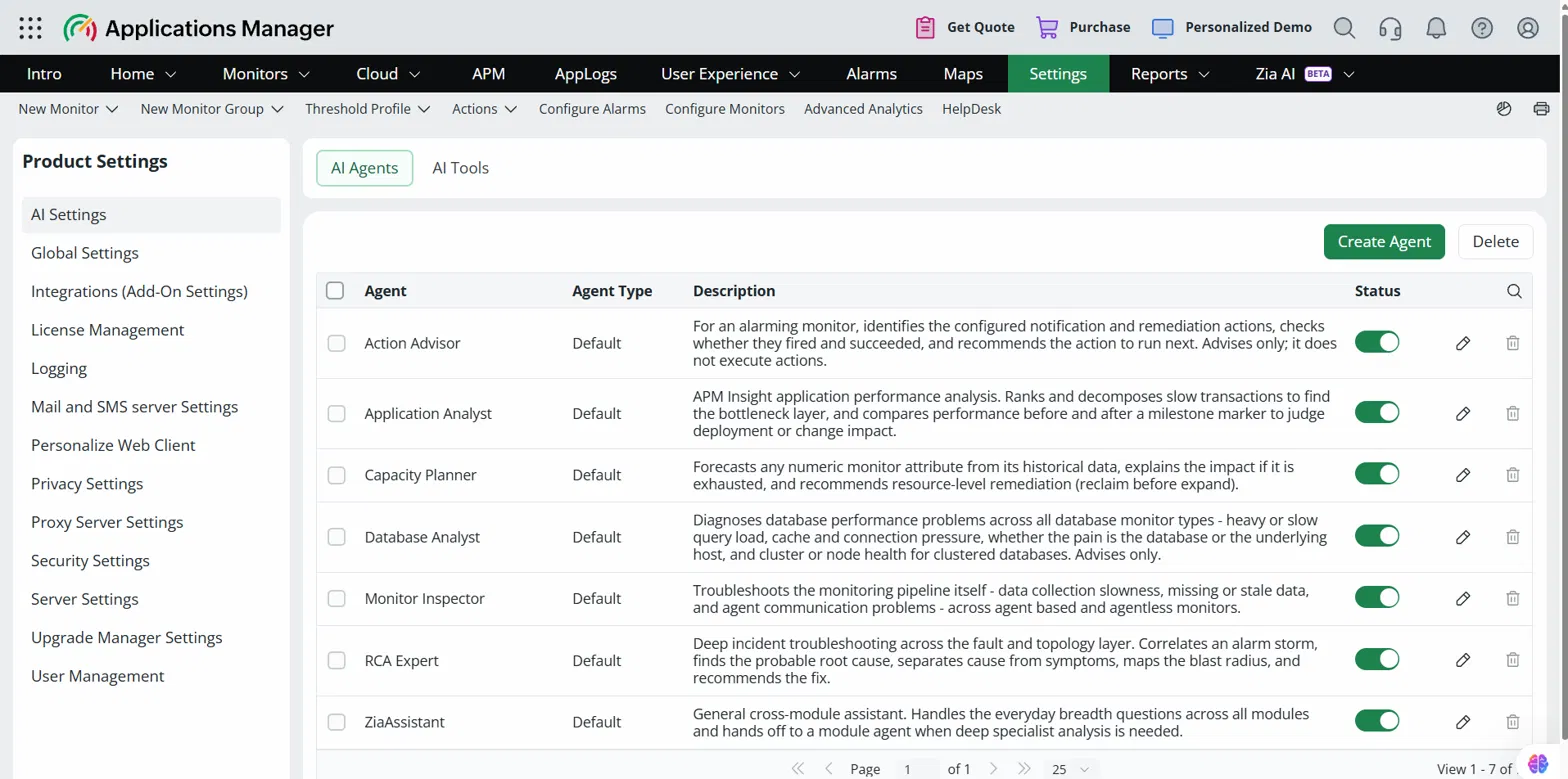
To create an agent:
- Click Create Agent.
- Under Agent Identity, enter the Agent Name and Agent Description.
- Select the Vendor and the Model the agent will use.
- Under System Prompt, define the agent's goal and behavior. You can click Generate System Prompt with AI to draft one from the description, then edit it.
- Under Tool Access, select the tools the agent can use. Tools are listed by module. You can select a whole module or expand it and pick individual tools.
- Click Save.
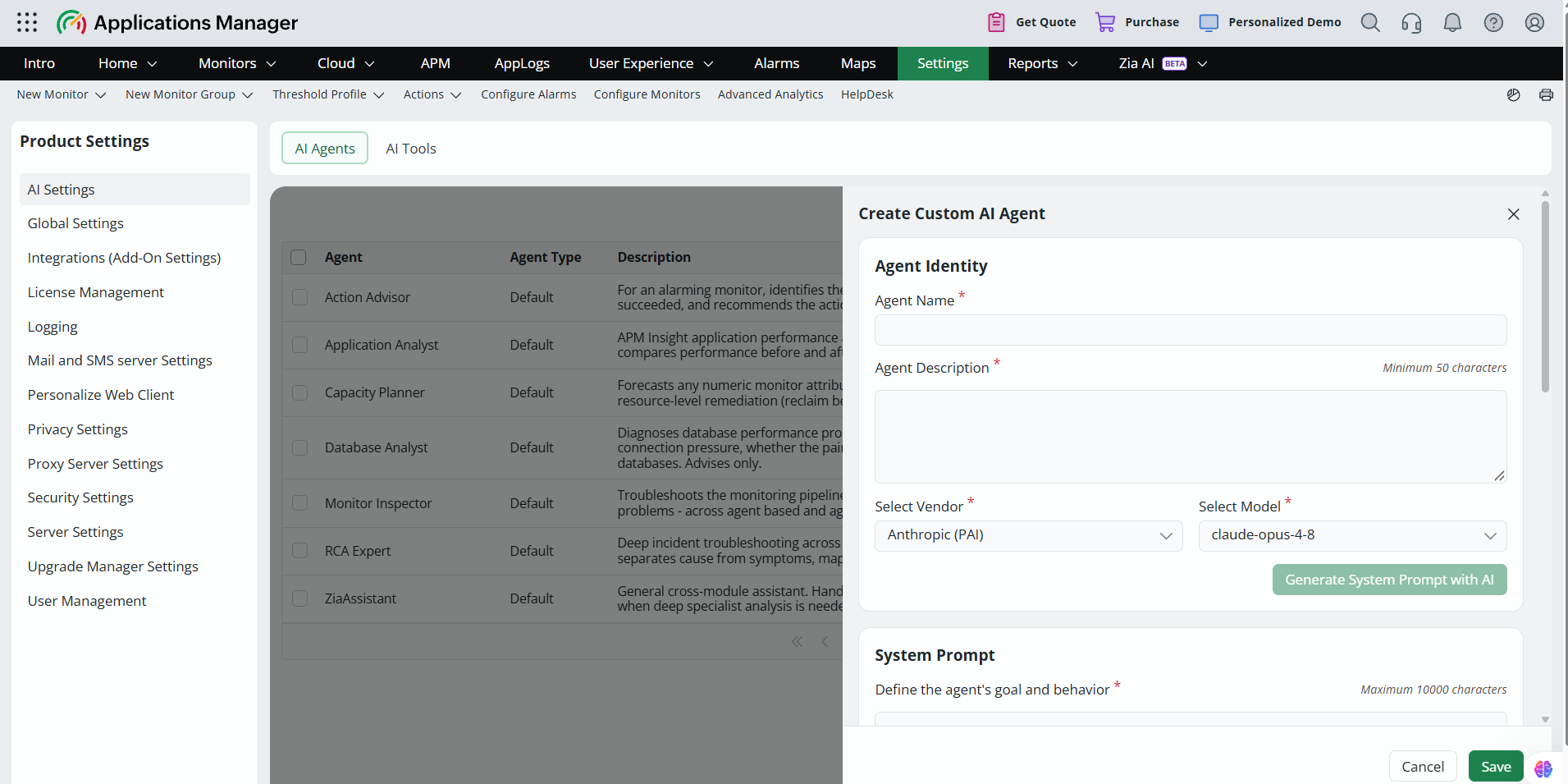
| Field | Description |
|---|---|
| Agent Name | Must be unique. Use letters, numbers, spaces, hyphens, or underscores, starting with a letter. |
| Agent Description | Between 50 and 500 characters. Also used as the source when generating a system prompt. |
| Vendor | The configured GenAI integration that the agent will use. |
| Model | The model the agent will use. Only models available on the selected vendor are listed. |
| System Prompt | Required, up to 10,000 characters. Be specific about the agent's domain, how it should reason, and any constraints or formatting preferences. |
| Tool Access | The tools the agent can use. At least one tool is required. |
The Generate System Prompt with AI feature becomes available once the description has at least 50 characters and a vendor and model are selected. The generated prompt is a starting point, so review and edit it before you save.
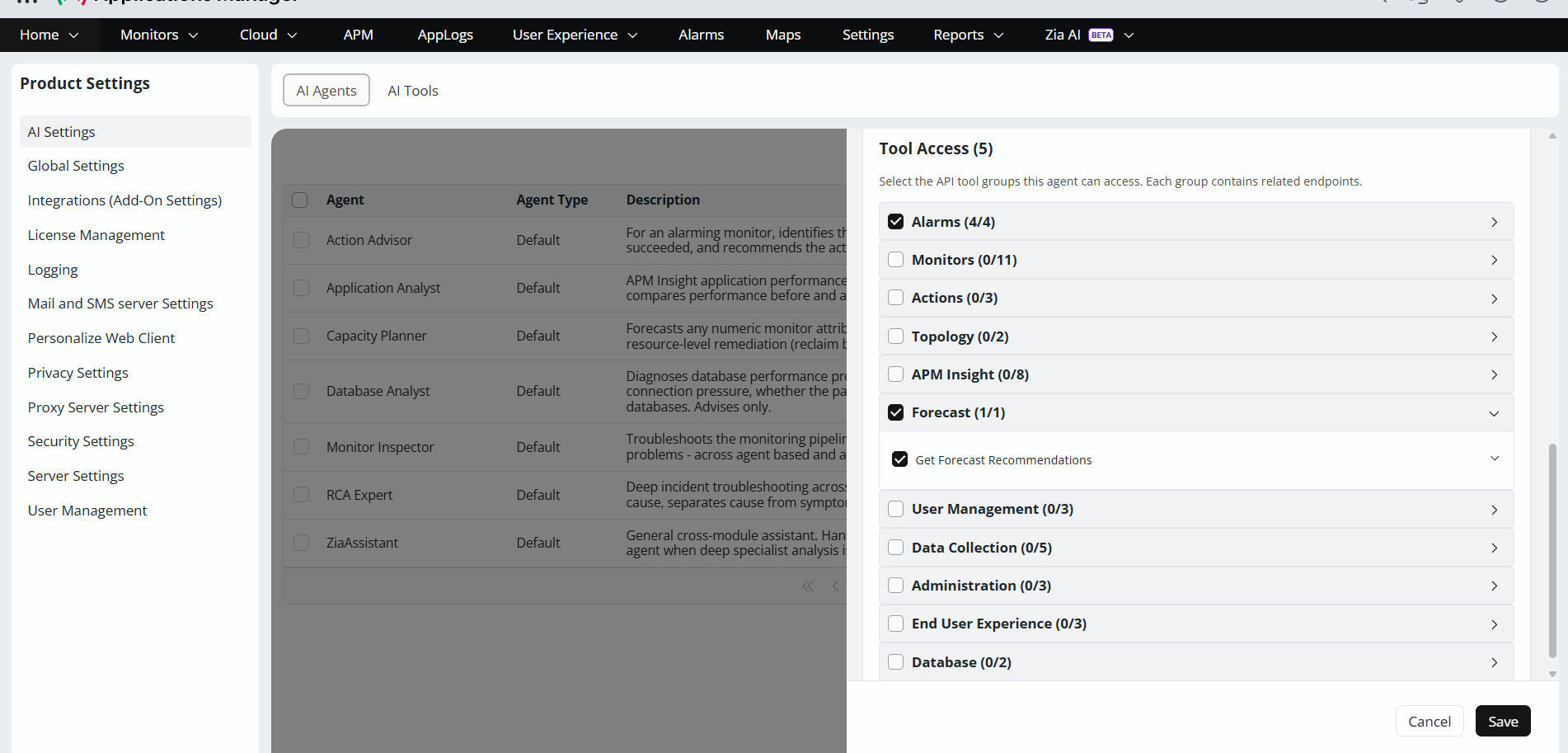
Give each agent only the tools its purpose requires. A narrower tool set keeps answers focused and reduces the amount of data sent to the GenAI provider. For the tools available in each module, refer to AI Tools.
From the agent list, you can edit an agent to change its description, system prompt, vendor, model, or tool access, enable or disable it using the Status column, and delete custom agents you no longer need.
Default Agents
| Agent | Specialization |
|---|---|
| ZiaAssistant | General assistant for everyday questions across all modules. |
| Capacity Planner | Forecasts a monitor's metrics from historical data, explains the impact if a resource is exhausted, and recommends resource-level remediation. |
| RCA Expert | Incident troubleshooting across alarms and topology: correlates an alarm storm, finds the probable root cause, separates cause from symptoms, and recommends the fix. |
| Application Analyst | APM Insight application performance analysis: ranks slow transactions to find the bottleneck layer and compares performance before and after a milestone. |
| Action Advisor | For an alarming monitor, identifies the configured notification and remediation actions, checks whether they fired and succeeded, and recommends the action to run next. |
| Monitor Inspector | Troubleshoots the monitoring pipeline itself: data collection slowness, missing or stale data, and agent communication problems. |
| Database Analyst | Diagnoses database performance problems across the database monitor types: query load, cache and connection pressure, host versus database bottlenecks, and cluster or node health. |
Notes
- AI Agents are available only to Admin users.
- An agent cannot be renamed after it is created.
- For a default agent, only the vendor and model assignment can be changed. A default agent cannot be deleted. Disable it instead if you do not want it offered in the chat.
- A disabled agent is not offered in the Ask Zia message box, but its configuration is retained.
- Deleting an agent removes its configuration and tool mappings permanently.
- Agent creation, modification, deletion, and enable or disable operations are recorded in the audit logs.
- Changing an agent's model changes the responses it produces, including their quality and response time.
Loved by customers all over the world

"Standout Tool With Extensive Monitoring Capabilities"
It allows us to track crucial metrics such as response times, resource utilization, error rates, and transaction performance. The real-time monitoring alerts promptly notify us of any issues or anomalies, enabling us to take immediate action.
Reviewer Role: Research and Development

"I like Applications Manager because it helps us to detect issues present in our servers and SQL databases."
Carlos Rivero
Tech Support Manager, Lexmark