AI Tools
Overview
A tool is a single, well-defined operation that an AI agent can perform against Applications Manager, for example, listing open alarms, fetching a monitor's metrics, or returning a monitor group's event summary. Every answer in Ask Zia is built from the data the agent's tools return.
Tools are organized by module. When you build an agent on the AI Agents page, you choose the tools it can use. The AI Tools page is where you review the tools available in your installation and control which of them any agent is allowed to use.
Prerequisites
- You must be logged in as an Admin user.
Accessing and Managing AI Tools
Go to Settings → Product Settings → AI Settings and open the AI Tools tab. You can also reach it from the Zia AI tab in the header by choosing AI Tools. The page lists every tool available in your installation with its description and status.
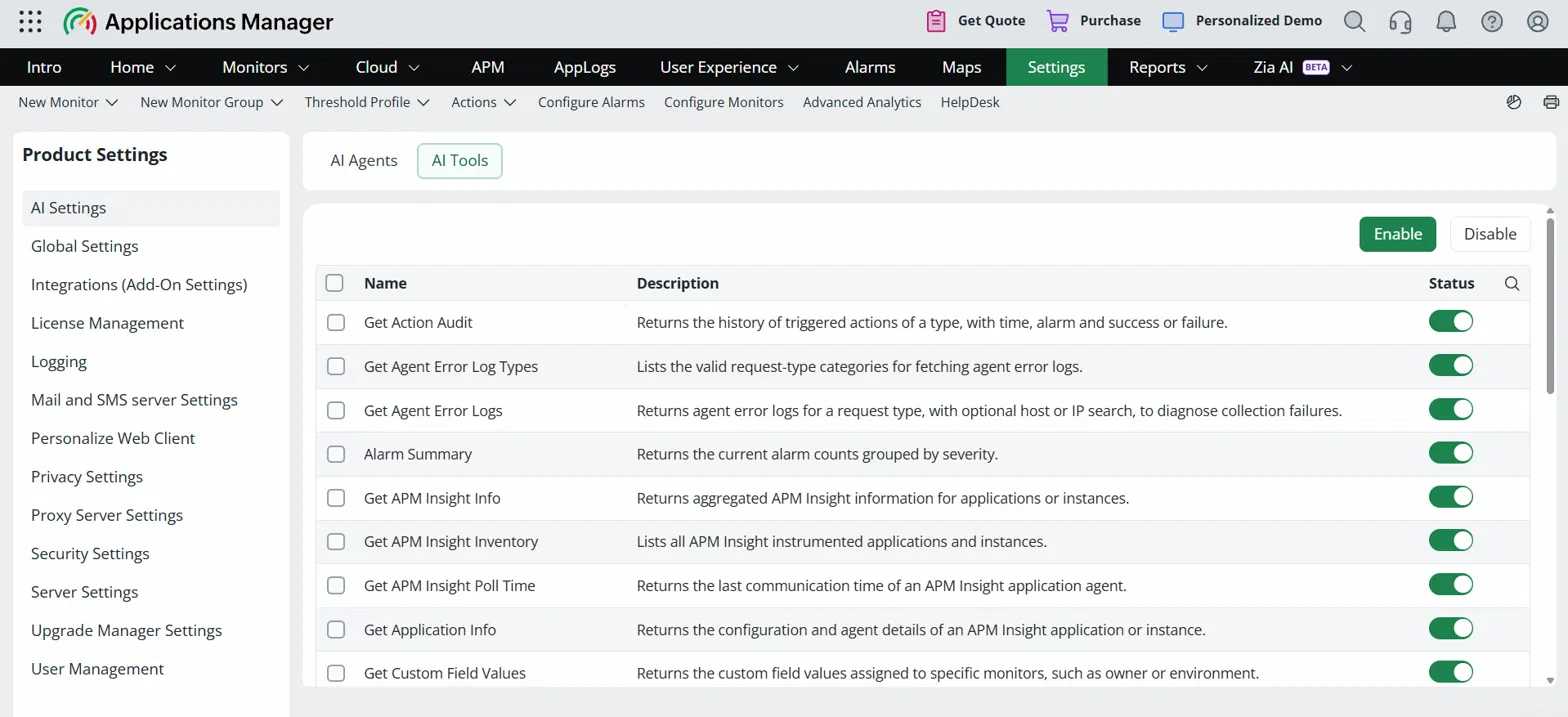
Use the Status column to enable or disable a single tool, or select several tools and apply the change in bulk. Disabling a tool takes effect for every agent at once, even if the tool is assigned to that agent, so it is the quickest way to put a capability out of reach without editing each agent.
Tools
| Module | Capabilities |
|---|---|
| Alarms | Lists the open alarms, summarizes them by severity, traces the root cause behind an alarming monitor, and retrieves the event history of a monitor attribute. |
| Monitors | Finds monitors and monitor groups, resolves their attributes, and retrieves their current metrics, historical trends, polling status, and milestones. |
| Actions | Lists the configured notification and remediation actions and shows the history of the actions that were triggered. |
| Topology | Retrieves the relationship graph of a resource and the devices a monitor depends on. |
| APM Insight | Lists the instrumented applications and instances, and retrieves their configuration, key transactions, transaction health, and transaction events. |
| Forecast | Retrieves the remediation recommendations attached to open forecast alerts. |
| User Management | Lists the users, user groups, and authentication domains configured in Applications Manager. |
| Data Collection | Lists the deployed monitoring agents and retrieves their error logs, the product's self-diagnostic alerts, and the last poll time of APM Insight agents. |
| Administration | Retrieves the license status and the custom fields and values attached to monitors. |
| End User Experience | Retrieves the user counts and browser errors of Real User Monitoring and the recorded steps of a Real Browser Monitor. |
| Database | Retrieves the cluster status and node details of Oracle RAC and MySQL cluster monitors. |
Within a module, each tool fetches one kind of data. Its description on the AI Tools page states what it returns.
Notes
- AI Tools are available only to Admin users.
- Tool enable and disable operations are recorded in the audit logs.
- Disabling a tool affects every agent immediately. Check which agents rely on it before disabling it.
- If every tool assigned to an agent is disabled, that agent cannot answer questions until at least one of its tools is enabled again.
- In Ask Zia, the Tool Calls section of a reply shows which tools produced that answer.
Loved by customers all over the world

"Standout Tool With Extensive Monitoring Capabilities"
It allows us to track crucial metrics such as response times, resource utilization, error rates, and transaction performance. The real-time monitoring alerts promptly notify us of any issues or anomalies, enabling us to take immediate action.
Reviewer Role: Research and Development

"I like Applications Manager because it helps us to detect issues present in our servers and SQL databases."
Carlos Rivero
Tech Support Manager, Lexmark