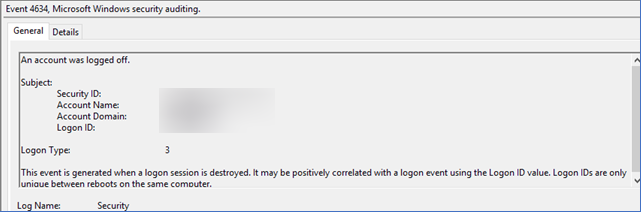
This is an important message for users of Applications Manager regarding the new Microsoft update released in April 2024 (KB5036909 for Windows Server). This update might lead to an increase in Windows security event ID 4634 within your environment.
What is Event ID 4634?
When a logon session is terminated, event 4634 is generated. Unlike Event ID 4647, it doesn't necessarily mean a user intentionally logged out. Various scenarios can lead to session termination, such as a computer going to sleep mode, a network connection dropping abruptly, or a system crash.
What is causing an issue?
The April 2024 security update for Windows Server might cause a significant increase in NTLM authentication traffic on domain controllers (DCs). This surge in NTLM attempts can strain authentication processes, potentially leading to more frequent occurrences of failed logoff. This can result in a rise of Windows security event ID 4634 being logged, indicating terminated sessions rather than successful logoffs.
Applications Manager typically collects data every 5 minutes and performs login/off operations 3-5 times per data collection, which amounts to approximately 1000+ events getting generated per day per server.
Who's most affected?
Applications Manager's users who use the WMI mode of monitoring for Microsoft applications like Windows, IIS servers, etc, without Kerberos Authentication might be impacted.
Note: This does not mean that every system with the April 2024 update applied will face this issue. Since the exact root-cause of this issue has not been disclosed by Microsoft, we cannot determine the environments where this issue is likely to occur.
The fix:
Even though Event ID 4634 may get generated in bulk, the data collection and monitoring in Applications Manager is not affected. There are two ways to fix this issue:
Solution 1: Apply the Windows May 2024 Security Update
Microsoft has addressed the issue in the May 2024 update. Updating to the latest version will reduce the Event ID 4634 generation. Depending on the Windows server version used in your environment, the update with the fix is given below:
- Windows Server 2022 (KB5037782)
- Windows Server 2019 (KB5037765)
- Windows Server 2016 (KB5037763)
- Windows Server 2012 R2 (KB5037823)
Solution 2: Switch WMI monitors to Kerberos Mode
Switching to Kerberos mode eliminates the event surge and improves overall security. Migrating to Kerberos mode will require some configuration changes within Applications Manager (Edit the respective monitor and Enable Kerberos mode of authentication). Ensure your environment is compatible with Kerberos authentication for WMI communication.

