ServiceDesk Plus > Resources > ITSM best practices > What is a ticket management system?
Home > Resources > ITSM best practices > What is a ticket management system?

IT help desk ticketing system

Try ServiceDesk Plus Now

Written by: Raghav S

Reviewed by: Zephaniah B

Last updated on: January 08, 2026

Originally published on: October 03, 2023

What is a ticket?

A ticket is a record maintained in a ticketing system by an IT department. It may represent an incident, a service request, or even an alert or event triggered by computer systems. It provides your IT service desk with contextual information on the request, helping them manage their ticket queue better. It also contains a history of communication between the requester and the IT technician. Incoming tickets submitted using ticket forms or templates may also offer more accurate information on an incident or a service request.

Tickets typically originate from three sources:

  • Employees or end users.
  • IT support agents: Technicians that raise tickets on behalf of end users.
  • Automated systems: Network monitoring tools that automatically generate tickets based on alerts.
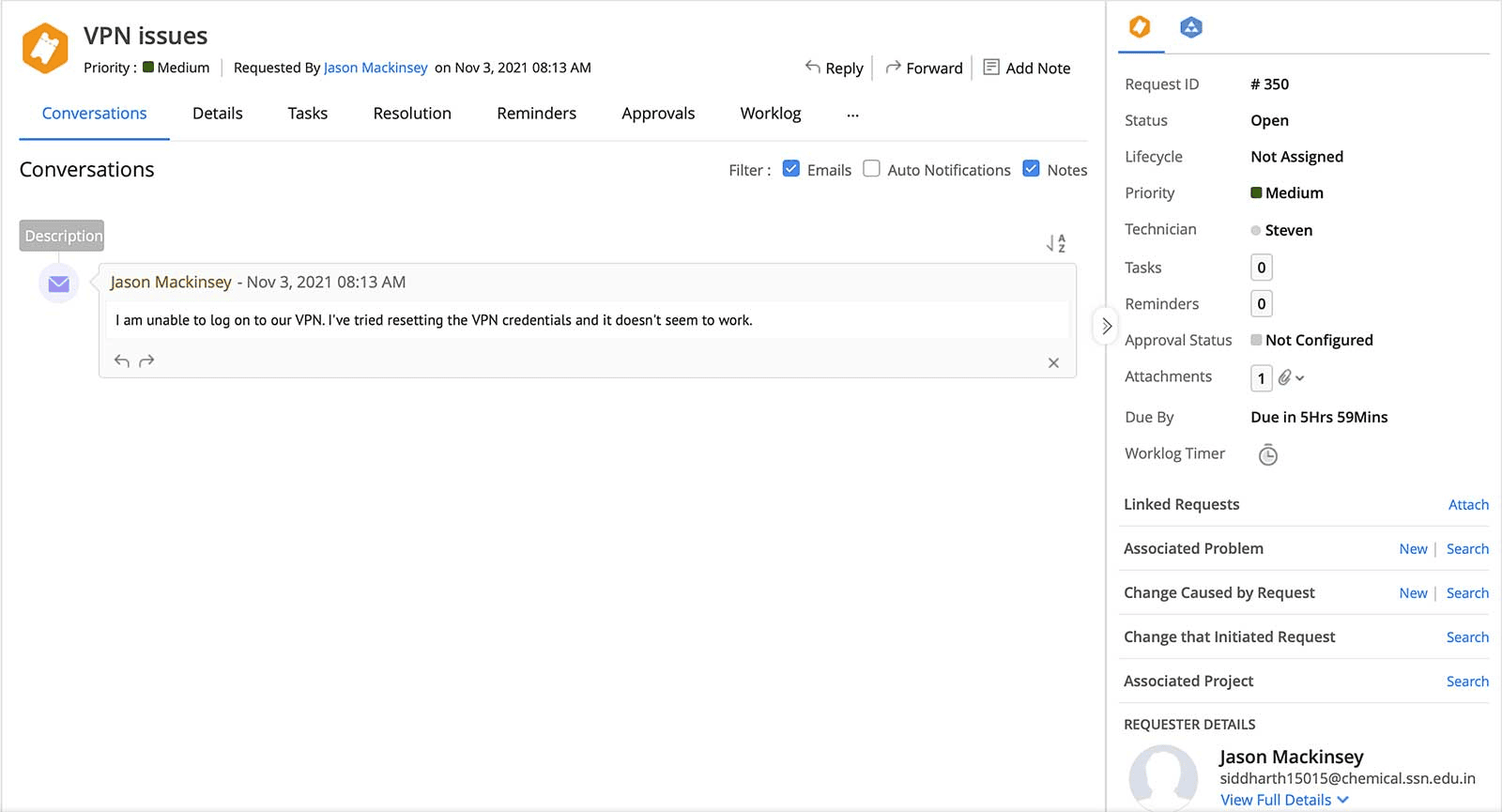
Example of a ticket created in ManageEngine ServiceDesk Plus
Figure 1: A ticket created in ManageEngine ServiceDesk Plus

See how ServiceDesk Plus can help your organization modernize its ticketing and other ITSM practices.

What is an IT ticketing system?

IT ticketing is a set of processes that enable organizations to handle incidents and service requests efficiently. An IT ticketing system acts as the single point of contact between end users and the IT service provider. This comprehensive solution helps service desk teams consolidate support requests from different channels into tickets, store them, and manage them centrally.

How does a ticketing system work?

Let's understand the functioning of an IT ticketing system through a real-life use case. An employee working for Zylker, a fictional financial services company, faces an issue with their VPN credentials, affecting their work. They shoot an email to the sysadmin with the subject "VPN issues."

Step 1: Log and triage a ticket

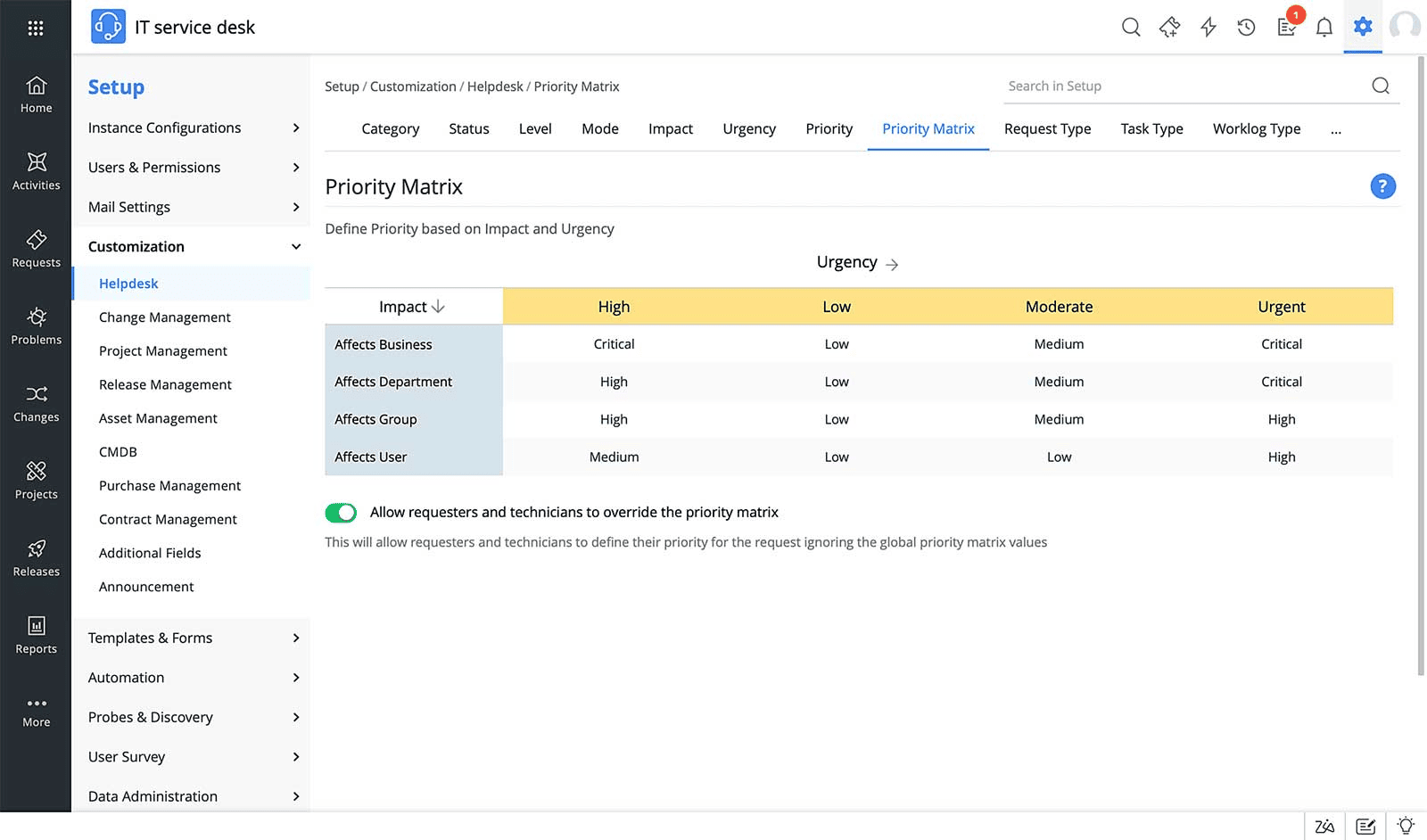
The service desk team uses a ticketing system that automatically converts incoming emails addressed to the sysadmin into incident tickets. Next, the team must triage it to determine its priority. Most ticketing solutions come equipped with a priority matrix that determines the priority of an incoming ticket based on the ticket parameters. Here is an example of a priority matrix in ManageEngine ServiceDesk Plus. ServiceDesk Plus also leverages predictive AI to intelligently prioritize tickets based on historical ticketing data.

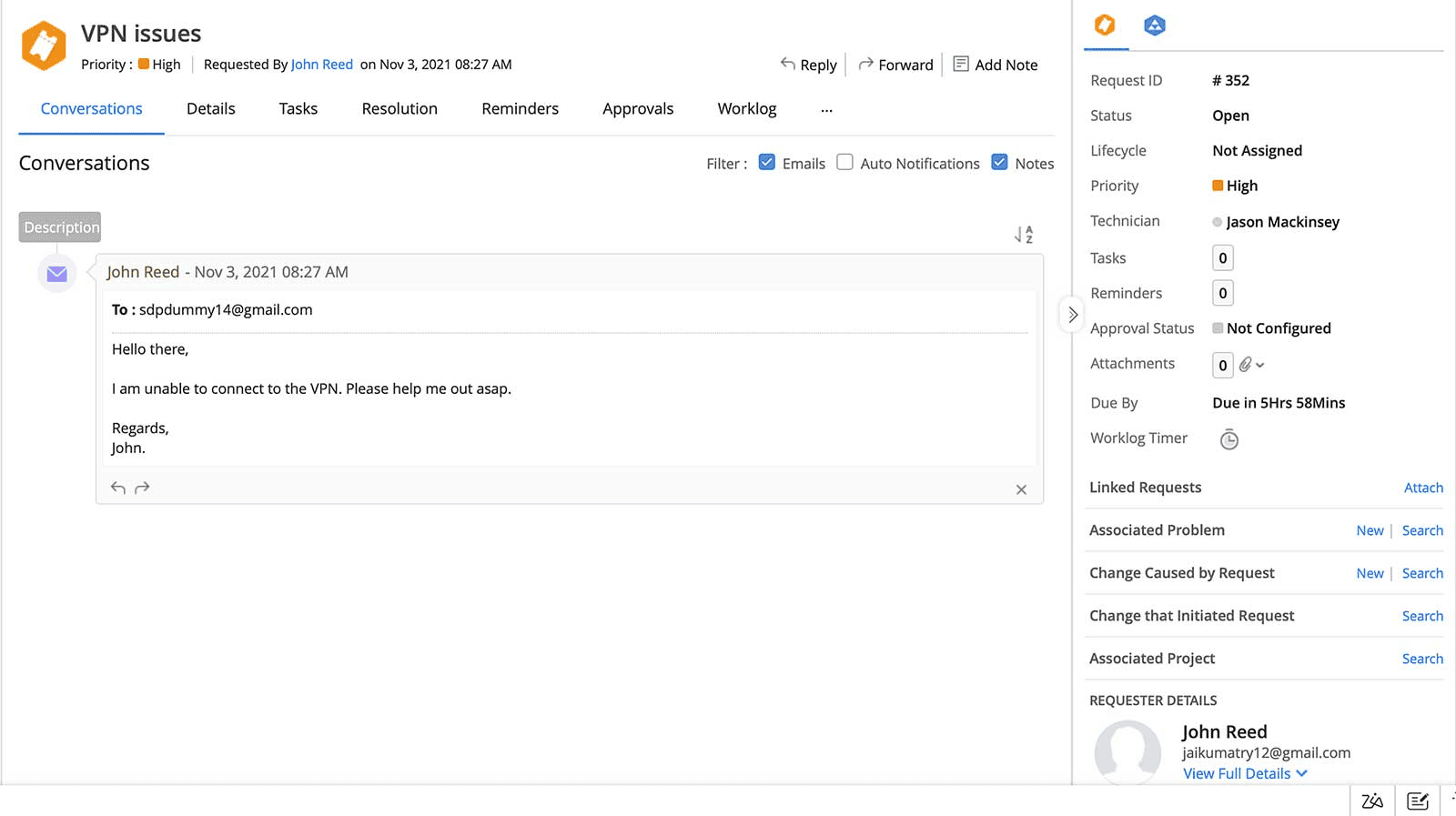
Automatically logged tickets from incoming emails in ServiceDesk Plus
Figure 2: Automatically created tickets from incoming emails in ServiceDesk Plus

Step 2: Route it to the right technicia

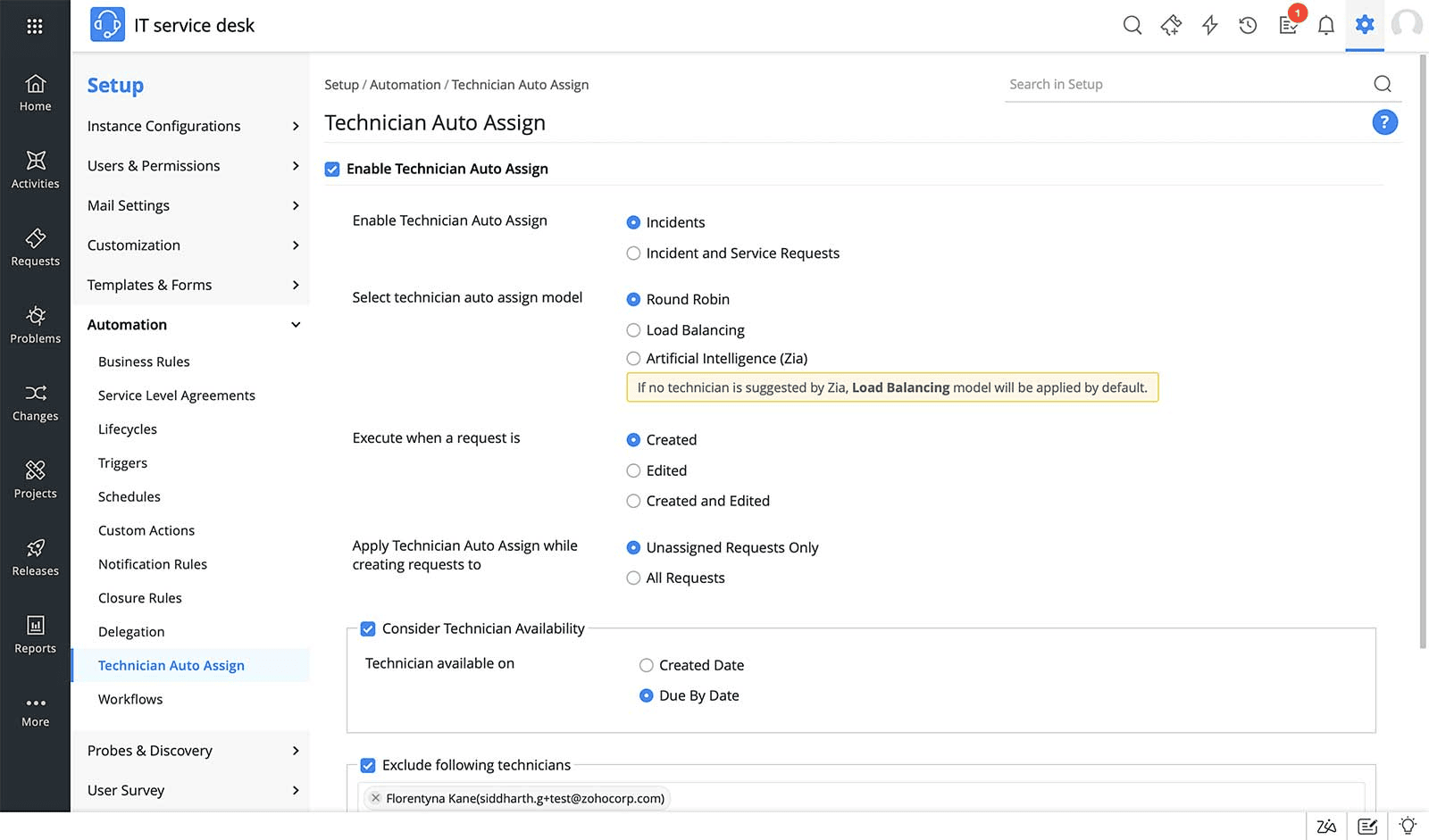
Once the ticketing system categorizes and prioritizes the employee's ticket, it assigns the ticket to a support agent available online for troubleshooting. The ticketing system may assign technicians to incoming tickets based on either the ticket parameters, or the workload and availability of technicians. Automation rules and technician auto-assign features help route tickets to support technicians based on algorithms like round robin or load balancing.

Priority matrix used to route tickets to the right technician in ITIL-compatible ticketing platform, ServiceDesk Plus
Figure 3: Priority matrix in ServiceDesk Plus

Step 3: Apply SLA-defined resolution timelines

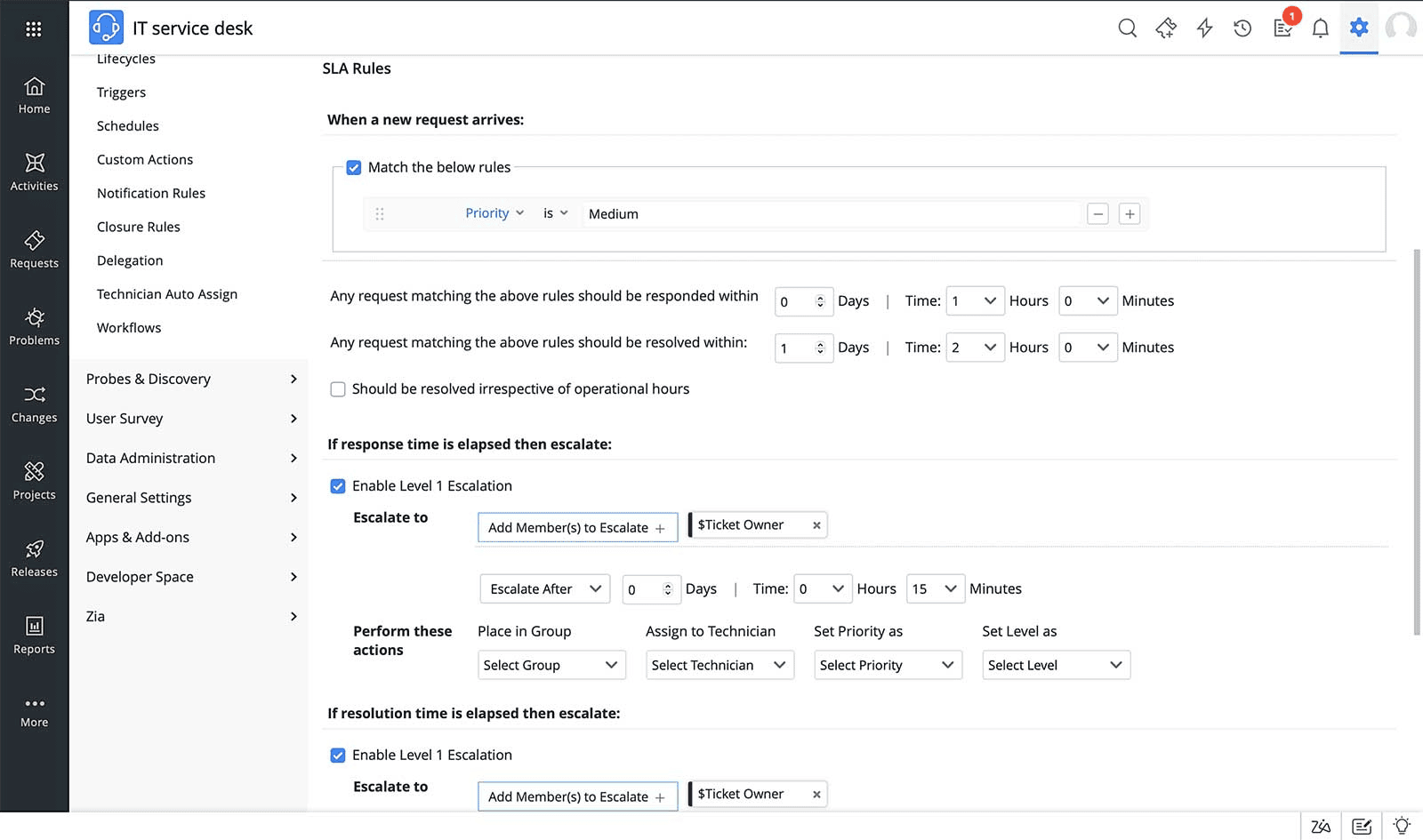
The ticketing system applies the right service level agreement (SLA) to the ticket based on predefined automation rules. An SLA is an agreement between the service provider and the consumer that defines the service delivery targets and escalation mechanisms for violations. Different services and incident workflows have varied SLA targets, and it is vital to create service-specific SLAs. Your SLAs act as benchmarks against which service desk teams evaluate KPIs and other metrics. Modern ticketing systems like ServiceDesk Plus also offer automated proactive escalation capabilities that help you steer clear of SLA violations.

Technician assignment rules supporting SLA-based ticket resolution
Figure 4: Technician assignment rules in ServiceDesk Plus help balance your
ticket queue and technician availability better

Once assigned, the technician works to resolve the ticket within the specified SLA mandate. If required, they may escalate the ticket to a specialist support group for resolution. The technician contacts the employee from within the ticketing system and requests for more information on the issue.

SLA automation and escalation rules in a ticketing managment system
Figure 5: SLA automation and escalation rules in ServiceDesk Plus

Step 4: Keep end-users and other stakeholders in the loop

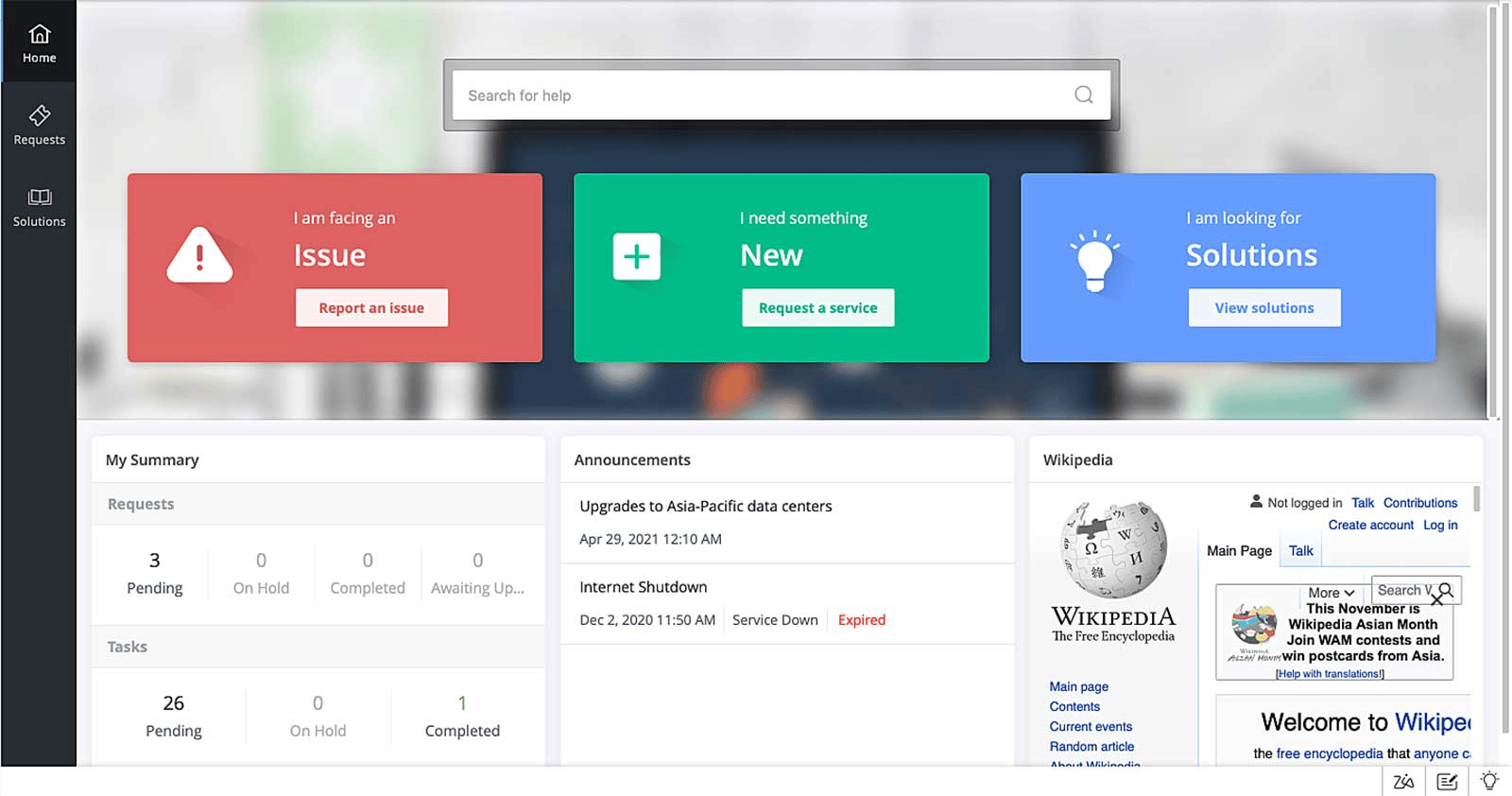
Meanwhile, throughout this entire life cycle, the employee is automatically notified of all the updates to their ticket. They can also track the progress of the ticket from within the self-service portal.

Integrated self-service portal keeping users updated in ServiceDesk Plus
Figure 6: The integrated self-service portal in ServiceDesk Plus

Step 5: Resolve tickets and measure the user experience

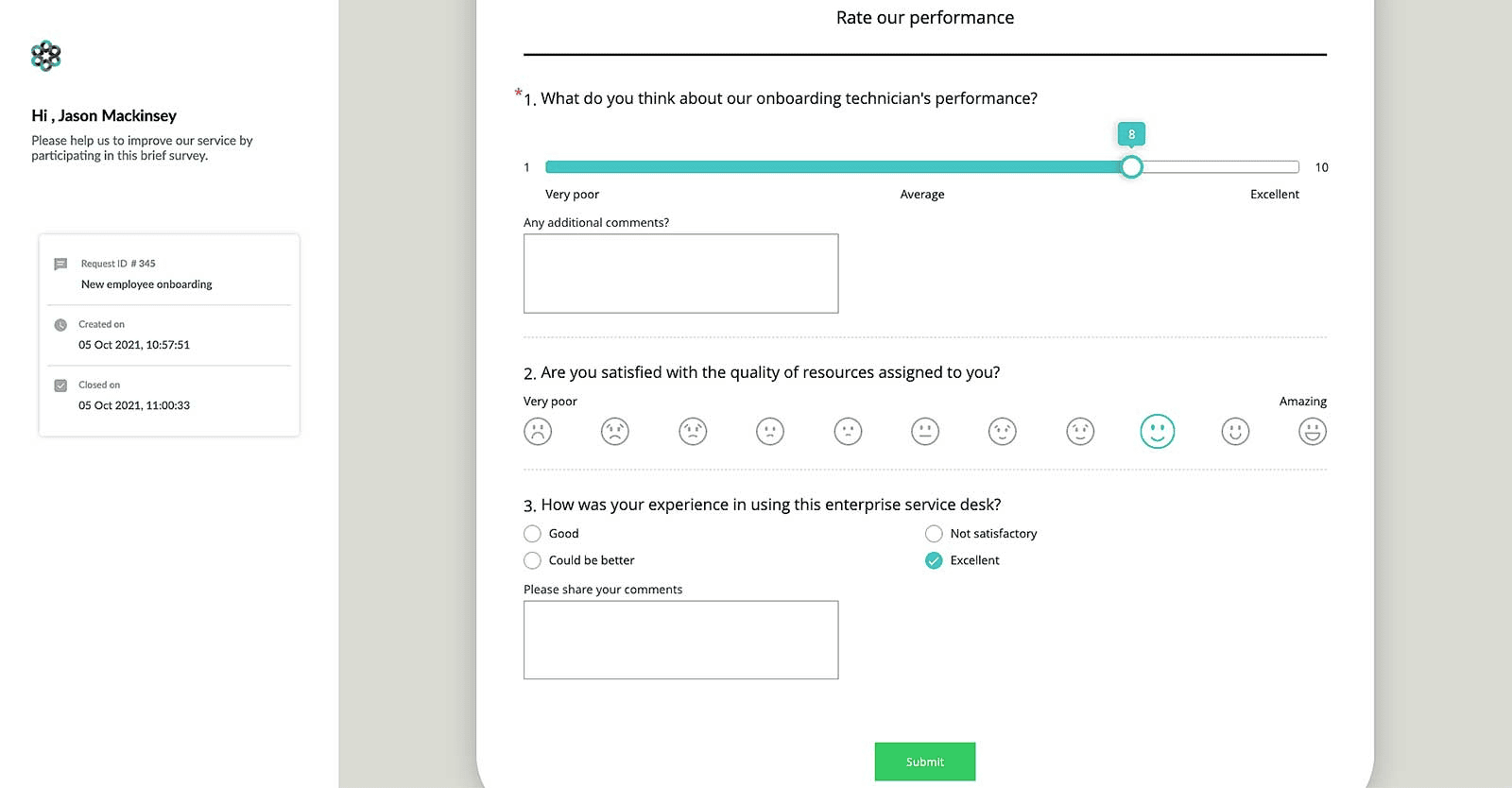
After receiving sufficient information on the issue, the technician identifies the appropriate fix or work-around and shares it with the employee. Once the issue is resolved, the technician closes the ticket and triggers a survey to ascertain the effectiveness of the resolution and the employee's experience in using the ticketing system.

User satisfaction survey form used to measure ticket resolution quality
Figure 7: A user-satisfaction survey form in ServiceDesk Plus

The data collected from this survey is used to build detailed reports and dashboards that provide deep insights into the performance of the IT service desk team. Furthermore, IT administrators can rely on these insights to make data-driven decisions and devise better service desk strategies. Technicians can track the tickets from creation to closure.

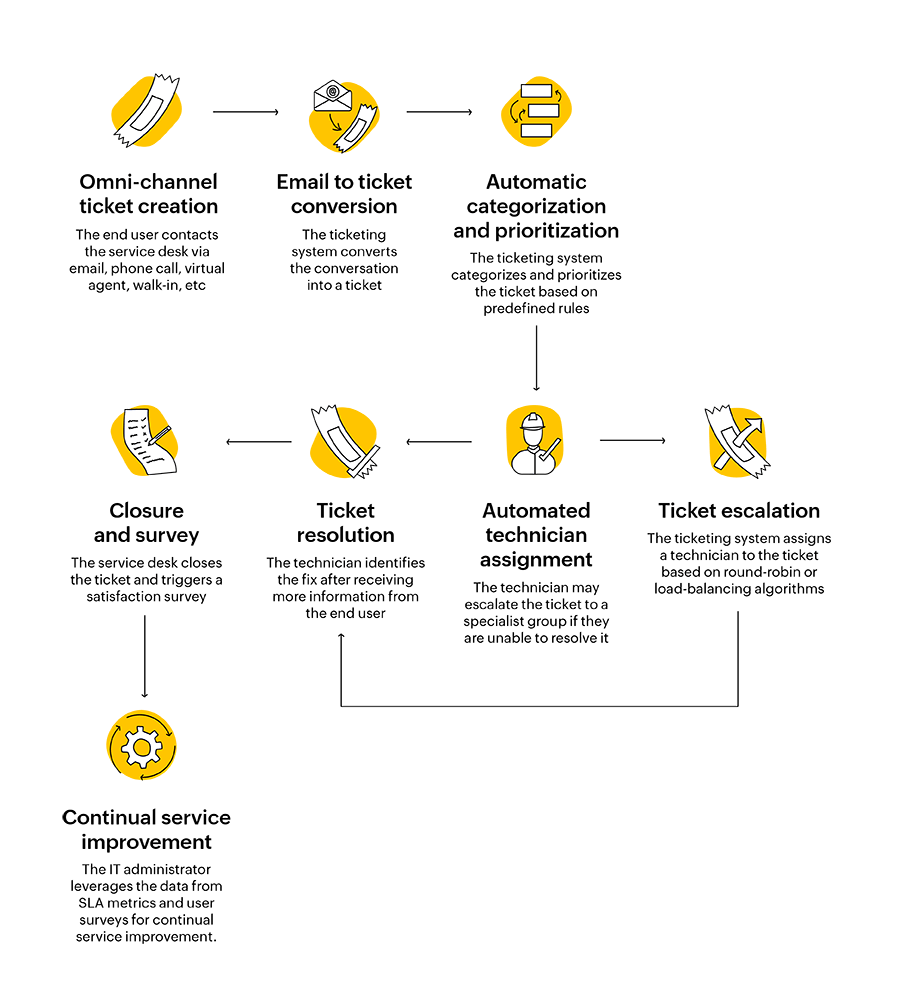
Workflow diagram showing the IT ticket life cycle stages
Figure 8: Ticket life cycle

What is the need for a help desk ticketing system?

The struggles without an IT ticketing system

Most SMBs start off with an email client or a spreadsheet to track requests. However, as the business scales, these systems are difficult to manage. Having to hop between tabs—your spreadsheet containing assets, the HR management system, and your support inbox to track requests and maintain context becomes extremely cumbersome.

It is also easy to get locked in to a legacy system that is either developed in-house or is no longer actively supported by the ITSM vendor. Without the ability to track your metrics, visualize them through dashboards and reports, or set up automations that offboard your help desk's workload, you're sure to overwhelm your service desk.

Using a unified ticketing system with automation and AI-driven capabilities helps you and your IT service desk team to truly focus on resolving tickets instead of being stuck managing your legacy toolsets.

A modern ITIL®-aligned ticketing system enables you to:

  • Respond to the tickets that require your immediate attention with automated triaging.
  • Streamline your service desk workload with automated technician assignment.
  • Extract the right data with ticket templates to standardize request logging.
  • Measure your service desk performance with reports and dashboards.
  • Automate every core ITSM process with automated visual workflows.

Why ServiceDesk Plus?

A versatile ticketing solution, such as ServiceDesk Plus, is ITIL-compatible for ITSM practices such as incident management, service request management, problem management, asset management, and change management. This solution both improves IT service delivery and overall employee experience, while implementing the best practices that the industry has standardized. There is no one-size-fits-all IT service desk platform or software, so it is important that every organization carefully chooses and configures an IT ticketing solution that works best for its needs.

Organizations are reticent to opt for enterprise-class ticketing tools, and not without reason. End users have to be educated on how to obtain value from the tool optimally, and these tools often come with a degree of complexity backed up by pricey invoices. However, there are enterprise-class solutions like ServiceDesk Plus with flexible licensing plans, transparent pricing, and a minimal learning curve that can help IT service desks modernize their service delivery and future-proof their ITSM operations.

Improve productivity by leveraging automations

Tab-hopping to send out notifications, emails, and replies all while handling ticket triaging, assignment, and resolution, is a Herculean task. There are aspects of ticketing which can be delegated to a modern IT ticketing system like ServiceDesk Plus, which offers:

  • Notification Rules, with customizable notification templates.
  • Conversation Summary and Reply Assist, to reduce the administrative overhead of ticketing communication.
  • Automated technician assignment through round robin, load balancing, and Zia-based assignment.

Modernize your IT ticketing with AI power-ups—Try ServiceDesk Plus today

Sign up for a free trial

What are the benefits of having an IT ticketing system?

Ensures tickets do not fall through the cracks

Most service desks that operate using a shared support inbox, a spreadsheet, or a legacy system have a hard time tracking their workloads.They go about their ticketing without automated notifications, SLA-based escalations, or end-to-end workflow automations. They are also hamstrung by the fact that they can't have custom views for their ticket queues, allocate tickets to groups, or get alerts during critical points along the ticket life cycle. An IT ticketing system solves these pain points and ensures IT service desks never lose track of a single ticket.

Ease of access for end users with omni-channel ticket support

Tickets originate from a myriad of sources, including during walk-ups and from monitoring systems. IT ticketing systems ensure that issues or requests raised via every channel−be it through email, phone call, self-service portal, live chat, conversational virtual assistant like Ask Zia in ServiceDesk Plus, or within Microsoft Teams and Slack, are logged as tickets and managed in a single repository.

Streamlining ticketing workflows with end-to-end automations

With simple automations, such as automatic routing of tickets to technicians, setting ticket priority through a priority matrix, and SLA management, IT teams can cut out the mundane work and bureaucratic overhead involved in ticketing and focus on what really matters: ticket management. Every ticketing workflow can be embedded with automations that evaluate conditions, distribute tasks, notify stakeholders, and more.

Gain insights into the team's performance

IT ticketing systems come with analytical capabilities or contextual integrations with business intelligence tools that can track metrics and generate reports; drive data-driven business decision-making; and send out surveys giving insights into the employee experience.

Enhance efficiency with a well-built knowledge base

A knowledge base is a repository of tried-and-tested resolutions. Easy access to these resolutions saves time and effort for technicians by eliminating the need to duplicate effort to achieve already documented solutions. Publishing knowledge base articles in the self-service portal for end users also cuts down the IT team's workload by driving self-resolution.

Self-service portal—Offering end users a centralized platform

Most organizations continue to use straightforward workflows, such as using email as the only means of communication with the IT support team. Self-service portals enable you to showcase the service catalog, allow end users to log tickets, browse through the knowledge base to find their own solutions, and keep tabs on their tickets and announcements. This minimizes the IT team's workload.

Choosing the right help desk ticketing system

With hundreds of enterprise IT vendors offering solutions ranging from simple ticketing systems to comprehensive ITSM platforms, you need to identify the right fit for your help desk operations. We recommend a systematic audit to determine your IT maturity, size and scale of operations, and unique requirements before starting the hunt for the right solution. Failing to nail down the right ticketing solution for your IT help desk may result in a complex implementation and reduced ROI.

Here are a few tips for identifying the right software for your enterprise:

A modern and future-proof ticketing system

Ensure that the ticketing solution of your choice is future-proof with AI capabilities and powerful automations in place to aid in deflecting the ticketing workload of your technicians to the platform.

A recent survey by ManageEngine showed that AI adoption is already prevalent, with 82% of respondents stating that their organization had already implemented AI features and capabilities within their ITSM practices.

Flexible deployment options

Ticketing solutions may be hosted on-premises or in the cloud, depending on the choice of the organization. Many factors influence these decisions, such as regulatory compliance, IT budgets, and privacy laws. Therefore, it is essential to choose an IT help desk ticketing solution vendor that offers flexible deployment options and seamless migration plans.

Native and third-party integrations with enterprise applications

Your business may rely on several IT and business applications for other enterprise operations. For example, your organization may use Slack or Microsoft Teams as its primary productivity and collaboration solution.

Additionally, native or third-party integrations with ITOM tools help your IT service desk team better manage your organization's network, servers, and endpoints. These contextual integrations eliminate the need for tab-hopping to manage siloed toolsets.

Compliance with data protection regulations

With the enforcement of several data privacy and security laws across the globe, organizations need to comply with them in all aspects of their business operations, including IT support and services. Ticketing systems process droves of personally identifiable information (PII) of employees. Such information needs to be encrypted and anonymized in case an employee leaves the organization. Thus, a ticketing system must offer these critical capabilities while complying with privacy regulations, such as the GDPR, CCPA, LGPD, Cyber Essentials, and Essential Eight.

Best practices to maximize
the ROI from your support ticket system

Here is a list of industry-standard best practices that will help your service desk team deliver remarkable employee experiences, elevate productivity, and contribute value to your business.

Promote self-service adoption

To realize the potential benefits of self-service, you need to implement a comprehensive self-service portal with a user-friendly knowledge base. The self-service portal should be accessible across platforms. Fostering self-service adoption in your organization helps end users reduce the number of L1 tickets being created through self-resolution, thereby reducing the ticket load on your IT technicians. This translates to increased productivity and greater availability of support technicians for more complex tasks.

Automate repetitive tasks

Mature ITSM platforms like ServiceDesk Plus offer meaningful AI features that deliver high value as well as low code and no code automations. This helps your service desk offload a portion of their tasks to the platform, helping copilot your service delivery alongside your technicians, such as:

  • Keeping end users in the loop with automated notifications.
  • Using structured workflows to automate the progress of tickets through their life cycle from end to end.
  • Automating ticket triage.

By automating these routine and tedious jobs, you can free up your talent pool to focus on what they do best: resolving tickets.

Keep tabs on metrics that matter

Evaluating your ticketing processes is the key to identifying the scope for improvement. One of the significant advantages that a ticketing system offers is the ability to dive deep into the enormous amount of data churned from tickets. In addition to this, the built-in analytics and dashboards module can be used to evaluate your key performance indicators (KPIs). By analyzing the KPIs and performance trends of IT technicians, IT administrators can design new strategies or build on existing ones to refine the service experience.

Here is a list of KPIs and metrics to keep tabs on:

Institute watertight SLA policies

SLAs determine your employee expectations about service delivery upfront. In addition to enforcing service-level targets, SLAs need to provide proper escalation mechanisms in case of SLA violations. In general, proactive escalation is the best practice, wherein the ticket is assigned to a specialist technician well before the SLA resolution target is violated. This way, your IT service desk can prevent SLA breaches while sustaining employee satisfaction.

Ticketing systems vs. ITSM platforms

Pure play IT ticketing systems are an excellent starting point for organizations. But as your IT processes mature, your organization needs to manage IT assets, roll out periodic changes, and troubleshoot those recurring incident tickets. This may lead to your organization acquiring additional tools.

This is where ITSM steps in. IT service management is a discipline adopted by organizations to manage end-to-end IT service delivery. It comprises practices to design, build, and deliver IT services effectively. ITSM platforms help organizations manage their IT services by enabling them to perform ticketing operations, manage IT assets, undertake IT projects, and roll out changes and releases, all from a single console.

IT help desk ticketing software have evolved into IT service management platforms. In the age of AI, ITSM leaders are driving processes and capabilities that pioneer efficiency through strategic AI features, leveraging conversational, predictive, agentic, and generative AI. Choosing a mature and suitable ITSM platform, which is industry and scale-agnostic, is the key to maximizing ROI and efficiency.

Frequently asked questions

Expand all

What is an IT ticketing system?

An IT ticketing system is software that helps IT departments receive, track, manage, and resolve issues faced by their employees. IT ticketing systems help IT teams automate ticketing processes such as categorization and prioritization, ticket distribution, knowledge article suggestion, and stakeholder communication.

What is the best IT ticketing system?