Zia Agents 101: Your starter guide to agentic service management in ServiceDesk Plus
August 12 | 10 mins read
Agentic AI is no longer limited to being a concept being debated in boardrooms or buried in analyst reports. It is something that is very slowly being deployed inside enterprise operations to take on complex workflows and deliver outcomes without waiting to be told what to do at every step. The scope of what is possible is significant, and the organizations that are moving now to use this technology are already starting to pull ahead.
But adoption, if we are being honest, is still in its infancy. Most organizations know agentic AI matters. Far fewer have actually done anything meaningful with it. According to the Capgemini Research Institute, only 2% of organisations have deployed AI agents at scale, while 61% remain at an exploratory stage. And it is not hard to see why, because the barriers to adoption are very real:
- The perceived complexity of building AI systems from scratch
- The cost of custom development
- The challenge of integrating agents into existing workflows
- And a general uncertainty about where to even start
The result is a lot of organizations stuck in pilot mode.
What if we said that this is exactly the gap Zia Agents in ServiceDesk Plus can help close?
With Zia Agents:
- You don't need to know how to engineer prompts, write code, or select AI models to get started.
- You don't need a dedicated AI team or months of development cycles to get started with your agentic ESM workflows.
- You don't need to procure a separate AI platform or bolt on another tool to your existing stack.
- You don't need to rip and replace the workflows your team already runs.
Zia Agents can slot into the processes you already have and the degree to which you want to customize them is entirely up to you.
But first, what are Zia Agents?
Zia Agents in ServiceDesk Plus are high-value AI agents that don't just answer questions, they get work done. Where humans miss tasks, drown in data, or simply run out of hours, Zia Agents step in so nothing stands between your service teams and the business goals that matter. They can be grounded in your business reality and equipped with the tools you define to take action across your ecosystem and get work done.
In this blog, we'll walk you through three ways to put Zia Agents to work. We'll start with the prebuilt agents available in the Agent Store that you can deploy in a single click and get value from immediately. We'll then look at how you can go further and build custom agents tailored to your specific environment using the no-code Agent Studio. And finally, we'll show you what it looks like when you put a network of agents to work together on a multi-system workflow like employee onboarding.
Start Here: Deploy prebuilt agents and get them to work in a single click
If you're new to Zia Agents, the prebuilt agent library is your fastest path to value. Think of these as off-the-shelf agents you can install directly from the Agent Store. These are agents that are already configured with a defined role, purpose, and behaviour, and they will be ready to get to work the moment they're deployed.
Here are 5 prebuilt agents that you can get started with.
| Prebuilt Zia agent | What it does | Business outcomes |
|---|---|---|
| L1 ServiceDesk Specialist | Handles incoming requests from triage to closure without technician involvement. Categorizes and prioritizes each request, searches the knowledge base using RAG to find the most relevant solution, applies the resolution, and notifies the requester automatically. |
|
| Request Context Assistant | Fires the moment a request is created. Searches the knowledge base for relevant articles, scans active announcements for related outages, and retrieves the requester's ticket history. It then compiles everything into a single context note, so technicians start with the full picture instead of a blank slate. |
|
| Helpdesk Coach | Evaluates closed tickets by combining structured ticket metadata with a summary of the technician-requester conversation. Scores performance across five dimensions: response timeliness, diagnostic quality, resolution effectiveness, communication and professionalism, and process compliance. Produces objective coaching feedback at scale. |
|
| PIR Generator | Takes a resolved incident and auto-generates a post-incident report covering timeline, root cause, impact, contributing factors, and lessons learned. |
|
| KB Article Generator | After a request closes, checks whether a relevant knowledge base article already exists. If not, it converts the resolution into a clean, structured article with a title, keywords, and description, then publishes it automatically. |
|
When off-the-shelf isn't enough: Build your own custom Zia Agents in a no-code workspace
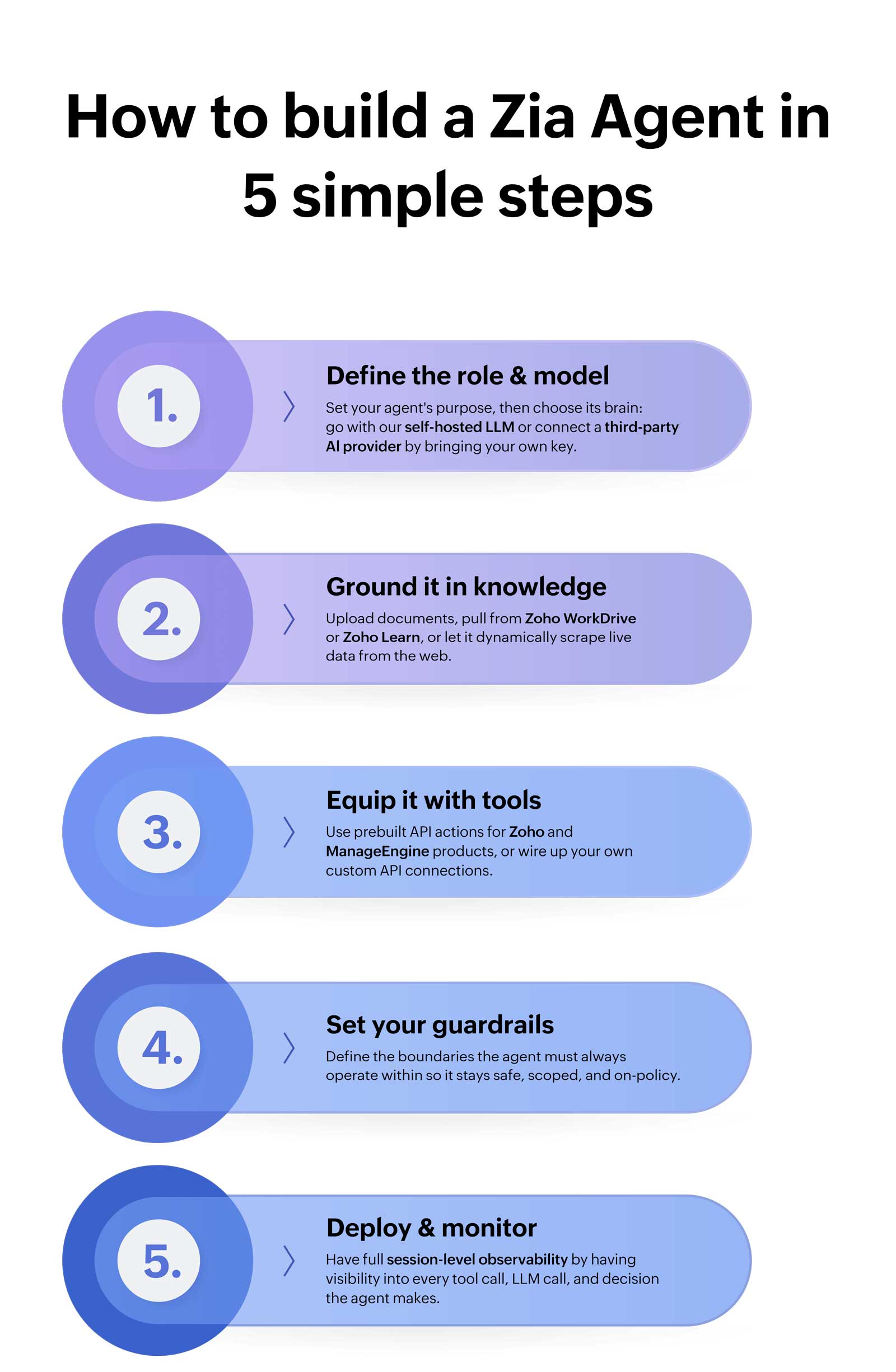
The prebuilt agents cover a lot of ground. But every service desk has workflows that are specific to its environment, its toolstack, and the way its teams actually operate. That's exactly what the Agent Studio is for. The Agent Studio is a no-code workspace where you can build custom Zia Agents from scratch in five simple steps. Describe what you want your agent to do in plain language and let the built-in AI assistance help you configure it, or build it from scratch yourself. Either way, you're not writing a single line of code.
The following are two examples of custom Zia Agents that you can replicate in your environment.
1. CI Health and Impact Analyzer Agent
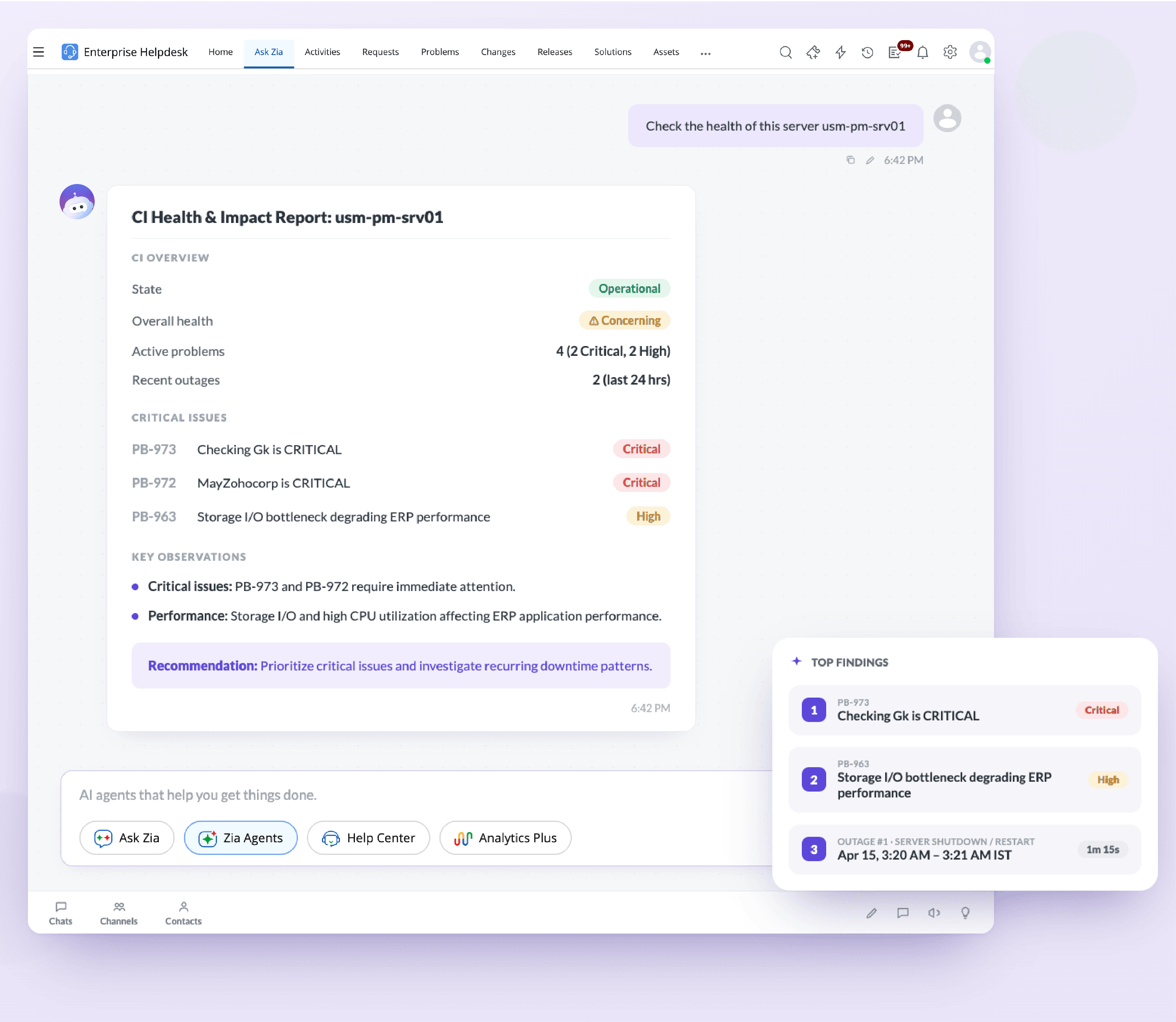
Before approving a change or escalating an incident, your team needs to know whether the configuration item in scope is actually healthy. Traditionally, that means someone manually jumping between ITSM and monitoring tools to pull that information before a decision can be made.
A CI Health and Impact Analyzer Agent helps eliminate this context switch. The agent can be invoked on demand through Ask Zia. You simply have to prompt it about the health of a CI and it surfaces the current status, the active alerts, performance baselines, availability, and more—all without you having to leave the platform.
2. Entra ID User Manager Agent
Every identity management task that lives outside the service desk is a context switch that slows your team down. A technician resolving an onboarding request shouldn't have to tab out to the Entra ID admin portal to create an account, add a user to a group, or disable a leaver—especially when the ticket is sitting right in front of them. The Entra ID User Manager Agent eliminates that friction. Invoked on demand through Ask Zia or automatically whenever an employee onboarding request comes in, it autonomously performs key identity management tasks like creating users, enabling or disabling accounts, managing user groups, and resetting passwords directly from within ServiceDesk Plus.
Your AI-powered task force is only 5 steps away
More on Zia Agents→Go beyond single agents: Orchestrate multi agent workflows to handle the hard stuff end to end
Individual agents are powerful. But just like how some workflows need a team, so do some agents. Workflows that are too sprawling, too cross-functional, and too multi-threaded might be a lot for any single agent to own. That's where multi-agent orchestration comes in.
In ServiceDesk Plus, you can build a network of agents and have a master agent coordinate them. The master agent understands the goal, breaks it into tasks, delegates each task to the right specialist agent, tracks progress, handles exceptions, and delivers the outcome.
To make this tangible, here's what it looks like in practice for one of IT's most operationally intensive recurring workflows: Employee onboarding
Here's how the flow would look like in ServiceDesk Plus.
It starts with an email. The moment a new hire request lands in the mailbox, the master Onboarding Orchestrator kicks in, orchestrating the workflow and delegating tasks to a network of specialist subagents that work in parallel from the moment the request is received. The first subagent parses the email and extracts all the relevant employee details. Next, another agent creates a service request ticket in ServiceDesk Plus with the employee's information pre-populated, and adds the new employee as a requester in ServiceDesk Plus. At the same time, another subagent creates a corresponding IT provisioning ticket in the IT instance, ensuring the right team has full visibility of what needs to be actioned on the infrastructure side.
In parallel, it populates all the necessary details within the IT ticket. The required hardware assets are then automatically provisioned based on available in-store inventory within ServiceDesk Plus. Next, a user account is simultaneously created in Microsoft Entra ID. Once all tasks are completed, a summary of every action taken is automatically added within the ticket and the ticket is then marked as resolved.
And because every agent in the network operates with full session-level logging, every tool call, every decision, and every action taken by each subagent is recorded and auditable. Your team has complete visibility into exactly what ran, when, and what it produced.
Bottom line
If you've made it this far, you already know that agentic AI isn't some distant, carefully-hyped promise sitting on the horizon waiting for the right moment to arrive. It's already here. The agentic AI shift is very much underway and it isn't reserved for organizations with dedicated AI teams, custom-built infrastructure, or months of runway to experiment. It's available to any service desk that's willing to take the first step. And with Zia Agents, that first step is genuinely small. Start with a prebuilt agent from the Agent Store and pick the workflow that has been costing your team the most time. Once you've seen what that looks like, go further and open the Agent Studio and build something that is tailored specifically to your toolstack, your knowledge sources, and the guardrails that make sense for the way your team operates. And when you are ready for the full picture, map out multi-agent workflows for the processes that have too many moving parts for any single person or any single agent to own alone.