


What is Initial Access?
Every cyberattack begins with a single foothold. In the MITRE ATT&CK® framework, Initial Access (TA0001) describes the nine techniques adversaries use to breach a network for the first time, whether through a phishing email, an unpatched web server, stolen credentials, or a compromised VPN connection.
What makes initial access the most consequential tactic in the kill chain is simple: if you catch the attacker here, the attack ends before it begins. Miss it, and you are now dealing with lateral movement, privilege escalation, data exfiltration, and ransomware, each progressively harder to contain.
According to the Verizon 2025 Data Breach Investigations Report, 68% of breaches involved a human element at the initial access stage, phishing, stolen credentials, or misconfigured external services. The CrowdStrike 2025 Global Threat Report puts the median breakout time (initial access to lateral movement) at 62 minutes, down from 84 minutes the previous year. The window to detect and respond is shrinking.

Key insight: Log360 provides 79 prebuilt detection rules mapped to TA0001, covering Windows, AWS, Microsoft 365, Cisco, Fortinet, SonicWall, and SQL Server, so your SOC team detects initial access attempts in real time.
The Initial Access threat landscape
Initial access is not a single attack, it is a category of entry methods that threat actors select based on the target's exposed surface. A state-sponsored group like APT29 will phish a diplomat with a tailored PDF, while a ransomware affiliate like Wizard spider will scan the internet for unpatched VPN appliances. Understanding which vectors your organization exposes determines where your detection effort should concentrate.
Three vectors dominate the initial access landscape and account for the overwhelming majority of real-world breaches:
- Phishing (T1566): Still the undisputed leader. Modern phishing has evolved beyond attachments - ISO-in-archive bypasses Mark of the Web, HTML smuggling evades gateway scanners, and QR-code phishing ("quishing") targets mobile devices entirely outside endpoint detection.
- Exploit Public-Facing Application (T1190): The CISA Known Exploited Vulnerabilities catalog added 187 entries in 2025. Critical vulnerabilities in Confluence (CVE-2023-22518), MOVEit (CVE-2023-34362), and Cleo (CVE-2024-50623) were weaponized within days of disclosure.
- Valid Accounts (T1078): Stolen credentials from info-stealers and underground markets let attackers walk through the front door. When the attacker logs in with legitimate credentials, traditional perimeter defenses see nothing, behavioral analytics and anomaly detection become the only line of defense.
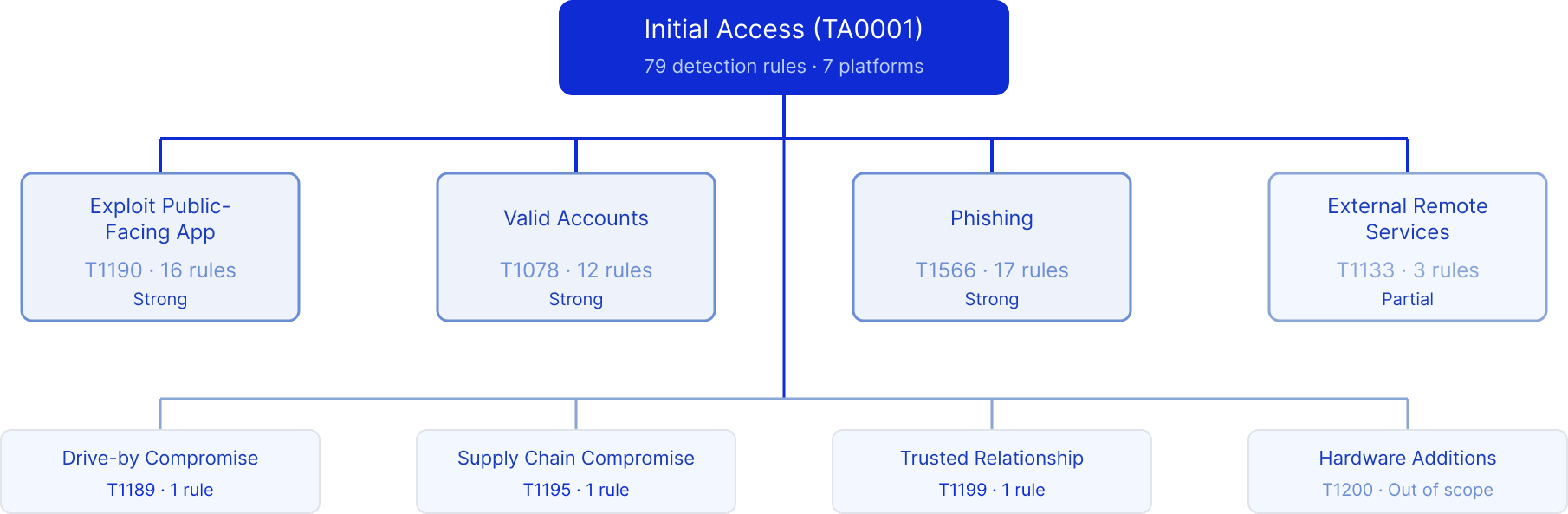
Techniques at a glance
| Technique | ID | Log360 coverage |
|---|---|---|
| Exploit Public-Facing Application | T1190 | Strong (16 rules) |
| Valid Accounts | T1078 | Strong (12 rules) |
| Phishing | T1566 | Strong (17 rules) |
| External Remote Services | T1133 | Partial (3 rules) |
| Drive-by Compromise | T1189 | 1 rule |
| Supply Chain Compromise | T1195 | 1 rule |
| Trusted Relationship | T1199 | 1 rule |
Detecting exploitation of public-facing applications (T1190)
When an attacker finds a vulnerability in your web server, VPN appliance, or cloud-exposed application, exploitation is often automated and happens within hours of a CVE disclosure. The attacker sends a crafted request that triggers code execution on your server, spawning a web shell, dropping a reverse shell, or establishing a backdoor.
The telltale signature is a web server process spawning an unexpected child. IIS does not normally run cmd.exe; Apache has no reason to launch PowerShell. Log360's real-time correlation engine monitors process creation events on your web-facing servers and immediately flags these anomalies through the Suspicious Process By Web Server Process rule (Trouble, Windows), which fires when IIS, Apache, Nginx, or Tomcat spawns cmd.exe, PowerShell, certutil, or other living-off-the-land binaries. For Windows Remote Management exploitation, the Suspicious Processes Spawned by WinRM rule (Trouble, Windows) watches for WinRM spawning unexpected executables - a pattern heavily used by threat actors exploiting Exchange Server vulnerabilities.
Log360 also carries signatures for specific high-impact CVEs. The Potential MOVEit Transfer CVE-2023-34362 rule (Trouble, Windows) detects the file activity pattern associated with the MOVEit Transfer SQL injection that impacted over 2,500 organizations. Similarly, the CVE-2024-50623 Exploitation Attempt - Cleo rule (Trouble, Windows) and the Fortinet Appliance Auth Bypass rule (Critical, Fortinet) catch exploitation of these widely targeted products before the attacker establishes persistence.
On the network perimeter, Log360 correlates firewall and IPS logs to surface exploitation attempts that never reach a successful web shell. The Repeated SQL Injection Attempts rule (Critical, Miscellaneous) triggers when multiple SQL injection payloads are detected from a single source, while Fortinet's Generic Attacks Detection and SQL Injection Detection rules (Trouble, Fortinet) catch attack patterns at the WAF layer.
When an exploitation alert fires, the analyst's first action in Log360 is to review the parent-child process chain, was it IIS spawning cmd.exe, or a legitimate admin session. The correlated alert view shows the originating IP, the target server, and any follow-on activity (file writes, network connections, scheduled task creation) within the same timeline. This context is what separates a sophisticated detection platform from a log dump, you see the attack story, not just a log line.
Detecting valid account abuse (T1078)
When attackers use legitimate credentials, purchased from access brokers, harvested by info-stealers, or obtained through credential stuffing, the perimeter sees a normal login. Firewalls pass it. VPNs accept it. Multi-factor authentication might even be bypassed through MFA fatigue, SIM swapping, or session token theft. The only defense is detecting that the behavior behind the credentials is wrong.
Log360 approaches this from multiple angles across cloud and on-premises environments. In Microsoft 365, the Temporary Access Pass Added To An Account rule (Critical, Microsoft 365) triggers when a TAP is provisioned a technique attackers use to bypass MFA for a compromised account. The Application ID URI Modified rule (Critical, Microsoft 365) catches a subtler form of abuse: modifying an application's identity URI to impersonate a trusted service, a technique observed in APT29 campaigns against Microsoft 365 tenants.
For accounts used as disposable footholds, the M365 Short Lived Accounts rule (Critical, Microsoft 365) detects accounts created and deleted within a short time window, a pattern that indicates an attacker provisioned a temporary identity, performed their actions, and cleaned up. Meanwhile, the Login to Disabled Account rule (Trouble, Microsoft 365) and its SQL Server counterpart catch authentication attempts against accounts that should be completely inactive, a strong signal of compromised credential reuse.
On the AWS side, the AWS Suspicious SAML Activity rule (Trouble, AWS) monitors for anomalous SAML federation patterns that could indicate a golden SAML attack, while the AWS Key Pair Import Activity rule (Trouble, AWS) flags unauthorized SSH key imports, an attacker backdoor that persists even after password resets.
The investigation workflow for credential abuse starts differently than exploitation - instead of checking process chains, the analyst reviews the user's authentication timeline in Log360. Has this account logged in from an impossible geography? Did a new device register immediately after sign-in (caught by the Risky Sign-in with Device Registration rule)? Were privileged roles modified shortly after access? These questions are answered in Log360's correlated user timeline powered by UEBA without pivoting between tools.
Detecting phishing (T1566)
Phishing has evolved far beyond "click this link." Modern phishing campaigns use ISO files nested inside ZIP archives to bypass Mark of the Web protections, OneNote files with embedded scripts to evade macro-blocking policies, and HTML smuggling to deliver payloads past email gateway scanners. The common thread: the payload must eventually execute on the endpoint, and that execution leaves traces that incident detection catches that a well-instrumented SIEM catches.

Log360 detects phishing across three stages. At the delivery stage, the Phishing Pattern ISO in Archive rule (Trouble, Windows) fires when an ISO file is extracted from an archive, a pattern with near-zero legitimate use in enterprise environments. At the payload-open stage, the Suspicious Microsoft OneNote Child Process rule (Trouble, Windows) detects when OneNote spawns PowerShell, cmd.exe, or mshta, the execution chain for OneNote-based phishing lures. The Suspicious Execution From Outlook Temporary Folder rule (Trouble, Windows) catches code execution from Outlook's temp cache, which means a user opened a malicious attachment that triggered execution without saving it to disk.
Log360 also monitors the administrative controls that make phishing detection possible. If an administrator (or an attacker with admin access) disables email protections, the Anti-Phishing Policy Removed, Anti-Phishing Rule Disabled, and Safe Links Rule Disabled rules (all Trouble, Microsoft 365) fire immediately - because an attacker's first move after compromising an M365 admin account is often to weaken email defenses before launching an internal phishing campaign.
At the endpoint, the Suspicious Double Extension File Execution rule (Trouble, Windows) catches files named "invoice.pdf.exe" - a classic social engineering trick that relies on Windows hiding known extensions. The Windows Registry Trust Record Modification rule (Trouble, Windows) detects changes to Office document trust settings, which attackers modify to ensure their macro-laden documents execute without prompts the next time.
Detecting external remote service abuse (T1133)
VPNs, RDP gateways, Citrix, and remote access tools like TeamViewer provide legitimate remote access which also makes them prime targets for attackers. A compromised VPN credential gives an adversary the same network access as an employee, and remote access tools installed during a previous compromise can persist undetected for months.
Log360 monitors for unauthorized remote access tool usage through the Remote Access Tool, TeamViewer Session Started On Windows Host rule (Attention, Windows), which fires when TeamViewer establishes a session on a Windows endpoint. In environments where TeamViewer is not authorized, this is a strong indicator of either shadow IT or an attacker tool. For DNS-based exploitation vectors, the Unusual Child Process of dns.exe and Unusual File Deletion by Dns.exe rules (Trouble, Windows) detect exploitation of DNS services, which attackers target to pivot through DNS infrastructure that has wide network access.
The effective defense for T1133 extends beyond built-in rules. Log360's UEBA module establishes behavioral baselines for VPN security monitoring patterns typical login hours, source geographies, connection durations and flags deviations. An employee's VPN credential used at 3 AM from an unfamiliar country generates a risk score spike that the analyst sees in the UEBA dashboard, even without a specific correlation rule for that exact scenario.
Other Initial Access techniques
Three additional TA0001 techniques have limited but meaningful detection coverage in Log360:
Drive-by Compromise (T1189)
In a drive-by attack, the user visits a compromised or malicious website that executes exploit code in the browser, leading to malware installation without any user action beyond navigating to the page. Log360 detects post-compromise activity through the Ryuk Wake on LAN Command rule (Critical, Windows), which catches a specific ransomware behavior often chained with drive-by delivery. For broader detection, pair endpoint logging with Log360's custom correlation capability to flag browser processes (chrome.exe, msedge.exe) spawning cmd.exe or PowerShell, a pattern that indicates successful browser exploitation.
Supply Chain Compromise (T1195)
Supply chain attacks compromise the software delivery pipeline itself, turning trusted update mechanisms into malware delivery channels, as seen in the SolarWinds Sunburst campaign and the MOVEit Transfer compromise. Log360 carries the Octopus Scanner Malware rule (Trouble, Windows) for a known supply chain malware variant. For unknown supply chain attacks, the defense relies on baselining normal update behavior, threat intelligence, and alerting on anomalies - unusual outbound connections from signed applications, or unexpected scheduled task creation by update processes.
Trusted Relationship (T1199)
Attackers compromise a trusted partner, vendor, or MSP to gain access to the target organization's environment. The Files Uploaded to Teams rule (Attention, Microsoft 365) monitors file sharing activity in Microsoft Teams, which attackers abuse to distribute malware through trusted collaboration channels. Organizations with MSP relationships should monitor vendor VPN accounts with Log360's scheduled alerting to flag access outside agreed maintenance windows.
ManageEngine Log360 for Initial Access detection
79 prebuilt detection rules across Windows, AWS, Microsoft 365, Cisco, Fortinet, and SonicWall. Real-time correlation, UEBA, and automated response detect the breach before the attacker moves laterally.
Threat hunting beyond automated rules
Hunt 1: New service accounts with external access
Search for newly created accounts that authenticated to external-facing services (VPN, OWA, RDP gateway) within 24 hours of creation. Legitimate service accounts rarely need external access on day one - this pattern often indicates an attacker-provisioned identity. In Log360, cross-reference account creation events (Event ID 4720) with VPN authentication logs filtered for the same username.
Hunt 2: Impossible travel in cloud platforms
Query AWS CloudTrail and Microsoft 365 Unified Audit logs for the same user account authenticating from two geographically distant locations within a time window that makes physical travel impossible. Log360's UEBA module automates this with geographic anomaly scoring, but manual hunts can focus on service accounts and break-glass accounts that UEBA may not baseline.
Hunt 3: Web shell persistence after patching
After patching a public-facing application vulnerability, hunt for web shells that the attacker may have dropped before the patch was applied. Search for .aspx, .php, .jsp files created in web-accessible directories during the vulnerability window. In Log360, filter file creation events by the web server's document root path and correlate with any triggered Suspicious MSExchangeMailboxReplication ASPX Write alerts.
Response playbook
Immediate containment (first 30 minutes)
- Isolate the entry point: If exploitation, isolate the compromised server from the network. If credential abuse, disable the compromised account and revoke all active sessions. If phishing - quarantine the email from all mailboxes and block the sender domain.
- Block the source: Add the attacker's source IP to the firewall blocklist. If cloud-based, revoke the session tokens and API keys associated with the compromised identity.
- Preserve evidence: Export the Log360 alert timeline, raw logs, and correlation details before any remediation steps that might alter log state.
Investigation and scoping (first 4 hours)
- Determine progression: Use Log360's MITRE ATT&CK timeline to check whether the attacker moved beyond initial access. Look for Execution (TA0002) and Persistence (TA0003) alerts on the same host or user within the same time window.
- Identify all affected assets: Search for the attacker's indicators (source IP, compromised account, dropped file hashes) across all log sources in Log360 to determine the full scope.
- Check for additional footholds: If one VPN credential was compromised, check whether other credentials from the same breach database were used. If one server was exploited, check all servers running the same vulnerable software.
Log360 automated response summary
Log360 can execute these containment actions automatically via SOAR when initial access alerts fire, reducing response time from minutes to seconds:
| Response action | When it triggers | What it does |
|---|---|---|
| Disable user account | Critical credential abuse alerts (TAP, short-lived accounts) | Disables the AD/M365 account and revokes sessions via PowerShell |
| Block source IP | Exploitation and SQL injection alerts | Adds IP to firewall blocklist via API integration |
| Create incident ticket | All Initial Access alerts | Creates ServiceDesk Plus ticket with alert context and timeline |
| Custom script execution | Configurable per alert profile | Runs user-defined PowerShell or Python script for custom containment |
How Initial Access connects to other tactics
Initial access rarely operates in isolation. Once the attacker gains a foothold, the kill chain progresses rapidly, CrowdStrike's 62-minute median breakout time means the attacker is moving laterally within an hour of the initial breach.
After a successful phishing attack, attackers typically proceed to Execution (TA0002) running the delivered payload via PowerShell, WMI, or scheduled tasks. From exploitation, the path often leads to Persistence (TA0003) the web shell or backdoor that survives reboots and patching. Valid account abuse frequently shortcuts to Privilege Escalation (TA0004) when the stolen credentials already have elevated privileges, or to Lateral Movement (TA0008) when the attacker uses them to access additional systems.
Log360's MITRE ATT&CK mapping view built on a defense in depth approach shows these tactic transitions in a single dashboard when an initial access alert fires, related alerts from downstream tactics are correlated automatically, giving the analyst the full attack progression without manual pivot-table analysis.
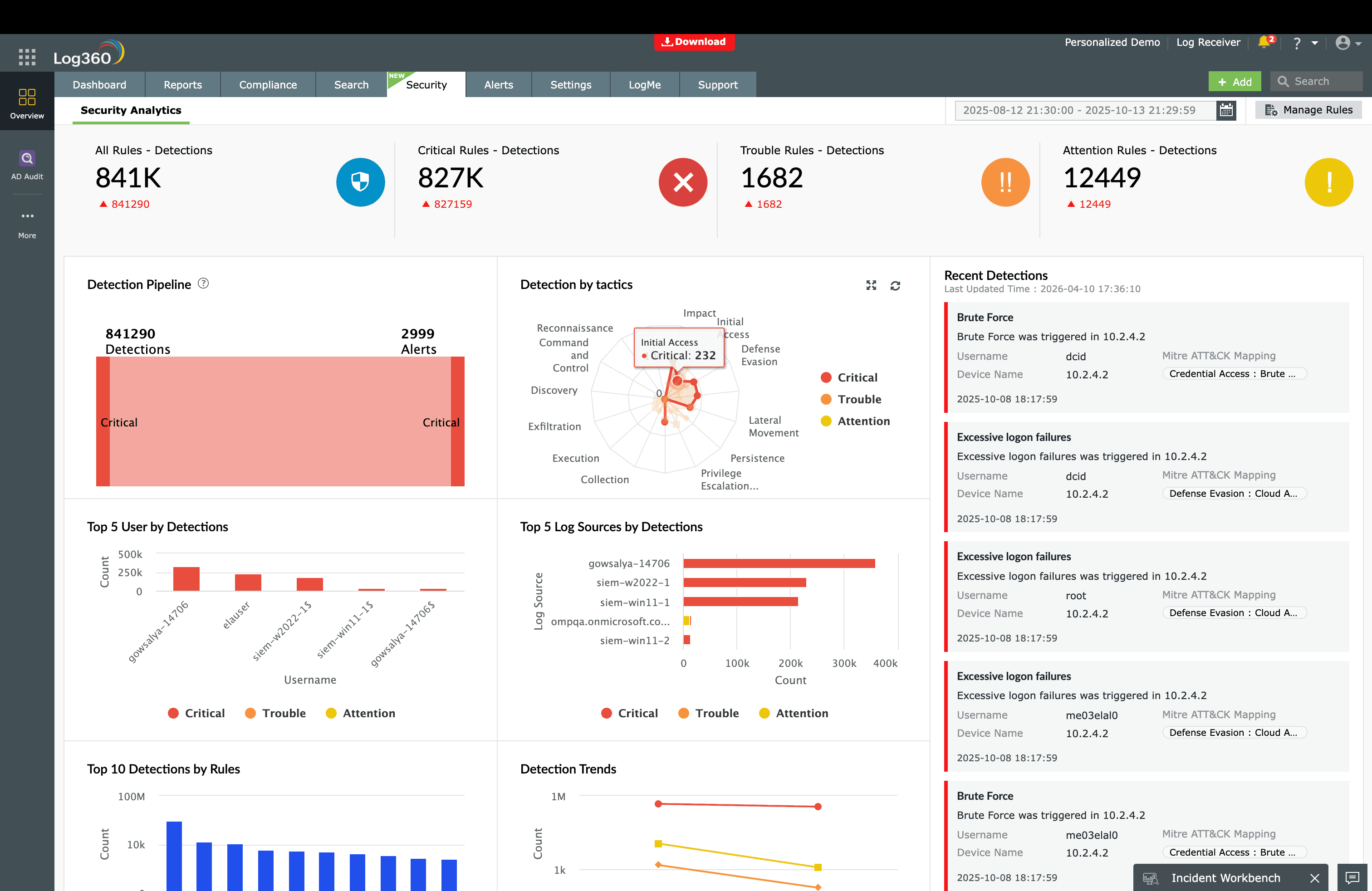
Detection rules reference
Log360 provides 79 prebuilt detection rules mapped to Initial Access (TA0001), covering Windows, AWS, Microsoft 365, Cisco, Fortinet, SonicWall, and SQL Server platforms. Key rules including Suspicious Process By Web Server Process, Temporary Access Pass Added To An Account, and Phishing Pattern ISO in Archive are described in the technique detection sections above.
Need to explore ManageEngine Log360? Schedule a personalized demo
FAQ
What is Initial Access in MITRE ATT&CK?
Initial Access (TA0001) is the first tactic in the MITRE ATT&CK® framework, describing how adversaries gain their first foothold in a target environment. It includes nine techniques ranging from phishing and exploitation of public-facing applications to abuse of valid accounts. Detecting initial access early is critical because every subsequent attack stage depends on it.
How many detection rules does Log360 have for Initial Access?
ManageEngine Log360 provides 79 prebuilt correlation rules mapped to TA0001, covering Windows endpoints, AWS, Microsoft 365, Cisco, Fortinet, SonicWall, and SQL Server. These rules detect web shell execution, phishing payloads, credential abuse, and external remote service abuse in real time.
What log sources do I need for Initial Access detection?
Effective TA0001 detection requires Windows Security Event Logs (processes, authentication), email gateway logs (phishing payloads), firewall and IPS logs (exploitation attempts), cloud audit logs (AWS CloudTrail, Microsoft 365 Unified Audit), and VPN/remote access logs. Log360 collects from 750+ log sources across all these categories.
Which Initial Access technique is most common?
Phishing (T1566) remains the most prevalent initial access vector, accounting for over 40% of breaches according to the Verizon DBIR. Modern phishing often uses ISO-in-archive payloads and HTML smuggling to bypass email gateway scanning. See our phishing detection guide for details.
What should I do when an Initial Access attack is detected?
Immediately isolate the affected endpoint or disable the compromised account to prevent lateral movement. Then investigate the scope using Log360's correlated alert timeline to determine whether the attacker has progressed to execution or persistence. Follow the ransomware attack chain response playbook for step-by-step containment, eradication, and recovery guidance.
- What is Initial Access?
- The threat landscape
- Techniques at a glance
- Detecting exploitation (T1190)
- Detecting valid account abuse (T1078)
- Detecting phishing (T1566)
- Detecting external remote services (T1133)
- Other Initial Access techniques
- Initial access use cases
- How Initial Access connects to other tactics
- FAQ

