ServiceDesk Plus>Features>Industry>Service desk software for K-12

Why do K-12 school districts need ITSM?

School district IT teams are expected to support thousands of users (students, teachers, and staff), devices, and applications across multiple schools, often with lean teams and limited budgets. Manual processes, scattered requests, and reactive support models make it difficult to keep up with growing demands. An ITSM platform helps districts operate more efficiently by automating repetitive work, standardizing service processes, and giving IT teams better visibility into requests, assets, and service performance district-wide.

How ServiceDesk Plus can help?

ServiceDesk Plus, an AI-driven unified service management platform, gives K-12 school districts one system of record to run service operations across every school. It brings together AI-powered service management, workflow automation, and integrated asset management capabilities, so IT teams can standardize support, stay on top of devices, and keep services running reliably across the district. The payoff is a more efficient IT team that delivers exceptional service, ultimately leading to greater satisfaction and community trust.

Highly rated by verified users

0(1214 Ratings)
0(132 Ratings)
0(224 Ratings)

Why ServiceDesk Plus is the platform of choice for K-12 district IT teams

Put high-value AI to work across your district

Offload everyday questions from teachers and students to Ask Zia, and equip technicians to resolve issues faster with predictive and GenAI capabilities like sentiment analysis, conversational summaries, reply assist, and more. Deploy Zia Agents to autonomously execute routine workflows from resolving password resets to provisioning new student accounts, so lean IT teams scale support across the district at no additional cost.

AI icon

Uphold service standards with end-to-end SLA management

Help district IT teams stay accountable by setting clear SLAs, tracking response and resolution times against them, and triggering automated escalation workflows before or after commitments are missed, so teachers and students receive timely support and service stays dependable across the district.

SLA management

Bring enterprise-grade service management to every team in your district

Extend the service model your IT team already relies on to the departments that keep schools running, including HR, facilities, transportation, nutrition services, safety, and finance, with connected workflows, automated approvals, and one portal staff already know how to use. When a new teacher is hired or a building issue crosses maintenance and security, requests move between departments without losing context, so teams across the district respond as one.

Enterprise grade service management

Roll out IT upgrades smoothly with change, project, and release management

Modernize district infrastructure without disrupting classrooms. Use change management to assess and approve upgrades so they stay low-risk, release management to test and deploy them in a controlled manner, and project management to coordinate long-term, multi-school rollouts with clear milestones and timelines.

Knowledge management icon

Orchestrate routine district processes with no-code/low-code workflow automation

Map out the multi-step processes your district runs every day, from device rollouts to staff onboarding, and let no-code/low-code workflows handle them automatically, so your IT team gets time back for what matters.

No-code/low-code workflow automation

Simplify asset tracking with bar code/QR code scanning

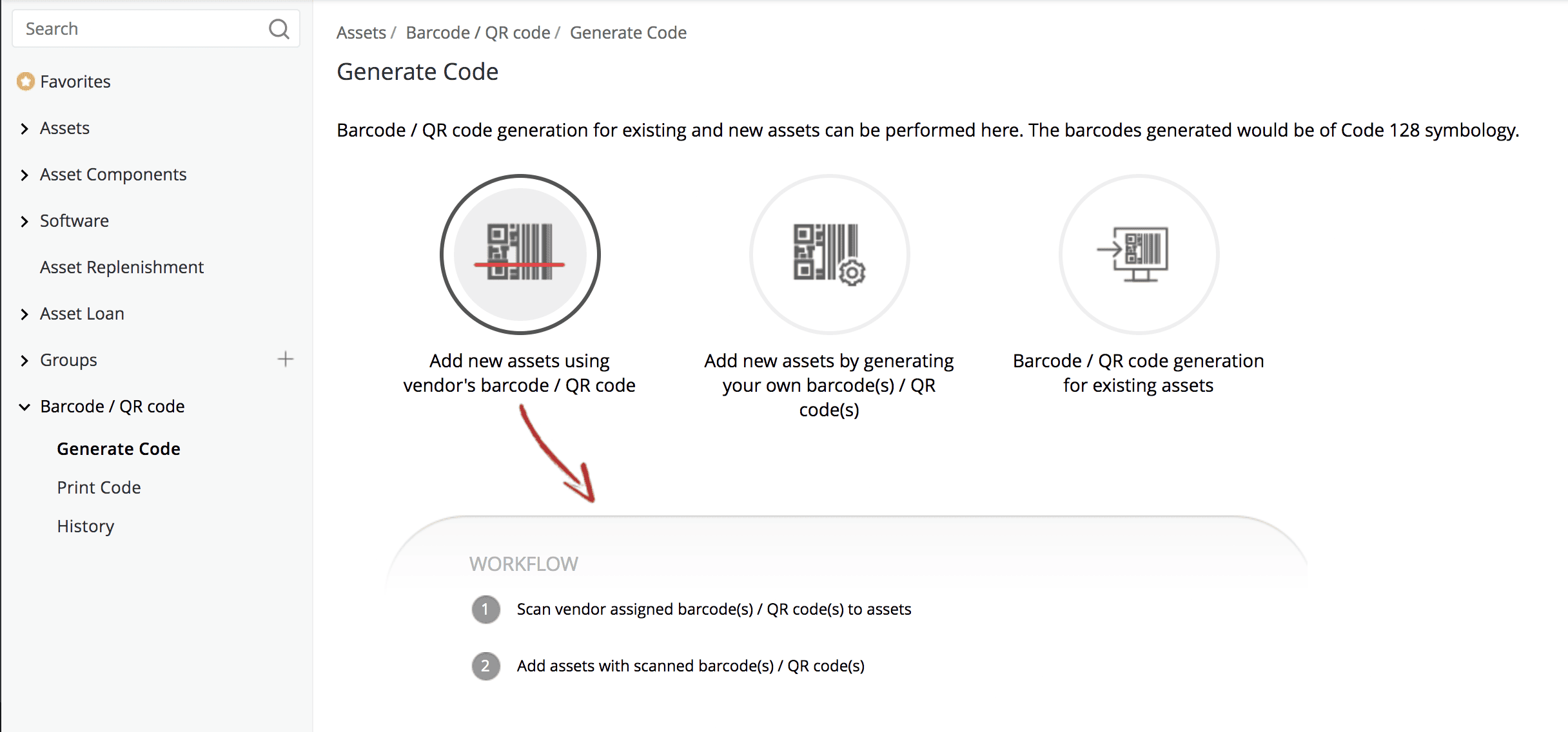
Generate bar codes or QR codes for your assets directly in ServiceDesk Plus, then use them to track devices through their entire life cycle, so IT can speed through inventory checks and district-wide audits, while students or teachers can scan a failing asset to report it in seconds.

Bar code/QR code scanning

Give every district user instant support through Ask Zia

Set Ask Zia, the conversational AI companion, as the default landing page of the self-service portal, so the first thing your students or teachers see is an LLM-style interface, a simple way to ask for help. Ask Zia lets users troubleshoot, submit requests, and check statuses in natural language, resolving routine questions through multi-turn conversations before they ever reach your lean IT team.

Ask Zia virtual agent handling an IT support question about a FortiClient connection issue and providing a step-by-step resolution

Protect students' personal information with built-in privacy controls

Safeguard sensitive student and staff information throughout its life cycle with built-in PII encryption and on-demand anonymization capabilities, so personal records like a student's contact information stay protected. This helps your district strengthen privacy and meet evolving data protection requirements.

Encrypt sensitive fields

Custom field configuration showing PII and ePHI flag enabled and field-level encryption turned on for a Medical Record Number field

Anonymize personal data

Anonymize and Erase dialog replacing a user's name and email with an anonymous identifier to comply with PII data deletion requirements

Keep district services available with intelligent
incident and problem management

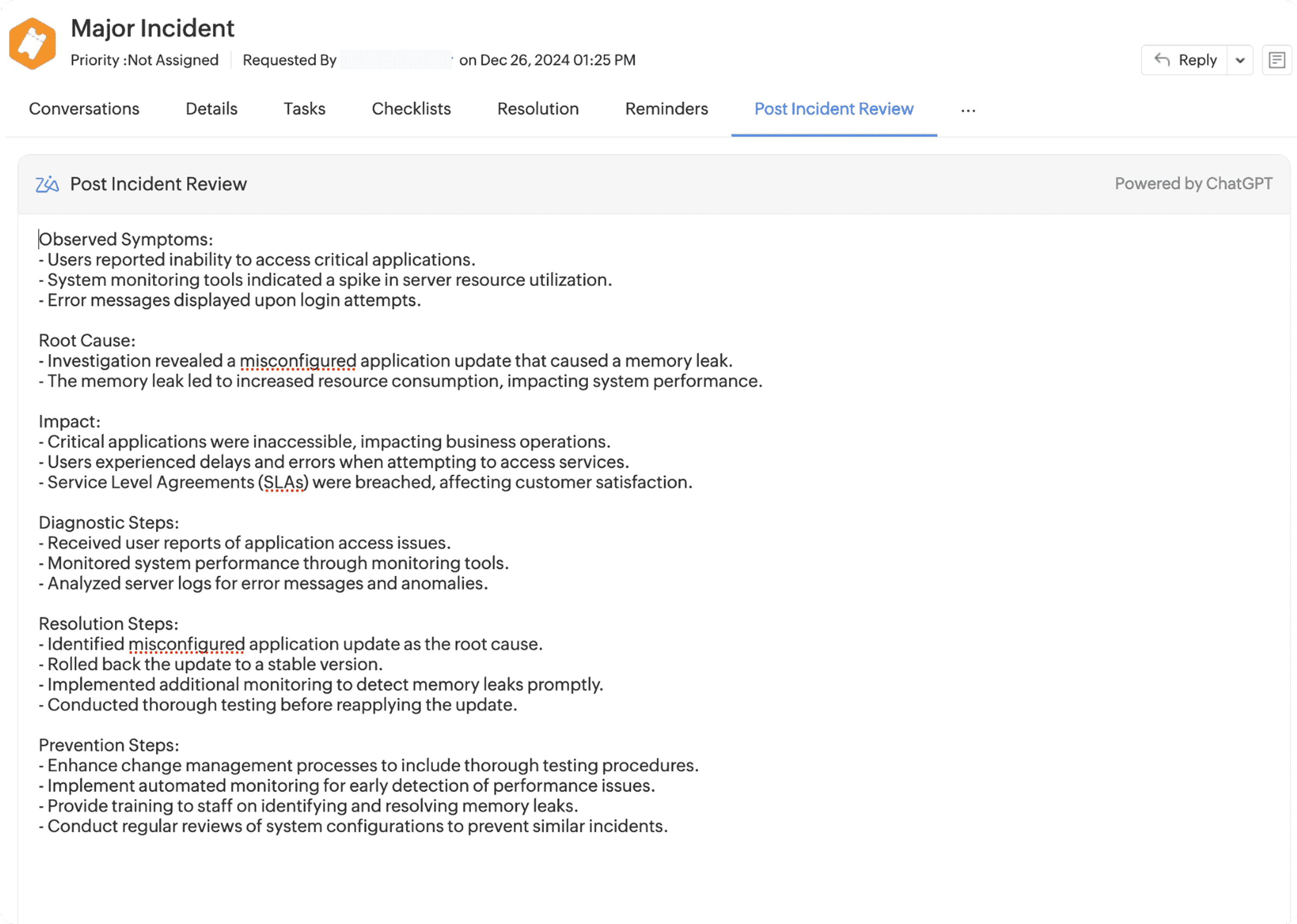
Minimize downtime and keep learning uninterrupted with ITIL-aligned incident management. AI-driven triage automatically categorizes, prioritizes, and routes incidents, while visual workflows help technicians meet SLAs and accelerate resolution. Integrated problem management, along with AI-assisted root cause analysis and post-incident reviews, helps prevent recurring disruptions from impacting the school day.

Zia AI suggesting category, subcategory, and item values for a new ITSM ticket using machine learning-based field predictions
ITSM incident workflow diagram showing automated routing through open, in-progress, major incident detection, and resolved states
AI-generated post-incident review showing timeline, contributing factors, and resolution summary
Problem Predictions panel showing AI-clustered ITSM incidents grouped by issue category with counts and related request records
Zia AI root cause analysis screen on a critical problem ticket, showing AI-generated analysis of patterns across related incidents

Turn your service desk data into district-wide decisions with real-time reports and dashboards

With over 150 predefined reports spanning incidents, problems, changes, assets, and contracts, district IT teams can track key metrics and measure service performance across schools, identify recurring technology issues, and uncover trends that impact teaching and learning. Schedule custom reports to reach the school leaders and district stakeholders automatically, and surface everything that matters on real-time dashboards so IT leadership has a clear view of service health, resource utilization, and district-wide priorities.

IT service desk manager dashboard showing open request counts, priority charts, SLA metrics, and task queues

Track ownership, usage, and licenses for every asset across your schools

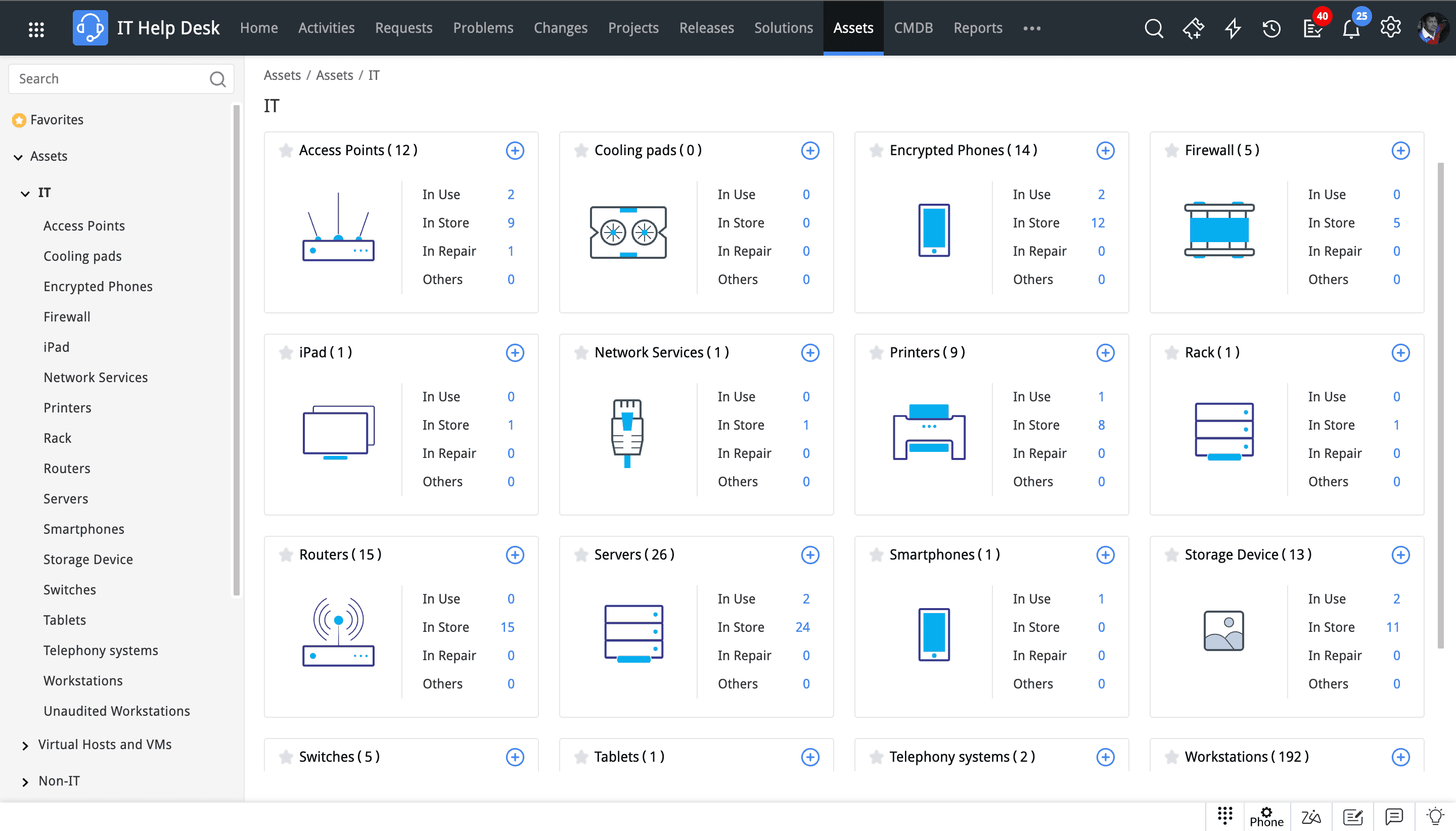
From student laptops and classroom projectors to lab equipment and HVAC systems, maintain complete visibility into every school's technology and facilities assets. ServiceDesk Plus helps IT teams discover and track asset ownership, monitor asset usage, manage software licenses, and conduct audits with ease, ensuring resources are always accounted for, properly maintained, and available when needed.

Asset inventory showing device ownership, usage status, and categories for complete IT asset visibility
CMDB map showing interconnected CIs including servers, network equipment, and services with relationship lines
Asset loan registry showing a list of loaned devices with fields for loaned user, department, site, dates, and return status
Barcode and QR code generation screen showing three scanning workflows for adding and tracking assets in the IT inventory

Connect ServiceDesk Plus to the tools that keep your district running

From identity platforms like Entra ID to collaboration tools like Slack or Microsoft Teams, ServiceDesk Plus plugs into the platforms your district already depends on, with more than 200 integrations in all. This way, your service desk stays aligned with your broader IT ecosystem, so everything keeps working together as you scale.

Entra ID
Slack
ManageEngine Endpoint Central
ManageEngine ADManager Plus
Zoho Flow
Zoom
Microsoft Copilot
Confluence
Microsoft Teams
Dynatrace
Jira
Firewall Analyzer
Entra ID
Slack
ManageEngine Endpoint Central
ManageEngine ADManager Plus
Zoho Flow
Zoom
Microsoft Copilot
Confluence
Microsoft Teams
Dynatrace
Jira
Firewall Analyzer
Entra ID
Slack
ManageEngine Endpoint Central
ManageEngine ADManager Plus
Zoho Flow
Zoom
Microsoft Copilot
Confluence
Microsoft Teams
Dynatrace
Jira
Firewall Analyzer
Entra ID
Slack
ManageEngine Endpoint Central
ManageEngine ADManager Plus
Zoho Flow
Zoom
Microsoft Copilot
Confluence
Microsoft Teams
Dynatrace
Jira
Firewall Analyzer

Hear it straight from our customer

Being able to leverage the IT Asset Management feature and the ticketing solution combined with the ability to integrate information from our student information system has made it much easier for us to generate reports.

—Krisha Moeller, director of IT

Talk to our experts about ServiceDesk Plus

To learn how ServiceDesk Plus can streamline service delivery across your district, reach out to our product experts today.

Frequently asked questions

For a school district, IT problems rarely stay contained, a network outage or an inaccessible student information system can stall an entire day of learning. An ITSM solution helps you log, track, and resolve such critical system issues, giving IT teams one centralized platform to handle the work. It provides incident management to resolve issues quickly, problem management to fix recurring issues, and a self-service portal and knowledge base that let end users solve common issues on their own. By automating routine requests and approvals, it helps lean teams keep up without burning out so IT service ultimately supports better teaching and learning.

As an AI-driven unified service management platform, ServiceDesk Plus gives district IT teams a single backbone for ITSM, asset management, and CMDB. Intelligent incident and request management with predictive triage routes tickets automatically, while custom no-code and low-code workflows, keep routine work running on autopilot. Change and release management make district-wide updates safe and controlled, end-to-end asset and CMDB capabilities deliver a 360-degree view of devices and infrastructure, and dashboards and integrations keep lean teams ahead through the busiest stretches of the year, with more time to focus on teaching and learning.

ServiceNow follows an enterprise pricing model, with capabilities spread across escalating tiers, annual renewal increases, and additional charges for essential modules and features such as problem management, workflow approvers and AI-powered capabilities.

In contrast, ServiceDesk Plus delivers comprehensive, ITIL-aligned ITSM capabilities in a single platform, with high-value AI built in at no additional cost. From generating PIRs and chatting with an LLM-powered assistant to letting AI agents orchestrate tasks, ServiceDesk Plus brings cutting-edge AI to K-12 IT teams with zero AI tax.

This enables school districts to access enterprise-grade service management at a fraction of the cost of ServiceNow. ServiceDesk Plus is part of the broader ManageEngine ecosystem and integrates natively with solutions such as Endpoint Central, ADManager Plus, OpManager Nexus and Log360. When you lift and replace ServiceNow with ManageEngine, your total cost of ownership not only reduces multifold but it opens up your IT budget to modernize your endpoint management, observability, and cybersecurity tech stacks, all of which is delivered by ManageEngine. Explore our pricing options.

Looking to extend ServiceDesk Plus’ benefits across other industries?

Let's support faster, easier, and together