

- Free Edition
- Quick Links
- Active Directory Auditing
- Active Directory auditor
- Active Directory monitoring
- Account lockout analyzer
- Login monitoring software
- Active Directory change notifier
- User logon audit reports
- AD logon logoff tracker
- User logon failure auditing
- Login history tracking tool
- AD change auditor
- Insider threat detection software
- Permissions change auditing
- Entra ID reporting
- Privileged user monitoring
- User behavior analytics tool
- Active Directory security monitoring
- Group Policy auditing tool
- GPO change auditor
- Entra ID auditing
- Audit user account management
- OU change auditor
- Audit group membership changes
- Active Directory auditing and reporting tool
- GPO reporting tool
- Remote desktop monitoring software
- PowerShell logging and auditing
- Azure password protection auditing
- Azure sign-in risk detection
- File Server Auditing
- Windows Server Auditing
- Employee Tracking
- Workstations Auditing
- Compliance Auditing
- Other features
- SIEM Integration
- Windows DNS - Schema Auditing
- Windows security event log monitoring
- SIEM audit solution
- Schedule Active Directory change reports
- Reports from Archived Data
- Aggregated summary reports
- AD new/old attribute changes
- Audit trail
- Audit Active Directory LAPS
- Scheduled Reports & Alerts
- Account lockout examiner
- Industry
- Documents
- Success Stories
- Related Products
- Log360 (On-Premise | Cloud) Comprehensive SIEM and UEBA
- ADManager Plus Active Directory Management & Reporting
- ADAudit Plus Real-time Active Directory Auditing and UBA
- ADSelfService Plus Identity security with MFA, SSO, and SSPR
- DataSecurity Plus File server auditing & data discovery
- Exchange Reporter Plus Exchange Server Auditing & Reporting
- M365 Manager Plus Microsoft 365 Management & Reporting Tool
- RecoveryManager Plus Enterprise backup and recovery tool
- SharePoint Manager Plus SharePoint Reporting and Auditing
- AD360 Integrated Identity & Access Management
- AD Free Tools Active Directory FREE Tools
File access monitoring with ADAudit Plus
File access monitoring is crucial for protecting sensitive data, ensuring regulatory compliance, and detecting security breaches. ADAudit Plus helps in this endeavour in several ways.
Track every file operation in real time
Capture file accesses including reads, writes, creates, deletes, renames, moves, and copy-paste events across Windows file servers and NAS devices.
Audit failed access attempts
Record denied read, write, and delete attempts alongside successful events so unauthorized access attempts leave a trace even when they fail.
Monitor NTFS permission changes
Detect every change to folder permissions, audit settings, and folder ownership, with before-and-after values for each modification.
Maintain a detailed access audit trail
Maintaining an audit trail is essential for ensuring security, regulatory compliance, accountability, and operational integrity. ADAudit Plus provides a detailed, chronological record of file accesses, well beyond the retention limits of native tools.
Detect file-based anomalies with UBA
Spot spikes in file deletions, unusual access times, and high-volume modification events, catching ransomware behavior and deliberate data destruction quickly.
Get instant alerts on critical file accesses
Alert profiles for file deletion, folder permission changes, failed access spikes, and ransomware indicators notify stakeholders in real time via email and SMS.
Meet compliance requirements for file access
Pre-configured compliance report sets for SOX, HIPAA, PCI-DSS, FISMA, GLBA, GDPR, and ISO 27001 cover file access events, permission changes, and audit trail requirements. Custom report profiles let you save filtered views for recurring auditor requests.
Respond to security incidents
Beyond notifications, ADAudit Plus can execute responses such as shutting down machines, ending user sessions, disconnecting machines from the network, and so on. You can also auto-create a ticket in your ITSM tool.
Track every file operation in real time
ADAudit Plus captures the full range of file operations the moment they occur, with details to investigate or report without pivoting to another tool. Pre-configured reports cover each operation type individually and in aggregate. You can:
- Audit all file accesses, including file creations, modifications, permission and ownership changes, deletions, move and rename actions, and so on.
- Trace every file deletion back to the exact user account, client machine, and IP address that performed it.
- Generate a per-user activity summary to understand what any individual user has been doing across monitored file servers.
- Confirm that backup operations are being performed by your authorized backup agent, not an unexpected process.
- Detect file accesses performed by scheduled tasks and services that run under a service account, separating automated operations from interactive user sessions.

Perform real-time file access monitoring across your hybrid file storage environment.
Maintain a detailed audit trail for compliance reporting.
Monitor NTFS permission and ownership changes
A folder accessible only to the finance team one morning can be open to all authenticated users by the afternoon if a permission change goes undetected. ADAudit Plus captures every NTFS permission modification, ownership transfer, and SACL change the moment it occurs to enable quick investigation and remediation. You can:
- Know immediately when a folder's DACL is modified, including the exact old and new permission values, so you can confirm whether the change was authorized.
- Detect changes to folder audit settings (SACL) that could disable event logging for risky directories.
- Track every folder ownership transfer, identifying when a file resource changes hands outside of your change management process.
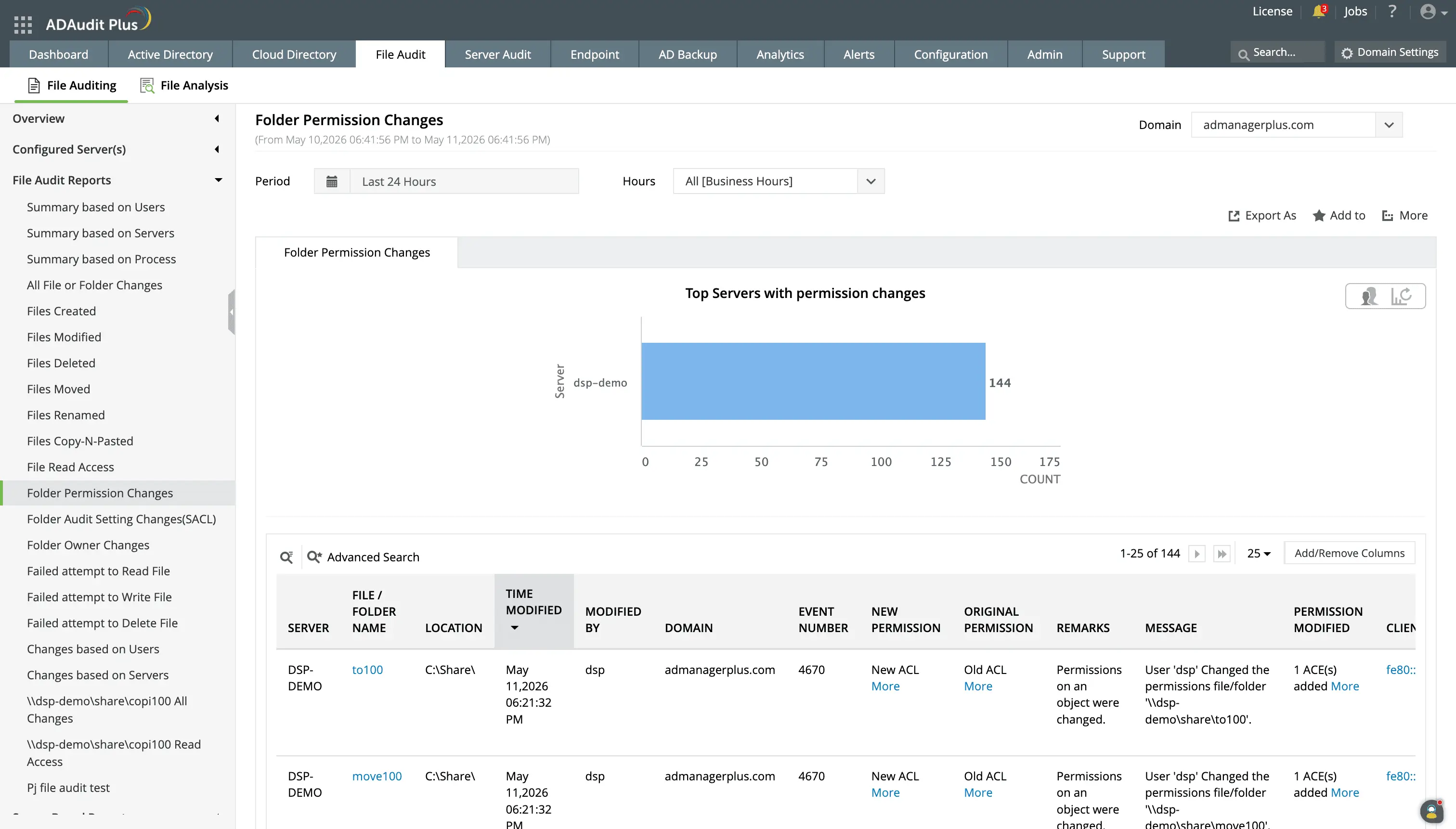
ADAudit Plus captures who changed a permission, what the change was, when it occurred, and from which machine.
Detect file-based threats with user behavior analytics
ADAudit Plus applies machine learning to build a behavioral baseline for each individual user's file access activity. When accesses deviate from that baseline, an anomaly is flagged. A spike in file deletions by an account that normally creates and reads documents stands out immediately rather than being lost in volume.
Five file activity anomaly reports are available:
- Unusual Volume of File Activity identifies when a user's total file activity for a period exceeds their established normal rate, an early indicator of data exfiltration or ransomware staging.
- Unusual Volume of File Deletions flags a spike in deletion events above a user's own baseline, distinguishing genuine ransomware behavior from scheduled archiving processes that legitimately delete large file sets.
- Unusual Volume of File Modification shows a rapid-modification pattern consistent with ransomware encryption, where files are opened, modified, and closed in rapid succession across a directory.
- File Activity performed at Unusual Time catches file access events that fall outside a user's normal working hours, flagging after-hours data access without requiring a fixed schedule policy.
- Unusual Volume of Failed File Accesses detects spikes in denied access attempts for a user, indicating they may be probing for data they are not authorized to reach.
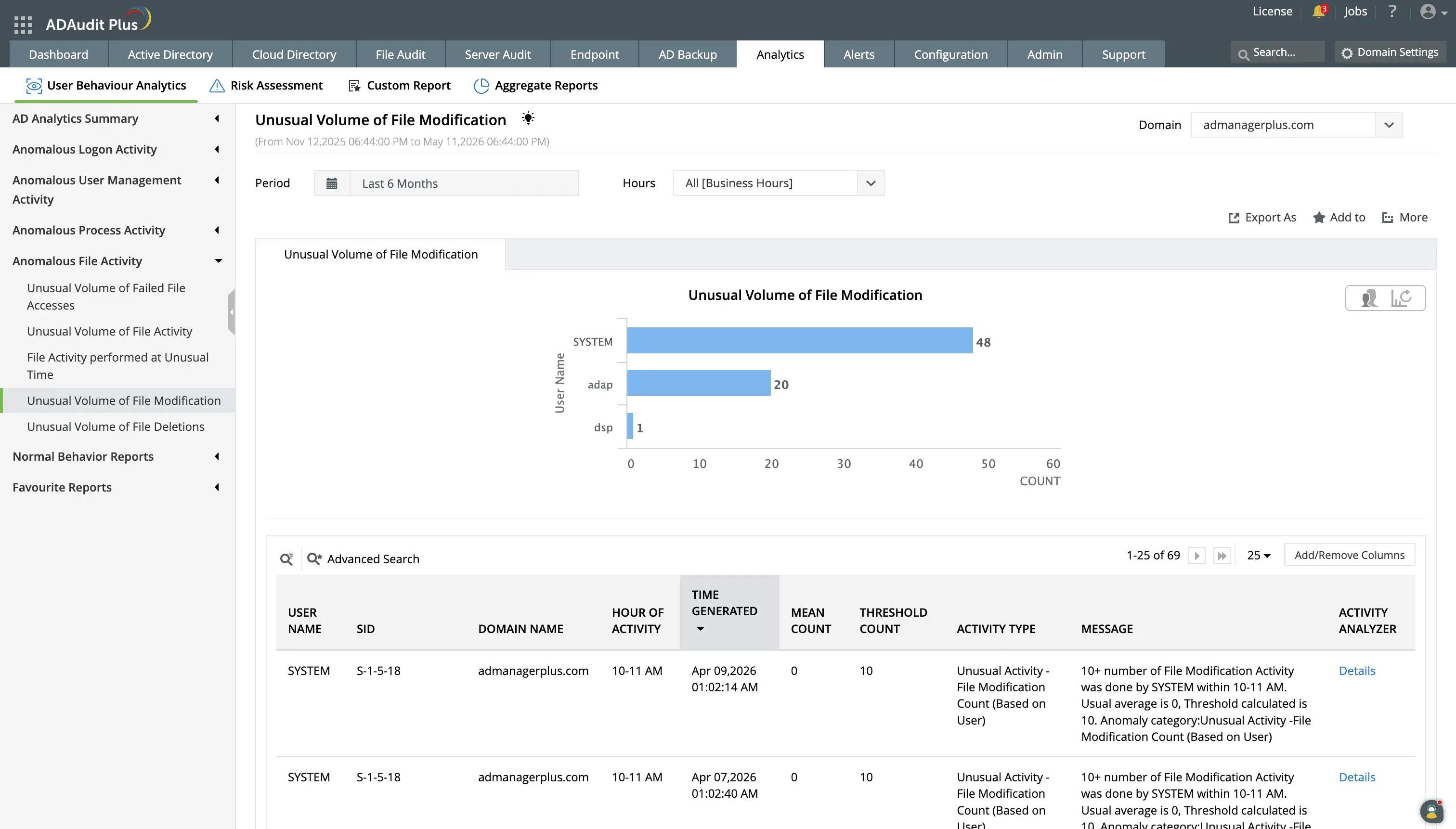
Detect behavioral deviations in file accesses by users using ML-based analysis.
Get real-time alerts on critical file events
Finding out about a critical file event hours later, during a scheduled report review, leaves your environment exposed in the meantime. ADAudit Plus alert profiles monitor file activity continuously and notify your team the moment a defined threshold is crossed. You can receive alerts when:
- A file or folder is deleted from a monitored location, so you can determine whether the deletion was authorized before backup windows close.
- Folder permissions change on a sensitive share, the responsible team is alerted instantly, with the full context of who made the change and what the new permissions are.
- Failed access attempts spike beyond a user's normal baseline, you know an unauthorized access attempt is in progress, not in the next morning's review
- Behavioral patterns match ransomware activity, so your team can isolate affected systems before encryption spreads further.
Alerts are delivered by email and SMS to the stakeholders you define in the alert profile. When an alert fires, ADAudit Plus can automatically create a ticket in ServiceNow, Zendesk, Jira, ManageEngine ServiceDesk Plus, Freshservice, or Kayako, so the right team is engaged and the response is logged without manual handoff.
Extend file access monitoring beyond Windows storage
Windows file servers are only part of most storage environments. ADAudit Plus monitors file accesses across 13 supported platform types from the same console as your Windows servers, covering NAS appliances, cloud file stores, and clustered file resources that Windows native auditing does not reach. You can monitor:
Windows File Server and Windows File Cluster, NetApp ONTAP, EMC Isilon, Synology NAS, QNAP NAS, Amazon FSx, Azure File Share, Hitachi NAS, Huawei OceanStor, Nutanix Files, CTERA Edge Filers, and Qumulo NAS
Meet compliance requirements for file access auditing
File access audit trails are a requirement under every major compliance framework your organization is likely subject to. ADAudit Plus includes pre-configured compliance report sets for seven standards, covering the access events, permission changes, and audit trail retention each framework requires.
Custom report profiles extend compliance reporting beyond the pre-configured sets. You can build a saved view combining specific users, file paths, audit actions, and date ranges, then schedule it for automatic delivery to auditors and compliance officers on a recurring basis, cutting out manual report preparation for recurring requests.
Why native tools fall short
Windows Security event logging can record file access events, but the raw infrastructure it provides is a starting point, not a complete solution. It has several disadvantages:
- Event volume is unmanageable at scale. A busy file server generates thousands of Security log events per hour. Without automated collection and correlation, finding the events that matter means manually searching through enormous logs.
- Audit data stays local. Security event logs are stored on each individual file server. Investigating a file access event across ten servers means reviewing ten separate logs, with no cross-server search or consolidated view.
- Native tooling has no alerting capability. Windows event logging records events passively. There is no built-in mechanism to notify your team when a critical threshold is crossed, and no alert fires when a user deletes a hundred files in three minutes.
- NAS and cloud file servers are outside scope entirely. Native Windows audit policy covers NTFS volumes on Windows servers only. NetApp, EMC, Synology, Amazon FSx, and Azure File Share generate no Windows Security events, leaving those platforms completely invisible.
ADAudit Plus centralizes event collection across all monitored servers and NAS platforms, applies per-user behavioral baselines, and delivers the real-time alerting and structured reporting that native tools cannot provide.
Download a free 30-day trial of ADAudit Plus and get complete visibility into who is accessing, modifying, and deleting files across your entire storage environment.
Frequently asked questions
Windows records file access events in the Security event log when object access auditing is enabled via Group Policy. You can review these events using Event Viewer by filtering for Event ID 4663, but you must access each server individually. ADAudit Plus centralizes collection and reporting across all monitored servers.
File access history in Windows is stored in the Security event log on the server hosting the file. With native tools, you filter for Event IDs 4656 and 4663 in Event Viewer per server. ADAudit Plus consolidates this history across all servers, filterable by user, path, and time range.
Windows does not include a dedicated file integrity monitoring capability. Security event logging can record file changes when object access auditing is enabled, but without policy-based monitoring or alerting. ADAudit Plus includes a File Integrity Monitoring module that tracks creates, modifications, deletes, moves, renames, and permission changes on designated folders.
The last-accessed timestamp for a file is stored as an NTFS attribute but does not identify the user who performed the access. ADAudit Plus records every file read event with the user identity, machine, IP address, and timestamp, giving you a searchable, user-attributed access history.
Yes, when object access auditing is configured in Group Policy and the file is in the audit scope. Read events appear as Event ID 4663 in the local Security log. ADAudit Plus captures these across all monitored servers in the File Read Access report, with user identity and IP address.
HIPAA, PCI-DSS, SOX, and GDPR require demonstrating who accessed regulated data, when, and from where, and retaining those records for defined periods. ADAudit Plus provides the structured audit trail, pre-configured compliance reports, and log retention that manual event log review cannot reliably deliver, with report sets for seven standards.