

- Free Edition
- Quick Links
- Active Directory Auditing
- Active Directory auditor
- Active Directory monitoring
- Account lockout analyzer
- Login monitoring software
- Active Directory change notifier
- User logon audit reports
- AD logon logoff tracker
- User logon failure auditing
- Login history tracking tool
- AD change auditor
- Insider threat detection software
- Permissions change auditing
- Entra ID reporting
- Privileged user monitoring
- User behavior analytics tool
- Active Directory security monitoring
- Group Policy auditing tool
- GPO change auditor
- Entra ID auditing
- Audit user account management
- OU change auditor
- Audit group membership changes
- Active Directory auditing and reporting tool
- GPO reporting tool
- Remote desktop monitoring software
- PowerShell logging and auditing
- Azure password protection auditing
- Azure sign-in risk detection
- File Server Auditing
- Windows Server Auditing
- Employee Tracking
- Workstations Auditing
- Compliance Auditing
- Other features
- SIEM Integration
- Windows DNS - Schema Auditing
- Windows security event log monitoring
- SIEM audit solution
- Schedule Active Directory change reports
- Reports from Archived Data
- Aggregated summary reports
- AD new/old attribute changes
- Audit trail
- Audit Active Directory LAPS
- Scheduled Reports & Alerts
- Account lockout examiner
- Industry
- Documents
- Success Stories
- Related Products
- Log360 (On-Premise | Cloud) Comprehensive SIEM and UEBA
- ADManager Plus Active Directory Management & Reporting
- ADAudit Plus Real-time Active Directory Auditing and UBA
- ADSelfService Plus Identity security with MFA, SSO, and SSPR
- DataSecurity Plus File server auditing & data discovery
- Exchange Reporter Plus Exchange Server Auditing & Reporting
- M365 Manager Plus Microsoft 365 Management & Reporting Tool
- RecoveryManager Plus Enterprise backup and recovery tool
- SharePoint Manager Plus SharePoint Reporting and Auditing
- AD360 Integrated Identity & Access Management
- AD Free Tools Active Directory FREE Tools
AD change monitoring with ADAudit Plus
Track changes across every AD object
Get complete visibility into changes made to users, groups, computers, OUs, Group Policy Objects (GPOs), DNS records, schema, and more.
See before-and-after values for every change
Every attribute change surfaces the old value alongside the new one: for user objects, computer accounts, GPO changes, permission changes, and more.
Audit privileged user activity
Track every action performed by Domain Admins, Enterprise Admins, and other privileged users, including LAPS password access, AdminSDHolder permission modifications, and changes to privileged group memberships.
Detect 25+ AD attacks and GPO misconfigurations
Identify active threats and security weaknesses with the Attack Surface Analyzer, including Kerberoasting, Golden Ticket, DCSync, along with GPO misconfigurations.
Get real-time alerts on critical AD events
Alert profiles fire the moment a domain policy changes, a privileged group is modified, or an audit log is cleared, with email and SMS delivery and optional auto-ticket creation in your ITSM tool.
Meet compliance requirements with ease
Pre-configured compliance report sets for SOX, HIPAA, PCI-DSS, FISMA, GLBA, GDPR, and ISO 27001 are ready to run without manual configuration.
What is AD change monitoring?
AD is the central authority for identity and access in most Windows environments. Every user account, group membership, Group Policy setting, and permission assignment flows through it, so any unauthorized or accidental change can have immediate consequences for security and operations. Monitoring those changes in real time is the only reliable way to keep an accurate picture of who has access to what, and to catch problems before they spread.
ADAudit Plus gives you real-time visibility into every AD change event, capturing the full context of each action: the object modified, the attribute affected, the user who made the change, the domain controller (DC) that recorded it, and the source machine. That level of detail is available across all major AD object types, from user and group management through GPOs, permissions, DNS, and schema.
Key changes ADAudit Plus monitors in AD
| AD area | What ADAudit Plus captures |
|---|---|
| User accounts | Creation, deletion, enable/disable events, password resets, password changes, account renames, OU moves, and all attribute changes with before-and-after values. |
| Group membership | Members added to or removed from security and distribution groups, group attribute changes, and group creation or deletion events. |
| Computer accounts | Computer account creation, deletion, modification, enable/disable, and moves between OUs. |
| Organizational units | OU creation, deletion, movement, modification, and renames across the directory hierarchy. |
| Group Policy Objects | GPO creation, deletion, link changes, and setting-level changes including password policy, lockout policy, and security settings. |
| Permissions and ACLs | Changes to permissions at the domain, OU, container, GPO, user, group, computer, and schema level, including AdminSDHolder Permission Changes. |
| DNS records | DNS node additions, modifications, and deletions, plus zone configuration and server setting changes. |
| Schema and configuration | Schema modifications, FSMO role changes, configuration partition changes, and site changes. |
Track changes across all AD objects
ADAudit Plus captures changes across the full range of AD objects through pre-configured reports, each structured around the who-what-when-where of the change rather than raw event log entries. Every report surfaces the caller identity, the DC that recorded the event, the source machine, and the exact time.
- Track changes to users including every password reset alongside the identity of the administrator who initiated it.
- Capture group membership changes across security groups with the caller identity and source machine.
- Track OU creation, deletion, and movement events, plus DNS record additions, modifications, and deletions.
- Detect schema and FSMO role changes, which affect the entire forest and should be tightly controlled.
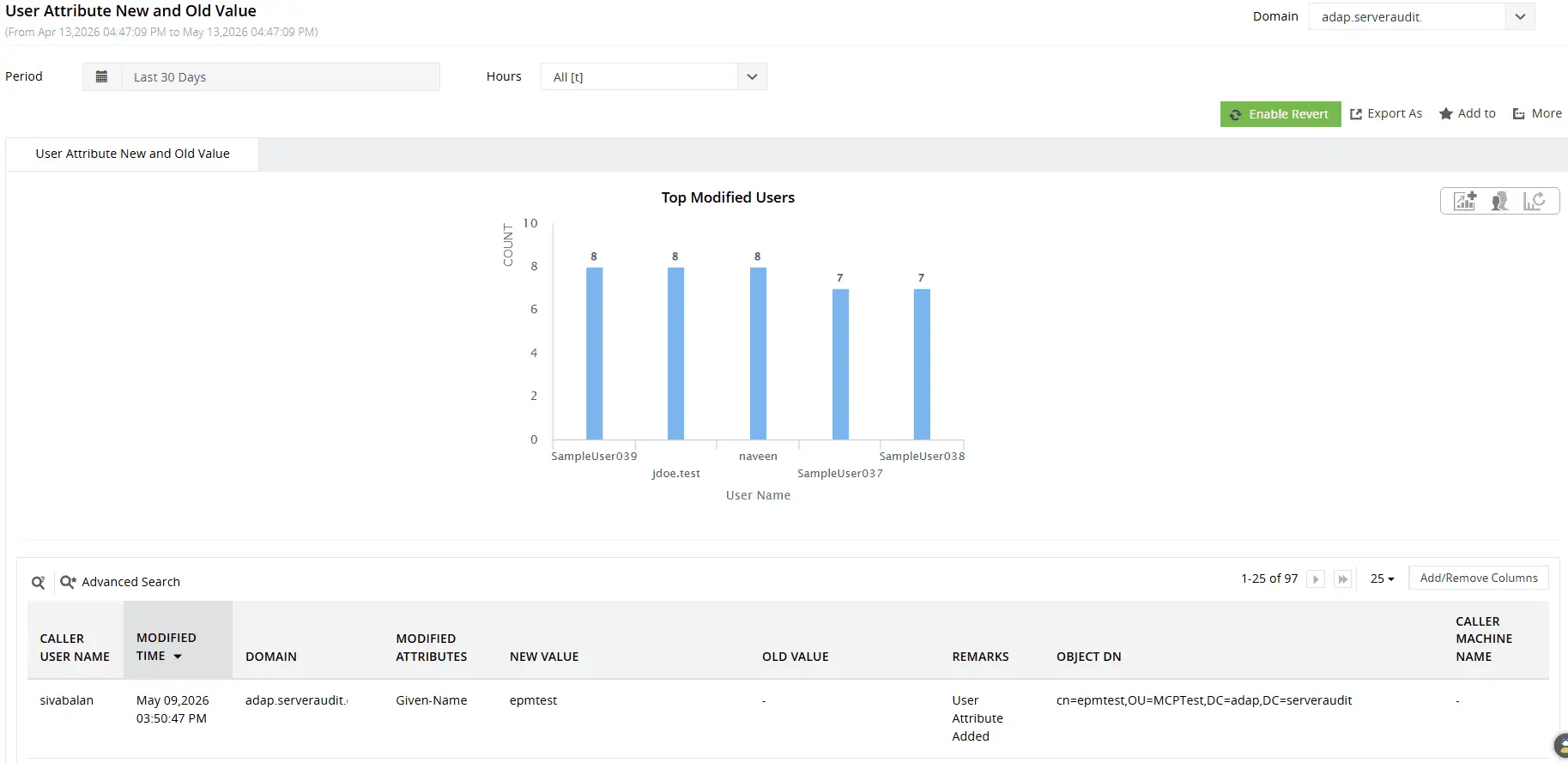
Track changes to user account attributes with complete visibility into the modified attribute name, previous and updated values, initiating user, and the precise time of modification.
Audit Group Policy and permission changes
GPOs control security settings, software deployment, and access configurations across every machine in the domain. A single unauthorized GPO change can weaken password requirements, relax lockout thresholds, or remove security restrictions across thousands of endpoints at once. ADAudit Plus captures every GPO change at both the object level and the setting level, with permission changes tracked at the same depth.
- Capture GPO creation, deletion, and link changes with the identity and source machine of whoever made them.
- Track changes to password policy, account lockout policy, and security settings within GPOs, with before-and-after values.
- Monitor permission changes at the domain, OU, GPO, user, group, and computer level.
- Track AdminSDHolder Permission Changes as a named, distinct event, because any modification propagates silently to protected accounts.
- Scan DCs, Windows Servers, and workstations against 350+ predefined benchmark settings to identify GPO misconfigurations and potential exposure points across the environment.
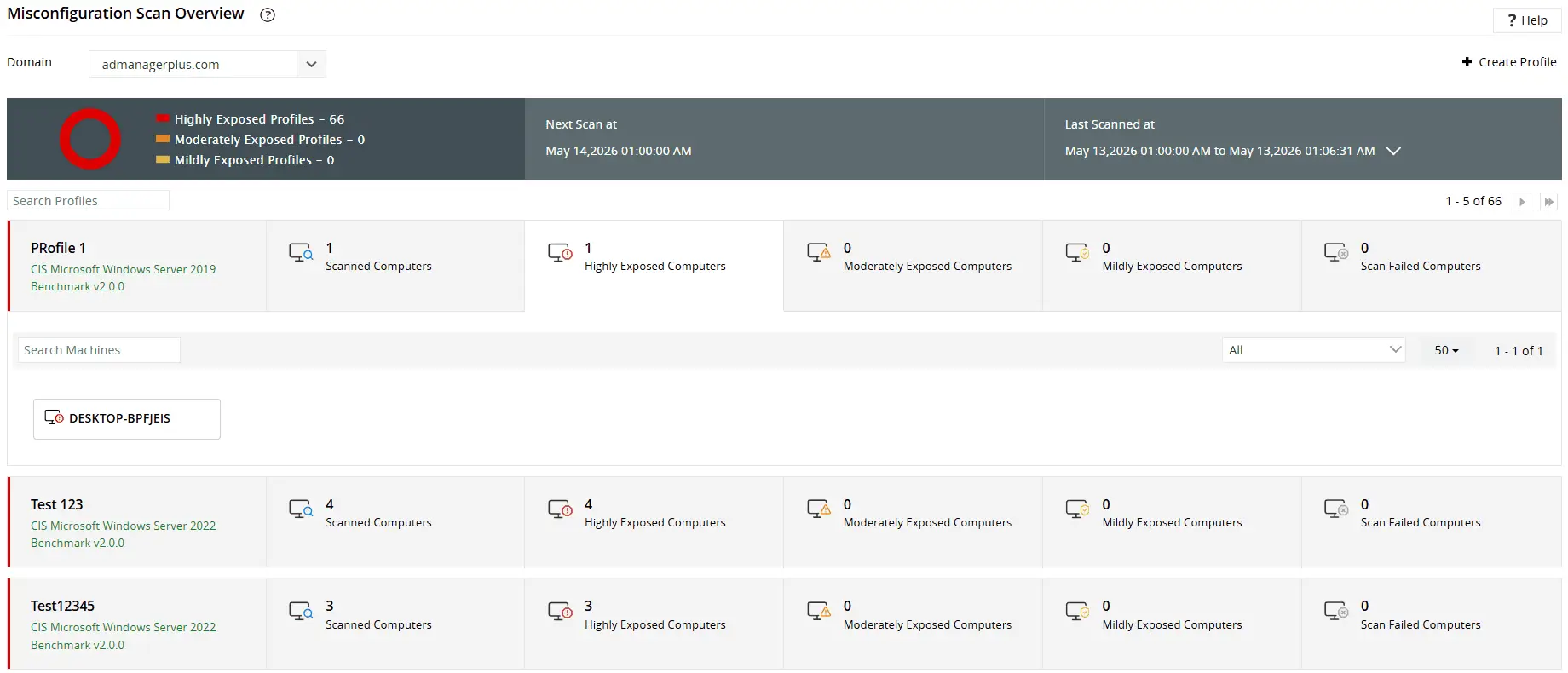
Gain an in-depth, at-a-glance view of GPO-based risk exposure across multiple systems to quickly identify the most vulnerable endpoints in your domain.
Monitor privileged user activity
Domain Admins, Enterprise Admins, and Schema Admins have access to every part of your AD environment. Their activity is the highest-priority audit area in most security frameworks, and also where unauthorized or accidental changes carry the greatest risk.
ADAudit Plus maintains a consolidated audit trail of every action taken by privileged accounts across all AD object types: user management, group changes, GPO modifications, permission assignments, and schema updates.
- Review privileged account changes in a centralized audit trail.
- Track Schema Admin activity, which should be rare and tightly controlled in healthy AD environments.
- Detect privileged account activity occurring outside normal business hours using UBA-driven anomaly detection.
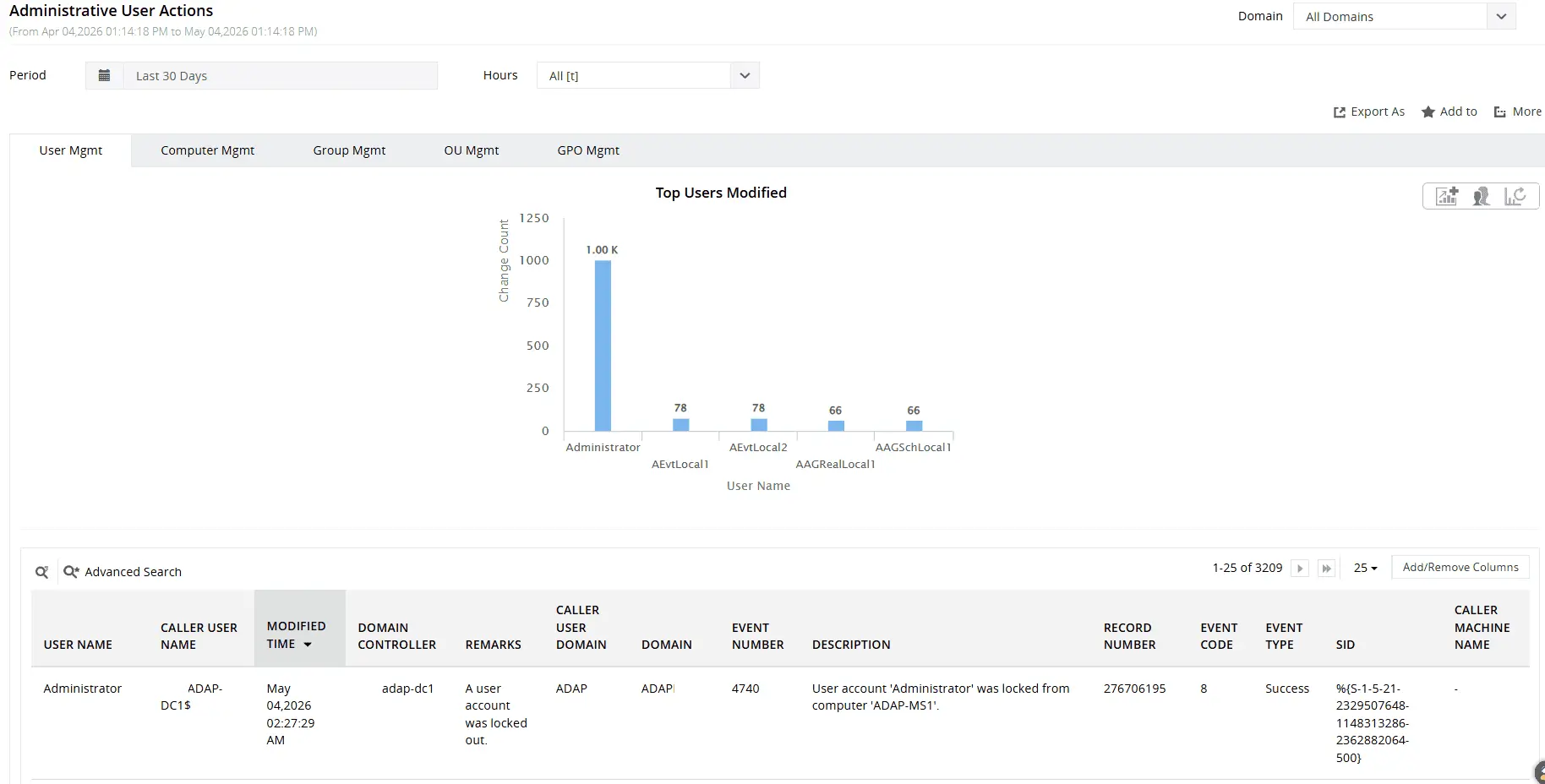
Track changes made by privileged users to AD objects, including users, groups, computers, OUs, and more.
Detect anomalies with UBA and threats with Attack Surface Analyzer
The Attack Surface Analyzer detects 25+ named AD attacks in real time, including brute-force attacks, Golden Ticket attacks, DCSync, RID hijacking, and more.
User behavior analytics (UBA) uses machine learning to establish a behavioral baseline for every user by analyzing patterns such as typical logon times, commonly accessed systems, authentication behavior, and the frequency and timing of administrative actions. Deviations from this baseline are automatically identified and surfaced in the Analytics tab without requiring manual threshold configuration.
- Unusual Volume of Logon Failures detects abnormal spikes in failed authentication attempts compared to a user's normal activity, helping identify potential brute-force attacks or compromised credentials.
- Unusual Volume of User Management Activity flags unexpected increases in account creation, modification, or deletion activity performed by administrators, helping detect suspicious administrative behavior.
- Unusual Volume of File Activity and Unusual Volume of File Deletions identify spikes in file operations that exceed established user baselines, helping uncover potential ransomware activity or data exfiltration attempts before significant damage occurs.
Get real-time alerts on critical AD changes
Audit reports tell you what happened. Alerts tell you what is happening now, before the impact spreads. ADAudit Plus ships with pre-configured alert profiles covering the most critical AD change events, all of which you can adjust to match your environment's risk tolerance.
Every alert delivers email and SMS notification to the responsible team. When a configured alert fires, ADAudit Plus can automatically create a ticket in ServiceNow, Jira, or another connected ITSM platform, so the response workflow starts without manual handoff.
- When a domain policy is modified, your team is notified immediately, so unauthorized changes to security baselines are caught before they affect the environment.
- When a user is added to a privileged group like Domain Admins, an alert fires in real time, giving your team the window to verify whether the change was authorized.
- When the security audit log is cleared on any DC, you are alerted at once, because log clearing is one of the clearest indicators of an active compromise attempt.
Meet compliance requirements with audit-ready reports
SOX, HIPAA, PCI-DSS, FISMA, GLBA, GDPR, and ISO 27001 all require documented evidence that access to critical systems is monitored, that changes are tracked, and that audit records are retained. ADAudit Plus ships with pre-configured compliance reports for all seven standards, mapped to the specific controls each framework requires.
When standard reports don't fit your audit scope, custom report profiles let you combine specific users, audit actions, object types, and time ranges into saved views that can be scheduled for automatic delivery to auditors and compliance officers. Every report exports to CSV, PDF, HTML, or XLSX.
Why native tools fall short
Windows Security event logs record AD change events, but working with them natively creates three significant gaps.
- First, logs are stored locally on each DC. In a multi-DC environment, correlating events across all of them requires manual collection or scripting, and that process is not audit-ready by default.
- Second, the raw event log format is not designed for investigation. Security event 4738 tells you that a user account was changed; it does not present the before-and-after attribute values in a readable format without significant post-processing.
- Third, retention is limited by the configured log size. Once the security log fills and overwrites older events, that historical record is gone unless a separate archiving process is in place.
ADAudit Plus centralizes event collection from all DCs, translates raw event data into structured, searchable reports with before-and-after values, and retains audit data according to your compliance requirements, without manual scripting or log management overhead.
4 compelling reasons to choose ADAudit Plus
Widely recognized
ADAudit Plus has been recognized as a Gartner Peer Insights Customers' Choice for Security Incident & Event Management (SIEM) for four consecutive years.
Easy deployment
Go from downloading ADAudit Plus to receiving predefined reports and alerts in under 30 minutes, without any professional help.
Competitive pricing
ADAudit Plus is licensed per-server, unlike other IT auditors which are licensed per-user. With per-server licensing, even with a growing number of users each year, you can continue to ingest log data without additional costs.
Unified visibility
ADAudit Plus consolidates auditing, security, and compliance across Active Directory, Entra ID, Windows servers, workstations, and file servers into a single pane of glass, eliminating the need to juggle multiple tools.
Frequently asked questions
Important Windows event IDs for AD change monitoring include 4720 (user account creation), 4728/4732/4756 (group membership changes), 5136 (directory service object modifications), 4719 (system audit policy changes), and 4662 (object access events).
Every organization's auditing requirements depend on its unique security priorities and compliance mandates, which means there's no one-size-fits-all approach to AD auditing. However, the following best practices can help you build an effective and sustainable auditing strategy:
- Reduce event noise: Configure advanced audit policies to capture only meaningful events, enabling clearer visibility into critical activity without overwhelming administrators with unnecessary logs.
- Focus on high-risk activity: Prioritize auditing for security-sensitive events such as logons, privilege usage, account lockouts, and group membership changes, where attackers are most likely to exploit gaps in visibility.
- Properly size event logs: Configure adequate log size and retention settings to ensure important audit events are not overwritten, preserving a complete audit trail.
- Retain logs for long-term analysis: Archive audit data according to regulatory and organizational retention requirements to support compliance reporting, investigations, and forensic analysis after security incidents.
Yes. ADAudit Plus monitors both on-premises AD and Microsoft Entra ID from a single console, correlating change events across both directories.