

- Free Edition
- Quick Links
- Active Directory Auditing
- Active Directory auditor
- Active Directory monitoring
- Account lockout analyzer
- Login monitoring software
- Active Directory change notifier
- User logon audit reports
- AD logon logoff tracker
- User logon failure auditing
- Login history tracking tool
- AD change auditor
- Insider threat detection software
- Permissions change auditing
- Entra ID reporting
- Privileged user monitoring
- User behavior analytics tool
- Active Directory security monitoring
- Group Policy auditing tool
- GPO change auditor
- Entra ID auditing
- Audit user account management
- OU change auditor
- Audit group membership changes
- Active Directory auditing and reporting tool
- GPO reporting tool
- Remote desktop monitoring software
- PowerShell logging and auditing
- Azure password protection auditing
- Azure sign-in risk detection
- File Server Auditing
- Windows Server Auditing
- Employee Tracking
- Workstations Auditing
- Compliance Auditing
- Other features
- SIEM Integration
- Windows DNS - Schema Auditing
- Windows security event log monitoring
- SIEM audit solution
- Schedule Active Directory change reports
- Reports from Archived Data
- Aggregated summary reports
- AD new/old attribute changes
- Audit trail
- Audit Active Directory LAPS
- Scheduled Reports & Alerts
- Account lockout examiner
- Industry
- Documents
- Success Stories
- Related Products
- Log360 (On-Premise | Cloud) Comprehensive SIEM and UEBA
- ADManager Plus Active Directory Management & Reporting
- ADAudit Plus Real-time Active Directory Auditing and UBA
- ADSelfService Plus Identity security with MFA, SSO, and SSPR
- DataSecurity Plus File server auditing & data discovery
- Exchange Reporter Plus Exchange Server Auditing & Reporting
- M365 Manager Plus Microsoft 365 Management & Reporting Tool
- RecoveryManager Plus Enterprise backup and recovery tool
- SharePoint Manager Plus SharePoint Reporting and Auditing
- AD360 Integrated Identity & Access Management
- AD Free Tools Active Directory FREE Tools
How ADAudit Plus performs file integrity monitoring
FIM begins with being aware of critical changes in your environment. ADAudit Plus gives you just that by tracking every file and folder change and telling you who made it, when, from which machine, and whether access was permitted or denied.
Detect unauthorised file modifications instantly
ADAudit Plus captures every change to files and folders in FIM-monitored locations (creations, modifications, deletions, moves, renames, and copy-paste events), so you know the moment an unauthorised change occurs.
Monitor registry and system configuration integrity
Sysmon-based registry auditing tracks read and write events on registry keys alongside system time changes, service installs, and scheduled task modifications, covering the configuration layer that file-only FIM tools miss.
Alert and respond automatically on FIM events
Built-in FIM alert profiles fire the moment a monitored file is deleted or folder permissions change. Alerts go out by email or SMS and can auto-create a ticket in ServiceNow, Zendesk, or your ITSM tool of choice.
Detect ransomware activity through UBA
Machine learning baselines establish normal file activity volumes per user. A spike in file modifications or deletions triggers an anomaly alert, giving you an early warning of ransomware or deliberate data destruction before the damage spreads.
Report on permission and audit setting changes
Folder permission (DACL) changes and audit setting (SACL) changes in FIM folder locations are captured in dedicated reports, so you can trace exactly when access controls were modified and by whom.
Catch denied access attempts in monitored locations
Failed write and delete attempts on FIM-monitored files are given dedicated reports, so you can identify accounts probing sensitive locations without waiting for a successful breach.
Extend FIM to NAS and cloud file stores
ADAudit Plus monitors file integrity across Windows file servers, Windows File Clusters, and multiple NAS device types including Amazon FSx, Azure File Share, NetApp, and Synology, from a single console.
What ADAudit Plus monitors for file integrity
| Area | What ADAudit Plus captures |
|---|---|
| Files and folders in monitored locations (operating system (OS), database, and application software files, archived logs and reports, and other critical files) | Creations, modifications, deletions, moves, renames, and copy-paste events with the originating user, machine, and IP address |
| Folder permissions (DACL) | Permission additions, removals, and changes on monitored folders, with old and new values |
| Audit settings (SACL) | Changes to folder audit policies in FIM-monitored locations |
| Registry keys | Read and write events on registry keys via Sysmon-based auditing |
| System configuration | System time changes, service installs, service state changes, and scheduled task modifications |
| Denied access attempts | Failed write and delete attempts on monitored files, capturing the account and source machine |
Detect changes in FIM folders in real time
ADAudit Plus captures every file and folder event in your FIM-monitored locations—including operating system (OS), database, and application software files, archived logs and reports, and other critical files—the moment it occurs. This means that you can:
- Receive dedicated reports for each operation type, including denied access attempts on FIM-monitored files.
- Track when files/folders are Created, Modified, Deleted, Moved (or) Renamed, and Copy-N-Pasted with details such as the name of the user, machine, IP address, and timestamp.
- Investigate user accounts that attempted to write to or delete files they were not permitted to touch.
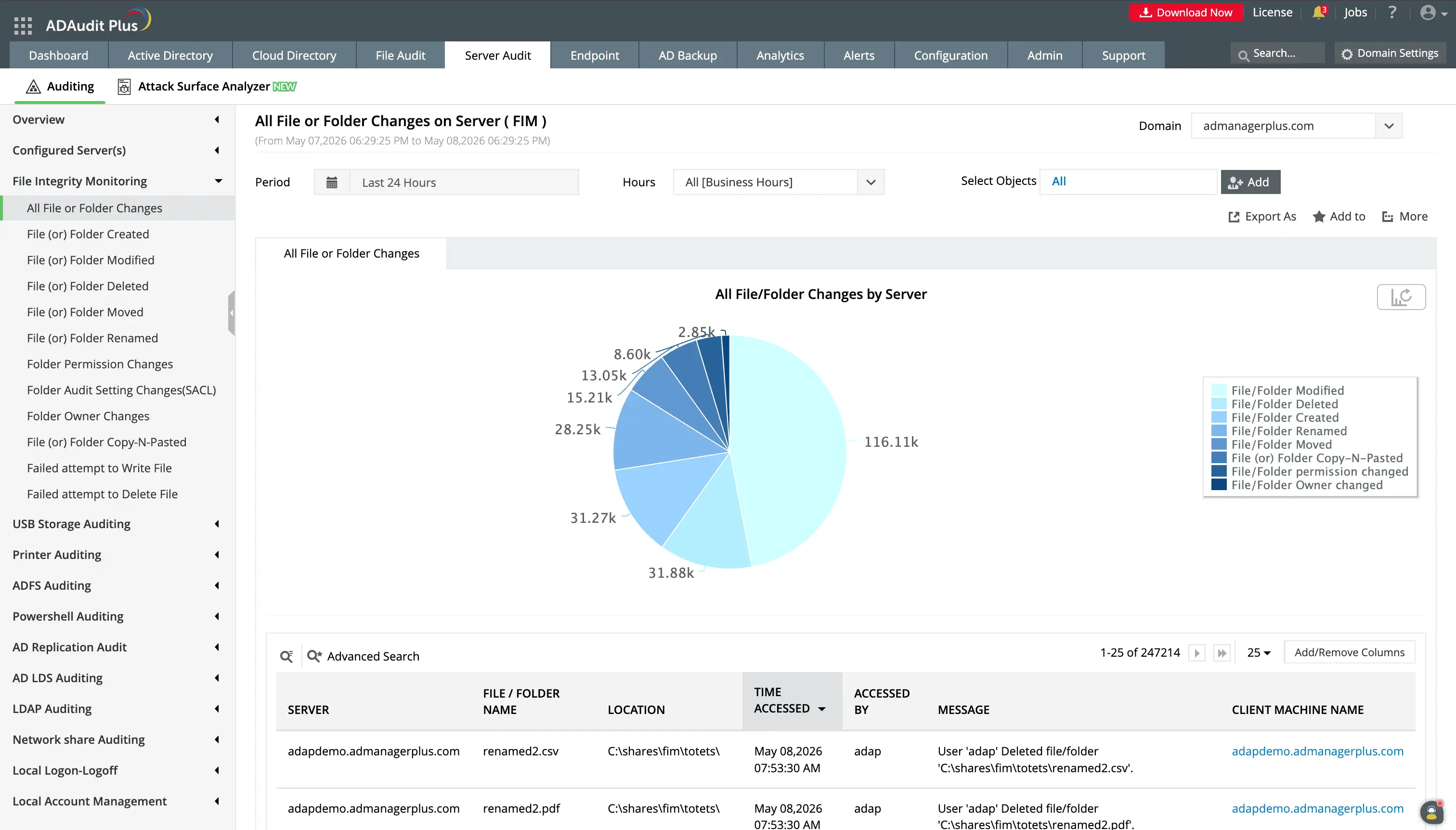
Receive dedicated report for critical system, OS, and registry folders that are monitored under the FIM capability.
You can report on specific periods or servers to have a targeted view of changes.
Monitor registry and system configuration integrity
Attackers frequently modify registry keys to establish persistence, alter service configurations to maintain access, or change system time to obscure their activity in logs. ADAudit Plus extends integrity monitoring to cover these configuration-layer changes through Sysmon-based auditing. You can view:
- Read and write events on registry keys across monitored servers.
- Reports that show when the server clock is modified, a tactic attackers use to shift timestamps and obscure when malicious activity occurred.
- Every new service installation on monitored servers, and scheduled tasks created, modified, and deleted to track avenues that are frequently abused for persistence and lateral movement.
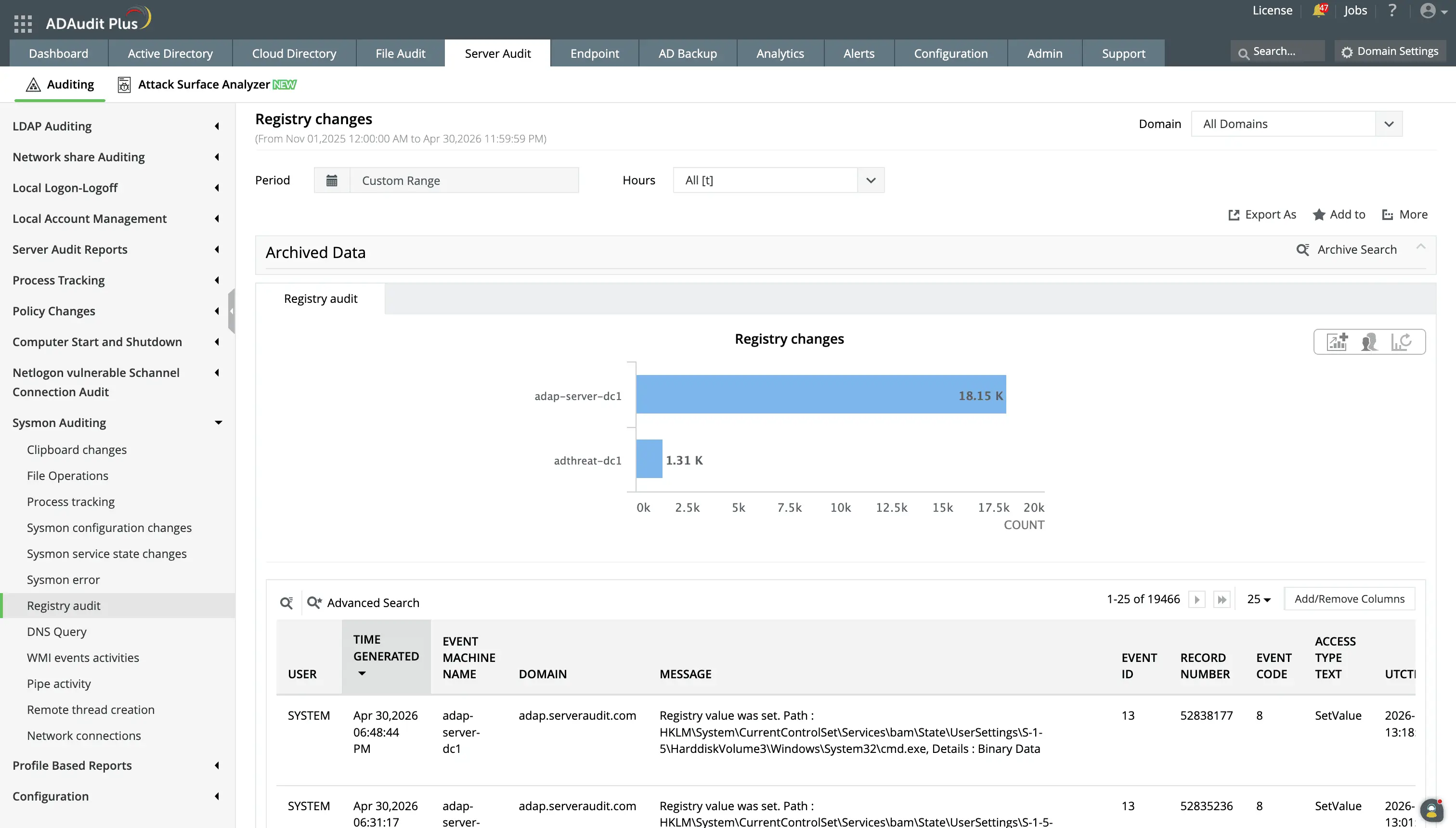
Monitor changes to the Windows Registry, including value changes, creation/deletion of keys, and modification of ACLs.
Get real-time FIM alerts with automated responses
With the built-in FIM alert profiles, you don't need to build detection logic from scratch before your monitoring becomes effective. These notify stakeholders when:
- When a file or folder is deleted in a FIM-monitored location, so data destruction events are investigated before they compound.
- When folder permissions change in a monitored location, letting you determine within minutes whether the change was authorised or whether an account is escalating its own access.
- Rogue users perform critical actions in FIM files outside of their working hours, so you can shut them down and minimize damage.
Beyond notifications, these alert profiles have two more additional capabilities to help you ensure file integrity:
- Every alert can trigger an automated response. This could be powerful remedial actions like ending a user's session, cutting off network access to a machine, etc.
- You can set up a workflow so a ticket is auto-created in ServiceNow, Zendesk, ManageEngine ServiceDesk Plus, Freshservice, Jira, or Kayako, and the responsible team is notified with the event context already attached.
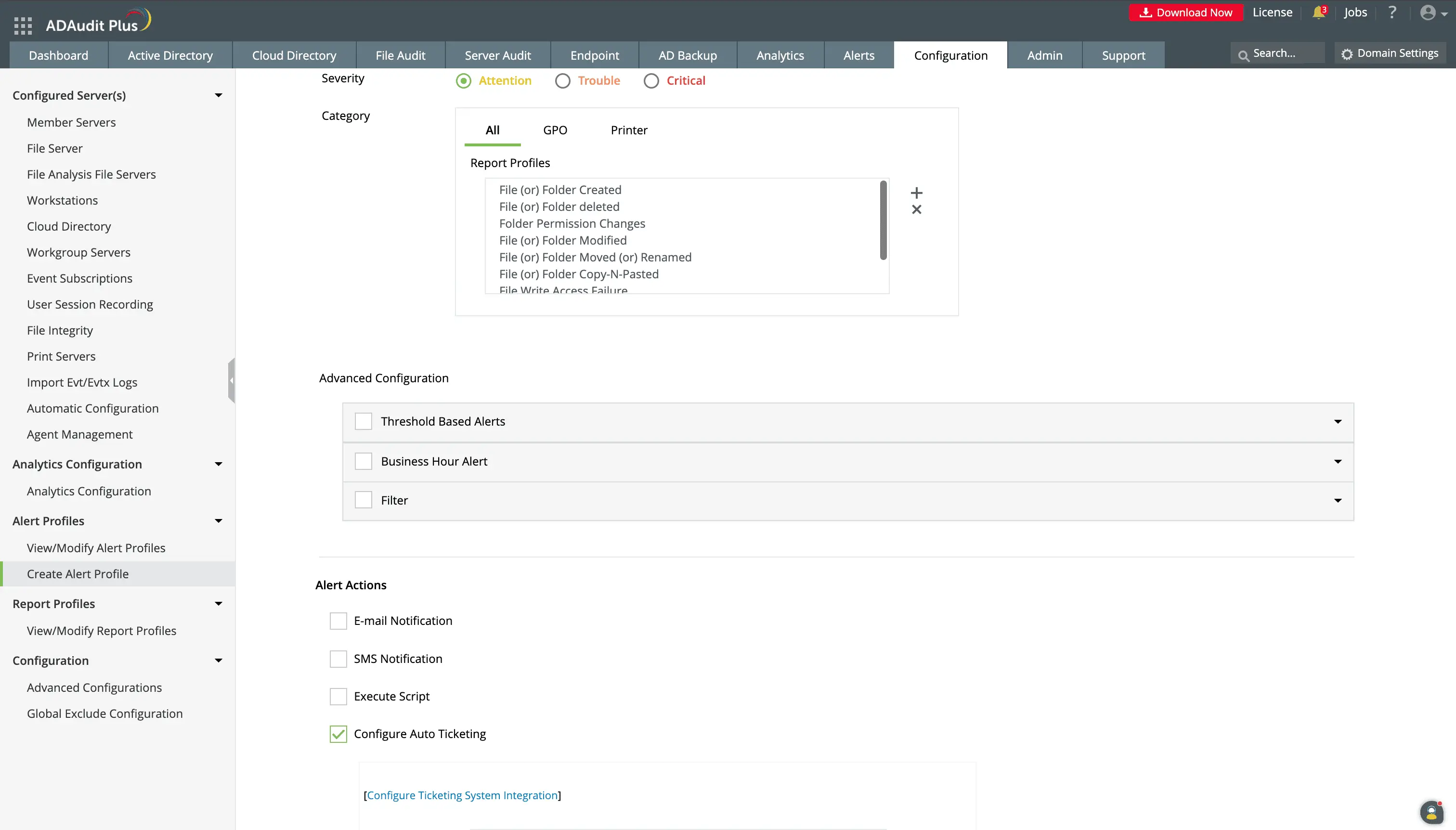
You can configure custom alerts to meet your organization's unique needs.
Beyond alerting, you can configure responses such as scripted actions or creating a ticket in supported ITSM tools.
Detect ransomware and insider threats
Since the UBA capability establishes a per-user baseline of normal file activity volume, timing, and patterns, when activity deviates from that baseline, you will be aware of it. The analytics reports can:
- Flag a spike in write events above a user's established baseline, one of the earliest detectable signs of ransomware encrypting files in place.
- Catch mass deletion events consistent with ransomware or an insider deliberately destroying data.
- Spot users whose overall file activity volume exceeds their personal baseline, a pattern consistent with bulk file staging before exfiltration.
- Consolidate common threat indicators into a single notification without requiring continuous manual monitoring of individual UBA reports.
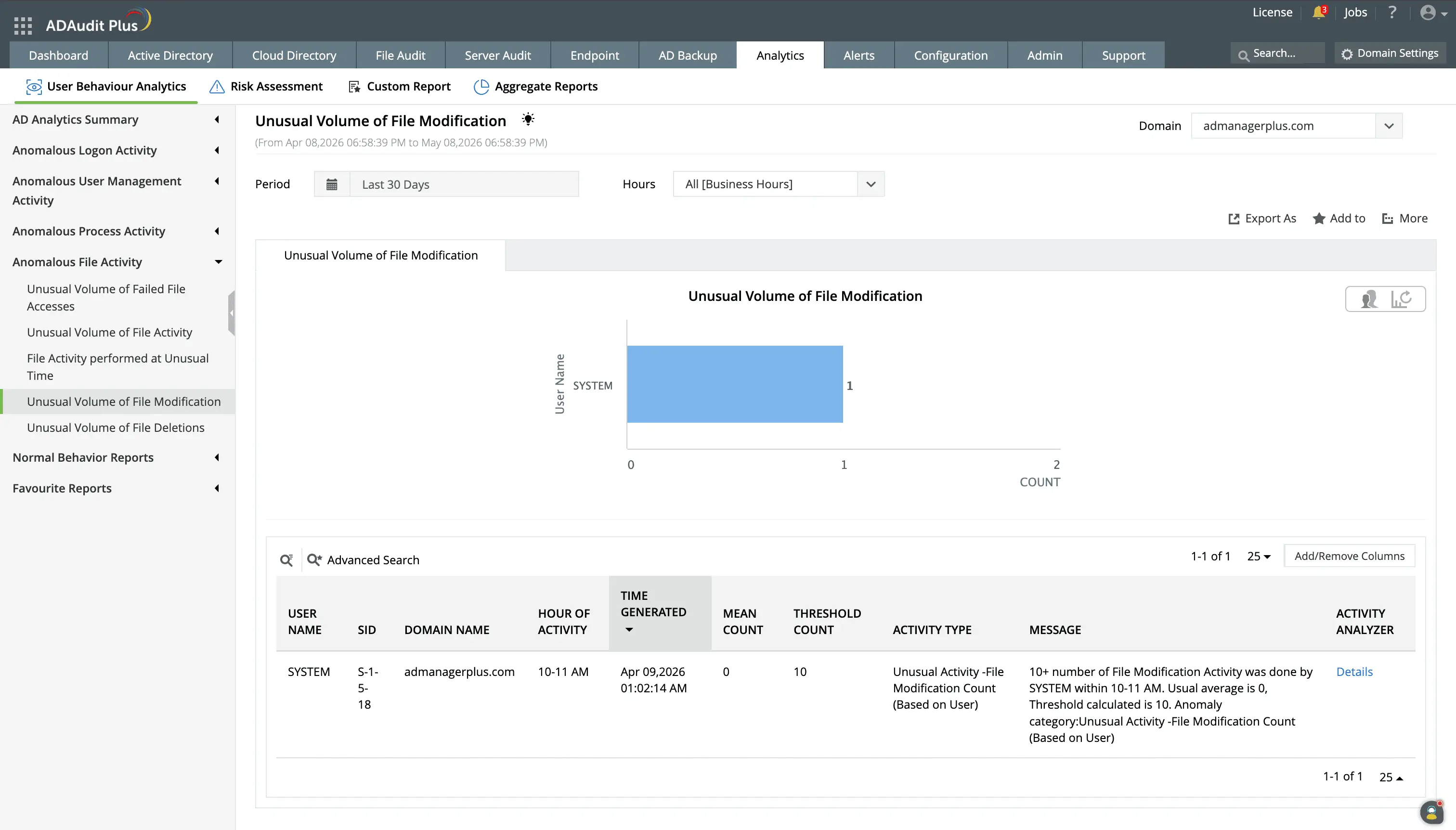
Any deviations from the activity baseline set by the UBA capabilty will be flagged and you can investigate the series of events in the anomaly.
One of the key indicators of malware intrusions is mass file modification events. With the anomaly reports, potential attacks are easy to detect.
Meet compliance requirements with FIM reporting
Several major compliance frameworks explicitly require file integrity monitoring, and most of the others require controls that FIM directly satisfies. ADAudit Plus provides pre-configured FIM report sets for seven standards, so compliance evidence is available on demand rather than assembled manually ahead of each audit.
Custom report profiles let you combine specific users, monitored locations, audit actions, and time filters into a saved view. For recurring compliance requests (a quarterly PCI-DSS review or a HIPAA audit covering a specific share), you run the saved profile rather than reconfiguring the report from scratch each time.
Why native Windows tools fall short for FIM
Windows does not include a built-in file integrity monitoring capability. The Security event log records object access events when auditing is configured, but translating raw event data into an actionable FIM audit trail requires manual effort that doesn't scale. On top of this,
- Security event logs are stored locally on each Windows server. In a multi-server environment, correlating file events across systems requires collecting and parsing logs from every machine individually.
- Native auditing captures access events but provides no anomaly detection. A user deleting a thousand files in ten minutes and a user deleting one file look identical in the Security event log without a baseline to compare against.
- Windows provides no registry integrity monitoring capability that surfaces changes in a searchable, reportable format alongside file events.
- There's no built-in mechanism to trigger an automated response (a ticket, an email, or a session termination) when a file integrity event occurs.
ADAudit Plus resolves each of these gaps. Events from all monitored servers are collected centrally, surfaced in named FIM reports, cross-referenced with UBA baselines, and connected to an automated alert and response workflow, from a single console.
4 compelling reasons to choose ADAudit Plus
Widely recognized
ADAudit Plus has been recognized as a Gartner Peer Insights Customers' Choice for Security Incident & Event Management (SIEM) for four consecutive years.
Easy deployment
Go from downloading ADAudit Plus to receiving predefined reports and alerts in under 30 minutes, without any professional help.
Competitive pricing
ADAudit Plus is licensed per-server, unlike other IT auditors which are licensed per-user. With per-server licensing, even with a growing number of users each year, you can continue to ingest log data without additional costs.
Unified visibility
ADAudit Plus consolidates auditing, security, and compliance across Active Directory, Entra ID, Windows servers, workstations, and file servers into a single pane of glass, eliminating the need to juggle multiple tools.
Frequently asked questions
File integrity monitoring is the practice of tracking changes to files, folders, and system configurations to detect unauthorised modifications. It answers a straightforward question that security teams need answered continuously: has anything changed that should not have changed?
For regulated environments, the answer has direct compliance implications. PCI-DSS explicitly requires FIM for systems in the cardholder data environment. HIPAA, SOX, and GDPR each require controls that FIM satisfies, including the ability to detect and investigate unauthorised access to sensitive data.
ADAudit Plus brings FIM into a unified auditing platform that spans Active Directory, Windows servers, and file servers. Rather than deploying a standalone FIM tool that operates in isolation, you get integrity monitoring alongside logon activity, permission changes, and user behavior analytics that provide full context around any file event.
When a file is deleted in a monitored location, you can see who deleted it, whether that account had any suspicious logon activity in the preceding hours, and whether the deletion triggered any UBA anomalies, without switching tools or correlating logs manually.
ADAudit Plus lets you define FIM policies centrally and apply them to groups of servers without configuring audit policy on each machine individually. You specify target folders, event types, and alert thresholds once, and the configuration propagates to every monitored server in that policy scope.
ADAudit Plus lets you scope FIM policies to specific folders, file types, and event categories. Excluding high-volume, low-risk paths such as temp folders and log directories and scoping alerts to create, delete, and permission change events keeps the alert queue actionable without creating gaps in coverage.
Windows does not include native FIM. The Security event log records object access events when auditing is configured, but provides no centralised collection, no anomaly detection, no registry monitoring, and no automated response. ADAudit Plus centralises FIM across all servers and connects events to UBA baselines and alerting.